What if we told you that a slight modification to your web hosting setup can make your website process 54 times as many HTTP requests as it currently does?
Some of you will probably say we need to see a psychiatrist, but the truth is that your hosting environment plays a significant role in determining your website performance. And speeding it up doesn’t necessarily require moving to a massively powerful and highly expensive hosting plan.
It may be a simple matter of changing the web server.
But which one should you choose?
The table below compares four of the most popular solutions of this kind in a few critical aspects.
| Architecture | Caching | PHP Processing | HTTP/3 Support | |
|---|---|---|---|---|
| Apache | Process-driven | Available through additional modules | FastCGI | Available through additional modules, but not fully polished |
| Nginx | Event-driven | FastCGI-based built-in engine | FastCGI | Still in development |
| LiteSpeed Web Server | Event-driven | Built-in engine with additional features | LiteSpeed-built API | Production-ready support |
| OpenLiteSpeed | Event-driven | Built-in engine | LiteSpeed-built API | Production-ready support |
Based on the information above, some of you may have correctly guessed that LiteSpeed Web Server and OpenLiteSpeed are well-positioned to deliver significantly better performance than their competitors.
We’ll now explain why.
What Is LiteSpeed?

LiteSpeed Web Server (also known as LSWS or LiteSpeed Enterprise) is a proprietary web server launched in 2003. But before we go on, here is a quick reminder of what a web server is.
Not to be confused with the virtual or physical machine hosting your website, it’s the software responsible for receiving HTTP requests from clients and responding to them with the appropriate resources (files and web pages or error messages).
The web server is one of the most critical components of any hosting setup. Your site performance depends on how quickly your web server processes the visitors’ requests. If the web server stops responding, the entire website goes down.
Although it’s been around for nearly two decades, LiteSpeed has yet to catch up with the competition. According to W3Techs, it’s used by just under 12% of the world’s websites. The LSWS share has grown over the last few years, but site owners clearly prefer to stick with the traditional names on the market.
In a few moments, we’ll try to understand why this is the case and also see why you may want to consider trying LSWS.
First, though, a few words about OpenLiteSpeed.
What Is OpenLiteSpeed?

OpenLiteSpeed (OLS) is the open-source edition of LiteSpeed Web Server. It uses the same architecture and was developed by the same people.
Unlike LSWS, however, OpenLiteSpeed is free to download, use, and redistribute. You can install it on any physical server and power as many websites as you want without paying a dime.
There is a flip side, of course.
A few of the LSWS features are missing in OLS. For example, some of the anti-DDoS tools have been omitted, and the caching engine has been stripped of its most advanced mechanisms. Transitioning from an existing Apache setup to OLS is more challenging than migrating to LiteSpeed’s Enterprise edition. As with any open-source product, you have to rely on the community for support if you encounter any issues setting up and running OpenLiteSpeed.
That is, of course, if you don’t have a helpful host like ScalaHosting. Our support operators are always ready to assist our clients with questions and difficulties related to your chosen web server, effectively resolving issues without any additional fees.
LiteSpeed Web Server vs. Apache and Nginx
Several factors make LSWS and OLS more appealing than their competitors. As is clear from the low adoption rates, however, site owners also find a few things they’re not particularly sure about.
The best way to highlight both the advantages and drawbacks is to compare LiteSpeed’s servers with those of other established names on the market. The main competition comes from Apache and Nginx – the two top web server solutions, cumulatively powering just under 70% of all websites, according to W3Techs.
Let’s see how LSWS and OLS stack up.
LiteSpeed Advantages
Architecture
Apache and Nginx represent the two main types of web servers.
First, you have Apache, a process-driven web server that spawns a new process or thread for every new connection. This method for processing requests can be traced back several decades, when traffic was much lower and websites were less complex. Nowadays, it’s far from the most efficient approach.
That’s why Nginx, Apache’s main competitor in terms of market share, uses an event-driven architecture. It handles multiple connections under a single process, making it faster and more efficient than the Apache method.
Like Nginx, LSWS and OLS are also based on an event-driven architecture, allowing them to process a large number of requests while keeping hardware resource usage to a minimum. The result is a noticeable speed advantage, especially on busy websites.
Caching
LiteSpeed and OpenLiteSpeed are notorious for their powerful caching engine. Caching means creating and storing a copy of the static content generated when a user visits one of your pages. When the next visitor comes along, the caching engine serves the stored copy instead of recreating the page for the second time. This speeds up the delivery, reduces server load, and improves the overall user experience.
LiteSpeed’s caching engine is called LSCache, and its main advantage is that it’s part of the web server’s core. Improving the speed of an Apache-powered website often involves setting up one of the numerous caching modules available. Although Nginx also has a built-in caching engine, configuring it for the best possible performance isn’t necessarily the easiest thing in the world.
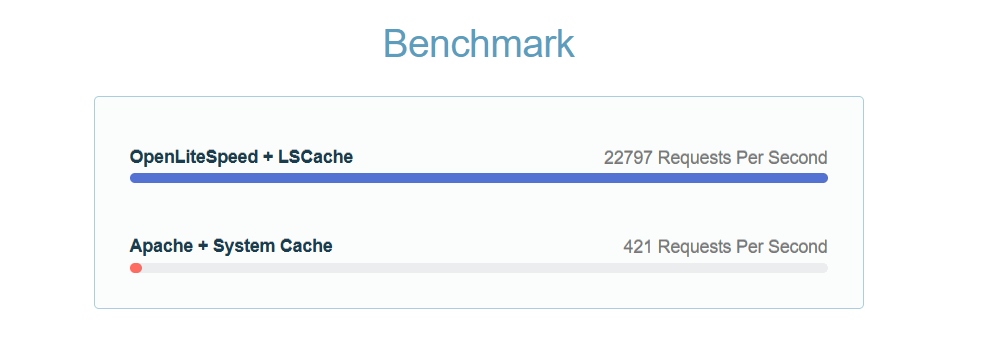
By contrast, LSCache is enabled by default, and you have free extensions and plugins for the most popular CMS solutions. They establish a connection between the application and the web server and configure the caching engine to produce the best possible results.The add-ons are easy to install, completely free, and highly effective, according to LiteSpeed’s benchmarks. For example, a Joomla website with the LSCache extension installed and running on top of OpenLiteSpeed can process 54 times more requests per second than the same site powered by a standard Apache setup.
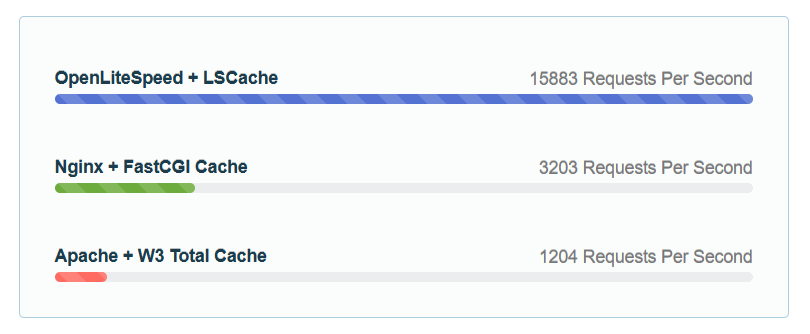
Even Nginx is no match for LSCache. LiteSpeed repeated the same experiment, this time using WordPress and also including an Nginx setup with caching powered by the FastCGI Cache protocol. OpenLiteSpeed was still about five times faster.
The caching mechanism in LiteSpeed’s premium web server is even more impressive. For example, it has a feature called Edge Side Includes that analyzes a page and separates the static elements from those relevant to the specific visitor. It can then serve cached copies of both static and dynamic content, drastically reducing loading times.
DDoS protection
The event-driven architecture and powerful caching engine make LiteSpeed servers more efficient in terms of hardware resources, allowing LSWS and OpenLiteSpeed to handle more traffic without slowing down. This gives you more time to react if you see someone setting up an attack on your website.
LSWS and OLS support reCAPTCHA tests that limit bot traffic, and you can also use the ModSecurity web application firewall to further boost your website protection.
At LSWS, you get additional anti-DDoS features like request, bandwidth, and connection throttling. All these are designed to stop hackers from trying to bring your website down with large volumes of junk traffic.
With Apache and Nginx, beefing up your website’s DDoS defenses requires additional firewall solutions. The level of security they provide depends on the correct configuration, which may be tricky to set.
Fast PHP processing
Most modern websites use PHP, so the speed with which a web server works with the programming language is critical. Once again, LSWS and OLS have the edge over the competition.
The most efficient Apache and Nginx configurations implement the FastCGI protocol – an interface that facilitates communication between the web server and an application (in our case, PHP). FastCGI is an evolution of the Common Gateway Interface (CGI) and is significantly faster than its predecessor.
The main difference lies in the way requests are handled. A typical CGI server spawns a new application process for every request. The process is terminated when the application responds with the output data, and a new one is created for the subsequent request.
FastCGI doesn’t terminate the process after it serves the data. Instead, the protocol uses it to handle further requests, which reduces operating system overhead, improves stability, and makes the entire setup much more easily scalable.
LiteSpeed’s developers have taken it a step further. They created a unique server Application Programming Interface (API) that uses the FastCGI philosophy but is even more efficient.
How much more efficient?
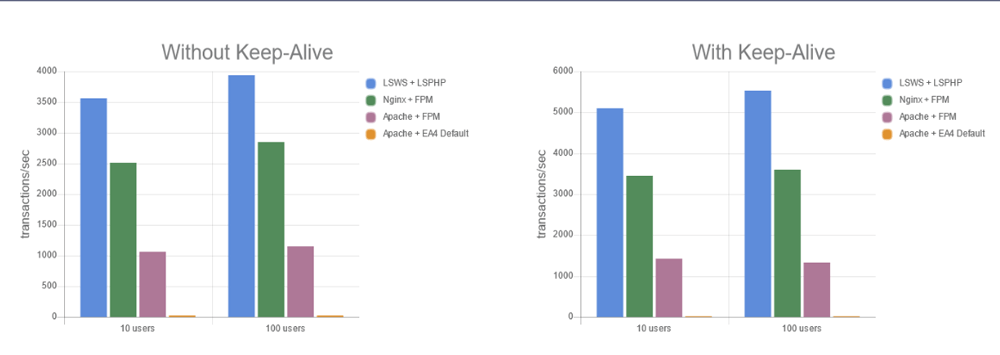
LiteSpeed ran a simple PHP script on the same machine using four different setups – an LSWS server running LiteSpeed’s API, an Nginx server running PHP-FPM (the most widely used FastCGI implementation for PHP), an Apache server running PHP-FPM, and an Apache server running the default CGI-based module.
The results speak for themselves.
Static file processing
HTTP/3, the third major version of the Hypertext Transfer Protocol, has been discussed for some time now. However, it hasn’t quite made its mark yet, and although pretty much all browsers support it, some still disable it by default.
The slow adoption may be due to the fact that HTTP/3 is a pretty heavy revision of the old standard. It switches from TCP to the QUIC transport layer network protocol, which enables it to overcome some performance-hindering factors in HTTP/2 and HTTP/1.1.
Although HTTP/3 is not what you’d call ubiquitous, the potential to improve loading speeds means it will be fully adopted sooner or later. And when that happens, your website performance will depend on how well your web server works with it.
Yet again, LiteSpeed seems to be ahead of the competition.
Apache and Nginx are open-source projects, meaning anyone can try and create a solution that implements HTTP/3 support. For example, experts from Cloudflare were the first to code a patch that introduced the new standard to Nginx back in 2019. The implementation was experimental, and reviews at the time suggested that it wasn’t perfect. A year later, Nginx’s own development team released a technology preview of HTTP/3 support for the web server. The final version is still being worked on.
Apache users have also wondered whether they can implement HTTP/3, but full official support is still elusive.
By contrast, LiteSpeed implemented QUIC in 2017, and two years later, they announced that both LSWS and OpenLiteSpeed support HTTP/3. The third version of the protocol can be used in a production environment, and the performance benefits are obvious.
According to tests, LiteSpeed, which uses HTTP/3, is faster than Nginx, a web server renowned for quickly processing static data.
LiteSpeed Disadvantages
With all these advantages in mind, you may be wondering why LSWS and OLS don’t have the lion’s share of the market. Well, there are one or two things users aren’t especially fond of.
LSWS price
LiteSpeed Web Server is a commercial product. There are several plans with different limitations on the number of websites and the hardware resources you can use with LSWS.
Here’s a rundown:
| Plan | Domains | RAM | Worker Processes | Price |
|---|---|---|---|---|
| Free Starter | 1 | 2GB | 1 | Free |
| Site Owner | 5 | 8GB | 1 | $10/mo |
| Site Owner Plus | 5 | Unlimited | 1 | $16/mo |
| Web Host Lite | Unlimited | 8GB | 1 | $26/mo |
| Web Host Essential | Unlimited | Unlimited | 1 | $36/mo |
| Web Host Professional | Unlimited | Unlimited | 2 | $46/mo |
| Web Host Enterprise | Unlimited | Unlimited | 4 | $65/mo |
| Web Host Elite | Unlimited | Unlimited | Configurable | $92/mo |
You can see there’s a free option, but it’s only suitable for websites with modest traffic. The fees aren’t exactly astronomical, but given the open-source alternatives, some people may consider them an unnecessary weight on the budget.
Speaking of open-source alternatives, many of you are probably wondering why website owners haven’t adopted OpenLiteSpeed. After all, it gives you the same event-driven architecture for free, without limits on the hardware configuration or the number of hosted websites.
It’s not quite as simple as that.
Installation
The complexity of switching from Apache or Nginx to LiteSpeed depends entirely on the web hosting setup. If LiteSpeed or OpenLiteSpeed are not available on your server, and you’re using a self-managed solution with no control panel, you’ll have to install them through the command line. Even users with some experience may be a bit apprehensive about tackling the task on their own.
There are server management platforms that supposedly support LiteSpeed, but in the real world, they make you jump through quite a few hoops to enjoy its benefits.
We’ve been in the hosting industry for long enough to know just how frustrating this could be. That’s why we ensured that switching from one web server to another is as straightforward as possible on our SPanel cloud VPS solutions.
More on that in a minute, but first, let’s see why you should consider using LiteSpeed over traditional web servers.
5 Reasons for Switching to LiteSpeed Web Server
LiteSpeed is emerging as more than a worthwhile alternative to Apache and Nginx. Here are five reasons for adopting it for your site.
1. Compatibility with Apache-powered websites
If your website was built with Apache, you can easily use LiteSpeed Web Server to boost its loading speeds. The Enterprise edition is fully compatible with Apache, and if you use an SPanel cloud VPS, you can switch to LiteSpeed with a couple of mouse clicks.
Moving from Apache to OpenLiteSpeed is just as straightforward, and it also supports mod_rewrite rules, so your website will work fine.
The difference between OLS and the Enterprise version is that with OLS, changes to the .htaccess file require a web server restart. If you use SPanel, this won’t impact your workflow in any way.
ScalaHosting’s proprietary server management platform detects any edits to the .htaccess file and automatically restarts OLS. That way, the changes you make to your site come into effect without you moving a finger.
2. Improved performance
LiteSpeed works particularly well for busy websites that get thousands of hits every second. This is mainly due to its low CPU and memory usage.
LSWS and OLS serve static content faster than any other web server, and PHP performance is further boosted by their custom PHP LSAPI.
The overall results are impressive. For instance, on a properly configured cloud VPS hosting platform, switching a busy WordPress website from Apache to LiteSpeed can reduce server load by up to 10 times.
At ScalaHosting, we’ve witnessed these results first-hand. Over the years, many popular websites hosted on our servers have switched to LiteSpeed, instantly handling over 30% more visitors without any drop in performance.
3. A more secure hosting environment out of the box
One of LiteSpeed’s biggest advantages is its built-in focus on security. While other web servers rely on external modules and plugins, LSWS integrates security features at the server level, stopping potential attacks before they reach your website.
Among these are tools that protect you against DDoS, brute-force, and request-flood attacks. LiteSpeed’s intelligent request throttling automatically detects and blocks malicious traffic patterns without affecting legitimate visitors.
The LiteSpeed Cache plugin, available for popular platforms like WordPress and Joomla, adds another layer of protection with reCAPTCHA integration, login page hardening, and real-time vulnerability patches.
Furthermore, LiteSpeed supports mod_security rules, giving you Apache-style web application firewall capabilities without requiring additional plugins or modules.
In short, by handling security at the web-server level, LiteSpeed reduces the load on your CMS and helps protect your site against a wide range of threats with minimal effort.
4. Lower hardware costs
Performance isn’t just about speed – it’s also about efficiency. LiteSpeed’s event-driven architecture allows it to handle far more concurrent connections while using fewer resources than its competitors.
Websites switching from Apache or Nginx to LiteSpeed often experience a significant performance boost while also noticing a noticeable drop in server load. Both static and dynamic content are served much faster, allowing your site to maintain optimal performance even under heavy traffic.
This efficiency lets you handle more visitors without upgrading to a costlier hosting plan.
Put simply, LiteSpeed helps you do more with less. Instead of scaling up your hosting to keep up with growth, you can rely on LiteSpeed’s optimized architecture to manage extra load – freeing up budget for other areas of your business.
5. Better SEO results and more revenues
The speed improvements go beyond making visitors happier – they also impact your search engine rankings. Google prioritizes fast-loading websites because they deliver a better user experience.
The performance boost provided by LiteSpeed automatically improves key metrics such as Core Web Vitals, giving your website a better chance to outrank competitors.
Faster loading speeds bring more organic traffic, reduce bounce rates, and increase user engagement – visitors spend more time on your site, click more links, and make more purchases.
In short, LiteSpeed doesn’t just make your website faster – it helps it rank higher, retain more visitors, and generate more revenue.
How To Install and Use LiteSpeed on Your SPanel Server
SPanel is ScalaHosting’s proprietary VPS management platform. It’s free with our managed and self-managed solutions. If you also have a Rocky Linux server, you can also purchase a license and use it on your own machine.
Our technical support specialists can migrate your website and verify that everything runs smoothly. Then, you’ll get access to SPanel’s Admin and User Interfaces, where you’ll find all the tools you need to manage your server and the projects hosted on it. Among them is a utility that can change the active web server on your VPS.
By default, your SPanel VPS runs on Apache, but you get three other setups you can enable with a couple of clicks:
- An Nginx reverse proxy running on top of Apache.
- LiteSpeed Web Server (you need to purchase a license first).
- OpenLiteSpeed.
The steps are about as straightforward as they get. Let’s see what you need to do to install and activate LSWS and OLS.
Since we’re talking about a server-wide change, we need to go to SPanel’s Admin Interface.
After logging in, click Web Server Manager.
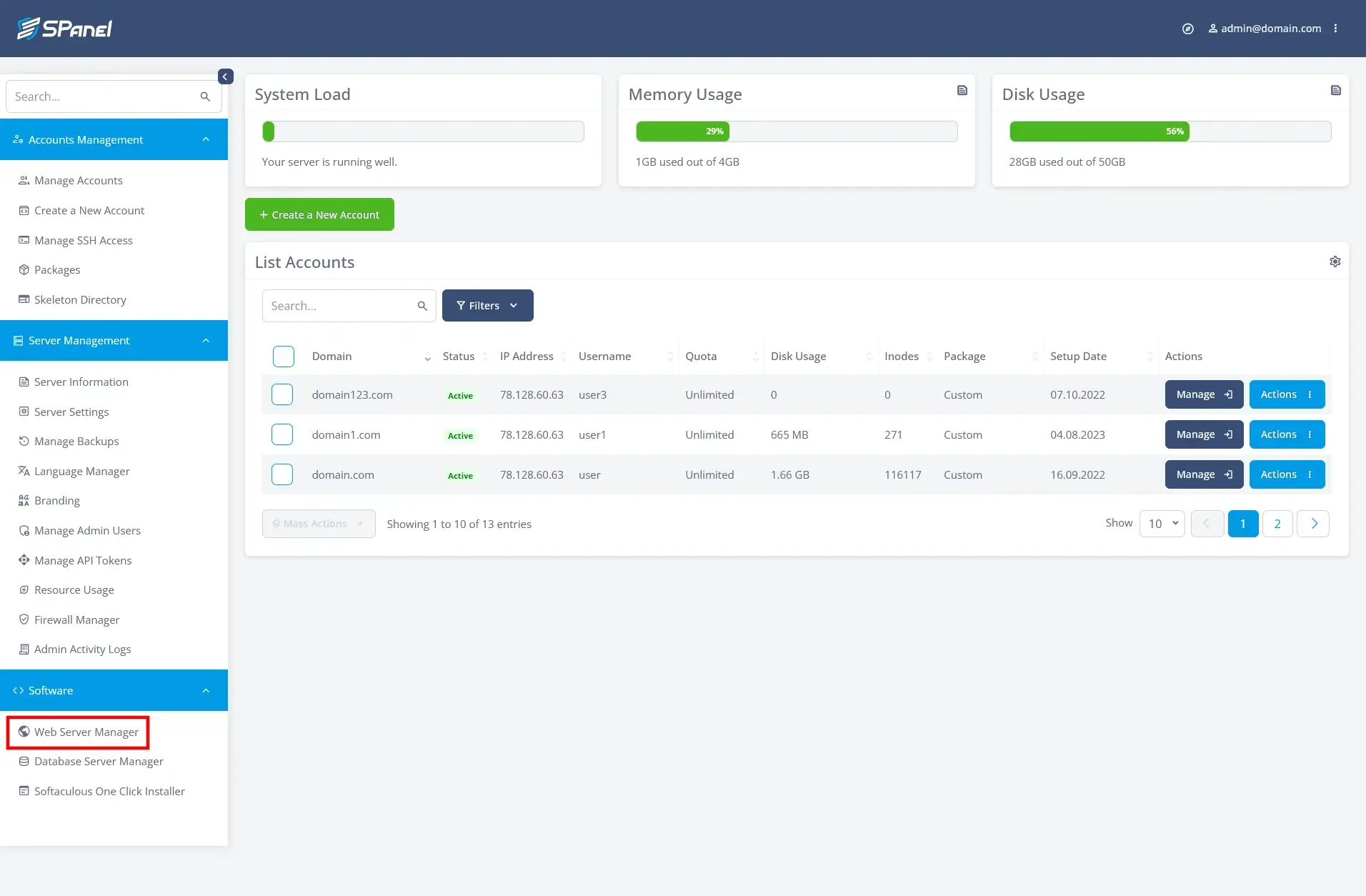
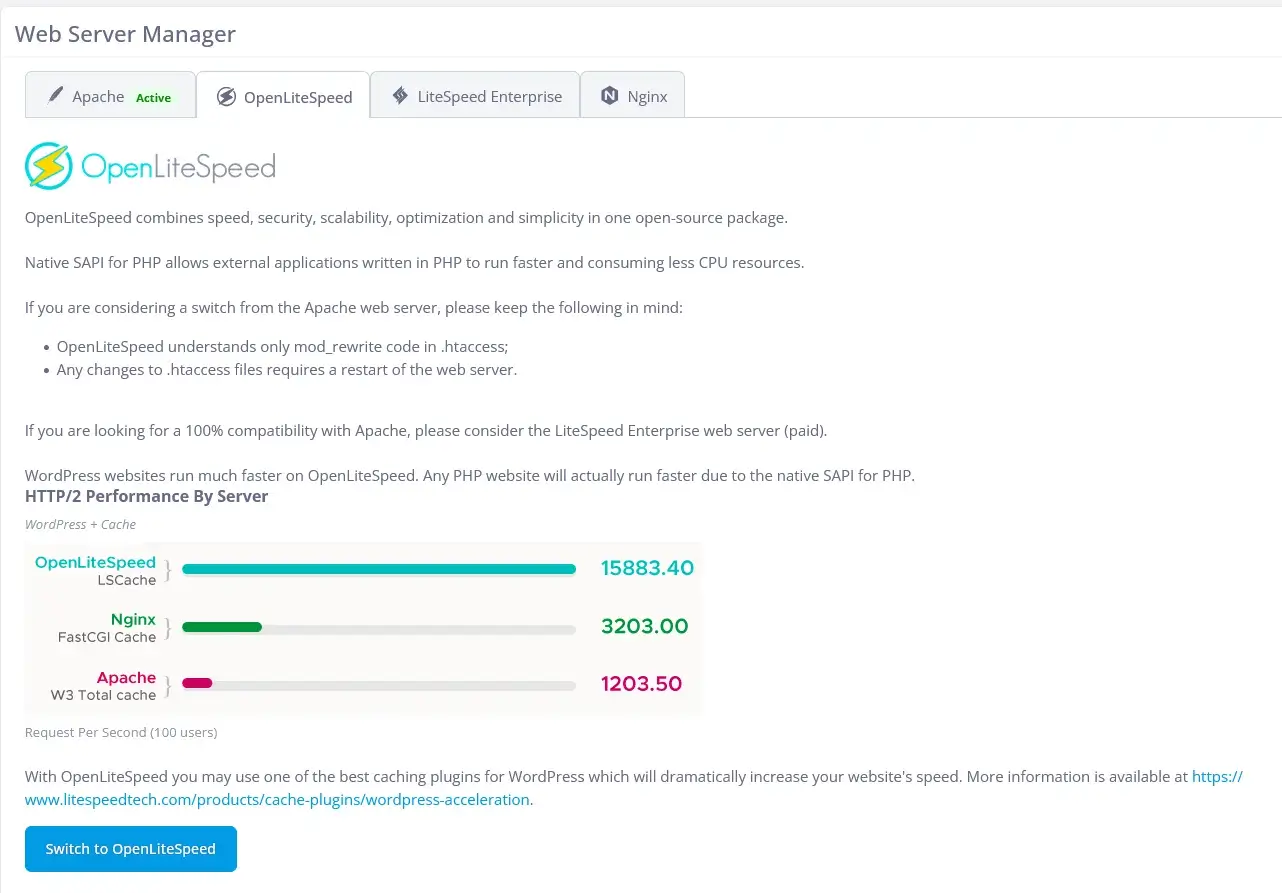
SPanel will show you the currently active setup alongside the available alternatives. To switch to OpenLiteSpeed, navigate to its tab and click the button located at the bottom of the page.
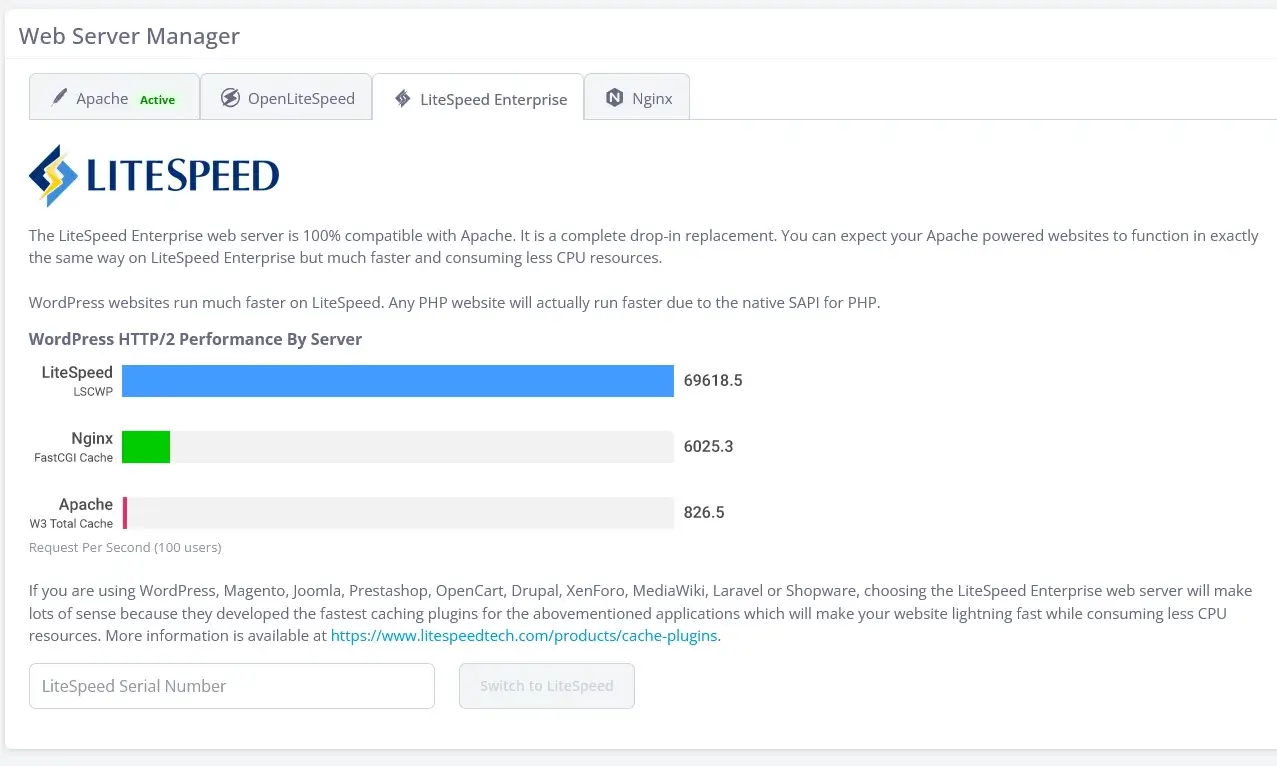
The LiteSpeed Enterprise tab is for installing LSWS. SPanel will need the serial number you received upon purchasing an LSWS plan. Apart from that, the steps are identical.
The VPS will need to reboot in order to complete the change. In a few minutes, it will be up and running using the web server of your choice.
So far, so good, but if you really want to improve your site performance, you’ll need to install the LSCache extension that configures your site to use LiteSpeed’s powerful caching engine. The extension is compatible with the world’s top website-building applications, and its installation is fairly straightforward.
Here, for example, is what you should do if you use the two most popular CMSs – WordPress and Joomla.
LSCache for WordPress
Log in to your WordPress dashboard, go to Plugins, and click Add New.
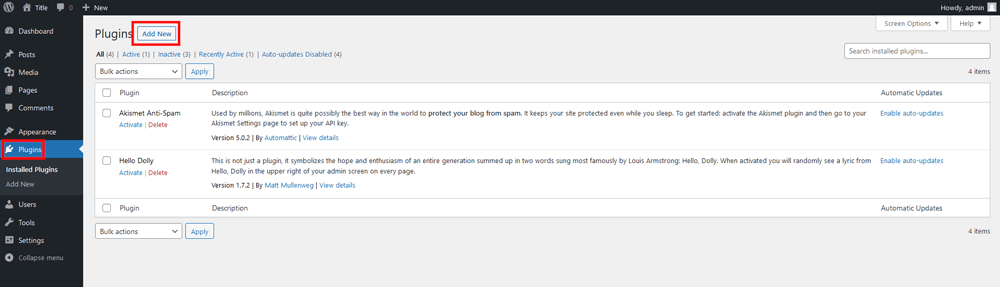
The LiteSpeed Cache plugin is listed on WP’s official repository, so you can use the search box to find it. Click Install Now to set it up.
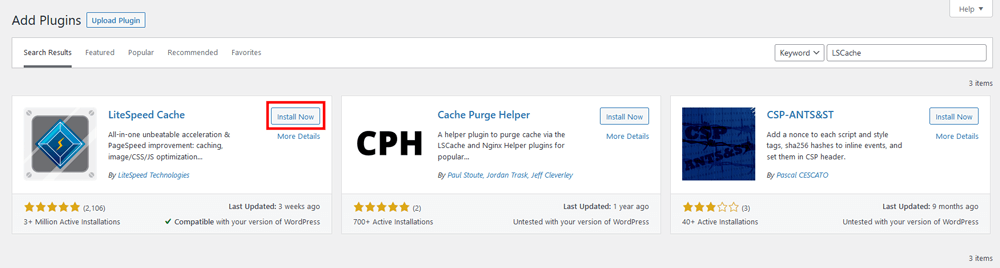
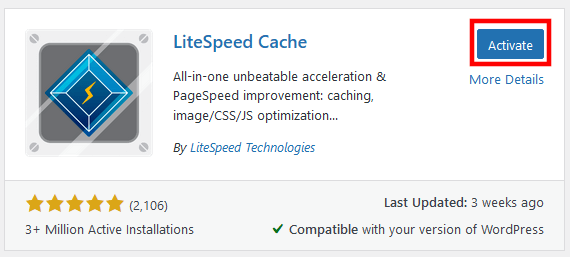
The LiteSpeed Cache plugin will be installed in a few seconds. The final step is to activate it.
LSCache for Joomla
If you use Joomla, the process involves a few more steps. However, there’s nothing to stop even a novice from completing it. First, download the LiteSpeed Cache module from LiteSpeed’s official website.
Versions for both Joomla 3 and Joomla 4 are available, so make sure you pick the right one. The website redirects you to GitHub, where you can download the add-on as a ZIP file.
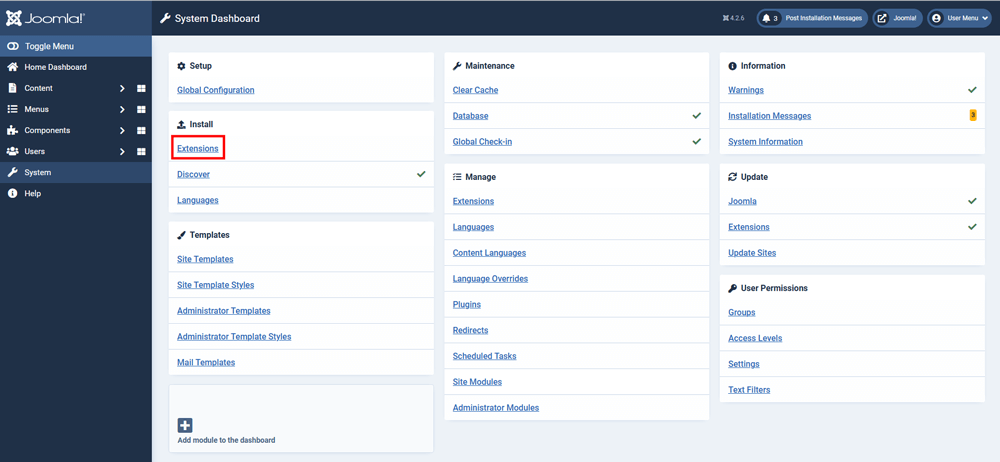
Next, log in to your Joomla Admin Area and go to System. Under the Install menu, select Extensions.
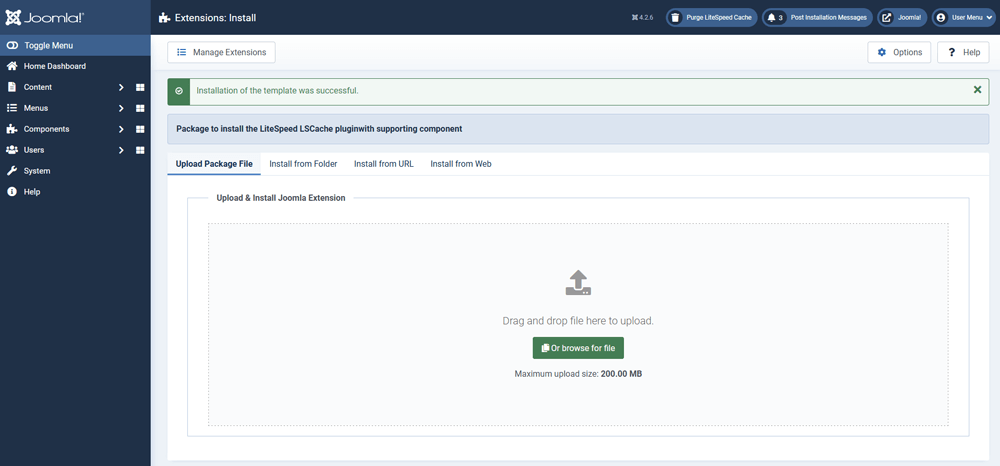
Joomla lets you drag and drop or select the zip file from the dashboard. The CMS automatically extracts the files in the correct folder and sets everything up. In a few seconds, it will display a message telling you you’re ready to go.
Conclusion
Although many people prefer to stick with the traditional Apache setup, numerous tests and experiments have shown that some modern alternatives are significantly faster. And speed is crucial because, in addition to improving your site’s user experience, it can also help you achieve higher search engine rankings.
LiteSpeed’s web servers are undoubtedly among the best web servers on the market. They have the architecture to improve your site performance and are equipped with all the features you need to achieve stable speeds at all times.
However, before you jump headfirst, it pays to research the different LiteSpeed options and find the one that best fits your needs. You should also check what support your hosting provider can offer and familiarize yourself with the steps to install the new web server on your account.
Hopefully, the information above will help you answer some of the most important questions.


FAQ
Q: Is LiteSpeed faster than other web servers?
A: The event-driven architecture gives LSWS and OpenLiteSpeed the edge over process-driven web servers like Apache. The unique caching engine is as good as anything on the market, and, at least for the time being, LiteSpeed has outpaced everyone else when it comes to HTTP/3 implementation. This has the potential to bring in yet more performance benefits.
Q: What is LSWS used for?
A: LSWS is an Apache drop-in replacement, and OpenLiteSpeed understands its directives, so they’re all but guaranteed to work with most Apache-driven websites. There’s a range of plans offering different limits on the number of websites you can host at once and the hardware you use to power them. This lets you find the most cost-effective solution.
Q: Is LiteSpeed the same as Apache?
A: LSWS, OLS, and Apache are all web servers, so their job is to process HTTP requests from visitors’ browsers. However, unlike Apache, LiteSpeed’s servers are based on an event-driven architecture, meaning they can handle more requests simultaneously without putting the hardware under excessive load. They also have a few additional features to further speed up your website.
What is a VPS – Everything you need to know!