Joomla is an open-source Content Management System (CMS) launched in 2005. About 10 years ago, the software was in the running for the title of the world’s most popular CMS. Back then, there wasn’t much separating Joomla and WordPress, the current market leader.
Nevertheless, Joomla’s flexibility and advanced user management features continue to power many well-known websites, including the pages of Roger Federer, Nintendo, and ITWire. Today, we’ll show you how to build a website with Joomla and explain why it has earned a reputation as one of the most versatile CMSs.
What is Joomla?
Joomla traces its roots back to Mambo – a website-building application initially released in 2000 by a company called Miro. Mambo was open source and relatively popular, but about five years after the project’s launch, Miro’s management team decided to assert greater control over the software. Some of Mambo’s core developers weren’t happy with the new direction, so they forked the CMS and created Joomla.
By 2008, all of Mambo’s developers had left, and the project was practically dead. Joomla, by contrast, is still going strong today. The CMS is doing so well because over the years, it has been refined into a robust core built around flexibility and structure. It has also built a large community of developers, users, and fans who drive its growth.
One of Joomla’s greatest strengths is that many advanced features are available out of the box. Let’s explore some of them.
- Joomla’s Access Control List (ACL)
Joomla’s ACL is an advanced access control system that gives you fine-grained control over permissions for individual users and user groups. The CMS allows you to define content areas, and you’re free to choose who has access to what. All this without installing any extensions or implementing custom solutions.
- Multilingual support
Joomla was also one of the first CMS platforms to include multilingual support in its core. Over the years, managing translations, language-specific menus, and localized content has become even easier, making Joomla a perfect choice for international and government websites and organizations serving diverse audiences.
- Content organization
Joomla has a category-based structure that allows you to implement logical hierarchies and build websites that remain easy to navigate, regardless of how much content you upload. In addition, the menu management is highly flexible, allowing you to create a sophisticated site structure without implementing complex workarounds.
- Extension ecosystem
Joomla may have plenty of built-in features, but this doesn’t mean you can implement additional functionality. Like most popular open-source platforms, Joomla has an extensive ecosystem of templates and extensions that have developed and grown alongside it. With them, you can customize your site’s appearance and completely transform its behavior.
At the time of writing, there are close to 5,000 extensions in Joomla’s official repository, with countless more offered on third-party websites. Chances are, whatever functionality you’re looking to implement, there’s an extension for it. Even if there isn’t, you’re using an open-source platform, so it’s easy to build a custom solution and integrate it into your site.
- Clean code and modern security, accessibility, and performance features
Open Source Matters, the nonprofit organization supporting Joomla, invests significant effort in ensuring the CMS adapts to the demands of users and the ever-shifting online landscape. This includes clean, performance-optimized code and built-in security and accessibility features like multi-factor authentication, text-to-speech functionality, password strength meters, etc. Thanks to all this, you can build a fully-functional website with fewer plugins, reducing complexity and improving long-term maintainability.
Why Choose Joomla for Your Website?
Many people take an overly simplistic approach to choosing a CMS. They assume that “most popular” means “best” and go for WordPress. However, this is often the wrong strategy.
The right CMS for your project should offer the perfect blend of flexibility, control, and long-term sustainability. Whether a particular CMS fits these requirements depends on your website. In many cases, Joomla is the best choice.
Here are some examples.
- Content-rich websites
Content-rich websites can benefit from Joomla’s categorization system. Blogs, news websites, magazines, and documentation sites can be a nightmare to navigate if they’re not built correctly, and compared to other CMS platforms, Joomla offers much more flexibility.
- Multi-user and collaborative projects
If you have multiple people working on your website, Joomla gives you the tools and controls you need to ensure work is done efficiently and securely. You can organize content creation and uploading with ease, even if you’re managing a growing team of editors, designers, and developers.
- SMB websites
Small to medium-sized businesses that need more than just a simple online brochure can use Joomla to create websites equipped with custom layouts, client portals, event calendars, contact forms, and even ecommerce functionality. The CMS offers a professional, scalable platform that gives site administrators plenty of options without locking them into a proprietary system.
- Custom projects built by professional developers
Joomla is ideal for developers who want complete control over the site-building application but don’t have the time to create an entirely custom framework. If you invest a little time learning its structure, the platform will deliver a robust, flexible, and future-proof foundation for building professional websites.
In other words, while it may not be the most widely used CMS, Joomla has quite a lot going for it. We’ll now show you how to get started.
How to Build a Website With Joomla?
Let’s start at the very beginning.
Purchasing a Joomla Hosting service and a Domain Name
Getting online, you need two things to start with – a Joomla hosting account and a domain name.
Web Hosting
Joomla doesn’t have any specific requirements, so it will easily run on most servers. Still, it pays to contact your potential host and double-check before you commit to a purchase.
Next, ensure the chosen hosting plan is optimized for speed and reliability. Website performance is crucial not only for user experience but also for SEO ranking.
Choosing an affordable shared package might sound like an excellent deal for starters, but make sure to consider how much resources and security you’ll need before you jump to this solution. For a more customized and secure environment, you are much better off with a cloud VPS package.
Domain Name
Choosing the right domain name is essential for your future brand. This is the name that all users will type to connect to your website, so pick a domain that is unique, memorable, and recognizable.
Many hosting providers offer free domain registration with their hosting plans. When switching providers, the domain remains under your ownership, and you can choose to transfer and manage it elsewhere.
Joomla Installation and Setup
Joomla has fairly basic server requirements.
For version 6.x, you need to have at least PHP 8.3.0 installed, though the CMS developers recommend using 8.4. Joomla works with MySQL, MariaDB, and PostgreSQL, and supports Apache 2.4 or later, Nginx 1.26 or later, and Microsoft IIS 10.
Installing Joomla depends on what is included in your hosting plan. Many packages include a control panel with a one-click installer, such as Softaculous. If you use SPanel, however, you have something a lot more powerful.
The dedicated Joomla Manager included in our proprietary server management system makes it easy to deploy and manage Joomla installations. The installation requires choosing the installation URL and entering your admin login details. SPanel does the rest.
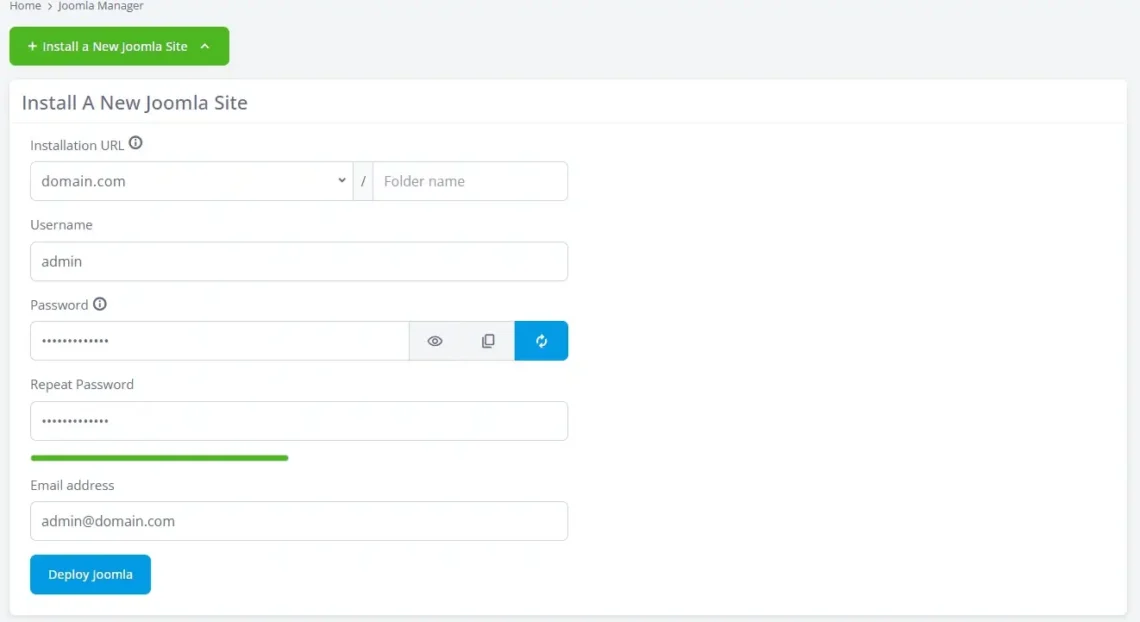
In a few seconds, your new installation will be deployed, and you’re ready to start work on your site. You can then use the Joomla Manager to manage all Joomla websites hosted on your server.
Even a manual installation isn’t that difficult. First, download the installation ZIP archive from Joomla’s official website, then upload the extracted files to the destination folder. Afterward, you create a MySQL database and a user associated with it.
A setup wizard in the installation folder guides you through the Joomla installation. On the first page, you’ll enter your site’s name and description as well as the admin login details.
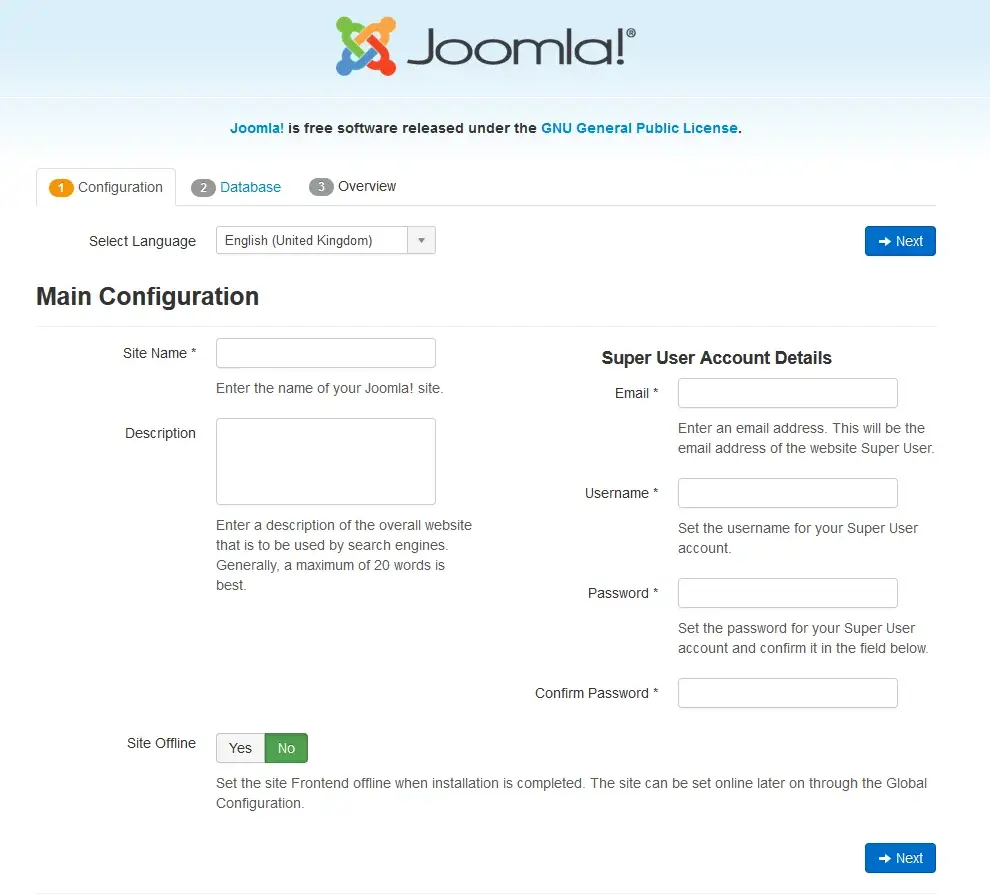
The next page will ask you for the correct database configuration. After you enter it, the wizard will give you a detailed overview of the installation you’re about to perform. If you approve it, the manual installation starts.
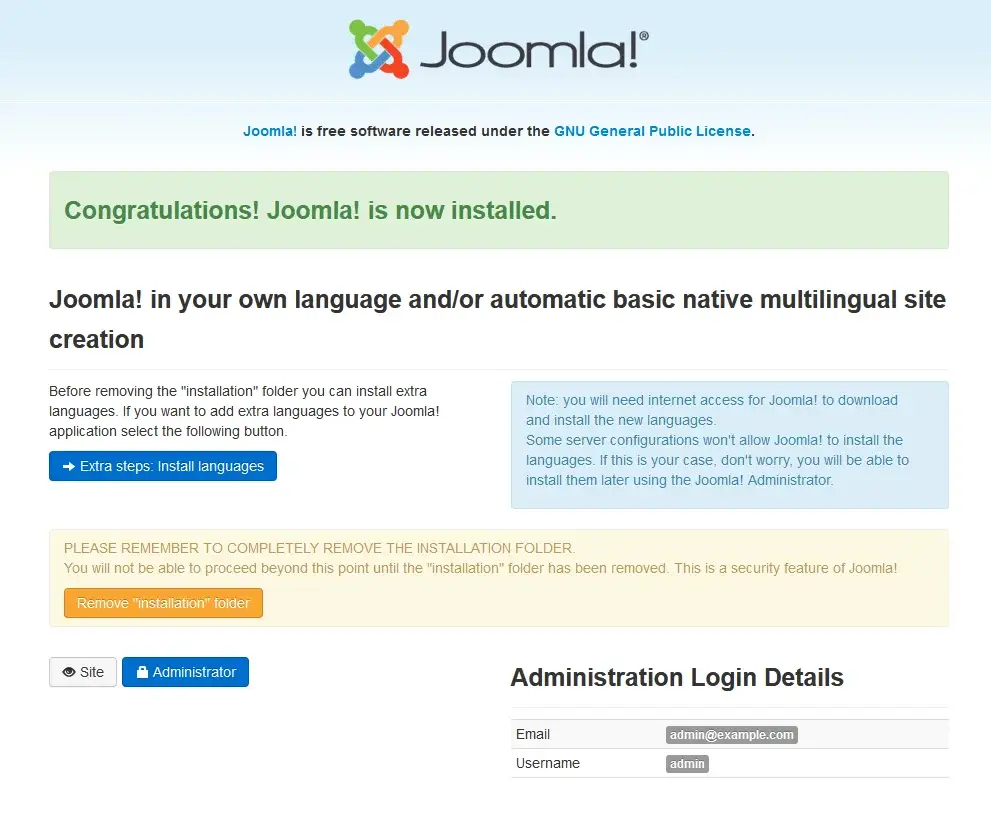
Once complete, you need to remove the installation folder to start working on your new Joomla website. The wizard can do it automatically for you.
Getting Familiar with the Joomla Basics
Like any other CMS, websites created with Joomla are managed through a backend interface.
In Joomla, it’s called the Control Panel, and you can find it at https://yourdomain.com/administrator by default. The first things you’ll see once logged in are new message notifications, a log of recent user actions, and left-side menus with shortcuts to essential areas in the backend.
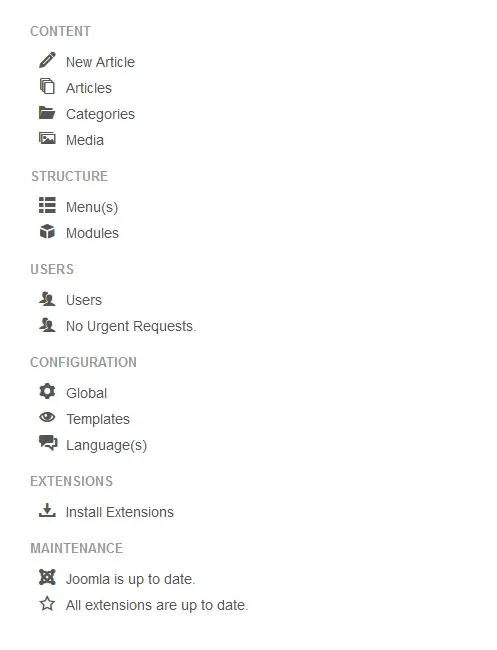
From here, you can write and publish articles, create menus, install modules, manage users, and much more. These tools, along with the rest of the utilities, are also categorized and accessible from the ribbon at the top of the screen.
Selecting your Template
Joomla templates are similar to WordPress themes in many ways. They change the front end of your website and determine how everything looks.
The Templates menu in Joomla is available from both the backend sidebar and under the Extensions category in the top ribbon. It has two submenus – Styles and Templates.

If you visit the Styles submenu, you can apply a template to the entire website by clicking its button in the Default column. Joomla comes with only a couple of templates by default – Beez3 and Protostar – and if you click their names in the Style column, you can modify their color schemes and add extra images.
The default Joomla themes are good for starters, but far from sufficient for most business projects. Luckily, you can choose and install one of the thousands of free and paid alternatives available on third-party websites like ThemeForest and Template Monster.
To do this, you need to select the Extensions menu and go to Manage > Install.
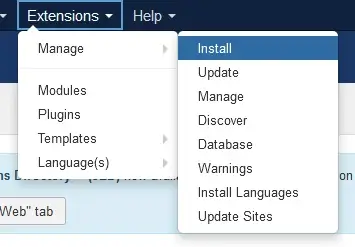
Choose the Upload Package File tab, then drag and drop your template archive into the designated area. Alternatively, you can click the Browse for File button and select the ZIP file. After a few seconds, the installation should be completed, and you will see the new template along with the default ones.
Customizing Templates
In the Templates submenu, you can also see the installed templates along with previews of how they look and a quick tour. If you click a template name, you can access its files and modify them as needed.
You can modify the HTML and CSS files, upload new images, and even change the template structure. Bear in mind, however, that these options are only suitable for advanced users, as they require some coding knowledge. Changes to your core theme files can break your entire website, so handle them with extra care.
Joomla Extensions
A great thing with Joomla is that devoted users and developers regularly create and update a wide range of extensions for the CMS. Unlike WordPress, however, Joomla uses the term “Extensions” to cover a much broader range of add-ons.
There are five distinct categories of Joomla extensions: Components, Modules, Plugins, Templates, and Languages.
Pretty much every component you use to customize your Joomla website can be considered an extension. Quite a few of those elements are built into the CMS by default, and there are many more in Joomla’s Extensions Directory.
The directory is easily accessible in the Joomla dashboard. Extensions from third-party sources are installed by opening the Extensions menu in the top ribbon and selecting Manage > Install. After you select the downloaded ZIP file, Joomla will automatically upload and install the necessary data.
Joomla Modules
Joomla modules extend your website’s functionality and improve the user experience. They include search boxes, login forms, widgets, banners, and more.
The Modules menu is accessible from the Extensions section in your backend. All pre-enabled add-ons are visible here, along with their page position, type, and accessibility.
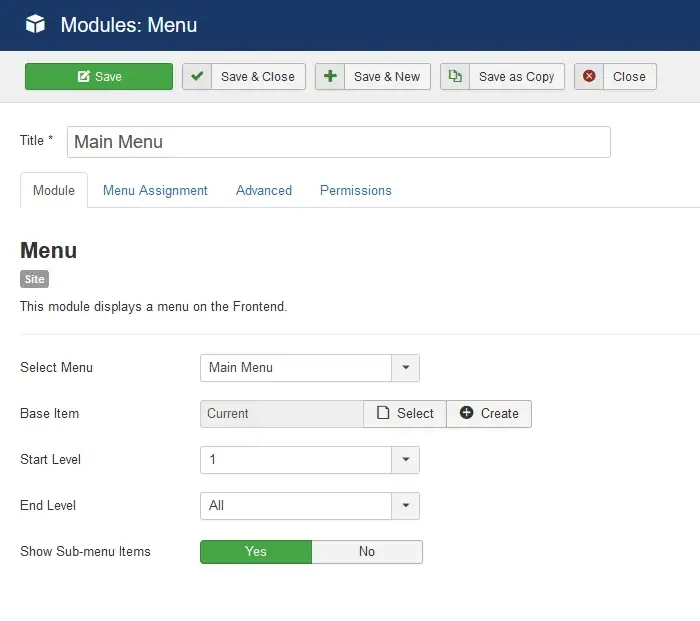
If you click a module’s name, you can customize it further. This includes changing its position, size, and even the visual interface.
You can add more modules through the New button. There are quite a few different types to choose from, or you can pick the Custom option to create an add-on yourself.
Positioning Joomla Modules
Joomla modules are handy, but only when positioned correctly.
In the Modules menu, you will find a column that indicates the position of each widget. Some options are self-explanatory (i.e., header or footer), but others might appear very confusing (i.e., position 1)
To figure out the correct position, you need to enable Preview Module Positions.
Go to Extensions > Templates. Then, click the Options button and select Enabled next to Preview Module Positions. Now go back to your website and add “?tp=1” to the end of the URL (e.g., “http://yourdomain.com/?=tp1“).
Joomla will now display the individual module positions available, so you can figure out which is which.
Once done, you can disable Preview Module Positions.
Creating New Articles
The content you publish on your Joomla website is delivered in the form of articles. All saved articles are available in the left sidebar and under the Content menu at the top.
To create a new post, simply click the New button.
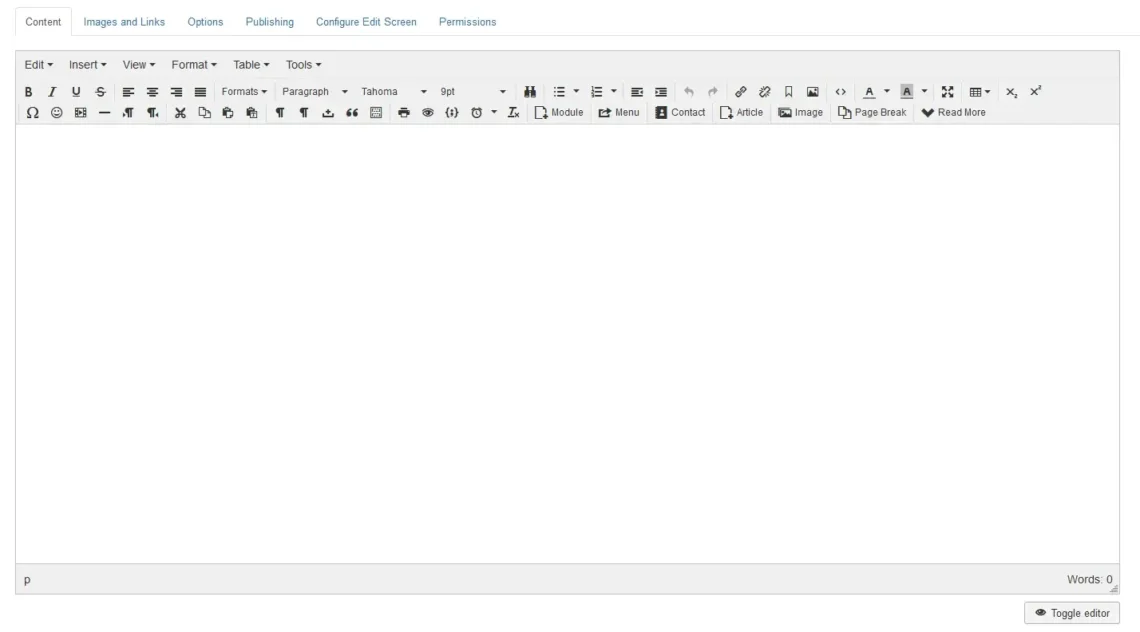
Finding your way around Joomla isn’t hard, but it still has a learning curve. If this is not your first time building a website, you will find many familiar menus and labels that other CMS solutions also support.
If you prefer to enter your HTML tags manually, Joomla offers you a Toggle Editor option to allow this manual modification.
Using the sidebar on the right, you can change the article status and category. The tabs above the editor allow you to add media files and configure your publishing options.
Adding Articles to Navigation Menus
When hosting a blog or portfolio website, you can expect to post new content (articles) regularly. Still, pages like About Us and Contact Us are often visible site-wide. To ensure that, you need to include them in the website’s navigation menu.
How to do that?
Go to Menus and click on the section you’d like to edit. All items in the selected menu will be displayed here.
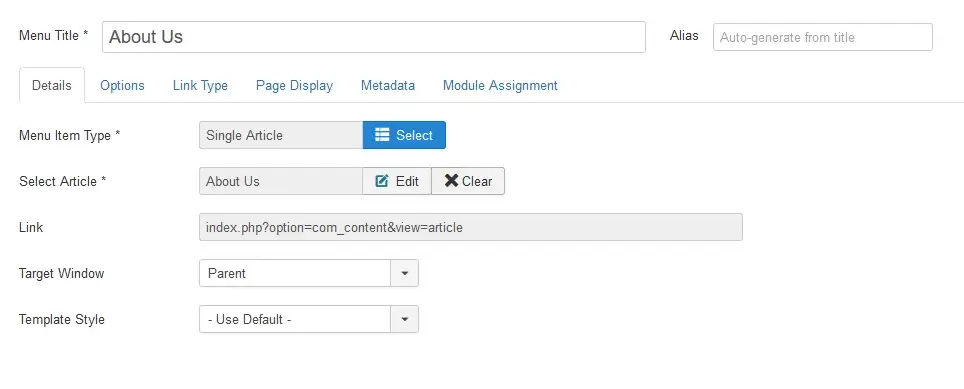
To add a new one, click New, then enter the new menu item title. From the Menu Item Type, you have to select Articles > Single Article. Then, click the Select button below and pick the article you want to add to this menu. You can also create a new article on the spot.
Conclusion
Even though it’s far less popular than WordPress, Joomla has its advantages. Much of the needed functionality is built in, so you won’t need to rely much on third-party code. Multilingual support is also available out of the box.
Some experts go so far as to claim that Joomla is even more SEO-friendly than WordPress.
Still, handling any CMS properly is impossible without a reliable hosting service. Having worked with Joomla for nearly 20 years, we at ScalaHosting know a thing or two about reliable services. Even Brian Teeman, one of Joomla’s co-founders, endorses our specialized Joomla hosting packages and hosts all his websites on them.


FAQ
Q: What is Joomla?
A: Unlike WordPress, Joomla didn’t start off as a simple blogging platform. Its goal has always been to give users the chance to create complex, good-looking websites quickly and easily. It might not be as easy to use as some of its competitors, but it’s efficient enough and still has a very loyal user base.
Q: Is Joomla free?
A: Joomla is a completely free and open-source platform. You can download a copy from its official website at https://www.joomla.org/ and install it manually, or use an automatic installer if your hosting plan offers one.
Q: Do I need to be a programmer to create a Joomla website?
A: The whole point of using a CMS is to create and manage a website through a simple web interface. Joomla is an intuitive solution that lets you build your project without writing a single line of code. It might not be the easiest to get the hang of, but you can master it even without programming experience.
Q: What kinds of websites can I create with Joomla?
A: Joomla can power a wide range of projects. You can use it to create anything from a personal blog to a complex portal for large corporations. The extra features provided by extensions and plugins can further enhance its versatility.
ScalaHosting – How to Build a Website Using Joomla?
What is a VPS – Everything you need to know!