A Black Friday sale, a newsletter blast, or a successful ad can multiply the number of people on your site within minutes. Whether your store stays fast and keeps taking orders depends less on how much traffic arrives and more on which part of your stack runs out first.
The short answer: No hosting plan can absorb every spike. Your website is ready when you know its current capacity, caching is configured correctly, checkout has been tested, monitoring will alert you when something degrades, and any scaling is completed before the campaign starts, not during it.
This checklist covers each layer, explains when a bigger VPS is enough and when a cluster makes sense, and shows where SPanel helps you see what is happening.
What Actually Breaks When Website Traffic Spikes?
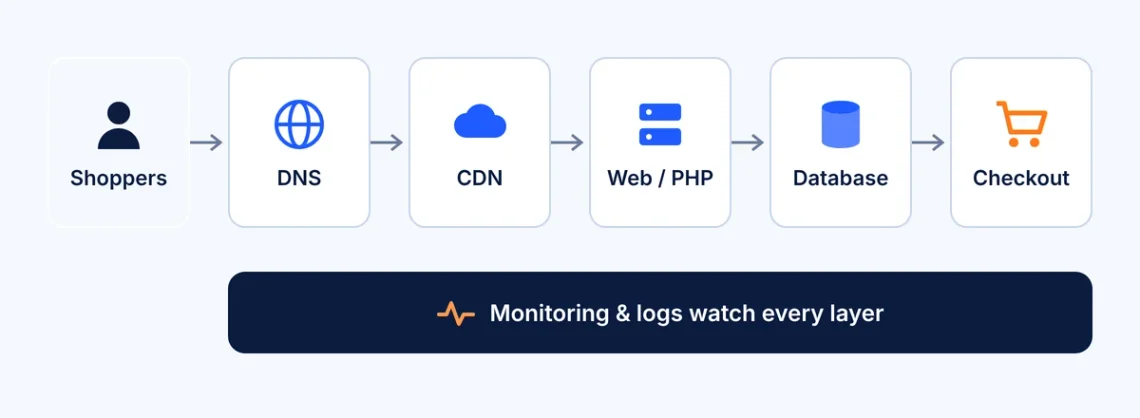
A website isn’t a single component. Each request passes through DNS, often a CDN, the web server and PHP, the database, and finally your application and its third-party services. Any of these can fail on its own.
Request path from shoppers through DNS, CDN, web/PHP and database to checkout, with monitoring across all layers
Each technology solves a different problem. Redundant DNS doesn’t add PHP capacity, and a CDN can’t guarantee that checkout works. Plan around the layer most likely to fail on your site, not the one that’s easiest to buy.
How Much Traffic Can Your Hosting Handle During Black Friday?
There is no universal number of visitors a VPS can support. A cached product page can be served almost instantly, while an uncached cart update keeps a PHP worker and a database connection busy far longer. Two stores on identical servers can behave very differently, especially in busy periods, like Black Friday.
Before adding resources, investigate:
Concurrent visitors, not daily visits. Peak concurrency in your busiest hour is what stresses the server.
CPU and available RAM. Sustained high usage during normal peaks means little headroom.
PHP worker saturation and request latency. When all workers are busy, requests queue and response times climb.
MariaDB load and slow queries. A few unindexed queries can stall checkout.
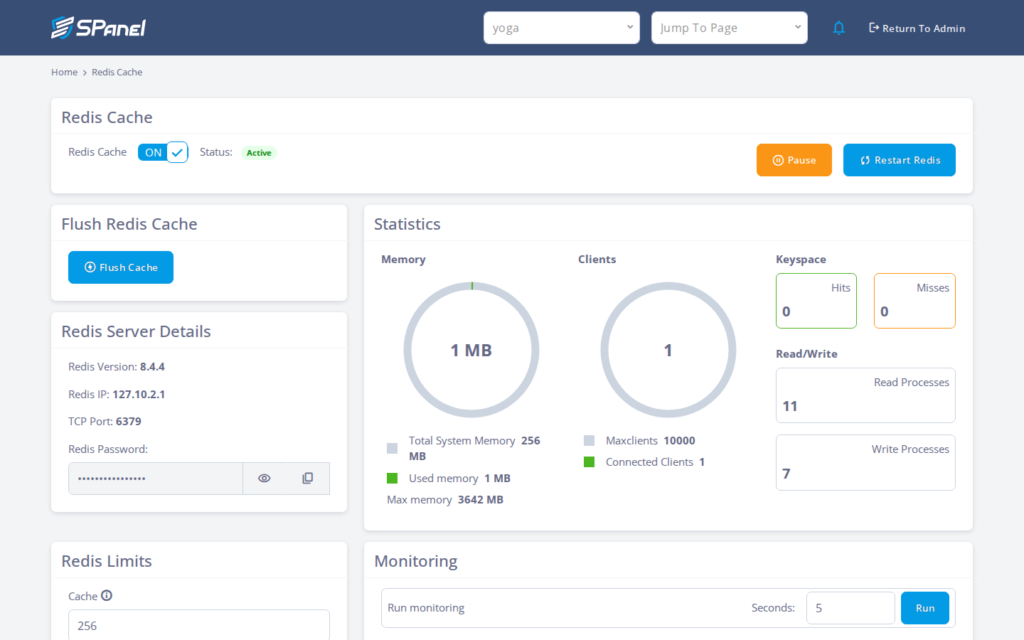
Redis cache effectiveness. Many misses relative to hits means the object cache isn’t helping much.
HTTP errors, response times, and timeouts. Rising 502, 503, and 504 responses are often the first sign of saturation.
SPanel’s Website Monitoring, domain logs, and Redis statistics (covered below) give you this baseline. Your last busy period is the most useful reference point.
Why DNS Clustering Matters for Website Availability
DNS translates your domain name into your server’s IP address. If the only authoritative nameserver for your domain is unreachable, visitors can’t find your site even when the web server is healthy.
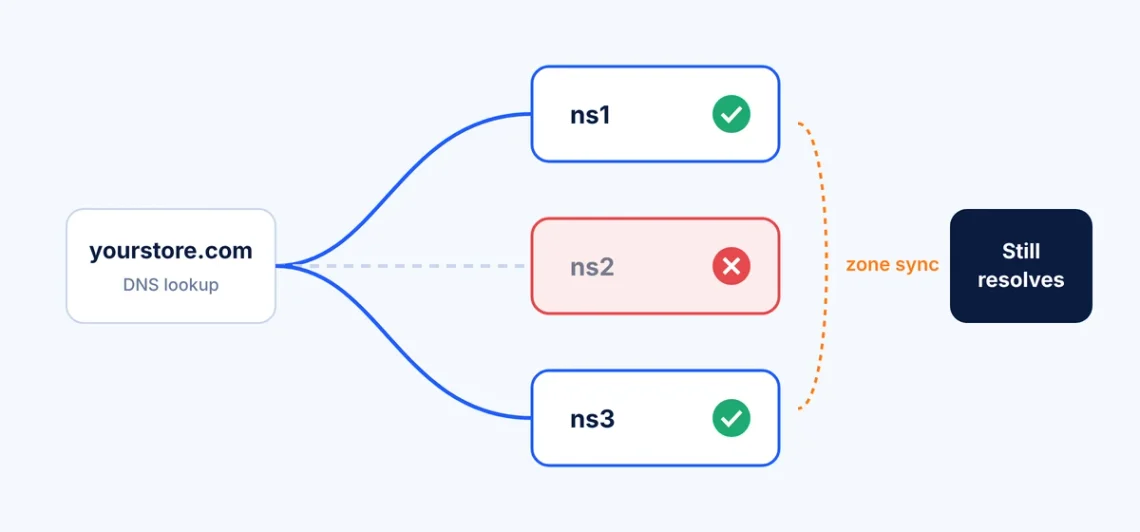
SPanel’s DNS Cluster (Cluster Management → DNS Cluster) links several authoritative SPanel DNS servers:
Multiple authoritative DNS servers answer for the same zones.
Zones and record changes synchronize automatically across members.
DNS keeps resolving if an individual nameserver fails.
Administrators manage members, status, and manual syncs from the DNS Cluster interface.
Three nameservers with synchronized zones; one fails, and the domain still resolves
Limitation: DNS clustering doesn’t distribute HTTP traffic, scale PHP capacity, or keep your website online if its only application server fails. It also replicates mistakes: a wrong A record reaches every member.
If Cloudflare is authoritative for your domain, Cloudflare’s DNS is the layer answering queries. In the standard integration, SPanel’s DNS cluster doesn’t independently serve that domain as well.
When Should You Increase VPS Resources, and When Do You Need a Cluster?
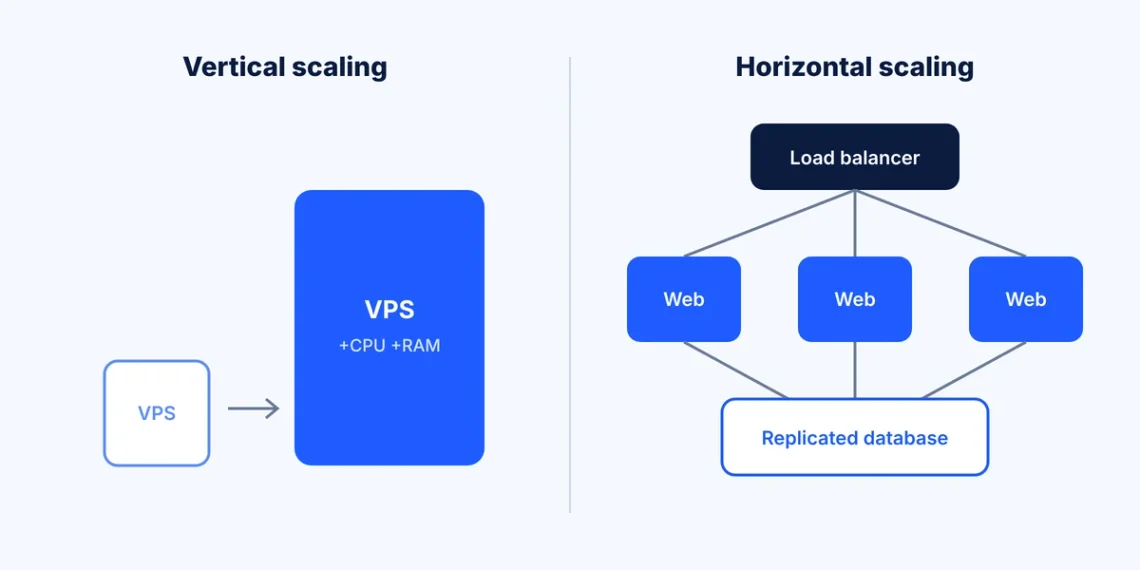
Vertical scaling means allocating more CPU, RAM, or storage to your existing VPS. It’s the right move when monitoring shows these resources are the bottleneck. It’s simple, but your site still depends on one server.
Horizontal scaling means adding appropriately configured web or database nodes, so workloads are shared, and one node failure doesn’t take the site offline. It adds resilience, but also architectural complexity and cost.
Vertical scaling enlarges one VPS; horizontal scaling adds web nodes behind a load balancer with a replicated database
Situation
Sensible next step
Moderate, predictable campaign
Optimize the existing VPS and verify spare capacity
CPU or RAM consistently near limits
Consider increasing VPS resources
Heavy repeated database queries
Optimize queries and evaluate caching or database capacity
Business can’t tolerate a single web-server failure
Consider managed cluster hosting
DNS is a single point of failure
Configure redundant authoritative DNS
Site needs protection from high levels of unwanted traffic
Appropriate CDN, WAF and traffic protection
SCluster is not an automatic scaling system. ScalaHosting’s technical team provisions cluster changes, such as adding nodes, while SPanel provides cluster health and status information. Request changes well before launch.
Review server resource usage against the demand your marketing team expects.
Check full-page caching and Redis object-cache configuration.
Exclude cart, checkout, and account pages from full-page caching. WooCommerce’s caching guide lists these pages and the cookies caches must respect.
Test checkout end to end: payment-provider responses, order creation and confirmation emails.
Check website monitoring, error logs, and PHP performance to establish a clean baseline.
Review CDN, firewall, and DNS configuration, including rules that could block real shoppers.
Arrange scaling or infrastructure changes before the campaign begins, then retest.
Stress and load tests before Black Friday should follow an agreed test plan, preferably on a staging environment. Get permission before generating significant traffic against production; an unannounced test can look like an attack.
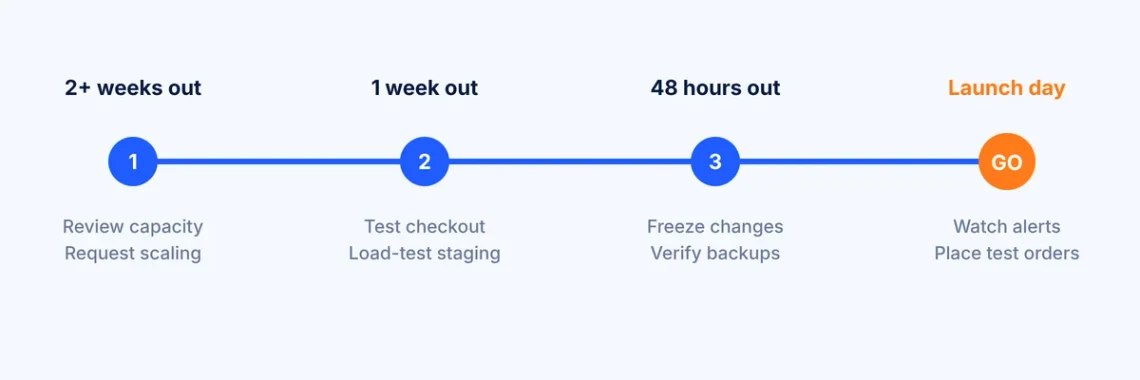
Pre-campaign timeline: review capacity two weeks out, test one week out, freeze changes 48 hours out, monitor on launch day
How SPanel Helps Monitor Your Website During Peak Black Friday Traffic
Domains → Website Monitoring
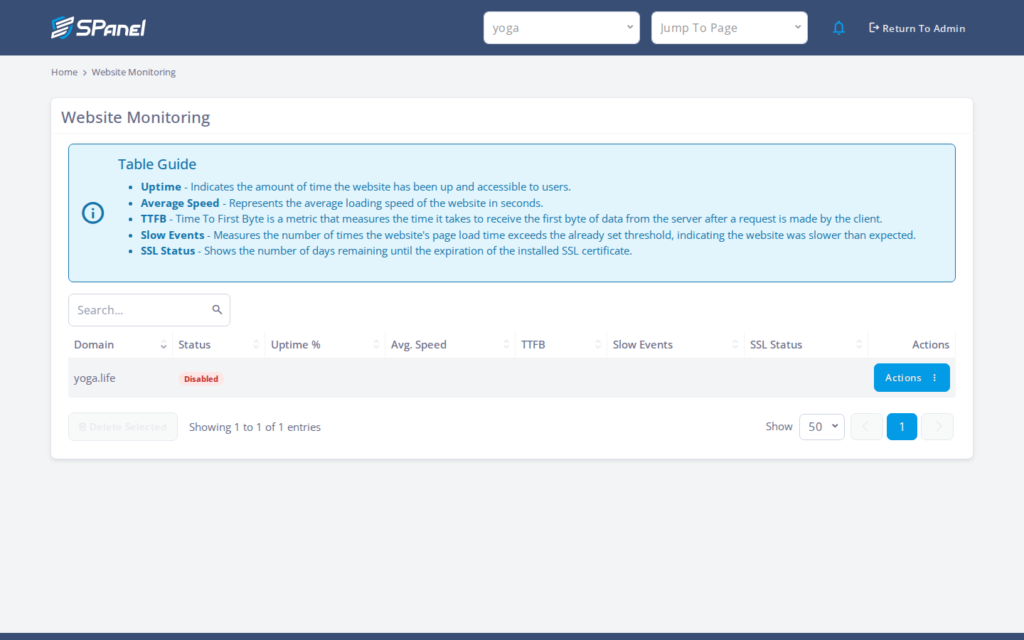
Once enabled for a domain, Website Monitoring tracks availability, average response speed, TTFB, SSL status, and slow events, with a history view for each domain. Expected-text (text-presence) monitoring flags pages that return a success code but are missing content you rely on, such as a checkout button. Alerts are sent through SPanel’s Notifications Manager, so configure at least one channel.
SPanel Website Monitoring showing uptime, average speed, TTFB, and SSL status per domain
Domains → Actions → View Logs
Access logs record each request with its HTTP status code, IP address, and user agent. Error and PHP error logs capture server and code problems. During a campaign, look for spikes in 500, 502, 503, and 504 responses and repeated 404s from broken campaign links. Download the full log for deeper analysis.
SPanel Redis Cache statistics showing memory, clients, hits, and misses.
Cluster Management → Status & Health
For applicable cluster setups, this screen shows the status of cluster nodes, NFS storage, the MariaDB Galera cluster and DNS servers, with tabs for nodes, services and the activity log.
Important: Monitoring detects selected symptoms. It doesn’t perform a real purchase, validate payments, or guarantee that a website is healthy. Place manual test orders during the campaign as well.
Three Campaign Scenarios: Which Hosting Setup Makes Sense?
These examples are hypothetical and meant to illustrate decision-making.
Scenario A: Small WooCommerce business. The store expects a moderate increase in orders. The priority is optimizing caching, confirming available CPU and RAM, and validating checkout. A larger plan is rarely the first fix.
Scenario B: Growing store running a major advertising campaign. Paid traffic may bring several times the normal concurrent visitors. Run a capacity test on staging, compare peak usage from earlier campaigns, and add VPS resources ahead of launch if CPU, RAM, or PHP workers are already close to their limits.
Scenario C: Revenue-critical online store. Even a short outage has material financial consequences. Managed cluster hosting with load-balanced web nodes, redundant DNS and appropriately configured failover becomes economically reasonable. It reduces single points of failure, but testing, backups, and monitoring are still required.
Is Your Website Ready? A Final Pre-Campaign Checklist
Check
Owner
Evidence needed
Status
Backup restore tested
Developer
Successful test restore
☐
Capacity reviewed
Developer / Host
Peak CPU, RAM and PHP worker data
☐
Caching verified
Developer
Cart, checkout and account pages excluded
☐
Checkout tested
Store manager
Test orders with every payment method
☐
Monitoring and alerts active
Developer
Test alert received
☐
CDN, firewall and DNS reviewed
Developer / Host
Configuration reviewed
☐
Scaling completed
Hosting provider
Changes applied and retested
☐
Evaluate your website at least several days before the campaign, so there’s time to test any changes.
Campaign readiness is a combination of capacity planning, application testing, monitoring, and suitable infrastructure. None of them works alone, and none can guarantee zero downtime, but together they make problems less likely and faster to diagnose.
Planning a major marketing campaign? ScalaHosting’secommerce VPSandcluster hostingoptions can help you prepare the server environment for increased demand during Black Friday and marketing campaigns.
A: There’s no fixed number. Capacity depends on caching, page and query complexity, and server configuration. Measure your own peaks.
Q:Does DNS clustering make my website faster?
A: Not noticeably, but it makes DNS more resilient by removing a single nameserver as a point of failure.
Q:Will adding RAM solve checkout slowdowns?
A: Only if memory is the bottleneck. Slow queries, busy PHP workers, or slow payment APIs are common causes. Check logs and monitoring first.
Q:Can a CDN protect an online store from traffic spikes?
A: Partly. A CDN offloads static and cacheable content, but cart and checkout requests still reach your origin server.
Q:What is the difference between VPS scaling and cluster hosting?
A: VPS scaling adds resources to one server. Cluster hosting spreads work across multiple nodes, so the site can survive an individual node failure.
Q:Does SPanel automatically scale a cluster when traffic increases?
A: No. ScalaHosting’s technical team provisions cluster changes. SPanel provides health and status information.
Q:How do I know if my website is ready for Black Friday traffic?
A: When the checklist above is complete: backup tested, capacity and caching verified, test orders successful, alerts working, and scaling finished before launch.