Modern Magento 2 stores handle thousands of database queries for catalogs, carts, sessions, and checkouts, making performance optimization essential for reliability and conversions. One of the most effective ways to reduce latency and server load is by implementing Redis, an in-memory caching solution widely used in high-traffic eCommerce environments.
In this guide, we will explain what Redis is, how it works within a Magento 2 architecture, and why it is considered a best-practice caching layer for serious online stores. We will also outline the measurable benefits, technical requirements, setup fundamentals, and the hosting environments where Redis delivers the strongest performance gains.
What is Redis Cache for Magento 2
Redis Cache is an in-memory data storage system used to temporarily store frequently accessed data so it can be retrieved much faster than from a traditional database. Instead of repeatedly querying MySQL for the same information, Magento can fetch that data directly from Redis, significantly reducing response times and server load. This can improve access to cached catalog data, configuration settings, layout data, full page cache entries, and session data.
Let’s get one thing straight from the get-go.
Magento 2 is neither very lightweight nor simple.
This ecommerce solution can be very demanding due to its versatility and scaling possibilities. Without a caching solution, even a moderate number of visitors can slow your online shop’s performance and negatively affect your revenue.
But Magento’s got its bases covered.
Magento 2 uses multiple caching layers to maintain performance, and Redis can serve as a backend for several of them. When Redis is enabled, Magento writes cached data to Redis instead of the filesystem or database. On subsequent requests, Magento checks Redis first. If the data is available (a cache hit), it is returned immediately. If not (a cache miss), Magento retrieves the data from the database and stores it in Redis for future use.
This process reduces repetitive database queries and improves the efficiency of dynamic operations such as:
Loading product and category pages
Managing customer sessions
Processing shopping carts and checkouts
Storing configuration and layout data
Handling API requests and background jobs
Types of Magento 2 Data Stored in Redis
There are three layers Redis can back: application cache, full page cache, and session storage:
Application Cache
These are your frequently used application resources and configuration data. Think of things like filters, product pages, and checkout steps. Storing such elements in your operating memory will speed up page loads and general responsiveness.
Full Page Cache (FPC)
High-traffic Magento shops can benefit greatly from full page caching. Instead of saving certain elements in your RAM, this method stores entire, fully rendered pages, reducing the time to reload them whenever necessary.
Session Storage
Personalization is a big part of ecommerce websites. Different users browse differently and enter distinct data. This includes login details, recommended items, favorites, shopping cart contents, etc. Redis helps you store this personalized information for better session reliability.
What’s more, Redis is officially supported and recommended for production deployments because it aligns with Magento’s performance and scalability architecture. It is capable of handling large datasets, supports persistence options, and integrates seamlessly with modern hosting environments such as VPS, cloud, and containerized infrastructure.
Note that session storage is not a cache per se; it simply saves user data like shopping carts and login states in fast memory instead of slow disk files.
Redis vs. File-Based Caching in Magento 2
As mentioned, Magento 2 has its own built-in caching mechanism that employs the server’s filesystem to store data. This actually works fine if you have a very small online shop or one with low traffic.
The problem is, Magento stores are rarely like that.
As users grow and more requests are processed, the file system becomes congested, latency appears, and disk I/O operations slow down.
You cannot have any of that.
Adding Redis to the mix will ensure:
Faster page generation
Reduced database load
More stable performance under traffic
Better scalability for growth
To reiterate, while not mandatory, pairing Magento 2 with Redis caching can do wonders for both growing and established online shops. Expanding your product catalog, user base, and checkout activity would be severely hindered if you rely solely on your file system.
Redis System Requirements for Magento 2 Stores
Because Magento 2 is significantly more resource-intensive than most ecommerce platforms, the Redis environment supporting it must be properly sized and configured. Underpowered Redis instances can become bottlenecks rather than performance boosters.
When picking your hosting plan, you want to ensure there is enough CPU and especially RAM to sufficiently meet the app’s demands.
Here are the baseline software requirements:
Cache backend: Redis 6.2+ works across older Magento 2.4.x installs; Redis 7.2 is the baseline for recent versions. Magento 2.4.8 added Valkey 8 (a drop-in, Redis-compatible fork), and Magento 2.4.9 makes Valkey the default — so on newer stores Valkey is the forward path, while existing Redis setups keep working.
Operating system: Linux (Ubuntu, AlmaLinux, Rocky Linux, Debian, etc.)
PHP extension: php-redis (phpredis) — not predis — for production workloads
Magento version: Magento 2.4.x (2.4.8 or 2.4.9 recommended for new builds)
Network: Low-latency connection between Magento and the cache backend
That doesn’t sound like much, but keep in mind this is the bare minimum for Redis to function properly.
Now, if you want to be on the safe side, you’d better prepare a more robust configuration:
When it comes to your operating memory, here are some numbers to consider:
Small store:
128 MB RAM dedicated to Redis
Medium store:
256 MB RAM dedicated to Redis
Large store / high traffic:
512+ MB RAM dedicated to Redis
Enterprise / multi-node:
1024+ MB RAM dedicated to Redis
Start with a conservative Redis memory limit, monitor memory usage, cache hit rate, evictions, and connected clients, then increase the limit when Redis starts evicting useful keys too early. Large Magento catalogs, heavy session volume, and high traffic may require significantly more memory, but the correct number depends on real usage.
On a shared instance, any eviction above zero can mean lost sessions, not just lost cache, which raises the stakes on sizing correctly. We recommend allkeys-lru for a cache-only instance and noeviction for a session-only instance.
Redis vs LiteMage: Different Magento Performance Layers
Redis and LiteMage solve different caching problems. Redis is an in-memory backend Magento can use for cache and session data. LiteMage is a LiteSpeed Web Server page-cache extension that accelerates Magento page delivery. They can complement each other on LiteSpeed-based hosting, but LiteMage does not replace Magento’s Redis configuration.
Optional Performance Layer: LiteMage Cache for LiteSpeed Serversfor Magento 2.
LiteMage Cache is specifically designed to speed up Magento pages. It caches both dynamic and static pages, effectively covering all your potential store bottlenecks. LiteMage employs Edge Side Includes (ESI), an XML markup language that enables dynamic web content assembly.
IMPORTANT: LiteMage is a paid Magento plugin and requires the LiteSpeed Web Server to operate, which is also subject to a license fee. Apart from the add-on price, the developers offer a discounted bundle where you can get it along with the server license.
Redis vs Varnish (now Vinyl Cache)
For full-page caching on nginx/apache stacks, Varnish is Adobe’s recommended production option and outperforms Redis FPC about 3x, because Redis FPC still boots PHP on every request while Varnish serves from RAM before PHP.
On LiteSpeed servers, LiteMage fills the same role. Same architecture (pages served by the web server before PHP), same ESI hole punching driven by the same cacheable attributes in Magento’s layout XML, plus native HTTPS, HTTP/2 and HTTP/3, which Varnish lacks (it needs nginx or Hitch in front for TLS termination).
Overall, Redis FPC is the right choice when server-level FPC isn’t available, and Redis remains the right tool for the application cache and session layers regardless of which FPC you run.
How to Set Up Redis for Magento 2 in SPanel
Setting up Redis in Magento 2 is straightforward, but it requires proper server access and configuration. Because Magento is resource-intensive and relies heavily on caching for performance, Redis should be configured carefully.
Luckily, even non-technical users can do so with SPanel.
Here are the steps on how to properly set up Redis with Magento:
Log in to SPanel
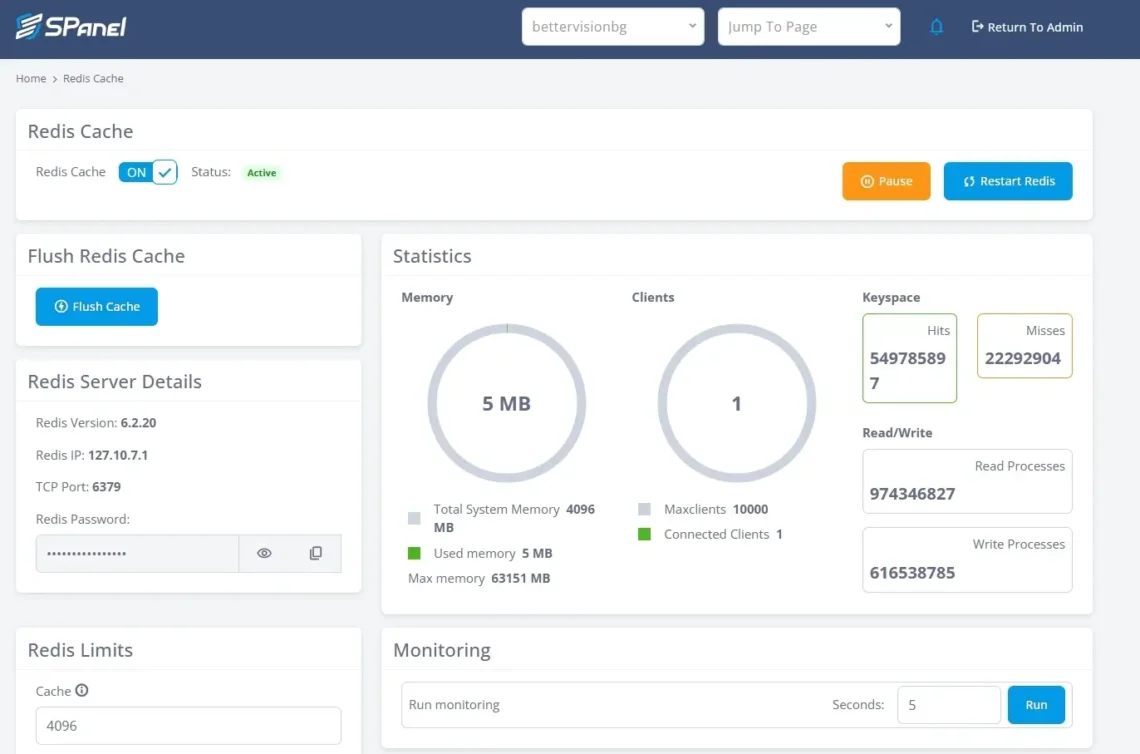
Navigate to Redis Cache under the Software section.
Activate Redis from the top-left toggle.
Copy Redis host/IP, port, and password.
Configure Magento with bin/magento setup:config:set for default cache, page cache, and sessions.
Use separate Redis database numbers for cache/page cache/sessions.
You can also configure the fine details and what you want to be cached – be it full pages, certain elements, or session storage.
After configuring Redis in Magento, flush the Magento cache and test the storefront, admin area, cart, and checkout.
Hosting Requirements for Redis for Magento 2
Running Redis for Magento is not just about installing a caching service. Achieving top performance is impossible without a hosting environment capable of handling Magento’s heavy resource usage and real-time performance demands. The popular ecommerce platform processes complex catalogs, dynamic pricing rules, sessions, and checkout operations, so Redis must operate on an infrastructure that delivers consistent speed, low latency, and reliable scalability.
So, let’s look at the main aspects of the web hosting service that may influence your Magento shop experience.
High-Performance Infrastructure
Every successful project starts with a powerful server, and Magento shops are no different. In fact, as this ecommerce solution is so complex, you would benefit from a top-tier infrastructure even more.
Magento itself creates large cache datasets, and this puts a heavy load on the server, especially during promotional periods, product reveals, and periods of high traffic. Some of the core requirements for smooth performance include:
Enterprise-grade CPUs with strong single-core performance
Guaranteed RAM allocation (not oversold memory)
NVMe or SSD storage for persistence and logging
Reliable network throughput with low latency
Stable virtualization or bare-metal architecture
ScalaHosting already ticks all the boxes, successfully hosting thousands of Magento websites. Clients can benefit from top-tier servers with up to 4.1Ghz power, ultra-fast NVMe storage, and Redis object caching available through SPanel Redis Cache. The cloud architecture guarantees dedicated CPU and RAM and consists of a large network of interconnected servers on a reliable, highly redundant network.
Transform your Business and Boost Sales with Scalable Magento Hosting
Memory is the most critical resource for Redis. Magento stores large amounts of cached data, including configuration, layout, product data, and session information. If the hosting environment does not provide enough dedicated RAM, Redis will begin evicting data prematurely, which leads to cache misses and performance degradation.
Еven though the minimum requirements for a small Magento store are around 2-4GB RAM, you will quickly find those insufficient. Aim for a hosting provider that can provide server tiers with more operating memory, as this will be essential for Redis.
ScalaHosting offers a wide range of managed VPS plans where the RAM grows exponentially. What’s more, you can fully customize your server and allocate as much CPU and RAM as you deem sufficient for your ecommerce project.
SPanel Redis provides one Redis instance per hosting account, not per individual website. Redis runs on the same server as the hosting account, which keeps latency low but means Redis memory must fit within the VPS resources. SPanel does not expose Redis clustering, replication, or high-availability Redis in the UI. The Flush Cache button clears the whole Redis instance, so use it carefully on production stores.
Easy Resource Scalability
This is a must-have for any online shop, where traffic surges are common. Magento stores grow their product line, add catalogs, change inventory, and apply promotions over time. If your RAM cannot scale accordingly, you risk dropping out of the race.
Important scalability capabilities include:
Instant RAM upgrades
Flexible CPU scaling
Storage expansion without downtime
Ability to handle sudden traffic spikes
Predictable resource allocation
ScalaHosting offers true cloud VPS hosting, which allows you to add/remove resources on a per-need basis. The process is quick, easy, and requires no more than a few mouse clicks. This is particularly valuable for marketing campaigns, holiday sales, and rapid business growth.
Built-in Redis Management Tools
Managing Redis manually through command-line interfaces can be complex, especially for teams without dedicated DevOps resources. Hosting environments that include integrated management tools significantly simplify deployment, monitoring, and maintenance.
To ensure you operate Redis without advanced technical experience, you need:
Easy Redis installation
Quick start/stop options
Memory usage monitoring
Cache flushing controls
Service status visibility
Inside ScalaHosting’s SPanel, you will find the unique Redis Cache Manager. This comprehensive tool allows managed VPS plans to get all the needed configuration details, monitor the Redis efficiency, and flush the cache with a click of a button. Furthermore, the expert Support Team can help you set up caching and answer any technical questions you have along the way.
Feature-packed Control Panels
If you’re on a self-managed VPS hosting plan, working with Magento and Redis would require a certain level of technical expertise. The thing is, most users aren’t, so an intuitive interface with extensive functionality is a must-have so you can focus on your shop’s growth.
This is why many clients prefer managed VPS services, coupled with a management platform that delivers:
Service management
Resource monitoring
Security configuration
Backup management
Performance diagnostics
Application deployment tools
SPanel is an in-house development of ScalaHosting, the fastest-growing control panel on the market. This hosting management solution not only includes all essential functionality for managing websites, domains, and email, but also comes with unique tools of its own. SPanel often adds user-suggested features, and, best of all – is completely free of charge for ScalaHosting customers.
Security and Reliability
Any ecommerce project is a lucrative target for web attacks, even more so if it proves to be successful. But that’s not the only reason you don’t want to compromise on security. Redis stores sensitive session and application data, so your hosting infrastructure must provide strong security and reliability controls.
Essential hosting security features include:
Firewall protection
Private network communication
Access control configuration
Automatic backups
DDoS protection
Regular security updates
You cannot go wrong when choosing ScalaHosting for advanced security. First of all, you have SShield – the unique security monitoring system that constantly watches over your traffic. Scala is also among the few hosts that not only offer a great backup solution, but also don’t charge anything for creation and restore. Naturally, you also get all essentials within any managed VPS plan – SSL certificates, a CDN integration, malware protection, email filtering, the works.
Conclusion
Redis has become a core component of modern Magento performance architecture. By storing frequently accessed data in memory, this caching method reduces database load, accelerates page delivery, and improves stability during high-traffic periods. For resource-intensive Magento stores, Redis is a must-have practical requirement for maintaining fast, reliable customer experiences.
When deployed on a properly sized infrastructure and configured according to best practices, Redis supports scalable growth, smoother checkouts, and more predictable performance under demand. Combined with a hosting environment that offers sufficient RAM, low latency, and easy resource scalability, Redis enables Magento stores to operate efficiently today while remaining prepared for future expansion.
FAQ
Q:Can Magento 2 use Redis for both cache and sessions?
A: Yes. Magento 2 can use Redis for default/application cache, full page cache, and session storage. If you use Redis for more than one purpose, configure separate Redis database numbers for each layer, such as database 0 for default cache, database 1 for full page cache, and database 2 for sessions. This keeps cache and session data logically separated and protects sessions from Magento’s own cache flushes, not from direct Redis commands. Full isolation requires sessions on a separate Redis instance. On SPanel, each account already gets its own dedicated instance, which caps the blast radius of any flush to that one account.
Q:Is LiteMage the same as Redis for Magento 2?
A: No. Redis and LiteMage work at different layers. Redis is an in-memory backend Magento can use for cache and session data. LiteMage is a LiteSpeed Web Server page-cache extension that accelerates Magento page delivery. They can complement each other on a LiteSpeed-based stack, but LiteMage does not replace Magento’s Redis configuration.
Q:How much Redis memory does a Magento 2 store need?
A: There is no single correct number. A small Magento store may start with 128–256 MB, while larger catalogs, high traffic, and heavy session activity may require 512 MB or more. The best approach is to start conservatively, monitor Redis memory usage, cache hit rate, evictions, and connected clients, then increase the memory limit when Redis starts evicting useful cache data too early.
Q:Should Redis persistence be on or off?
A: You should keep persistence off for cache, on for sessions, which is the second reason (after flush isolation) to keep sessions on their own instance where possible. Note the SPanel constraint honestly, if the per-account instance uses one persistence setting.