When HTTP 200 Lies: Why Uptime Monitoring Needs Content Checks

A WooCommerce store owner gets a chat ping on a Tuesday morning. A regular customer can’t complete checkout.
The owner refreshes the homepage – it loads. Products page – loads. About page – loads. Every uptime monitor on the dashboard is green. According to every external check, the site is up.
Then they actually try to buy something.
The cart page renders, but the shipping calculator is silently failing. Every order over the last four hours has bounced at the same step. The site has been “up” the entire time it’s been broken.
This is the gap between what a status code tells you and what a customer experiences. And it’s why monitoring that only checks for HTTP 200 misses a meaningful share of real outages.
How SPanel closes this gap?
SPanel website content-aware monitoring does more than check whether a server returns a successful HTTP status. For each monitored domain or subdomain, customers can choose a 1, 5, 10, or 15-minute check interval, set a response-time threshold, enable SSL expiration monitoring, and optionally define text that must appear in the page response.
If that text is missing, SPanel treats the site as down even if the HTTP status is 200. For customers with multiple ScalaHosting servers, one server can monitor another, creating an external vantage point without a separate uptime-monitoring subscription.
What HTTP 200 Actually Tells You (and What It Doesn’t)

HTTP 200 is the status code a web server returns when it has successfully produced a response to a request. It means one specific thing: the server received the request, processed it without throwing an error at the HTTP layer, and sent back a body.
That’s it.
What HTTP 200 does not guarantee:
- That the body contains the page the visitor expected
- That the database query inside the page returned data
- That an external API call inside the page succeeded
- That the page rendered correctly in a browser
- That the application logic ran without silently catching an exception
A status code lives at the protocol layer. A working website lives at the application layer. They’re related, but the relationship isn’t as tight as most monitoring tools assume.
Modern web applications are especially prone to this gap. PHP frameworks like WordPress, Laravel, and Drupal ship with default exception handlers that catch fatal errors and render a generic “something went wrong” page – with an HTTP 200 status.
The Silent Failures That Slip Past Status-Code Monitoring
Four scenarios show up over and over in support tickets. They’re worth keeping in mind the next time you look at a green monitoring dashboard.
- The Caught Fatal Error
A WordPress plugin update introduces an incompatibility with the current PHP version. On every request to the affected page, PHP throws a fatal error. WordPress’s error handler catches it and renders a clean “There has been a critical error on this website” page. The HTTP status is 200, because the error handler succeeded at its job – which was to render an error page instead of crashing the server.
A status-code monitor will report your site as up the entire time visitors are bouncing off the error page.
- The Empty Product Grid
A WooCommerce store’s product catalog page loads. The header is there, the footer is there, the sidebar filters are there. The product grid is empty because the database query timed out and the template fell through to its empty-state. The page returns 200, the bytes are flowing, and the only thing missing is the entire reason a customer visited.
- The Partial Render
A SaaS dashboard fetches account data from an internal API on page load. The page renders the navigation, the header, and the layout shell. Then the API call fails, the client-side JavaScript catches the error, and the data area stays blank. The server returned a 200 status code because it served the shell HTML successfully. The customer sees a broken dashboard.
- The Missing Login Form
An agency-managed marketing site uses a plugin that adds a login form to a specific page. After a plugin conflict, the form fails to register. The page renders, the surrounding content is intact, but the form is gone. Visitors who needed to log in can’t. The HTTP status, as you’d expect by now, is 200.
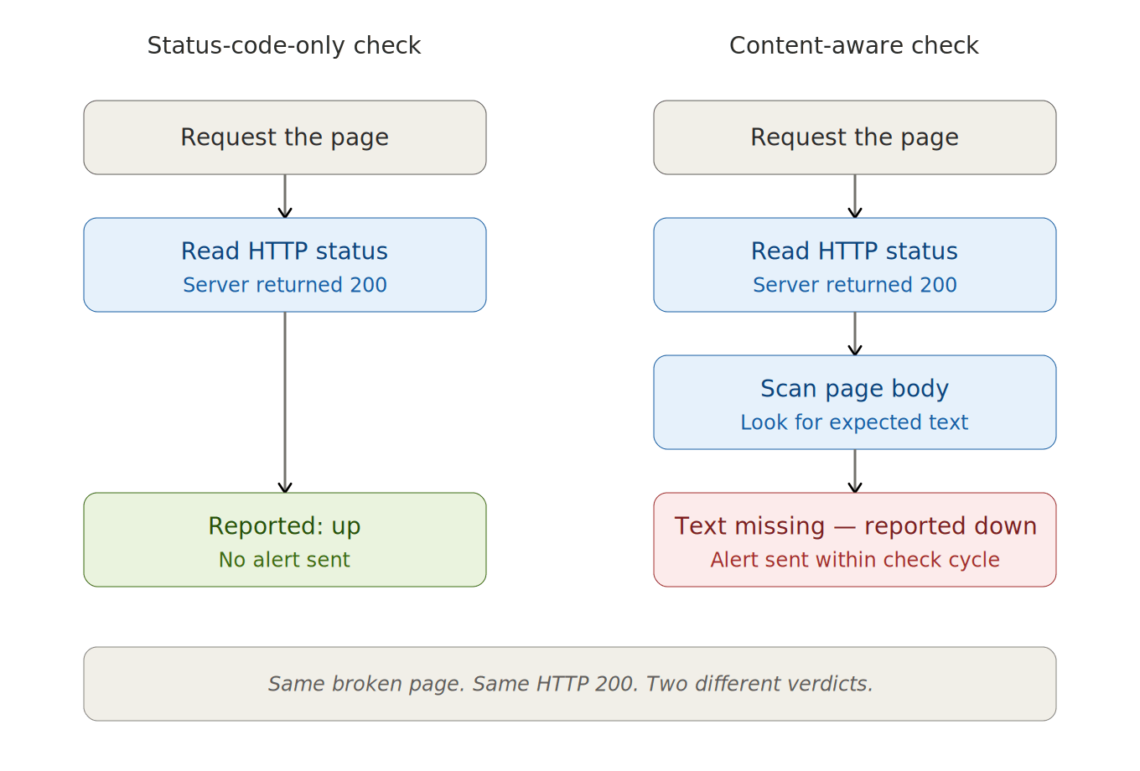
In every one of these cases, the failure mode is the same: the server responded successfully, and the rendered page is broken in some way the response code can’t see.
Here’s what that looks like as a flow:
Why Standard Uptime Monitoring Misses All of This
Most uptime services exist because someone needed a fast, cheap signal that “the server is responding.” The original use case was catching network outages, server crashes, and misconfigured DNS – the kinds of failures that take an entire site offline at the protocol layer. A status-code check was the right tool for that job, and for a long time it was the only tool many services offered.
That signal still has value, but the failure modes that hurt businesses today have shifted upward.
Outright server crashes are rare on modern managed infrastructure. What’s common is partial failure: one plugin breaks, one database query times out, one upstream API stops responding. The server is fine. The site is broken.
Content-aware monitoring closes that gap. Instead of asking “did the server respond?”, it asks “did the response contain the thing it was supposed to contain?” That second question is closer to what your customers care about.
| Check Type | What It Catches | What It Misses |
|---|---|---|
| HTTP status code only | Server offline, DNS failure, 4xx/5xx errors | Caught exceptions returning 200, empty content, partial renders |
| HTTP + content check | All of the above + silent application failures | JavaScript-rendered content, API response validation |
| HTTP + content + SSL expiry | All of the above + certificate expiration | Response time degradation |
| HTTP + content + SSL + response time | All of the above + slow-loading pages | Functional testing, multi-step flows |
| Cross-server + all checks above | All of the above + server-level outages the in-server monitor can’t detect | — |
Content Checks: Looking at What the Visitor Actually Sees
A content check (sometimes called a text-presence check or keyword check) is a simple addition to a standard uptime poll. After the monitor receives the HTTP response, it scans the response body for a specific piece of text you’ve configured. If the text is there, the site passes. If it’s missing, the site is treated as down (even when the HTTP status is 200).
The mechanism is intentionally simple.
The check looks for an exact substring in the rendered HTML. If your homepage normally includes a footer that says “© 2026 Your Company” and that text is missing from the response, the check fails. If your product page normally contains “Add to cart” and that phrase is missing because the product grid didn’t render, the check fails.
For server-rendered sites (the vast majority of WordPress, WooCommerce, and standard CMS deployments), substring matching captures a significant share of real failure modes with very little overhead.
Important limitation: A text-presence check is not the same as a browser test. It checks the HTTP response body for an exact text string. It does not execute JavaScript, click buttons, submit checkout forms, or verify personalized content. For dynamic applications, choose text that appears in the server response or use a dedicated synthetic monitoring tool for full user-flow testing.
What to Check For: Picking the Right Sentinel Text
The text you choose matters. A good sentinel string has three properties: it’s specific to a working page, it’s stable across legitimate page changes, and it appears in the part of the page that depends on the application working correctly.
- For a WordPress Site
A footer copyright line, a tagline in the site header, or a phrase from your main call-to-action are all reasonable choices. Avoid sentinels that appear in static HTML the server can render even when WordPress itself is broken – your goal is to detect application-level failure, which means picking text that proves WordPress (and the database behind it) actually executed.
- For a WooCommerce Store
The text “Add to cart” on a product page is a near-perfect sentinel. It only appears when WooCommerce successfully queried the product catalog and rendered a product card. If the database is failing or the catalog is empty, the page might still return a 200, but “Add to cart” won’t appear.
- For a SaaS Dashboard
Pick text that depends on the application’s core data path. A label like “Active subscriptions” or a heading like “Today’s revenue” only renders when the dashboard’s data layer is working. If the page renders but the data fetch failed, the heading might still appear from a hardcoded template – in which case pick text that requires the data to have arrived, like a known unit label or a chart title.
- For an Agency-Managed Marketing Site
A tagline, a service name, or a piece of footer text that’s specific to that client’s site. Avoid generic strings (“Contact us,” “Home”) that could appear in any partially-broken state. The more distinctive the sentinel, the less likely a false negative.
Beyond Content Checks: The Other Signals That Matter
Content checks catch silent rendering failures, but they’re one signal in a larger picture. Three other checks earn their place in any serious content-aware monitoring setup.
- SSL expiration tracking. An expired SSL certificate doesn’t make your site return a non-200 status – it makes browsers refuse to load it. Daily checks against your certificate’s expiration date, with alerts at the 72-hour mark, give you time to investigate why auto-renewal didn’t fire (or to renew manually if you’re managing SSLs by hand).
- Response time and slow-event tracking. A site that loads in 18 seconds is technically up. It’s also losing customers. Tracking the response time and time-to-first-byte on every check, then alerting when the count of slow events crosses a threshold (rather than firing on every isolated slow request), separates real degradation from network noise.
- External vantage points. Monitoring that runs from inside your own server has a fundamental gap: if the server itself crashes, the monitor crashes with it. Running checks from a different server gives you a vantage point outside the failure domain. For businesses running multiple servers, this is straightforward – each server watches the others. For single-server setups, a lightweight external uptime service makes a good complement to in-server monitoring.
Here’s a rough sense of how detection coverage stacks up as you layer signals together. The numbers are illustrative, based on the share of common failure modes each check class can catch – not benchmark data.
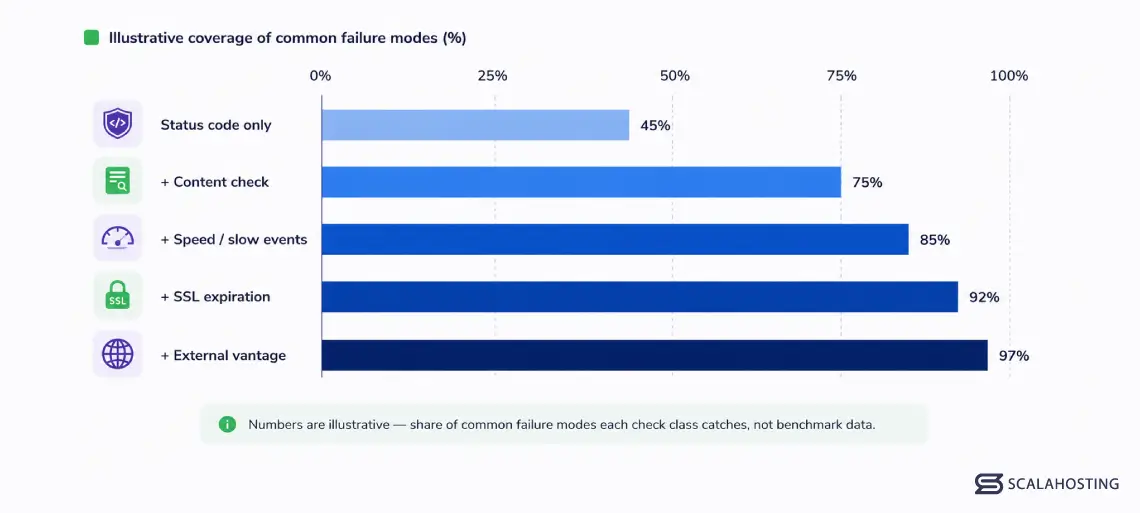
The pattern is consistent – each layer catches a category of failure the layer below it can’t see. The biggest single jump is the one most monitoring setups skip: adding content checks on top of status-code monitoring.
How SPanel Builds Content-Aware Monitoring Into the Hosting Stack
SPanel’s website monitoring is built into ScalaHosting managed VPS accounts, so customers do not need a separate tool just to catch basic uptime, speed, SSL, and content-availability problems. Every monitored domain gets HTTP status checking on a schedule the customer picks (1, 5, 10, or 15 minutes). On top of that, three things make the feature worth setting up immediately on any business-critical site:
- Text-presence checks are part of the basic monitoring configuration, not an upgrade. The customer specifies a piece of text that should appear in the response body, and the monitor flags the site as down whenever the text is missing – even on HTTP 200 responses. This is the difference between catching an outage in minutes and finding out from a customer the next morning.
- SSL expiration alerts fire 72 hours before a certificate expires. The check runs daily, so the alerts repeat until the cert is renewed. For sites using Let’s Encrypt with SPanel’s automatic renewal, this is a safety net for the rare case where renewal fails silently.
- Slow-event tracking counts how many checks exceeded your speed threshold across the day. At 15 slow events in a day, the monitor sends an alert – high enough to ignore the occasional one-off slow request, low enough to surface real degradation before customers start noticing.
Customers running more than one ScalaHosting server can configure each server to monitor the others, which provides external monitoring at no additional cost. A two-server setup gives each site an outside vantage point. A three-server setup gives each site two independent watchers. This is an enterprise monitoring topology that small businesses normally don’t have access to without paying for a separate service.
And because the monitor accepts any URL, the same SPanel server can also watch sites you host elsewhere – a marketing site at another provider, a vendor API your application depends on, or client sites you manage for customers. The hosting account becomes a general-purpose monitoring node.
The data – your response times, your downtime events, your SSL expiration history – lives on your own server. It’s part of your account backups, it survives a full-server restore, and it isn’t held by a third-party platform you’d have to migrate away from if you ever changed services.
Most SaaS monitoring services require re-setup after migration, so this is a real differentiator that can save your business a lot of headaches.
For agencies and businesses running multiple sites, the cumulative effect matters: every site under managed VPS hosting gets the same monitoring capabilities, with no per-site fees and no upgrade tiers. The cost stays flat as the number of sites grows.
Because SPanel’s monitoring runs alongside SShield – ScalaHosting’s real-time security layer – the two systems watch the same application from different angles. SShield analyzes incoming traffic patterns and blocks malicious requests before they reach your application. The website monitor checks whether the application itself is responding correctly to normal requests. A plugin conflict that serves a broken page to legitimate visitors won’t look like an attack, so SShield won’t catch it – that’s exactly the scenario the content check exists for.
Together, the two systems cover the failure modes that neither handles alone.
A Practical Setup Checklist
Setting up content-aware monitoring on a critical site takes about ten minutes. The order that works:
- Pick the pages that matter most. Your homepage is a starting point, but the pages worth monitoring are the ones whose failure costs you money or reputation – checkout, login, the main product catalog, the contact form, the booking page. Prioritize transactional pages over informational ones.
- Choose a sentinel string for each page. A piece of text that only appears when the application is working correctly. Test it: load the page in a browser, view source, and confirm the string is in the HTML. A 5–15 character phrase is usually enough.
- Set the check interval based on how fast you need to know. One-minute checks for transactional pages, 5–15 minutes for everything else. Faster isn’t always better – you’ll get the same outages with longer intervals, just slightly delayed.
- Set a realistic speed threshold. Look at your normal response times for a few days before picking a number. A threshold set too tight will alert constantly on harmless variance; one set too loose will miss real degradation.
- Confirm your contact email is current. Monitoring without a working alert path is no monitoring at all. Send yourself a test alert if the system supports it; otherwise, check that the configured address actually delivers to an inbox someone reads.
- Enable SSL monitoring on every domain that uses HTTPS. Even if you have automated renewal, the daily check is a cheap safety net.
- If you run multiple servers, configure cross-monitoring. Each server watches the others. Even one external watcher is worth more than three internal ones.
Closing the Gap
HTTP 200 was designed to tell you that a server responded. It was never designed to tell you that a site was working. As the failure modes have shifted from server outages to silent application failures, the gap between those two signals has become the gap between catching problems early and finding out from customers.
A content check is the smallest meaningful upgrade you can make to your monitoring setup. It takes a few minutes, costs nothing on a hosting plan that includes it, and catches a class of failure that no status-code monitor ever will.
Ready to set up content-aware monitoring on your sites? Explore ScalaHosting’s managed VPS plans – every plan includes SPanel website monitoring with text-presence checks, SSL expiration alerts, speed tracking, and cross-server monitoring at no additional cost.
FAQ
Q: Does HTTP 200 mean a website is working?
A: No. HTTP 200 only means the server returned a successful HTTP response. It does not prove that the expected page content loaded, that the database returned the right data, that checkout works, or that JavaScript-rendered sections completed successfully. A content-aware monitor adds a second check by looking for expected text in the response body.
Q: Does content-aware monitoring slow down my site?
A: No in any meaningful way. SPanel makes one normal HTTP/HTTPS request at the interval you choose. The text check happens on the response body the monitor already received. For most sites, that extra request every 1, 5, 10, or 15 minutes is negligible.
Q: How fast will I find out about an outage?
A: Within your configured check interval, plus the few seconds it takes to send the alert email. With one-minute checks, you’ll typically know within 1 to 2 minutes after the failure starts. Most monitoring services treat the first detection as the alert trigger to avoid spamming you with repeated emails for the same incident.
Q: What if my page content changes legitimately?
A: Pick a sentinel string that doesn’t change. A footer copyright, a tagline, a navigation label, or a structural phrase like “Add to cart” – these stay stable through routine content updates. If you redesign the site or change the sentinel area, update the configured text. It’s a one-line change in the monitoring settings.
Q: Should I still use an external service like Pingdom or UptimeRobot?
A: For most sites, in-server monitoring covers the cases that actually happen. If you run a single server and want a belt-and-braces setup, a lightweight external service catches the rare case where your server itself goes offline. For multi-server setups, configuring each server to watch the others delivers the same external coverage without an extra subscription.