
How to Flush and Restart Redis Cache in SPanel
In SPanel, you flush or restart your account’s Redis cache from the Redis Cache section under Software, using the Flush Cache and Restart Redis controls – no SSH or root needed.
Flush Cache clears the cached keys; Restart Redis restarts the per-account service. Both act on your whole per-account instance, not a single site’s keys, so expect a brief cold-cache slowdown right after. The live statistics on the same page let you confirm the effect.
Who this is for
This is for site owners and people running a managed VPS who have already deployed Redis and now need to clear it. The common cases: you pushed a deploy and the old cache is serving stale data, or the cache is misbehaving and you want a clean restart – done from the panel, without opening a shell.
What problem this solves
A cache that should be helping you is suddenly the problem. After a deploy, Redis may keep handing back values that no longer match what is on disk, so visitors see old pages or stale API responses. Or the service drifts – memory fills, clients pile up, responses slow. You need a way to empty the cached keys or bounce the service, and to confirm it worked.
How SPanel solves this
Open the Redis Cache page under Software > Redis Cache. On a deployed instance with status ON/Active, you get a small set of controls: Flush Cache (the offline_bolt icon), Restart Redis (the sync icon), and Pause.
Flush Cache clears the cached keys for your account’s Redis instance – the data is gone and the next requests rebuild it. Restart Redis restarts the per-account service, clearing in-memory state and resetting connections. The same page shows live Statistics – memory use, connected clients, and hits/misses – so after you act you can watch the numbers reset and climb back as traffic warms the cache. SPanel runs the operation against your instance; rebuilding the cache and clearing any single site’s keys is still your job.
Why this is different in SPanel
Two things stand out. First, Flush Cache and Restart Redis run straight from the panel, scoped to your own per-account instance – no SSH or root, and you cannot touch another account’s cache.
Second, the live Statistics sit on the same page as the controls, so you confirm a flush or restart on the spot: memory drops, hit/miss counters reset, and you watch them recover.
Before you start
- Confirm your Redis instance is deployed and shows status ON/Active. If it is not deployed yet, deploy Redis first.
- You only need your normal SPanel user login – no root or SSH.
- Flush Cache is destructive: it empties all cached keys for the account. There is no undo, but the cache rebuilds from your application.
- Pick a low-traffic moment so the cold-cache dip affects fewer visitors.
Step-by-step
- Sign in to SPanel and go to Software > Redis Cache. Confirm the instance – for example, the deployed yoga Redis – shows status ON/Active. You should see the Flush Cache, Restart Redis, and Pause controls along with the live Statistics.
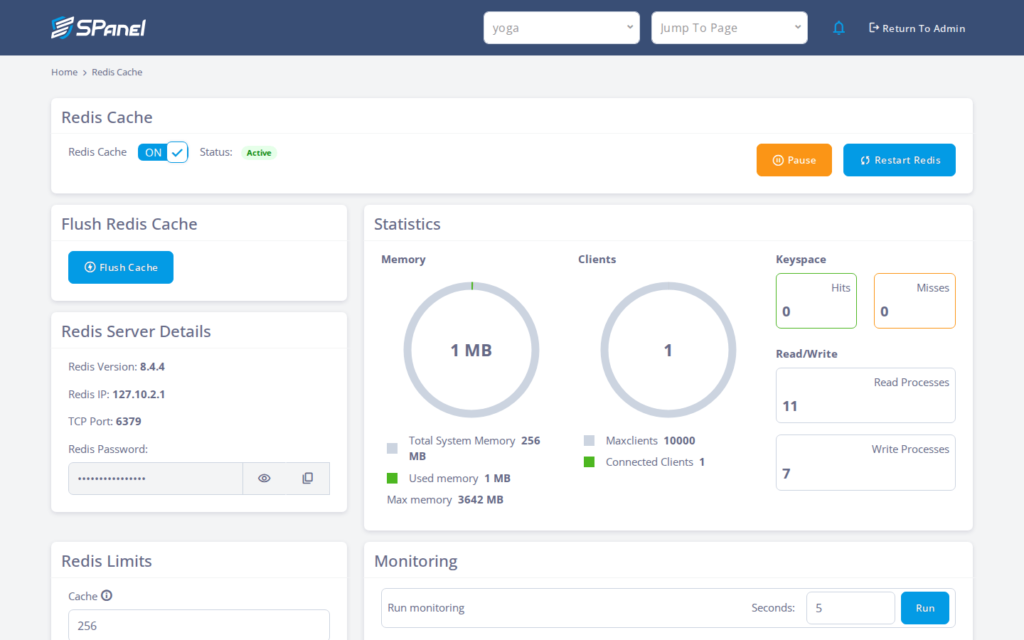
- Decide which action you need. To clear stale data, use Flush Cache. To reset in-memory state and connections without deliberately wiping keys, use Restart Redis. After a deploy, flushing is usually the right call.
- Safety check before flushing: this empties every cached key for the account, not one site. Confirm you are on the correct account’s instance and that a brief slowdown is acceptable. When ready, click Flush Cache.
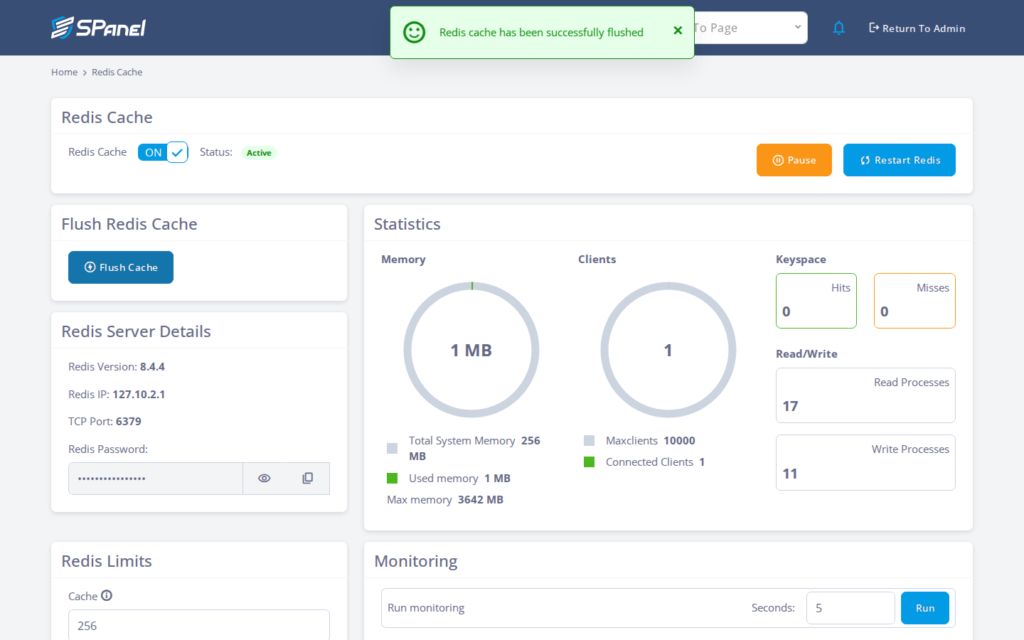
- Watch the Statistics. Memory use should drop and the hits/misses counters reset. As traffic returns, misses rise first while the cache is cold, then hits climb as it warms – that pattern confirms the flush worked.
- If you chose Restart Redis instead, click it and expect current connections to drop for a moment while the service comes back. The Statistics reset as it restarts.
What happens behind the scenes
Flush Cache tells your account’s Redis instance to drop its keys; Restart Redis stops and starts the per-account service process. Both are scoped to your account alone, which is why you do not need root. Nothing on disk is deleted; Redis is a cache, so the source data lives in your database and files.
The safety property worth remembering: clearing the cache costs you a short rebuild, not your content.
Limitations and edge cases
- Flushing clears everything for that account’s Redis. All cached keys go and the next requests rebuild them, so expect a brief performance dip while the cache is cold. What to do: flush during quieter traffic and let it warm up before judging speed.
- Restart momentarily drops current connections. In-flight requests using Redis can be interrupted for a second or two. What to do: restart at a low-traffic moment and retry any failed request.
- Flush and Restart act on the whole per-account instance, not one site’s keys. If several sites share this Redis, all of them lose their cache. What to do: clear a single site’s keys app-side – through its caching plugin or framework, or by deleting keys by prefix – rather than flushing the instance.
Troubleshooting
| Symptom | Likely cause | What to do |
| No Flush Cache or Restart Redis buttons | Redis is not deployed or the instance is not ON/Active | Deploy Redis first, then return to the page once status shows ON/Active. |
| Site still serves stale content after a flush | The app is caching elsewhere (page cache, CDN, browser) | Clear the app or CDN cache too; Redis is only one layer. |
| Some requests error during a restart | Connections dropped while the service restarted | Retry the request; restart at a quieter time next time. |
| Flush emptied another site’s cache too | Multiple sites share one per-account instance | Use app-side or prefix-based clearing for a single site. |
When to use this / when not to use this
| Use this when | Skip or use something else when |
| Stale data persists after a deploy | You only need to clear one site among several |
| The cache is misbehaving and needs a clean restart | A cold-cache dip would hurt during peak traffic |
| You lack SSH or root and need to act from the panel | You want to keep keys but tune the Redis memory eviction policy instead |
FAQ
Q: Does flushing delete my site’s actual data?
A: No. Redis holds cached copies; your real data stays in your database and files. A flush only forces the cache to rebuild.
Q: Will a flush affect other sites on the account?
A: Yes, if they share the same per-account instance. Flush and Restart act on the whole instance, so clear a single site’s keys app-side or by prefix instead.
Q: Do I need SSH or root to do this?
A: No. Both controls run from the SPanel Redis Cache page using your normal user login, scoped to your own instance.
Q: What is the difference between Flush Cache and Restart Redis?
A: Flush Cache empties the cached keys but leaves the service running. Restart Redis bounces the service, resetting in-memory state and dropping current connections.
Q: Why is my site slower right after flushing?
A: The cache is cold and rebuilding from scratch, so early requests miss and take the slow path. Watch the Statistics; performance recovers as keys repopulate.
Q: Is there an undo for a flush?
A: No. But because the cache is derived data, your application rebuilds it automatically on the next requests.
