What Is a DNS Cluster and Why Your Domain Needs Redundant Nameservers

A DNS cluster is a group of separate servers that all answer authoritative DNS for the same domains, so your sites and email keep resolving even if one server goes offline.
In SPanel, you can build a cluster by adding secondary DNS servers on the DNS Cluster page; every zone replicates to each member automatically, and every change syncs across the cluster. Most registrars already expect at least two nameservers, for exactly this reason.
- A DNS cluster keeps a domain resolvable even if one nameserver fails.
- SPanel replicates every DNS zone to all members automatically, with no manual copying.
- You add members on the DNS Cluster page using an IP address, SSH port, and root password.
- It is an admin-level feature for multi-server setups, not an end-user account setting.
How do DNS Clusters Work
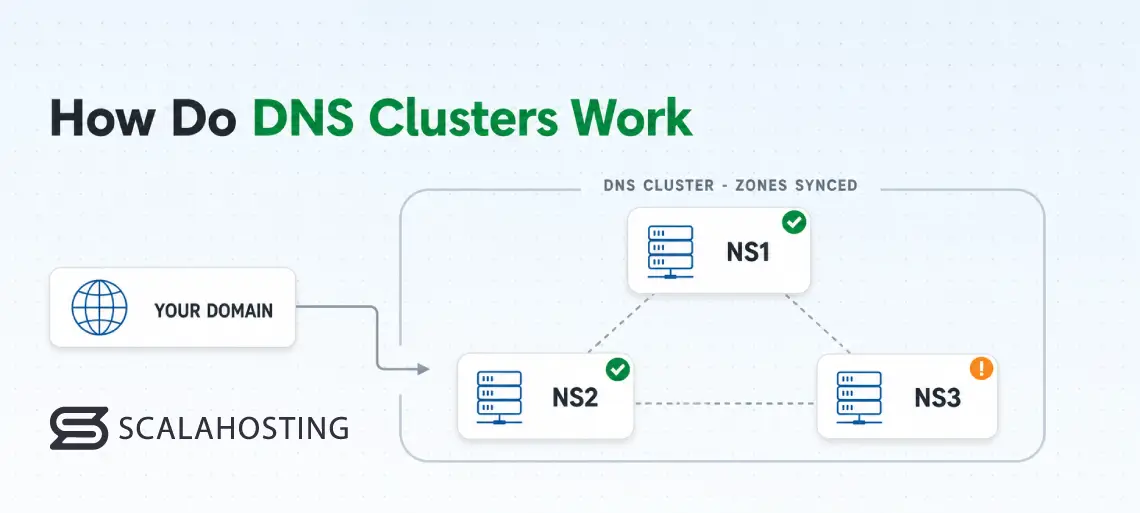
DNS turns your domain name into the address of the machine that serves your site. If the one server answering those lookups stops responding, your domain goes dark, even when the web server, database, and email behind it are healthy.
A DNS cluster removes that single point of failure by spreading the same authoritative answers across more than one machine.
You can point SPanel at another server, and it replicates every zone, then keeps them in sync. The confirmed panel on the DNS Cluster page says it plainly: add one or more secondary servers, and SPanel synchronizes your zones to them.
What People Get Wrong About DNS Clusters
The common assumption is that “my host is up, so my DNS is up.” Those are actually two different things: when the machine serving the DNS fails, the health of your web server is irrelevant.
A second misconception is that two nameserver names at your registrar mean redundancy. If ns1 and ns2 both point at the same physical server, you have one nameserver wearing two hats.
Real redundancy means separate machines, ideally in separate locations.
How DNS Clustering Actually Works
SPanel’s DNS runs on BIND 9, the authoritative software behind a large share of the internet’s lookups.
In a cluster, standalone DNS servers attach to your SPanel server as members. Every zone replicates to all members, and every change – adding, updating, or removing a record – syncs across the cluster automatically.
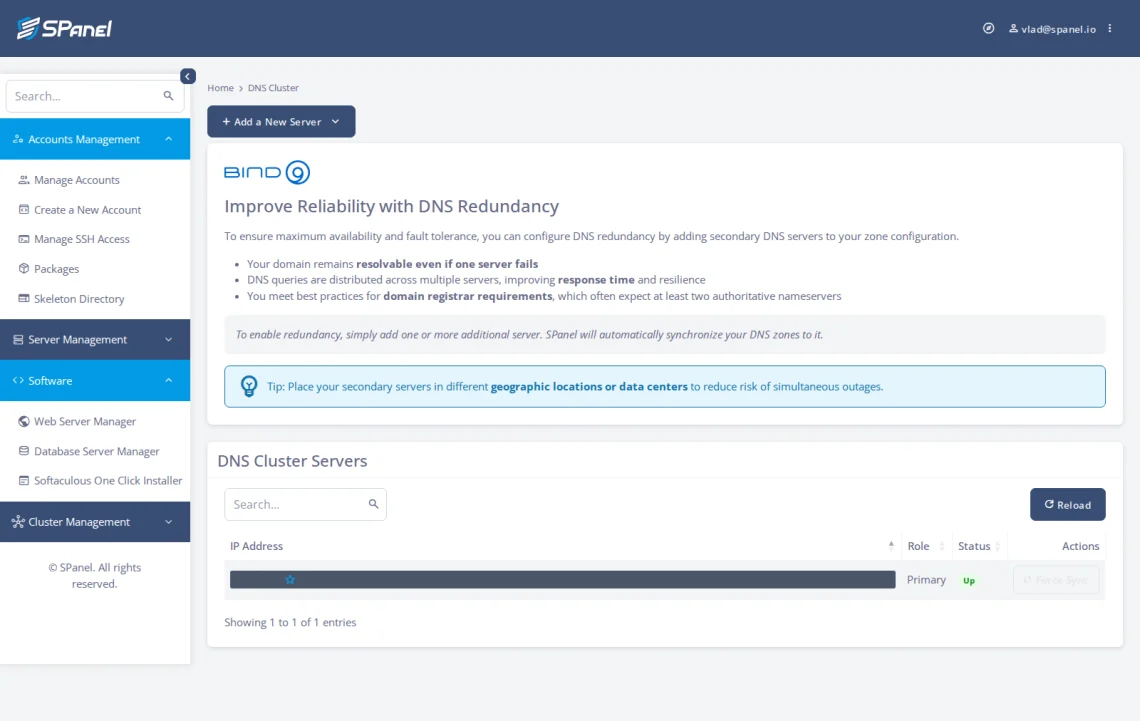
In the SPanel admin area, under Cluster Management, the DNS Cluster page lists your cluster servers with IP Address, Role, Status, and Actions columns. Your existing server shows a Role of Primary and a Status of Up. A Reload button sits above the table, and each row has a Force Sync action.
Where SPanel is different
Many hosts tell you to “set up secondary DNS” and hand you a wiki tutorial page.
SPanel does the hard work for you.
Adding a member is straightforward: provide the new server’s IP Address, SSH Port, and Root Password, and SPanel connects and pulls your zones across.
The page also has a panel titled “Improve Reliability with DNS Redundancy”: your domain stays resolvable even if one server fails, queries are distributed across multiple servers for better response time and resilience, and you meet the registrar’s best practices.
This functionality is included by default in SPanel. This means you are not paying extra for it. What’s more, ScalaHosting already hosts over 700,000 domain names, and many of them take advantage of this DNS redundancy.
Practical Example of DNS Clustering
Take a small agency running two managed VPS boxes for a portfolio of client sites. One server is in Frankfurt, and the other one resides in New York.
With clustering, both act as authoritative DNS for every client domain, so if the Frankfurt box needs an emergency reboot at 2 a.m., New York keeps answering, and no client site or mailbox goes unreachable.
This is particularly useful for resellers with multiple clients.
A reseller running a single nameserver has no such cushion like in the example above. One provider network incident takes every hosted domain offline at once, and a second member added ahead of time turns that into a non-event.
Single server vs a DNS cluster
| Single-server DNS | SPanel DNS cluster | |
|---|---|---|
| Nameservers answering | One machine | Two or more separate machines |
| When one server fails | Domain stops resolving | Other members keep answering |
| Zone updates | Live on the one server | Replicated to every member automatically |
| Geographic spread | Single location | Members can sit in different data centers |
| Registrar two-NS expectation | One real server | Met with separate servers |
DNS Cluster Limitations
Clustering is not a cure for everything.
It protects DNS availability, but it does not act as a backup for your website files, databases, or email content. It won’t fix a bad DNS record either: publish a wrong A record and the cluster faithfully replicates that mistake to every member.
DNS clustering is admin-facing, lives in the SPanel admin area, and requires root SSH access to the servers you add, so it targets VPS operators, agencies, and resellers, not a typical end-user account. The members are SPanel DNS servers working together, so pairing with an unrelated third-party DNS service can easily break your entire configuration.
How to Set Up DNS Clustering in SPanel
To take advantage of DNS clustering, start by confirming your registrar lists at least two nameservers for your domain.
- In the SPanel admin area, open Cluster Management, then DNS Cluster.
- Review the DNS Cluster Servers table; its IP Address, Role, Status, and Actions columns show your primary server as Role Primary, Status Up.
- Click +Add a New Server to open the Add a New Secondary DNS Server form.
- Enter the secondary server’s IP Address, its SSH Port, and the Root Password.
- Click Add Server to start the setup.
- Use Reload to refresh member status, and a row’s Force Sync action to push zones.
Related resources
DNS clustering sits next to other SPanel features worth reading about.
If email deliverability is your concern, see how SPanel adds SPF and DKIM to every new domain automatically so your mail passes authentication.
If you are weighing a multi-server setup, how SPanel compares to cPanel for VPS operators puts the wider platform in context.
Clustering is included on every ScalaHosting managed VPS, so you can build your cluster from the DNS Cluster page today – or try SPanel on one without a per-zone fee.
FAQ
Q: What is a DNS cluster in simple terms?
A: A DNS cluster is a set of separate servers that all answer authoritative DNS for the same domains. Because more than one machine holds the records, a lookup succeeds as long as any member is online.
Q: Why do domains need redundant nameservers?
A: A single nameserver is a single point of failure. If the single machine answering DNS goes offline, your domain will stop resolving for every visitor. Most registrars expect at least two nameservers, and putting them on separate machines turns two names into genuine redundancy.
Q: How do I add a server to the DNS cluster in SPanel?
A: Open the DNS Cluster page under Cluster Management, click +Add a New Server, and complete the Add a New Secondary DNS Server form with the new server’s IP Address, SSH Port, and Root Password. Click Add Server, and SPanel sets the machine up as a member and syncs your zones to it.
Q: Do DNS changes sync across the cluster automatically?
A: Yes. Once a server is a cluster member, every zone change replicates to the whole cluster automatically. This includes adding, editing, or removing a record. SPanel synchronizes your DNS zones to added servers for you.
Q: Is DNS clustering something end users set up?
A: No. It is an admin-level feature in the SPanel admin area and requires root SSH access to the servers you add, so it is aimed at VPS operators, agencies, and resellers with multi-server setups. End-user accounts do not manage cluster screens, though those domains still gain the redundancy.
Q: Does a DNS cluster replace my backups?
A: No. A cluster protects DNS availability when a server fails. It does not back up your website files, databases, or email, and it will not undo a bad DNS record; it replicates whatever you publish. Keep separate backups alongside DNS redundancy.