Managed cluster hosting keeps a website online when a single server fails by running several servers as one system. Web, mail, database, and DNS roles share storage over NFS (Network File System), MariaDB Galera replicates every write to every node, and MaxScale routes database queries to a healthy one.
On ScalaHosting managed plans, the technical team provisions the cluster to the shape you request, and SPanel’s Cluster Management page reports live per-node health. You get high availability and room to scale by adding servers – without building the failover plumbing yourself.
SPanel documents four topologies: Mail Redundancy (MX), DNS-Only Nodes (DNS), Dedicated Database Nodes (DB), and Full Cluster (All Services).
The Status & Health page shows tiles for Cluster Nodes, NFS Storage, MariaDB Galera Cluster, and DNS Servers, plus Nodes, Services, and Activity Log tabs.
Topology changes go through the ScalaHosting technical team, not a self-service button.
High availability reduces single-server downtime. It doesn’t replace backups, and it won’t save you from an application-level mistake.
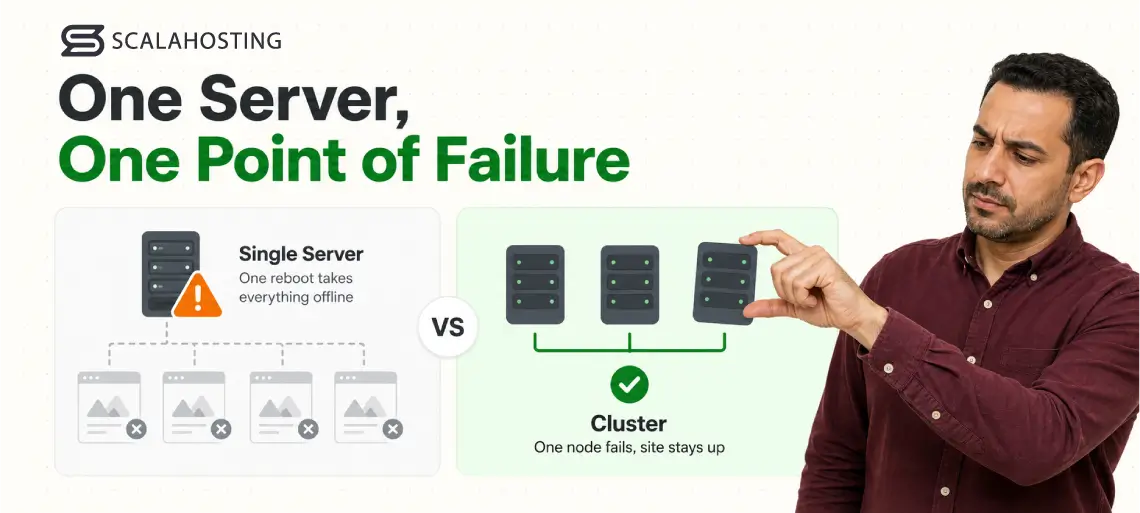
One server is one point of failure.
When it reboots for a patch, loses a disk, or trips over a runaway process, every site on it goes dark at once. For an ecommerce store taking orders or an agency hosting forty client sites, that hour results in lost revenue and a stack of tickets. Managed cluster hosting removes that single failure mode by running several servers as one. Here’s how it works, what it protects against, and where it stops.
Why One Server Is One Point of Failure
For a personal blog, an occasional outage is an annoyance. For revenue-generating infrastructure, it’s a direct cost – and the math sets the stakes.
Industry-standard SLA uptime of 99.9% still allows roughly 8.7 hours of downtime a year, while a premium 99.99% target trims that to about 52 minutes. ScalaHosting guarantees 99.9% uptime on its fully managed VPS plans, and a cluster is how you push past a single machine’s ceiling toward the higher end of that range.
High availability used to carry an enterprise price tag: a specialist to wire up replication and load balancing, or a platform that billed per component. A managed VPS cluster gives ScalaHosting customers the same idea – several servers acting as one – without the hefty invoice.
What Is Managed Cluster Hosting?
Managed cluster hosting spreads your website across multiple servers so no single machine failure takes the whole site down. A managed VPS cluster builds that on three pieces: a shared NFS storage node that serves the same files to every server, MariaDB Galera replication that keeps every database copy identical, and MaxScale query routing that sends each query to a healthy database node. You request the shape you need, ScalaHosting provisions it, and SPanel reports the health of every node.
Capacity grows the same way resilience does – by adding a node, not by migrating everything to a bigger machine over a tense weekend.
High Availability Is Not the Same as “Never Goes Down”
The first misconception is that high availability means a site never goes down.
It doesn’t.
A cluster removes the single-server failure mode. It does not remove bad deploys, expired certificates, or a plugin that crashes everywhere at once.
The second mistake is treating replication as a backup. Replication copies your live data everywhere instantly – including a bad DELETE. A cluster answers one question: is the site still up? A backup answers a different one: can I get last Tuesday back? Serious sites need both.
How a Managed VPS Cluster Works
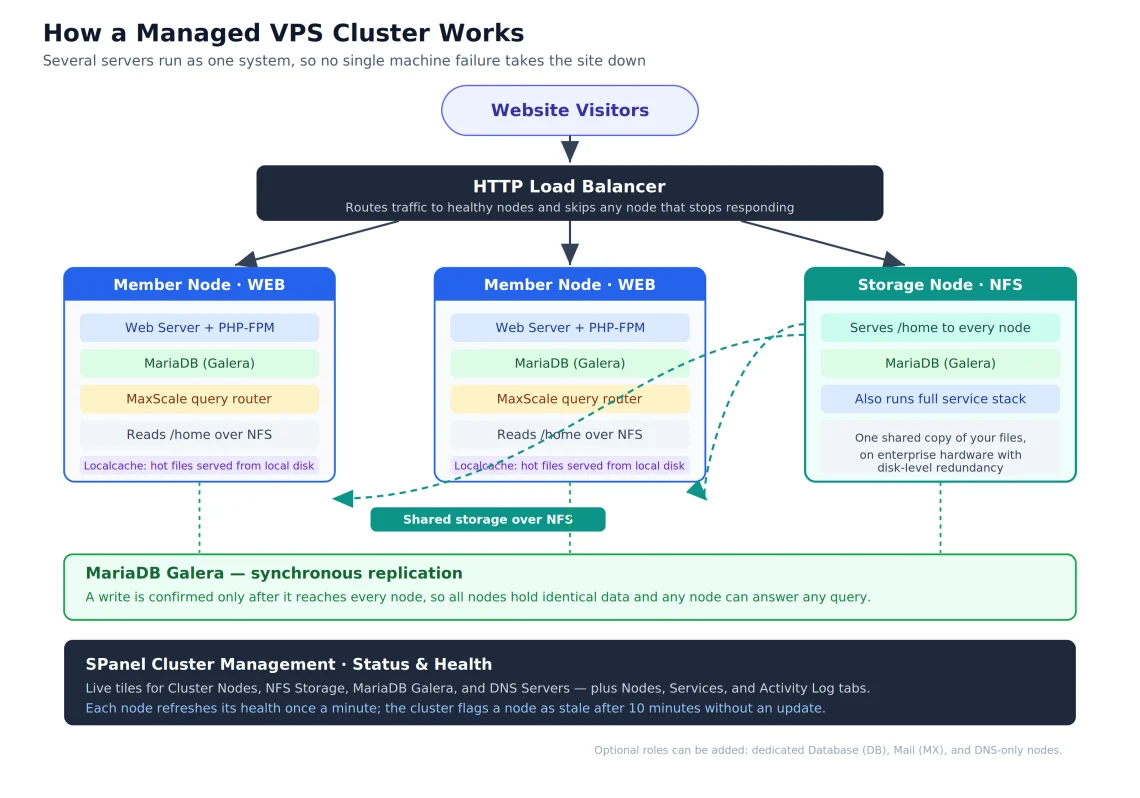
Picture a shared pantry with a line of cooks: no single cook calling in sick can close the restaurant. The pantry is the storage node, serving /home to every member over NFS so all servers read the same files. Each member node runs the full service stack.
How a managed VPS cluster fits together: shared NFS storage, synchronous Galera replication, MaxScale routing, and first-party health monitoring in SPanel.
Cluster roles decide who does what. Web nodes serve traffic behind the HTTP load balancer, a mail node handles email and is published in your MX records, and a database node takes queries through MaxScale.
Underneath, MariaDB runs Galera replication so a write on one node reaches the others. Because that replication is synchronous, a write is confirmed only after every node has it. That’s what lets any node safely answer any query. Web nodes also cache hot paths from shared storage on local disk, where sequential reads run up to 60× faster than over NFS.
Accounts, domains, and system users stay synchronized cluster-wide, so if a node fails, the site survives on the rest. Failover is quick: the database layer reroutes within seconds – usually before a visitor notices – and the load balancer stops sending new traffic to any node that goes quiet.
The Four Cluster Topologies SPanel Supports
Cluster Management sits inside the SPanel admin with two entries: Status & Health and DNS Cluster. Open Status & Health and the heading reads SPanel Cluster Infrastructure, under a Home > Cluster Management breadcrumb. That page documents four topologies in plain terms.
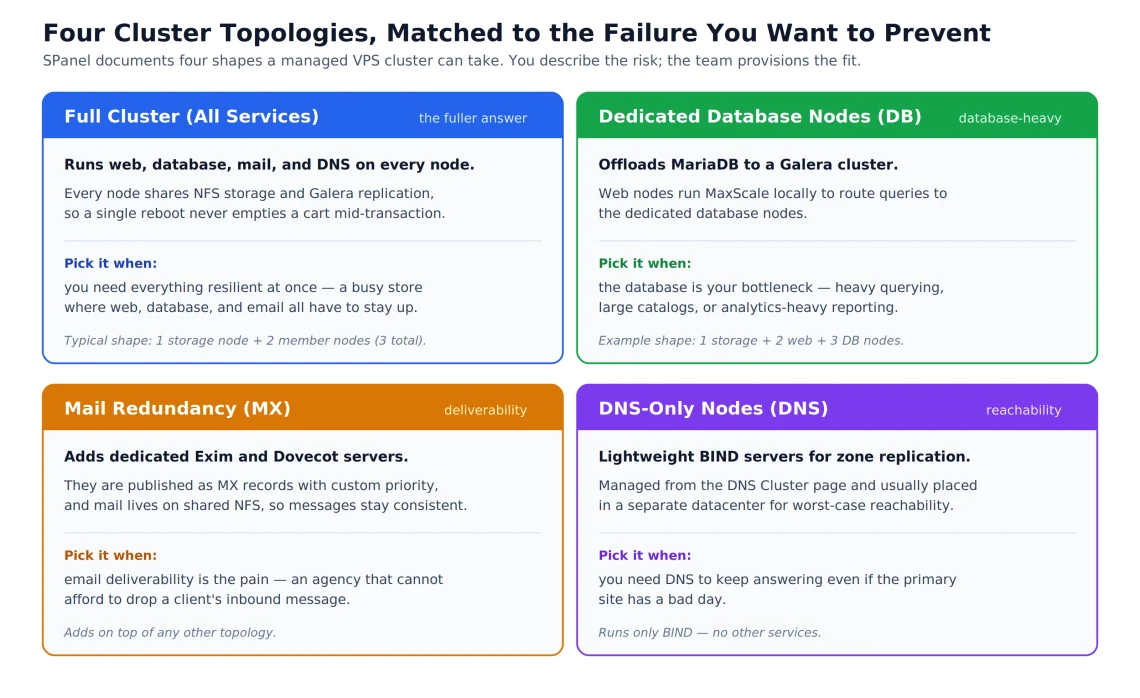
The rule of thumb – match the topology to the failure you’re trying to prevent.
Mail Redundancy (MX) adds dedicated Exim and Dovecot servers as MX records with custom priority, with mail on shared NFS.
DNS-Only Nodes (DNS) are lightweight BIND servers for zone replication, managed from the DNS Cluster page.
Dedicated Database Nodes (DB) offload MariaDB to a Galera cluster while web nodes run MaxScale locally to route queries.
Full Cluster (All Services) runs web, database, mail, and DNS on every node, sharing NFS storage and Galera replication.
The four topologies at a glance, each matched to the failure it’s designed to prevent.
How to Monitor Cluster Health in SPanel
Monitoring is first-party. Summary tiles cover Cluster Nodes – with an “N online · N stale” count – plus NFS Storage, MariaDB Galera Cluster, and DNS Servers. The Nodes tab reports load, disk, memory, replication, and status per member; the Services tab tracks each service from Web Server and PHP-FPM to MariaDB, MaxScale, mail, BIND, NFS, and Firewall; and the Activity Log carries a severity filter.
Under the hood, each node refreshes its health once a minute, and the cluster flags a node as stale after 10 minutes without an update – so a problem surfaces on the dashboard long before it becomes a mystery.
One caveat matters here. On the shipping product, this screen is for monitoring and health only. Adding nodes or changing topology goes through the ScalaHosting technical team, which provisions the cluster. That’s a managed-service model, not a self-service one.
What a Managed Cluster Looks Like in Practice
Shelley runs a busy WooCommerce store, and her risk is a checkout outage during a sale. A Full Cluster keeps web, database, and mail running across several nodes, so a single reboot no longer empties a cart mid-transaction. And when a sale arrives, capacity grows by adding a node rather than gambling on one server holding the line.
An agency hosting client sites has a different pain: email deliverability. Mail Redundancy adds dedicated Exim and Dovecot servers published as MX records with custom priority, and because mail lives on shared NFS, messages stay consistent no matter which node accepts them. If the primary mail server is unreachable, sending servers simply fall back to the next MX record.
Managed Cluster vs. DIY vs. a Single Server
The comparison is structural – what you get versus what you keep running yourself.
What You Get
Managed Cluster (Managed)
Do-It-Yourself (Unmanaged)
Single Server
Survives one server failing
Yes, across member nodes
Only if you build it
No
Shared storage across nodes
NFS, provisioned for you
You configure and maintain it
Not applicable
Database replication
MariaDB Galera, managed
You install and tune Galera
Single database
Query routing
MaxScale, configured for you
You deploy MaxScale yourself
None
Health monitoring
Built into SPanel
You assemble your own
Basic, per server
Who fixes a broken node
ScalaHosting technical team
You
You
An operations team can build all of this on unmanaged servers – but every layer is then theirs to maintain. That gap is exactly what managed hosting actually means in practice: the failover plumbing exists either way, but on a managed cluster it isn’t your pager that goes off.
What a Cluster Won’t Do
A cluster isn’t a universal solution for all web hosting problems. For example, it doesn’t replace backups – replication spreads a mistake as fast as good data, so keep independent backups and point-in-time recovery outside the cluster. It doesn’t fix application faults, since code that fails will fail on every node. And it won’t rescue a site from a breach on its own, which is why real-time security monitoring still matters. To help with the latter, SShield runs on every node and blocks 99.998% of web attacks before they land.
There’s also the managed-service boundary: topology changes route through the technical team, not a panel button. For most business owners, that’s a plus – an expert does the risky part. For a team that wants button-level provisioning control, it’s a real trade-off worth naming up front.
How to Choose the Right Cluster Setup
Start with the failure you’re actually trying to prevent, then work backward to the shape:
Name the risk. Is it a checkout outage, a dropped client email, a database that buckles under load, or a domain that has to stay resolvable no matter what?
Match a topology to it. Mail Redundancy for deliverability, Dedicated Database Nodes for a database bottleneck, DNS-Only Nodes for reachability, or a Full Cluster when everything has to stay resilient at once.
Talk to the technical team. Describe the shape you need; they design and provision the cluster around your traffic patterns and redundancy requirements.
Keep an independent backup schedule running. A cluster protects uptime; backups protect against mistakes. Run both.
Use Status & Health as your daily check. Scan for stale members and higher-severity Activity Log events before they turn into support tickets.
High availability stopped being an enterprise-only line item. On a managed cluster, the failover plumbing is built and monitored for you – your job is to match the topology to the risk you’re actually carrying and keep a backup running alongside it. Because every cluster is designed around your workload, the next step is a conversation, not a checkout.
Frequently Asked Questions About Managed Cluster Hosting
Q:What is a managed VPS cluster?
A: A managed VPS cluster is several servers running as one hosting system. They share /home over NFS, replicate the database with MariaDB Galera, and route queries through MaxScale, with member roles for web, mail, database, and DNS. The aim is high availability – the site stays up when one server fails – plus scaling by adding servers.
Q:Does a cluster replace backups?
A: No. Replication keeps your live data identical across nodes, which also means it copies mistakes instantly – a bad delete or an encrypted file spreads everywhere at once. A cluster answers “is the site still up?” while backups answer “can I restore last week?” Keep point-in-time backups outside the cluster.
Q:Can I add cluster nodes myself in SPanel?
A: Not on the shipping product. The Cluster Management page is for monitoring and health; adding nodes or changing topology goes through the ScalaHosting technical team. You describe the shape you need, they provision it, and the panel then shows live per-node status. It’s managed, not self-service – by design, because cluster operations are too consequential to expose to a misclick.
Q:What cluster topologies does SPanel support?
A: Four, named on the Status & Health page. Mail Redundancy (MX) adds dedicated Exim and Dovecot mail servers. DNS-Only Nodes run BIND for zone replication. Dedicated Database Nodes offload MariaDB to a Galera cluster with MaxScale routing. Full Cluster (All Services) runs every service – web, database, mail, and DNS – on each node.
Q:How do I check the health of my cluster?
A: Open Cluster Management, then Status & Health. Summary tiles show Cluster Nodes, NFS Storage, MariaDB Galera Cluster, and DNS Servers. Below them, the Nodes tab reports load, disk, memory, replication, and status per server; the Services tab tracks each running service; and the Activity Log records events with a severity filter. Node health refreshes every minute.
Q:How fast does a cluster recover from a node failure?
A: Usually within seconds. Galera detects a failed database node almost immediately and keeps accepting writes as long as a majority of nodes remain online; MaxScale stops routing queries to the downed node; and the load balancer redirects new web traffic to the survivors. When the node returns, it resyncs and rejoins automatically.
Q:Will my website load faster on a cluster?
A: Not automatically. A cluster provides capacity and reliability – handling more concurrent visitors and surviving failures – rather than raw single-request speed. A high-performance single VPS can serve an individual page just as fast. Read-heavy sites can gain from localcache, which serves hot files from local disk, but that’s a separate enhancement.
Q:What’s the smallest practical cluster?
A: Three nodes. Two is technically possible, but three is the minimum that keeps database quorum – and therefore keeps accepting writes if one node drops. Very small workloads don’t benefit; clusters start to earn their cost once redundancy or capacity genuinely justifies running more than one machine.
Q:Is high availability only for large companies?
A: Not anymore. It used to require a specialist or a platform that billed per component. On ScalaHosting managed plans, a cluster is provisioned by the technical team and monitored inside SPanel at no per-feature charge, so a small store or agency can run one without an enterprise budget.