
An SPanel package is a named hosting plan built from fourteen per-account limits: disk space, inodes, domains, email accounts, databases, hourly email rate, PHP workers, PHP priority, and the kernel-enforced ceilings on CPU, memory, disk throughput, disk IOPS, and processes – plus a feature set. You set each dial once, assign the package to an account, and SPanel holds the line. Every dial is included free on ScalaHosting managed VPS plans.
Imagine this story.
Ana runs a 60-account SPanel server out of France. She resells shared hosting to local shops, a dental clinic, and three small design agencies who each park a dozen client sites on her box. The first time she opened the package form in the Admin Interface, she counted fourteen fields and felt the usual question land: which of these actually matter, and what number am I supposed to type?
Most panel documentation explains how to save a package. Almost none explains what each limit does when an account pushes against it, or what a sane starting value looks like. This is that field guide – one dial at a time.
To put it simply, a package is a named bundle of fourteen account limits that SPanel applies in a single move and enforces below the panel – in the kernel, the filesystem, the mail server, and the PHP runtime.
Hold onto that last point. None of these limits is honor-system validation in a web form. Each one is enforced by the part of the system that owns the resource, so the ceiling holds whether the account is driven through the panel, the SPanel HTTP API, an SSH session, or your billing automation.
The storage pair: disk quota and inodes
Disk quota (MB) caps how much disk space the account may use. Inodes caps how many files and directories it may create. They go together because they catch two different failures. Quota stops the obvious one: a backup archive or an unpruned upload folder eating the drive. The inodes limit stops the subtle one: millions of tiny files (cache fragments, PHP session files, mail spam) exhausting the filesystem long before the gigabytes run out.
At the ceiling: both are real filesystem quotas, applied through the kernel’s quota machinery on ext4 and XFS. An account at quota gets “disk full” from the operating system itself when it tries to write, not a polite note from a web page. Existing data stays put; only new writes are refused. SPanel emails a warning to the account’s own contact address when usage crosses 95% of quota, so the wall rarely arrives as a surprise.
A sensible start (plan-design judgment): for a small single-site plan, 10 GB of quota paired with roughly 250,000 inodes keeps a normal WordPress or WooCommerce store comfortable. Raise both together as the plan grows; a quota with no inode ceiling is a quota with a back door.
The creation counts: domains, email accounts, databases
Maximum domains, maximum email accounts, and maximum databases define the shape of a plan rather than its horsepower. A Starter plan might be one site, ten mailboxes, two databases; a Pro plan, unlimited of each.
At the ceiling: these are checked at creation time by the SPanel system scripts. An account at its domain ceiling is told so, clearly, the moment it tries to add another, in the panel and at the system level alike.
One honest detail worth knowing: lowering an account’s database limit from ten to five does not delete five databases. Creation counts gate new growth; they never reach back and destroy data. The account simply can’t create the eleventh until it’s under the line again.
A sensible start: match the counts to the story you’re selling. If “one website” is the product, set domains to 1 and let mailboxes and databases breathe a little above what a single site needs.
The email send rate
Max hourly emails – the per-account outgoing-message cap – is the anti-spam and reputation dial, enforced by the Exim mail server’s own rate-limiting rather than by anything in the panel.
At the ceiling: a hijacked contact form or a compromised plugin hits the hourly cap and stops, instead of pumping thousands of messages from your shared IP and getting it blacklisted. The limit can target a single mailbox or a single domain when one sender is the problem, and a server-wide Email Sending Limit, under Server Settings → Email Settings, is available as a backstop. Every day, SPanel scans the previous day’s mail log and emails you a summary of any accounts that went over – the compromise canary you didn’t have to build. We go deeper on this in our piece on catching spam before it torches your server IP.
A sensible start: a few hundred messages an hour covers legitimate transactional mail for most small sites. If a client genuinely sends newsletters, route them to a dedicated sending service rather than lifting the cap to thousands.
The PHP pair: workers and priority
Maximum PHP-FPM workers sets how many PHP requests an account can process at once. PHP priority – high, medium, or low – decides whose PHP gets the CPU first when the server is contended.
At the ceiling: the worker ceiling is written into the account’s own PHP-FPM pool (and the OpenLiteSpeed equivalent on that stack), so it’s the PHP runtime itself that declines to spawn worker sixteen when the plan says fifteen. Priority is applied as real operating-system process priority, so a high-priority plan’s PHP genuinely runs ahead of a low-priority plan’s under load. There’s also a quick admin action – Change Limits on the account, reached from its row’s Actions menu – to clamp a single account’s workers on the spot, for the account that’s overloading a shared box this minute.
A sensible start: the default worker ceiling is 15 per account, which suits most plans; leave priority at medium and reserve high for premium tiers, so the ladder means something.
Pull quote: “The panel is where you set a limit. The kernel, the filesystem, the mail server, and the PHP runtime are where it actually holds.”
Want to follow along on a live panel? Every dial described here ships with SPanel on ScalaHosting’s managed VPS plans – no separate license, no per-account add-on. If you already run a managed VPS, the package form is sitting in your Admin Interface right now, ready to open alongside this guide.
The performance four: CPU, memory, disk throughput, and IOPS
These are the kernel-enforced ceilings, and they’re the reason per-account limiting used to mean buying a separate, paid operating-system layer. SPanel enforces them natively with Linux control groups – cgroups v2, the same mechanism the entire container world is built on. A small SPanel service called cpm sweeps once per second and places every limited account’s processes into that account’s control group. New process, about a second, contained.
CPU limit is a percentage where 100 equals one full core, 50 is half a core, and 200 is two cores. It is a share of a core, not a share of the whole server, and that one sentence prevents the most common misreading of this dial. At the ceiling: the account is throttled, not killed. Its processes simply receive no more than their share of CPU time; the site slows under its own excess load while every other account keeps full speed. Nothing crashes, nothing is lost.
Memory limit (MB) caps the account’s RAM. At the ceiling: the kernel reclaims memory inside that account’s group only, in the worst case ending the account’s own offending process, and the rest of the server never feels it. SPanel’s health monitoring even tells the two apart: a true server-wide out-of-memory event raises an admin alert, while a per-account containment event is recognized as a limit doing its job, not an emergency.
Disk throughput (MB/s) and IOPS put each account’s storage traffic in its own lane: throughput is the volume of data moving to and from the disk, IOPS is the count of separate operations. This is storage traffic, not network traffic; ScalaHosting’s managed VPS plans come with unmetered network traffic, and these dials have nothing to do with it. At the ceiling: over-limit reads and writes are queued, not failed. The heavy account’s nightly backup takes longer; everyone else’s latency stays flat.
There’s a server-wide burst mode sitting over all four. With it on, enforcement engages only when server load reaches the core count (genuine pressure), so accounts can use idle capacity on a quiet server and get strict fair shares on a busy one, within about a second of the pressure starting. It’s load-aware generosity with a fairness trigger, and it earns its own article on hosting limits that stand down when the server is idle.
A sensible start: for a standard small-business plan, 100 CPU (one full core), 1 GB of memory, and modest disk throughput and IOPS lanes give a site real headroom without letting any single account monopolize the box. Size memory with care, because too tight a ceiling reclaims the account’s own work mid-task. Pair this dial with honest sizing rather than treating smaller as better.
The process ceiling
Maximum Total Processes caps how many simultaneous processes the account may run. It’s fork-bomb insurance and general containment in one number.
At the ceiling: process N+1 simply cannot start. A fork bomb, malicious or a buggy script gone sideways, hits the cap and fizzles instead of exhausting the server’s process table and taking everyone down with it. This is the failure that’s catastrophic without a limit and a complete non-event with one.
A sensible start: a few hundred processes covers a busy site with room to spare; the goal is a ceiling high enough that legitimate traffic never touches it and low enough that a runaway can’t consume the whole server.
The feature set
The fourteenth dial isn’t a number. The feature set decides which SPanel User Interface tools accounts on this package can use. The default is everything.
At the ceiling: there isn’t one in the throttling sense. A feature that’s off the set simply isn’t shown to the account. What it buys you is product design. A curated subset turns a budget tier into a genuinely simpler product rather than merely a smaller one, and lets a premium tier look visibly richer. Selling “fewer, clearer tools” is a real plan differentiator, not a downgrade.
The fourteen dials at a glance
The values below are illustrative plan-design judgment for a small single-site plan, not product defaults – tune them to what you actually sell.
| Dial | What it limits | At the ceiling | A sensible start |
| Disk quota | Disk space (MB) | “Disk full” on new writes | 10 GB |
| Inodes | File/directory count | New files refused | ~250,000 |
| Max domains | Sites the account can add | Creation declined | 1 |
| Max email accounts | Mailboxes | Creation declined | 10 |
| Max databases | Databases | Creation declined | 2 |
| Hourly email | Outgoing messages/hour | Further sends held by Exim | a few hundred |
| PHP workers | Simultaneous PHP requests | Worker not spawned | 15 (default) |
| PHP priority | CPU order under load | Lower priority waits | medium |
| CPU | Share of a core (100 = one core) | Throttled, not killed | 100 |
| Memory | RAM (MB) | Reclaimed inside the account | 1 GB |
| Disk throughput | Storage MB/s | Queued, not failed | modest lane |
| IOPS | Disk operations/sec | Queued, not failed | modest lane |
| Processes | Simultaneous processes | The fork fails | a few hundred |
| Feature set | Which UI tools show | Tool hidden from account | everything |
Any dial can be left unlimited; a package only enforces what you set. And every dial exists in two forms: as part of a named package, and as a per-account custom value set through Use Custom Limits in the account’s Change Limits action – the clean home for one-off deals that shouldn’t pollute your plan catalog.
Demo flow: reading the package form, dial by dial
These steps walk the Admin Interface screens where the fourteen dials live and where you watch them take effect.
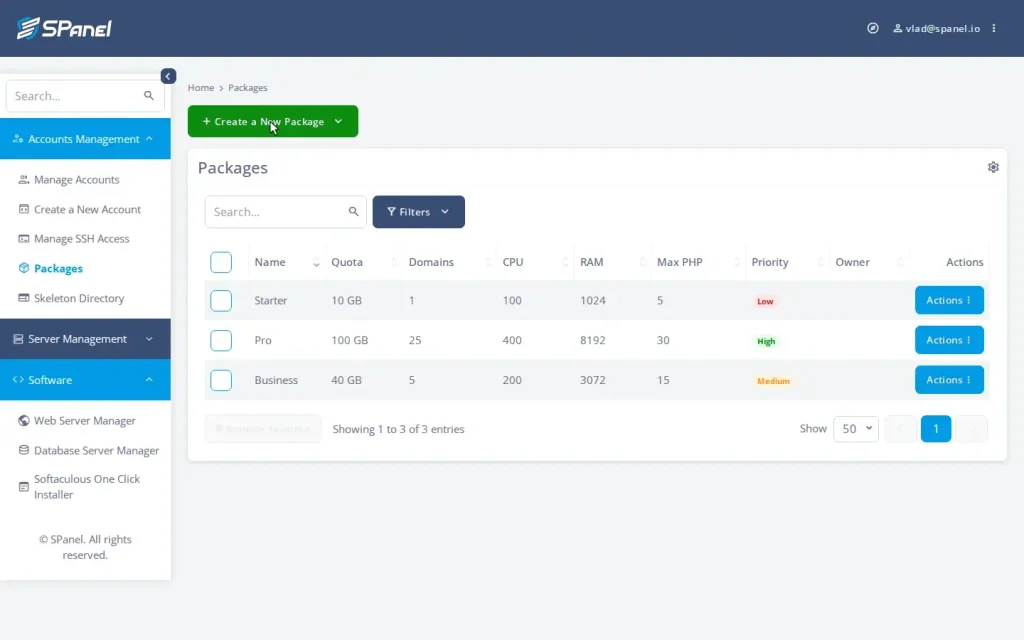
- From the Admin Interface, open Packages. The list shows every package you’ve defined, with its key limits at a glance – the columns run Name, Quota, Domains, CPU, RAM, Max PHP, Priority, and Owner.
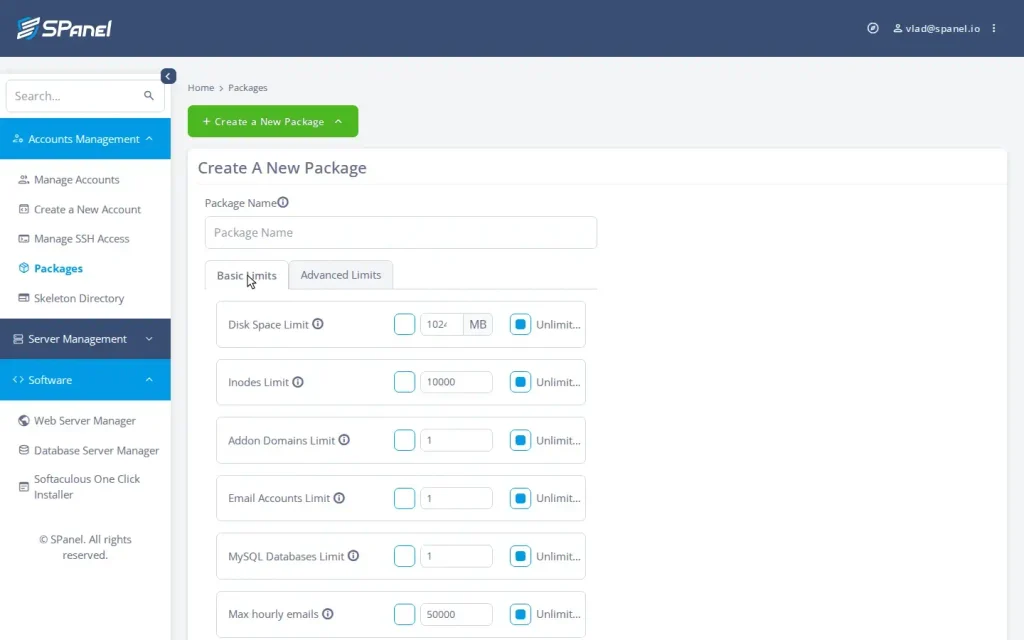
- Click Create a New Package (or edit an existing one). The Basic Limits tab holds the storage pair and the creation counts – Disk Space Limit, Inodes Limit, Addon Domains Limit, Email Accounts Limit, MySQL Databases Limit – plus Max hourly emails.
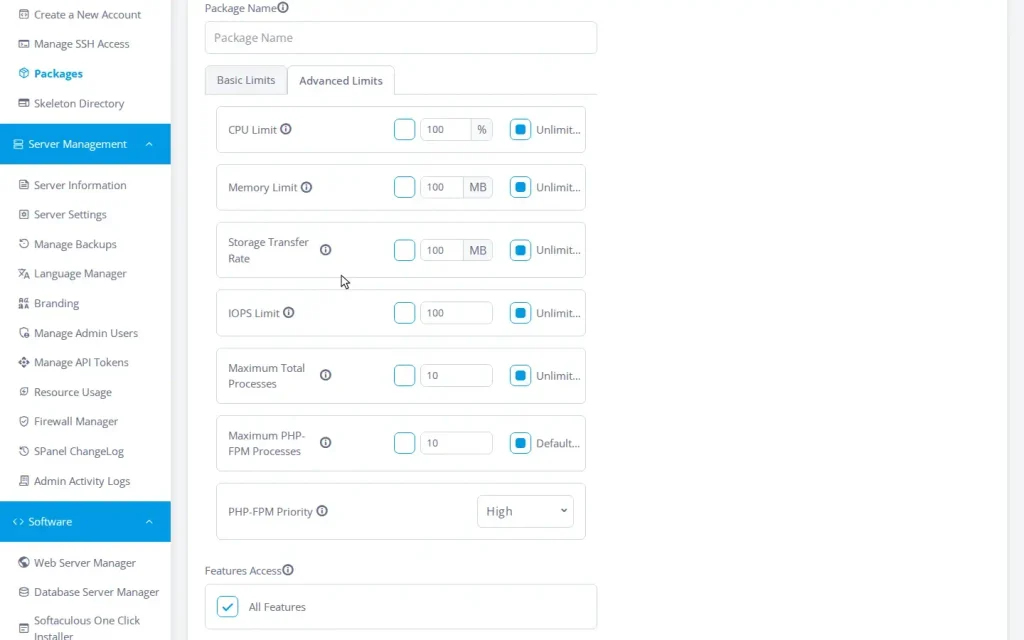
- Open the Advanced Limits tab. Here are the kernel-enforced dials – CPU Limit, Memory Limit, Storage Transfer Rate (disk throughput), IOPS Limit, and Maximum Total Processes – alongside Maximum PHP-FPM Processes (the PHP workers) and the PHP-FPM Priority select.
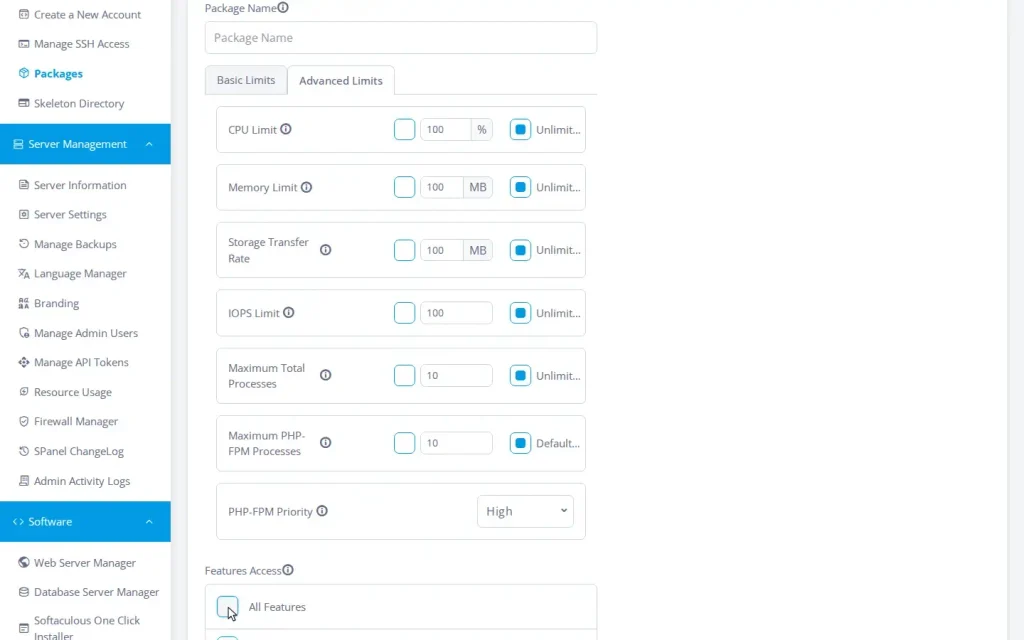
- Open Features Access – the feature-set selector – to choose which User Interface tools this package exposes to its accounts.
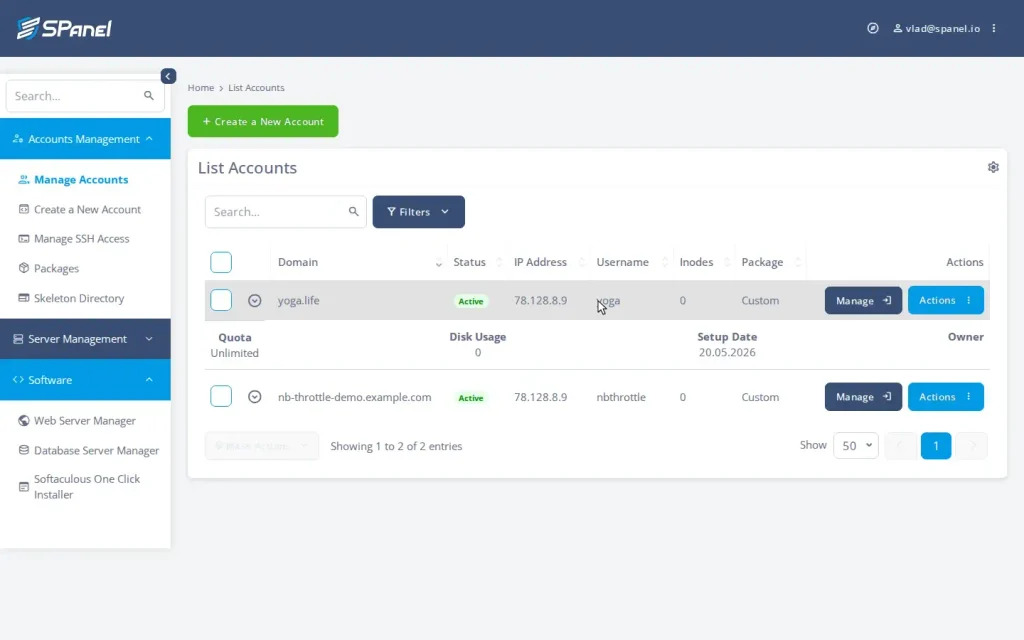
- Save, then open Manage Accounts (the List Accounts screen). Each account row shows its Inodes used and its assigned Package; expand a row to see Disk Usage against its Quota ceiling.
To watch a runaway account get caught instead of catching it by hand, the same dials drive the containment story in how one bad plugin used to take down twenty good sites, and the full hands-on setup lives in per-account limits without a CloudLinux license.
See it on a real server. Every dial in this guide ships on every ScalaHosting managed VPS at no extra cost – no per-account fees, no premium tier. Start a ScalaHosting trial to open the package form yourself, or vote for what we build next on the Cloud Democracy board at features.spanel.io.
FAQ
Q: What resource limits can I set per hosting account on SPanel?
A: Disk space and inodes; the number of domains, email accounts, and databases; outgoing emails per hour; PHP workers and priority; and kernel-enforced ceilings on CPU, memory, disk throughput, IOPS, and simultaneous processes. Any of them can be left unlimited.
Q: What does a CPU limit of 100 mean?
A: One full CPU core. 50 is half a core; 200 is two cores. The percentage is of a core, not of the whole server.
Q: Do I need CloudLinux to limit CPU and RAM per account?
A: No. SPanel enforces CPU, memory, disk throughput, IOPS, and process limits natively through the Linux kernel’s control groups (cgroups v2), with no separate OS layer or license. To be precise about scope: this is resource limiting, not a claim of CageFS-style per-account filesystem virtualization – account isolation comes from standard Linux users and permissions plus the SShield security stack.
Q: What happens when an account hits its memory limit?
A: The kernel reclaims memory inside that account’s group only, in the worst case ending the account’s own offending process. The rest of the server keeps running, and SPanel treats a server-wide memory emergency as a separate event with its own alert.
Q: Is the disk throughput limit my internet bandwidth?
A: No. The MB/s dial governs storage traffic – how fast the account reads and writes files on disk. It has nothing to do with network traffic, and ScalaHosting’s managed VPS plans come with unmetered network traffic.
Q: If I lower an account’s database limit, are databases deleted?
A: No. Creation counts gate new creation; they never delete existing data. The account just can’t create more until it’s back under the ceiling.
Q: How fast do the limits take effect?
A: The cpm enforcement service sweeps every second, so a new process is confined within about a second. Plan assignments and limit changes apply immediately and in place, with no migration.
Q: Can I sell plans that differ in features, not just size?
A: Yes. The feature set decides which User Interface tools a package exposes. The default is everything; a curated subset makes a budget tier a genuinely simpler product.
