

ON THIS PAGE
Burst mode is a load-aware enforcement mode for SPanel’s per-account resource limits. It compares a server’s load to its CPU core count around once a second and enforces those limits only when the server is actually busy.
While load stays below the core count, accounts run unconfined and can use idle capacity. The moment the load reaches the core count, fair-share enforcement engages within about a second. Burst mode works server-wide and is included free on every ScalaHosting managed VPS.
A 4 a.m. question
Here is a story for you.
Diego runs a 30-account VPS for small business clients. At 4 a.m., the server is nearly asleep: one cron job, a trickle of visitors, seven idle cores. A backup script on one account wants to compress a large archive, and under a strict CPU limit, it crawls at half a core while the other seven cores just sit idle.
Why throttle a job when no one needs protecting from it?
Burst mode is SPanel’s answer, and it captures how we think about limits: they protect everyone on the server, not punish paying customers.
What burst mode actually is
Burst mode makes per-account resource limits load-aware, so they stand down when the server has spare capacity and engage the moment it doesn’t.
SPanel enforces five per-account limits through Linux control groups (cgroups v2, the same kernel mechanism the container world is built on):
- CPU
- Memory
- Storage transfer rate
- Disk IOPS
- Total processes
A small SPanel service sweeps once per second and places each limited account’s processes into its control group. Burst mode decides when that machinery clamps down, server-wide.
With burst mode on, the service compares the server’s load against the CPU core count every second: below the count, accounts run unconfined and use the spare capacity; at or above it, every limited account is confined to its budget. Full speed on a quiet server, fair shares on a busy one.
The objection burst mode answers
Every admin who has set a CPU limit knows the feeling: you cap an account so a runaway plugin can’t take the box down, then watch it get throttled at 2 a.m. on a 90%-idle server, slowing a paying customer for no benefit. A limit only earns its keep during the busy windows when accounts contend for the CPU. Burst mode acts then and gets out of the way the rest of the time.
Limits should protect everyone, not punish anyone – a principle that runs through all of SPanel’s kernel-level resource controls, not just burst mode. SPanel’s package limits reference covers every dial and what happens when an account reaches it.
How the trigger works: load versus core count
First, the number that trips people up. A CPU limit in SPanel is a percentage of a single core, not of the whole server: 100% means one full core, 50% means half a core, 200% means two cores. Admins coming from other systems often misread “100” as the entire machine.
The trigger itself is not a per-account percentage.
It is system load compared against the core count. On an 8-core server, a load average below 8 means roughly one core’s worth of capacity is idle, and SPanel reads that as room to spare; at 8 or higher, every core is spoken for and accounts go back inside their budgets. It is a deliberately blunt signal, cheap to measure.
The one-second sweep, told honestly
Two details matter, and skipping either would oversell the feature.
- Enforcement is not instantaneous. The sweep runs every second, so a new process can run unconfined for up to about a second after it starts. For the sustained overload these limits exist to stop, a one-second horizon is the right trade; it is not built to catch microbursts, and we don’t claim it is.
- Burst mode has a conservative tail. When a busy period ends, processes that were already confined stay in their control groups until they exit; only newly started work runs free again. Web workers recycle often, so the tail is short, but it is real. This is the boring reliability work that makes a feature trustworthy.
Burst mode on or off: which posture fits your billing
Both postures are legitimate; which one a server should run is a deliberate decision, not a default to accept blindly.
| Question | Burst mode ON | Burst mode OFF |
| When are limits enforced? | Only while load is at or above the core count | Always, regardless of load |
| What can an account do on an idle server? | Burst into the free capacity | Stays inside its plan ceiling |
| Behavior under genuine load | Fair-share enforcement within ~1 second | Identical fair-share enforcement |
| Billing model it suits | “Fast whenever the server is quiet” | “What you pay for is exactly what you get” |
With burst mode off, confinement is unconditional: every account’s processes enter their control groups within a second of starting, whatever the load. Some billing models prefer that; when a Pro plan promises two cores and never more, “never more” is part of the product. Because burst mode is set at the server level, that posture applies to every account on the box at once.
Demo flow
These steps walk the Admin Interface surfaces where the per-account limits burst mode governs are configured.
- Log in to the SPanel Admin Interface with the administrator account.
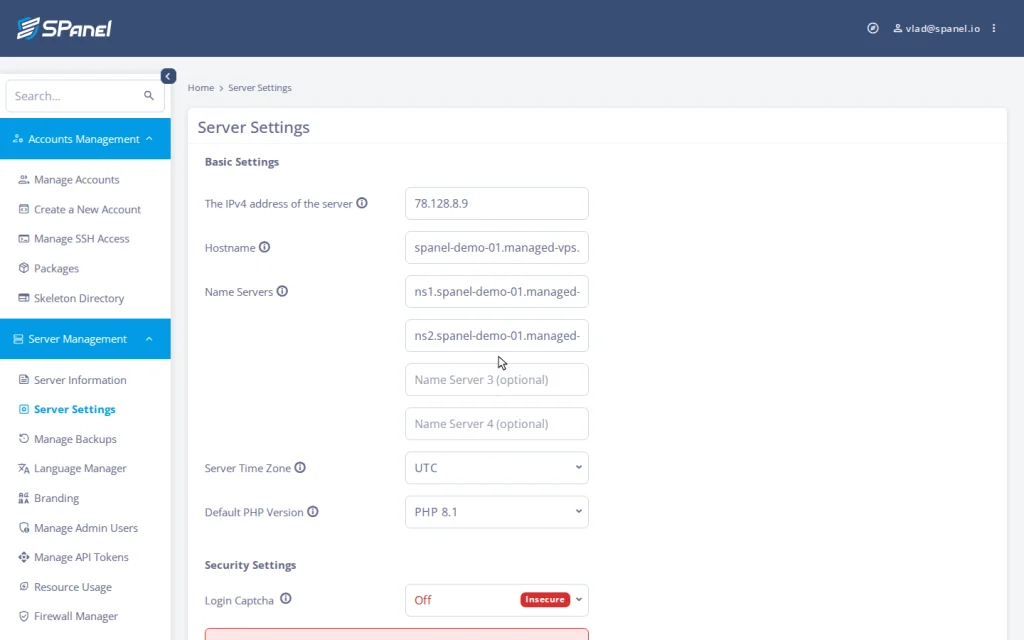
- Open Server Management → Server Settings. This is SPanel’s server-wide settings area – hostname, name servers, the email sending limit, and control-panel access all live here. Burst mode applies at this server level, not as a per-account dial.
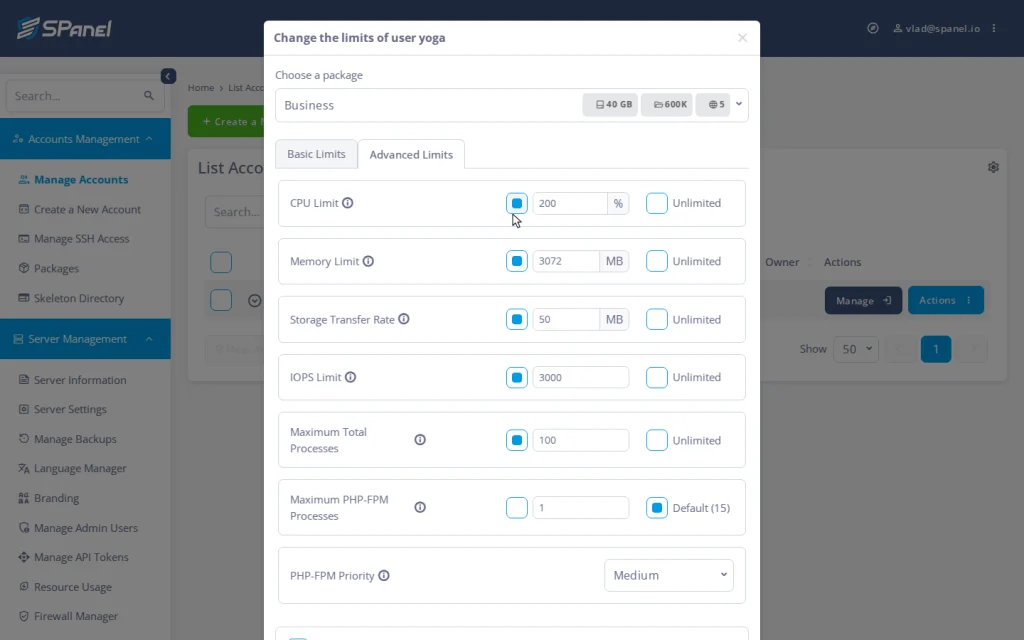
- Open Accounts Management → Packages → Create a New Package (or edit one) and switch to the Advanced Limits tab – the kernel-limit group: CPU Limit, Memory Limit, Storage Transfer Rate, IOPS Limit, and Maximum Total Processes.
The CPU Limit field defaults to 100%, one full core.

- Back in Manage Accounts, open an account’s Actions → Change Limits and switch to the Advanced Limits tab to see all five kernel limits for that account side by side – the same dials, applied per account.
Limits that protect, not punish
Burst mode is a small idea with a clear philosophy. Limits exist so one account’s bad day stays that account’s bad day; the runaway plugin or the heavy backup never becomes everyone’s problem. But protection is only needed when something threatens, so on a quiet server the honest move is to share the headroom.
That idea came from hosting providers on the Cloud Democracy board, who asked for per-account CPU, RAM, and IO control without a separate operating-system license. We built it natively on the kernel.
The mechanics live in the SPanel docs, built on the kernel’s own cgroups v2 control groups. Try it on a ScalaHosting managed VPS: a quiet server stays fast, a busy one stays fair.
FAQ
Q: What is burst mode in SPanel?
A: Load-aware enforcement of per-account limits. While the server’s load is below its CPU core count, accounts run unconfined and can use idle capacity. The moment load reaches the core count, SPanel confines every limited account to its budget within about a second.
Q: Does burst mode mean my accounts have no limits?
A: No. The limits are always defined. Burst mode only changes when they are enforced: they stand down while there is spare capacity and engage within a second once the server is busy.
Q: How fast does enforcement kick in?
A: The service sweeps once per second, so a new process is confined within about a second. We don’t claim instantaneous enforcement; one second is the deliberate granularity, right for the sustained overload these limits target.
Q: What does a CPU limit of 100 mean?
A: One full CPU core. 50 means half a core; 200 means two cores. The percentage is of a single core, not of the whole server.
Q: Should a server run burst mode on or off?
A: On if you want customers to get fast sites whenever the server is quiet. Off if your plans promise absolute ceilings. Both are fair; they just draw the line differently.
Q: Is burst mode some kind of AI?
A: No. It is deterministic kernel enforcement: control groups plus a once-per-second service that compares load to the core count. No model, no guesswork. SShield is where SPanel’s security intelligence lives.