White-labeling a hosting business means no client ever sees your infrastructure provider. On a ScalaHosting managed VPS, SPanel closes most of the gaps from one Branding screen: your logo and name on the login page, a neutral/hostpanelURL on each client’s own domain, branded webmail, and a branded API endpoint.
A mere two settings take care of that: a branded hostname and branded nameservers. Best of all, these white-label options are included for free, as part of the package.
A login page told the truth, and the reseller lost a client
Here is a scenario that often rings true for resellers.
Pavel runs a small hosting business in Bulgaria: thirty client sites, mostly local shops and a couple of design studios. He had done the obvious branding: his logo on the panel, his company name on the invoices. Then one client, resetting an email password, spotted an unfamiliar product name in the corner of a screen. A quick search later, that client was reading the upstream provider’s public pricing and asking Pavel an uncomfortable question – why are you charging me more than what this provider offers?
That story is not hypothetical.
A long-time reseller filed almost exactly this complaint on ScalaHosting’s public feature board. White-labeling fails the same way every time: not in one big reveal, but through a single surface that still spells out someone else’s name. This checklist walks through all seven leak possibilities and shows you how SPanel can help you patch them up.
What “white-label hosting” actually means
White-label hosting is reselling a provider’s infrastructure under your own brand, so the client believes, correctly from their side of the relationship, that they are your customer, not the provider’s.
The reseller owns the client relationship; the provider runs the metal.
For that to hold, every surface the client touches has to carry the reseller’s identity. Most resellers handle the easy part (a logo here, a company name there). The trouble is the rest: the login URL, the webmail round trip, the mail server settings, the DNS delegation. Those leak because they are technical enough that people forget they are client-facing.
White-labeling in the wider control-panel category is also, very often, a paid tier, with per-account licensing and reseller add-ons behind the surcharges.
On SPanel, branding is part of the panel and included free on every ScalaHosting managed VPS, which changes the math for a reseller pricing their own plans. And the panel under your brand is mature infrastructure, not a side project: ScalaHosting reports SPanel powers over 700,000 websites across more than 120 countries.
The 7 leak points at a glance
Here is the whole checklist in one view; the rest of the article takes each row in turn and shows the exact SPanel setting that closes it.
#
Where your name can leak
What a client sees by default
The setting that closes it
Done state
1
Login page (logo + name)
The panel vendor’s logo and name
Branding: company name + logo
Your brand on the first screen
2
Login URL / path
/spanel in the address bar
Branding → Login URL set to /hostpanel
Neutral path on the client’s domain
3
Webmail entry point
Default-path webmail links
Branding (rewrites webmail links)
Webmail stays on your branded path
4
API endpoint
The /spanel API path
Branding (the API follows the brand)
Integrations address your path
5
Server hostname
A vendor-flavored hostname
Hostname field (Server Settings → Basic Settings)
server1.yourbrand.com
6
Nameservers
Vendor nameservers in client DNS
Name Servers (Server Settings → Basic Settings)
ns1/ns2.yourbrand.com
7
Third-party tools’ own names
phpMyAdmin, the webmail app, installers
None; they keep their names
The honest remainder
Leaks 1–4: What the Branding screen closes
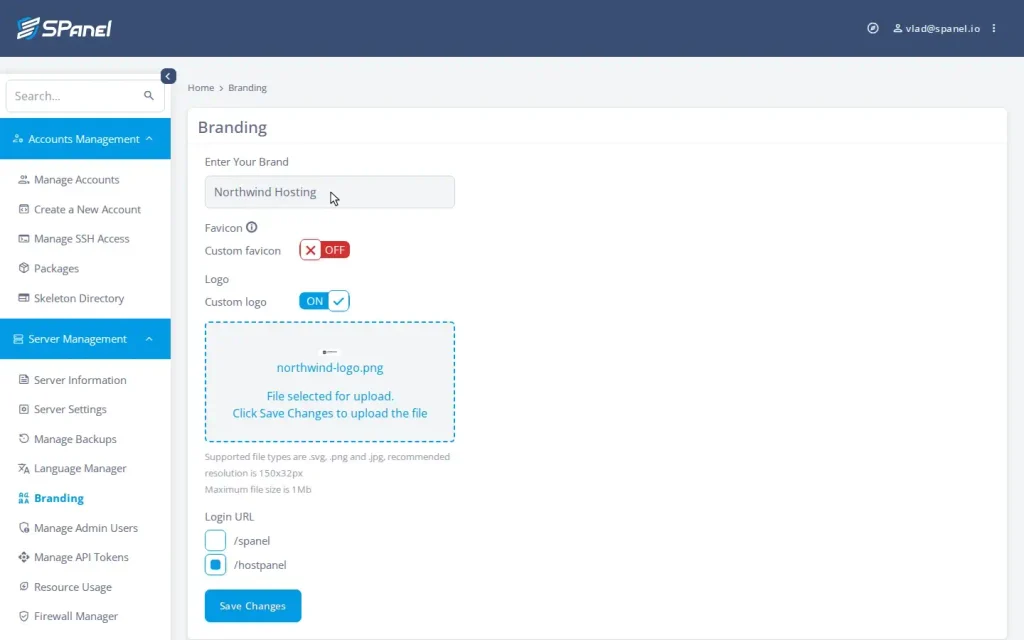
In the Admin Interface, the Branding screen (Server Management → Branding) is three inputs: your company name in the “Enter Your Brand” field, your logo under “Custom logo”, and a Login URL option that switches the panel from the default /spanel path to the neutral /hostpanel path. Set the three, click Save Changes, and four of the seven leak points close at once across every domain on the server.
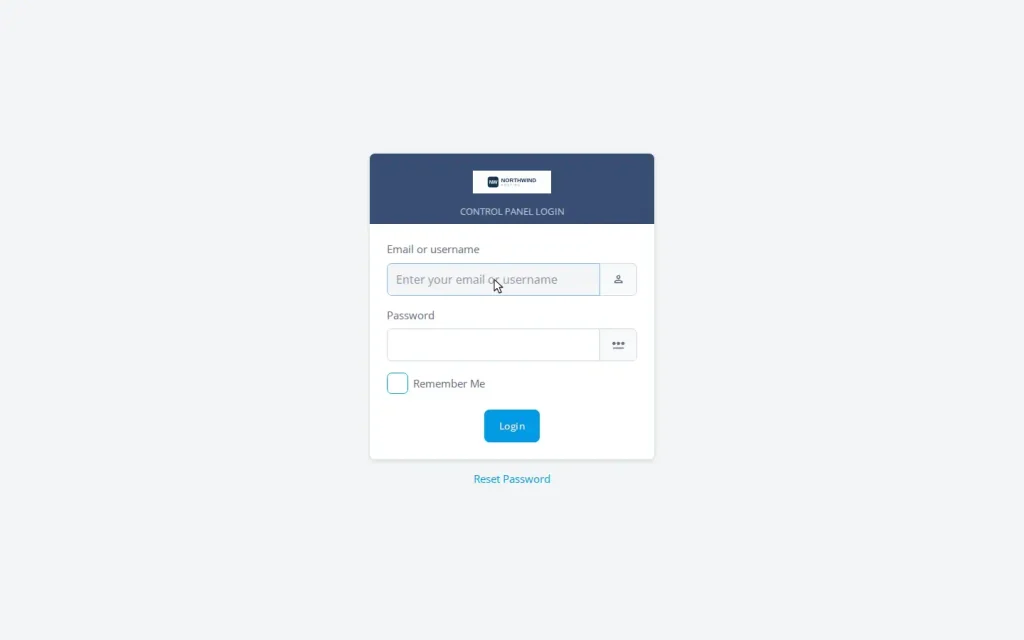
Leak 1: the login page. This is the first thing every client sees and the most common place a brand goes missing. Branding replaces the panel vendor’s logo and name with yours, starting on the login screen. For just this part, the five-minute branding walkthrough covers the name, the logo upload, and the before/after in detail.
Leak 2: the login URL. A path like /spanel is a giveaway: it names the software in the address bar, where a curious client will eventually read it. Setting the “Login URL” option to /hostpanel switches the panel to the neutral path, which reveals nothing about the underlying panel.
One detail to set expectations on: the branded path is the neutral /hostpanel, not a free-form string like /pavelpanel. The benefit is a clean, non-identifying URL on the client’s own domain, and that is what closes the leak.
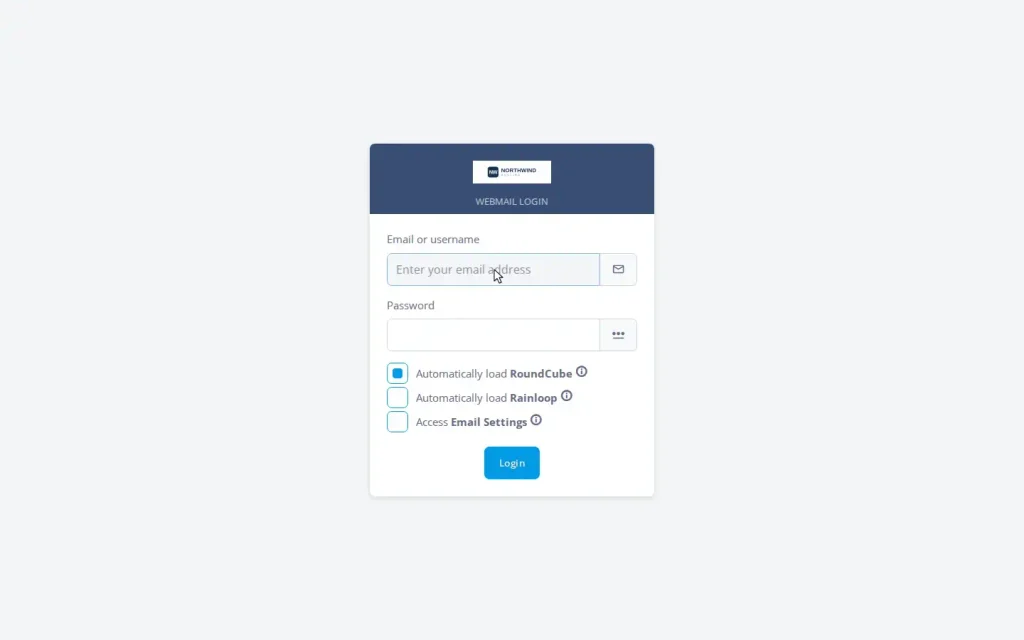
Leak 3: the webmail entry point. Webmail is a quiet leak because it is a round trip: the client clicks from the panel out to webmail and back. If those links point at the default path, the brand drops on the way through. SPanel rewrites the integrated webmail’s login and logout links to the branded path, so the round trip stays inside your brand.
Leak 4: the API endpoint. This one matters for resellers who automate. The SPanel API endpoint follows the branding URL setting, so when branding is on, integrations and scripts address the same neutral /hostpanel path the panel uses, not /spanel. Your automation presents the same surface as your panel, documented behavior in the official SPanel API docs.
What makes the branded path trustworthy is what it does behind the screen. It rewrites the web server and proxy configuration for every hosted domain, across whichever stack the server runs (Apache behind Nginx, or OpenLiteSpeed), and reloads the web services immediately. New domains inherit the branding automatically: add a client next week and their configuration is written branded from the start. And SPanel’s updater reasserts the branded URL, webmail links included, on every update, so the classic “the upgrade reset my customization” failure does not happen here.
See it before you commit. Every setting in this checklist – the Branding screen, the /hostpanel Login URL, and the hostname and nameserver fields under Server Settings – ships on every ScalaHosting managed VPS, with branding included at no extra cost. The surest way to judge which surfaces carry your brand is to walk the checklist on a real panel yourself.
Leak 5: Тhe server hostname
Branding rebrands the panel. It does not rename the server, and that is by design: the hostname is yours to set.
The hostname surfaces in places clients copy and paste. When someone configures Outlook or Thunderbird, or sets up an FTP client, those fields reference the hostname. If it reads like vps-4471.somevendor.net, you have handed the client the vendor’s name in plain text inside their own mail client.
The fix is a single setting.
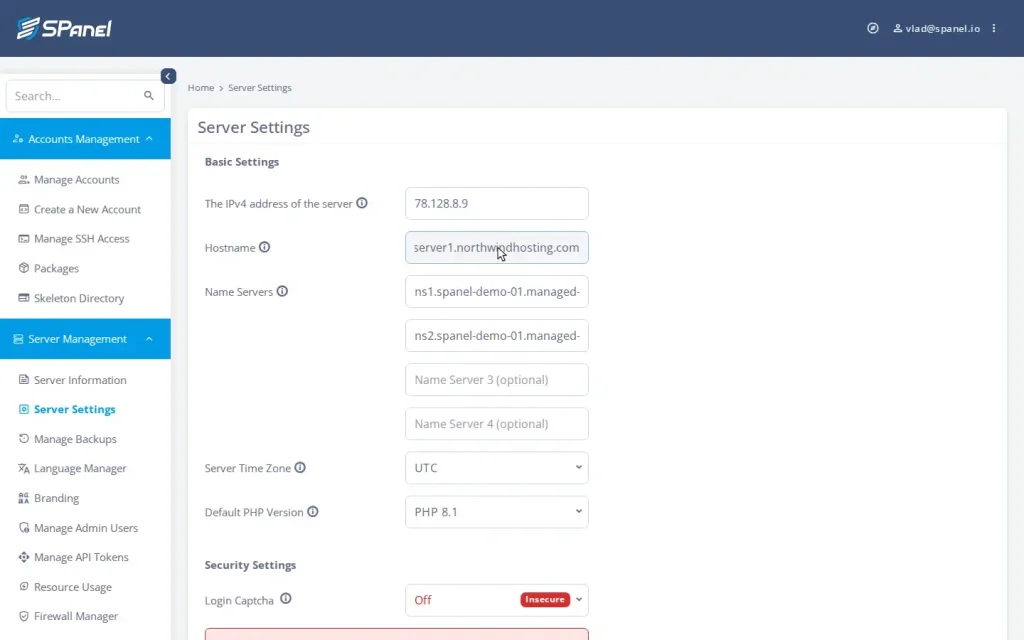
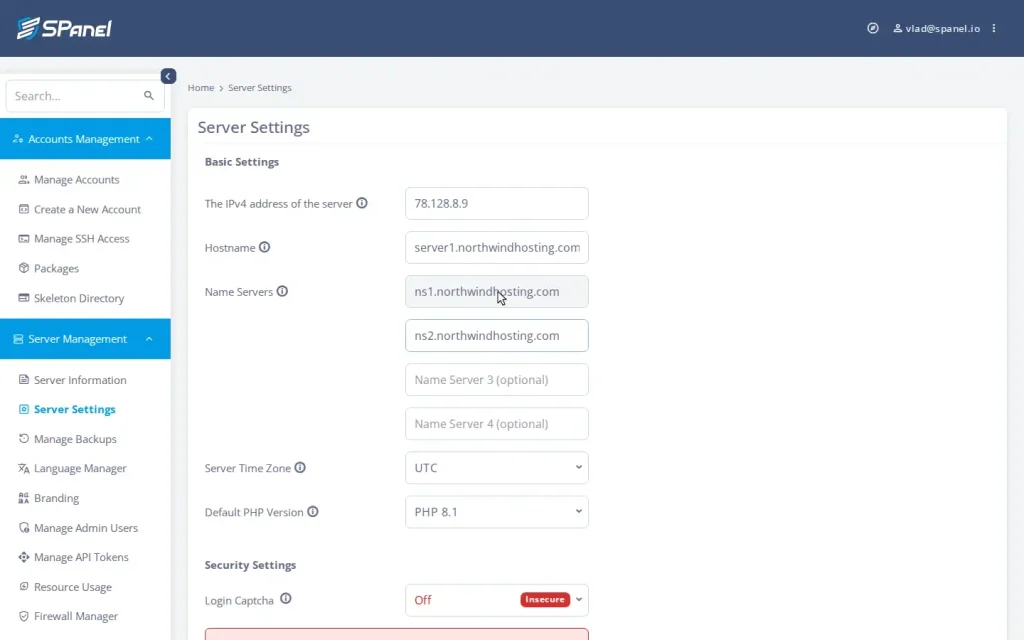
In SPanel, the hostname lives under Server Management → Server Settings → Basic Settings; set the Hostname field to a name on your own domain, where server1.yourbrand.com is the conventional pattern. Now the mail and FTP settings your clients copy carry your brand. This, plus the nameservers below, is the part of white-labeling that lives outside the Branding screen, and it is why this checklist exists: branding alone is necessary but not sufficient. The dedicated how-to for setting a branded hostname and branded nameservers has the precise steps.
Leak 6: Тhe nameservers
DNS delegation is the leak almost nobody checks, because nameservers feel like back-office plumbing.
They are not.
When a client looks up their own domain, or a developer runs a whois, the nameservers are right there, and default vendor nameservers name the vendor.
Run your own: ns1.yourbrand.com and ns2.yourbrand.com, pointed at the server. The Name Servers fields sit in the same Server Settings → Basic Settings screen as the hostname; set Name Server 1 and Name Server 2 to names on your domain so client domains delegate to you. For a client whose site delegates to ns1.yourbrand.com, the entire DNS trail reads as yours.
Put leaks 5 and 6 together, and you have the three-step professional setup that the honest version of white-labeling actually requires: enable branding, set a branded hostname, set branded nameservers. A reseller who completes all three presents no vendor surface to a client anywhere the client is likely to look.
Leak 7: The tools that keep their own names
Here is the one this checklist will not let you fake.
The panel chrome carries your brand, but some tools embedded in the hosting experience display their own product identities: the webmail client’s own interface, an application installer’s own screens, phpMyAdmin. They do in every hosting panel, white-labeled or not, because they are separate products with their own trademarks.
The accurate claim: the panel identity, the login experience, the URL, the webmail entry point, and the API endpoint carry your brand; the tools inside keep their own names. That is not a hole in SPanel; it is how hosting panels are built, and a reseller who understands the boundary sells more confidently than one who oversells invisibility and gets caught by a phpMyAdmin header.
One more honest note, because it comes up.
Switching to a neutral URL reduces casual fingerprinting of which panel runs the server – one less obvious signal for a scanner or a curious visitor. That is a real but minor benefit, not a security control, and you should never sell it as one: a determined party can still identify the software through other signals, and your security story is SShield and the hardening stack, not a hidden URL.
Demo flow: White-labeling your server in the Admin Interface
Deterministic steps to close the panel-controlled leaks (1–6); the numbers map to the checklist above.
Log in to the Admin Interface and open Branding from the Server Management menu.
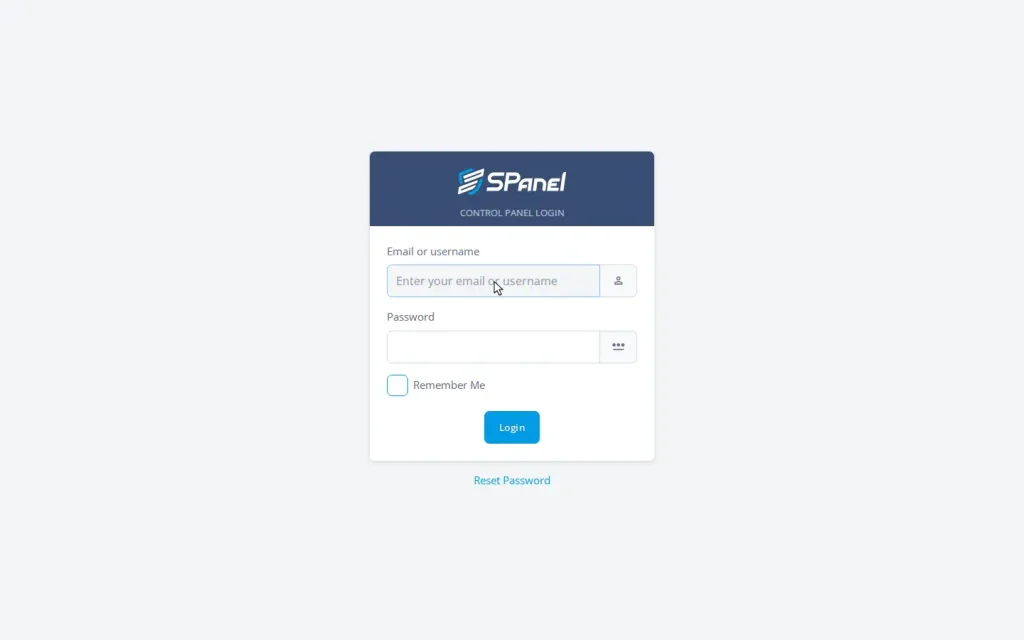
Record the starting state: visit the default login at the /spanel path so you can show clients the before.
In the Enter Your Brand field, type your company name (here, Northwind Hosting); upload the logo under Custom logo; set the Login URL option to /hostpanel; and click Save Changes.
Confirm the result on a hosted client domain at the /hostpanel/login path: the branded login page on the client’s own domain.
Open the webmail entry point and confirm the login and logout links carry the branded path.
Open Server Management → Server Settings → Basic Settings and set the Hostname field to a name on your own domain, such as server1.northwindhosting.com.
In the same Basic Settings screen, set Name Server 1 and Name Server 2 to names on your own domain (ns1 and ns2).
The branding state is inherited automatically by every new account and domain, so you run this once per server, not once per client.
How SPanel compares on the leak points
For category context, stated observationally: per the cPanel documentation itself, the login page cannot be rebranded, and the branding workflow spans multiple tools – logo and company name in one place, styles by copying themes, icons via a command over SSH.
Leak point
A multi-tool panel workflow
SPanel
Login page logo/name
Customization area
Branding screen
Login page itself
Often not rebrandable
Branded, on the client’s domain
Login URL
Vendor path
Neutral /hostpanel path
Webmail links
Manual / not covered
Rewritten automatically
New domains
Re-apply per domain
Inherited automatically
White-label cost
Frequently a paid tier
Included free
The point is not that one panel is good and another is bad; cPanel has a long record and a deep feature set. The difference is structural: SPanel closes the panel-controlled leaks from one screen that propagates server-wide and survives updates, where the older model spreads the same job across several tools and a login page it cannot rebrand.
Close every leak, then build on it
White-labeling done properly is a checklist, not a switch, but a short one, and SPanel does most of it for you. Enable branding, set a branded hostname, set branded nameservers, and be honest about the tools that keep their own names. Do that and a client has nowhere obvious to find the company behind your company. As a reseller you set your own prices and keep the margin, and that margin only holds while the client cannot price-shop the provider behind you.
Branding is one half of running a hosting business; the packages that define your hosting tiers are the other. If you are weighing the whole move, here is how to stand up a self-branded hosting business in a weekend with a managed VPS, branding, and your first client account.
Try SPanel free on a ScalaHosting managed VPS, where every feature in this checklist is included. And if there is a branding capability you wish existed, the Cloud Democracy board is where users propose and vote on what SPanel builds next. Reseller and white-label features have been proposed and shipped from there before.
FAQ
Q:What does white-labeling a hosting panel actually change?
A: Three things you set from the Admin Interface: the company name the panel shows, the logo it shows (including on the login page), and the panel URL, which switches from the default /spanel path to the neutral /hostpanel path on every domain. Webmail entry links and the API endpoint follow the branded URL.
Q:Will my clients ever see the SPanel name after I enable branding?
A: The panel identity, login page, login URL, and webmail entry carry your brand. Third-party tools embedded in hosting (the webmail client’s own interface, app installers, phpMyAdmin) show their own product names, as in every panel. For a fully vendor-free experience, also set a branded hostname and branded nameservers.
Q:Can I use a totally custom login path like/mypanel?
A: The supported branded state is the neutral /hostpanel path, which reveals nothing about the panel software and is inherited automatically by new domains. The “Login URL” option offers /spanel or /hostpanel, not a free-form string, so describe the outcome to clients as a neutral URL on their own domain.
Q:Do I have to re-apply branding every time I add a client?
A: No. New accounts, addon domains, and subdomains generate their web server configuration with branding already applied. Enable it once; the server keeps it consistent.
Q:Does updating SPanel wipe my branding?
A: No. The update process reasserts the branded URL in the configuration it touches, including the webmail login and logout links.
Q:Can I run two different brands on one server?
A: No. Branding is server-wide: one name, one logo, one path per server. Two distinct brands should run on separate servers, which is cleaner operationally anyway.
Q:Does white-labeling cost extra on SPanel?
A: No. Branding is included free on every ScalaHosting managed VPS, like every other SPanel feature. There is no white-label surcharge and no per-account fee.
Q:Is hiding the panel’s name a security feature?
A: Treat it as reduced fingerprinting, not security. The neutral path removes the most obvious signal of which panel runs the server. Real security comes from SShield and the hardening stack, not URL obscurity.
Working in the web hosting industry for over 13 years, Rado has inevitably got some insight into the industry. A digital marketer by education, Rado is always putting himself in the client's shoes, trying to see what's best for THEM first. A man of the fine detail, you can often find him spending 10+ minutes wondering over a missing comma or slightly skewed design.