SPanel, ScalaHosting’s free control panel, white-labels from a single Branding screen. You can set your company name, upload your logo, switch the panel’s Login URL to the neutral /hostpanel path, and your clients log in at their own domain under your brand. What’s more, these options are included for free on every managed cloud VPS with Scala.
In comparison, cPanel’s own ecosystem documentation states that its login page cannot be rebranded and that its white-labeling spans several separate tools.
A login page that quietly advertised the wrong company
Here is a scenario for you:
Tomás runs a 25-client web studio in Porto. He sells web hosting as part of his monthly retainer, and for years his clients logged in to a panel that showed someone else’s name in the corner. Twice last year, a client Googled that name, found the upstream host’s retail pricing, and asked Tomás why they were paying him more. Nothing about his service had changed – only what the login page advertised.
That login page is the sharpest line between cPanel and SPanel white-labeling. cPanel’s makers admit it can’t be rebranded; SPanel rebrands it with a single switch on the client’s own domain.
This article walks both workflows side by side and is honest about what white-labeling never covers – on any panel.
What white-labeling a hosting panel actually means
White-labeling a hosting panel means presenting it under your own company name, logo, and login URL, so users see your brand rather than the panel vendor’s.
For a reseller, this isn’t just some fancy decoration. Your clients pay you, not your infrastructure provider, and the panel is one of the few surfaces they touch every week. When it carries a third-party name, it plants a small questionyou’d rather never raise – who actually runs my hosting? For many hosting providers, white-labeling has traditionally been offered in a reseller tier or as a per-account add-on.
The login page: where the two workflows split
cPanel has earned its place. It has an intuitive interface, a deep feature set, and it sets the standard that the rest of the industry measures against. None of what follows is a knock on the product – it’s how branding works inside it, documented by cPanel and the hosts that build on it.
In cPanel and WHM, branding is assembled from a few places. Company name and logo go into the WHM Customization area, visual styling is handled by copying and editing a theme, and panel icons are generated through a command you run over SSH.
Each is doable; together they’re a small project you revisit as you grow. The piece that stops it short is the login page. Cpanel’s own customization documentation, echoed by host knowledge bases, states the login screen cannot be rebranded. Resellers on the WHMCS forums have also flagged that the panel login link can send a client to the upstream provider’s domain.
SPanel takes a different approach.
From the Admin Interface’s Branding screen, you set your company name, upload your logo, and switch the panel’s Login URL from the default /spanel to the neutral /hostpanel. That one change rewrites the panel path across every domain, updates the proxy configuration, rewrites the integrated webmail’s entry links, and reloads the web services.
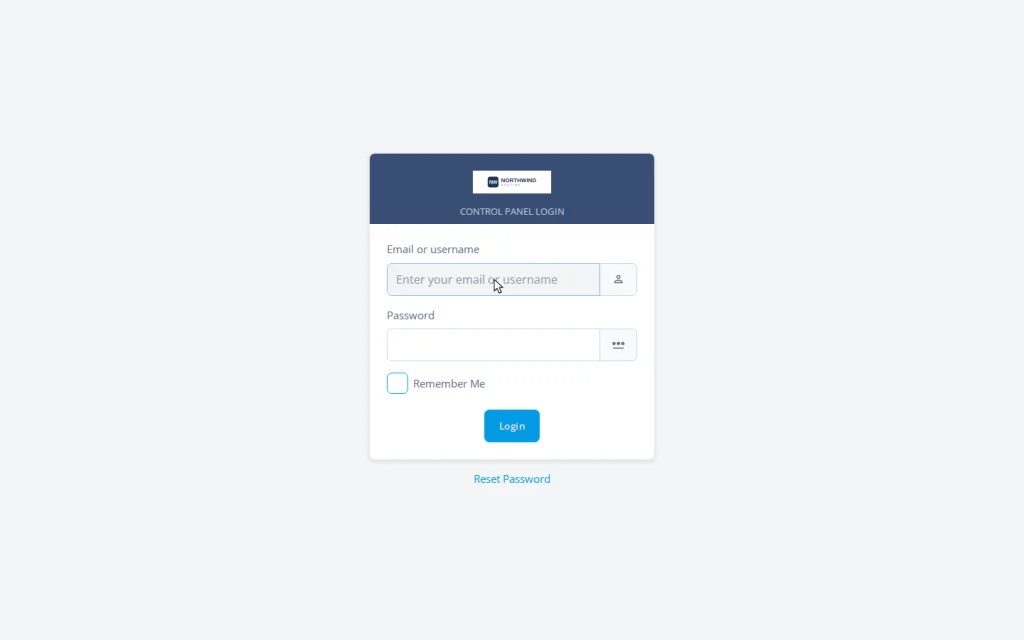
The login page is part of what gets rebranded, not the exception. Because the panel answers through every hosted domain, your client logs in at client-site.com/hostpanel/login – their domain, your brand.
To recap: “Branding either survives every new domain and every panel update, or it isn’t branding – it’s a setting you’ll have to remember.”
Side by side: the two white-label workflows
| What you’re branding | cPanel / WHM | SPanel |
| Company name & logo | Set in the WHM Customization area | Set on the Admin Interface Branding screen |
| Login page | Documented as not rebrandable by cPanel’s makers | Rebranded by the same Login URL switch |
| Where clients log in | Commonly a shared server or provider address | The client’s own domain at /hostpanel/login |
| Steps to apply it | Customization for the logo, a theme copy for styles, an SSH command for icons | One switch on the Branding screen |
| New domains as you grow | Re-check styling as accounts are added | Inherit the branding automatically |
| After a panel update | Customizations can need re-applying | Reasserted by the updater, webmail included |
| API endpoint | Tied to the panel’s own naming | Follows the branded path (documented) |
| Typical cost model | Often part of a reseller tier or paid add-on | Included free on every ScalaHosting managed VPS |
cPanel can carry your brand across much of the interface, and many resellers run good businesses doing exactly that. The differences are the login page, the client-facing URL, and how many moving parts you maintain – SPanel collapses those to one switch. For the hands-on version, see the five-minute SPanel branding walkthrough.
Weighing a reseller setup? On a ScalaHosting managed VPS, SPanel branding lives on one screen and reaches every hosted domain – login page included, at no extra cost.


What your client actually sees
Branding only matters at the moment a client looks. On a fragmented setup, the client clicks the hosting link in your welcome email and lands on a login page that – however polished the rest of the panel is – still names the panel software on a URL that isn’t their domain.
On a branded SPanel server, the same client opens yourdomain.com/hostpanel/login, sees your logo and company name, and works inside a panel that reads as yours throughout. Every domain you host serves that branded login by default – you don’t assemble it per client. That’s the case for client logins on their own domain.
The parts white-labeling never covers – on any panel
A comparison that only lists wins isn’t trustworthy, so here’s the honest scope.
Two things sit outside the branding toggle on every panel, SPanel included. The server hostname is the name in mail and FTP client settings, and the toggle doesn’t rename it – set a hostname on your own domain (server1.yourbrand.com). The nameservers clients delegate DNS to should run as ns1/ns2 on your domain. SPanel supports both, making the full job three steps: enable branding, set a branded hostname, run branded nameservers – all in the complete white-label checklist.
Two more truths.
Branding is server-wide. One server carries a single brand, so if you want to manage a second one – this means two servers. And third-party tools embedded in the hosting experience – the webmail client, application installers, phpMyAdmin – keep their own product names, as they do in every panel.
One thing branding is not: a security feature. The neutral /hostpanel path reduces casual fingerprinting of which panel runs your server, which some owners value. It is not a security boundary – a determined party can still identify the software through other signals, and SPanel’s real security story is SShield, not URL obscurity.
Demo flow
- Log in to the Admin Interface with your administrative username and password.
- In a separate browser tab, open a hosted domain’s default panel login at client-site.com/spanel to record the unbranded starting point.
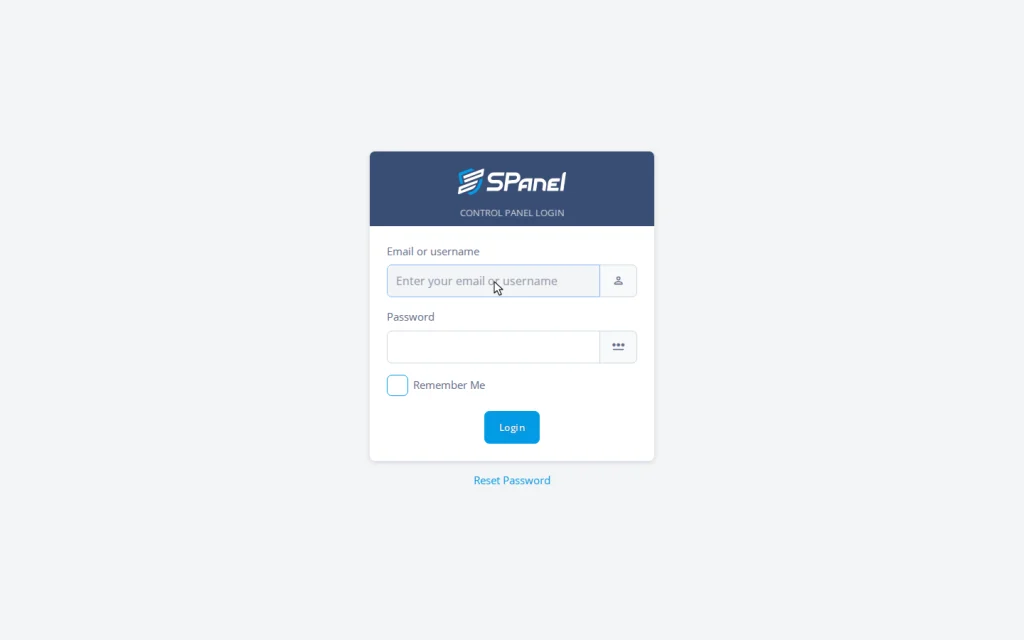
- Back in the Admin Interface, open Server Management → Branding. Type your company name in the Enter Your Brand field, upload your logo under Custom logo, and find the Login URL options (/spanel or /hostpanel).
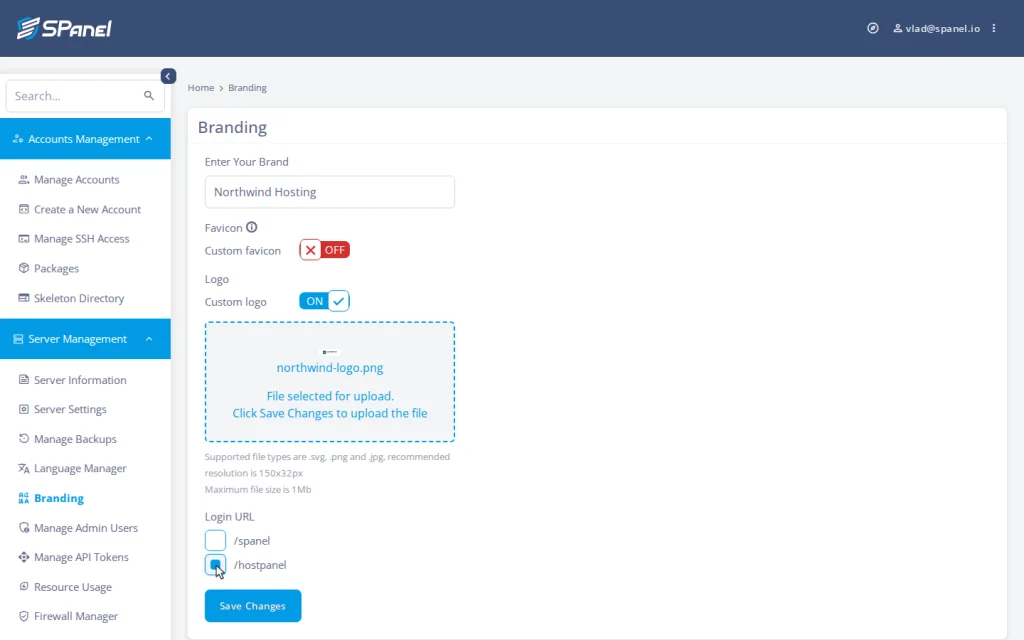
- Set the Login URL to /hostpanel and click Save Changes. SPanel rewrites the panel path to /hostpanel server-wide, updates the webmail entry links, and reloads the web services.
- Reload the client domain’s login, now at client-site.com/hostpanel/login, to see the branded page with your logo and company name.
FAQ
Q: Can you really not rebrand the cPanel login page?
A: Per cPanel’s own documentation and the host knowledge bases built on it, the login screen stays unbranded; you can white-label much of the interface but not that page. SPanel rebrands the login page with the same Login URL switch that applies to the rest of the panel.
Q: What does SPanel branding actually change?
A: Three things from the Admin Interface: the company name the panel displays, the logo it shows, and the panel URL, which moves from /spanel to the neutral /hostpanel path across every domain. Webmail entry links and the API endpoint follow the branded URL.
Q: Where do my clients log in after I switch?
A: At their own domain plus the branded path – for example client-site.com/hostpanel/login. Every hosted domain serves the branded login, so no shared server address appears in your instructions.
Q: Do I have to re-brand every time I add a client or domain?
A: No. New accounts, addon domains, and subdomains generate their configuration with branding already applied. Enable it once, and the server keeps it consistent.
Q: Will an SPanel update wipe my branding like other software updates do?
A: No. The updater reasserts the branded URL in the configuration it touches, including the webmail login and logout links.
Q: Does white-labeling cost extra on SPanel?
A: No. It’s included free with every ScalaHosting managed VPS – no white-label surcharge and no per-account fee.
Try it on a real server
White-labeling shouldn’t be a project you constantly maintain. On a ScalaHosting managed VPS, SPanel branding is one toggle, included free, applied across every domain and kept through every update. Spin up a managed VPS, flip the switch, and log in at your own domain to see the before/after.
If there’s a branding behavior you wish worked differently, the Cloud Democracy board at features.spanel.io is where resellers ask for it. For the source details, see the cPanel documentation on login-page branding and the SPanel API documentation on the branded endpoint.