
When you enable branding on an SPanel server, every site you host serves its own login page. A client whose website is client-site.com signs in at client-site.com/hostpanel/login – their domain, your logo, your company name, no shared server address to memorize.
SPanel is ScalaHosting’s control panel, included free on every managed VPS. This client-facing login experience is the default once branding is on, not something you assemble per account.
A login URL the client actually recognizes
Picture a 12-client design agency in Manchester. They build sites, host them, and handle the email. Every month, a client emails support asking, “What’s that login address again? And what is SPanel?” The agency has spent years being the client’s single point of contact, and a stray server hostname in the address bar quietly undoes that.
That awkward question has a precise cause: the login URL. On many setups, clients sign in at a shared panel hostname that belongs to the infrastructure provider, on a path that names the panel software. The brand the client sees at the door is not the agency’s. This article is about closing that one gap and why the login URL is the most underrated white-label detail there is.
What “log in at your own domain” actually means
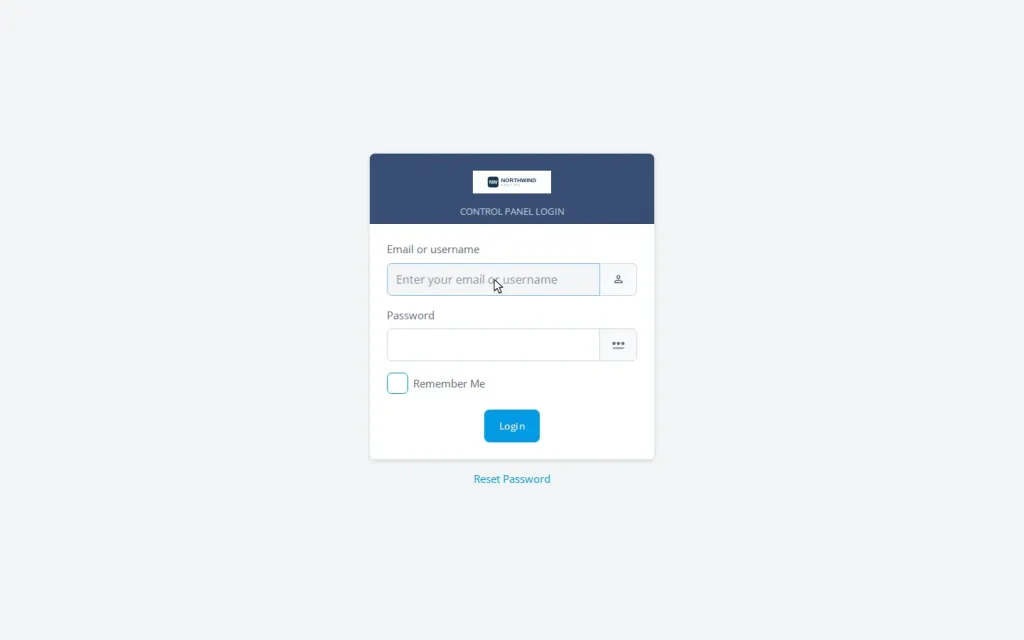
With branding enabled, every domain on the server receives its own login page at the client’s domain plus the neutral /hostpanel path, so each client signs in somewhere they already recognize.
There’s no per-client setup behind this. Because SPanel is reachable through every hosted domain, the moment you create an account for client-site.com, that domain answers at client-site.com/hostpanel/login with your company name and logo. No shared panel.youragency.net, no IP address, no instructions that read like a server manual.
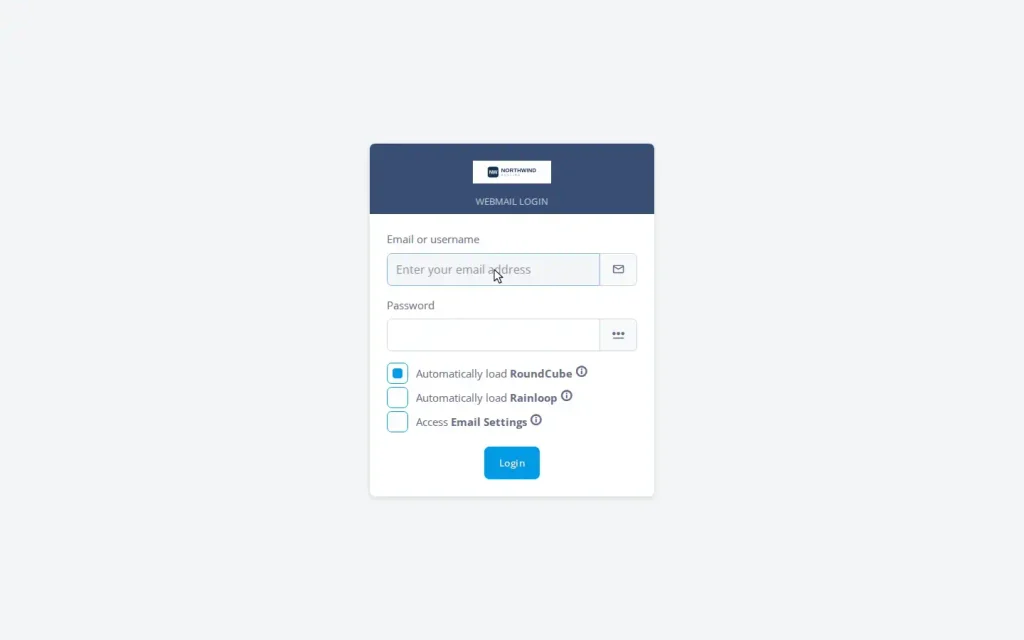
The webmail entry point follows the same branded URL, so a client moving between the panel and their inbox never lands on a vendor address. So does the API endpoint, which matters if you automate account creation: your scripts and the panel speak to the same neutral path. That behavior is documented in the official SPanel API documentation.
Why the login URL is the sharpest differentiator
Here’s the part most reseller guides skip.
On the most widely used legacy panel, the login page itself cannot be rebranded. Resellers can change logos inside the panel and on the webmail screen, but the main sign-in page stays the vendor’s, a limitation documented by cPanel-ecosystem hosts themselves, including InMotion Hosting’s support material.
Even worse, the “log in to your panel” button in many billing setups sends clients to the upstream provider’s domain. One curious client, one search, and they can easily find who really runs their hosting and what it costs.
SPanel handles the login page the other way around: the client’s own domain is the front door, branded, by default. That single difference is what turns “I resell someone’s hosting” into “I run a hosting company.”
| What the client sees | Typical legacy-panel reseller setup | SPanel with branding enabled |
| Login URL | shared provider hostname or panel address | the client’s own domain + /hostpanel/login |
| Login page brand | the panel vendor’s name and logo | your company name and your logo |
| Login path | often names the panel software | neutral /hostpanel, reveals nothing |
| New domains | branding re-applied each time | inherited automatically |
| Webmail entry | may bounce to a vendor URL | follows the branded URL |
If you run client hosting and want the login page to carry your brand instead of a vendor’s, SPanel’s branding is included on every ScalaHosting managed VPS, with no separate white-label tier to buy.
It’s the default, not an assembly project
The win is that it costs nothing to maintain. Set it once from the Admin Interface’s Branding screen: enter your brand name, upload your logo, and set the Login URL to the neutral /hostpanel path. SPanel writes the branded login into the web configuration for every domain already on the server, and every domain you add afterward inherits it. New accounts, addon domains, subdomains, and main-domain changes all generate their configuration with your brand already in place.
That config also survives the upgrade cycle. SPanel’s updater reasserts the branded URL in the configuration it regenerates, webmail login and logout links included, so an update never resets you to the default /spanel path.
Demo flow
The Admin Interface steps that produce the screenshots, in order.
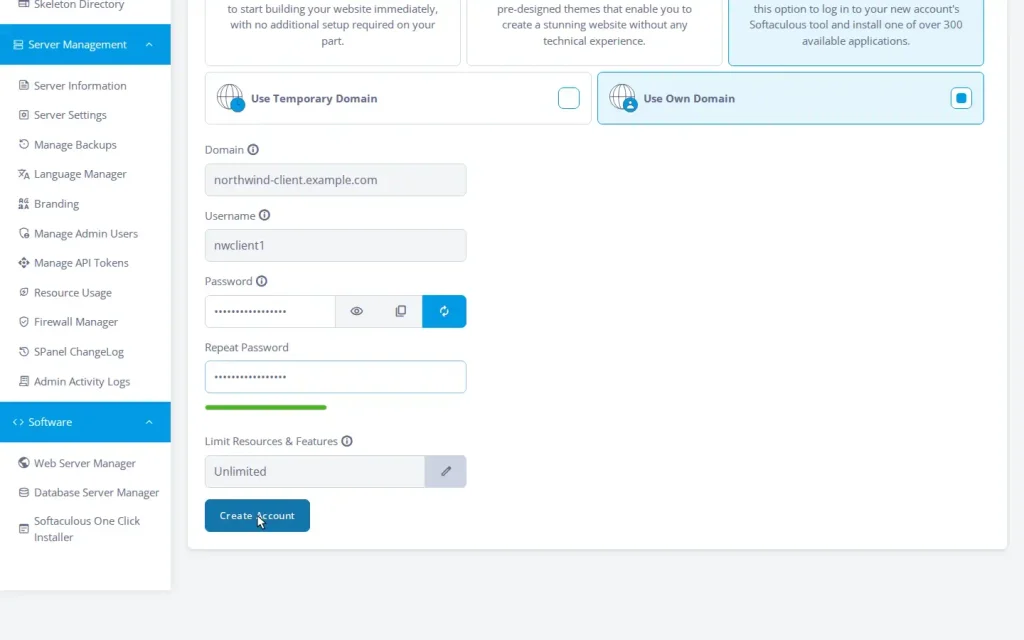
- Log in to the SPanel Admin Interface as the server administrator. Under Accounts Management, create an account for the client with the needed username and password. Submit the form.
- In a fresh browser session, visit the client’s own domain at the branded path: client-domain.com/hostpanel/login. The page shows their company name and logo.
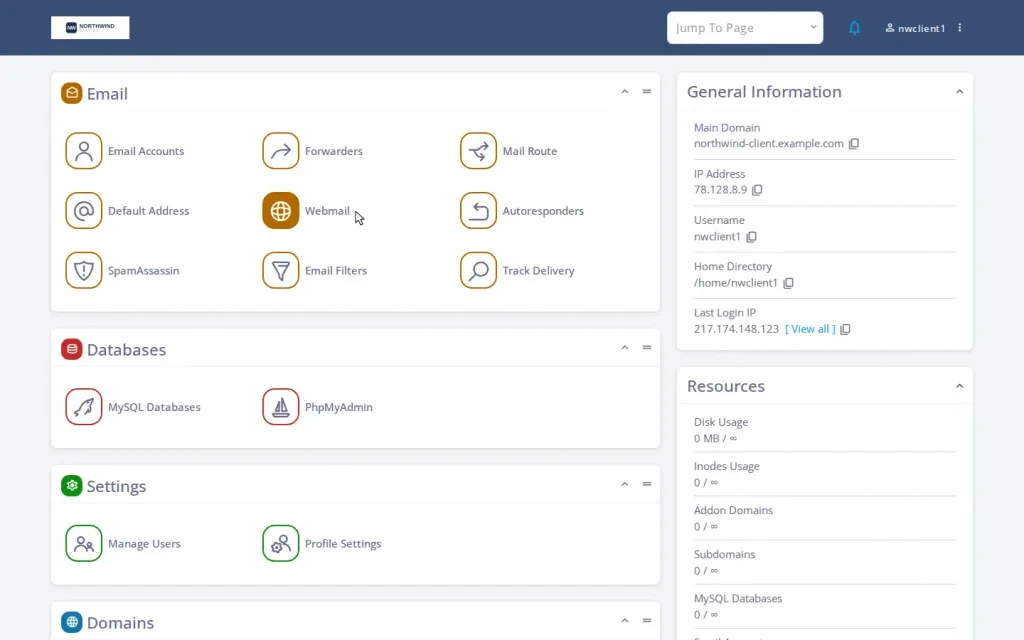
- Sign in as the client and land on the User Interface dashboard. Email, files, and databases all sit under the reseller’s brand, reached from the client’s own domain.
- From the dashboard, open the webmail entry point. The link stays on the branded URL rather than bouncing to a vendor address.
Where the brand still needs your help
Honest scoping, because the login page is one touchpoint of several. The branded path is the neutral /hostpanel. It reveals nothing about the panel software, but it is not a free-form custom string, and that neutrality is what lets every new domain inherit it automatically.
Two settings outside the login experience complete the picture: the server hostname (set one on your own domain, like server1.youragency.com, so mail and FTP settings carry your brand) and branded nameservers (ns1/ns2 on your domain for client DNS). SPanel supports all three; together they leave no infrastructure vendor visible.
A few embedded tools, like the webmail client’s own interface, an application installer (like Sotaculous), or phpMyAdmin, keep their own product names, as they do in every hosting panel.
See it on a real server
If you run client hosting, the login URL is the first thing your clients see and the easiest brand leak to close. SPanel makes the client’s own domain the front door by default, free on every ScalaHosting managed VPS. ScalaHosting reports its platform powers over 700,000 sites across more than 120 countries. Walk the agency-flavored version in our branded client tour, and if there’s a branding behavior you’d like to see next, the Cloud Democracy Project is where users ask and vote for new features.
FAQ
Q: Where exactly do my clients log in after I enable branding?
A: At their own domain plus the branded path – for example client-site.com/hostpanel/login. Every hosted domain serves the branded login page, so no shared server address appears in any client instruction.
Q: Do I have to set this up for each client?
A: No. Enable branding once from the Admin Interface. New accounts, addon domains, and subdomains all generate their web configuration with the branded login already applied.
Q: Can clients of a legacy panel log in at their own domain like this?
A: Generally not for the main login page. On the most common legacy panel the sign-in page cannot be rebranded, and billing integrations often route the login button to the provider’s domain.
Q: Can I use a fully custom path like /mypanel?
A: No. The Login URL setting offers two choices, the default /spanel and the branded /hostpanel, not a free-form custom string. The neutral /hostpanel reveals nothing about the panel software, is inherited by every new domain, and survives panel updates, webmail links included.
Q: Does this cost extra?
A: No. Branding is included free on every ScalaHosting managed VPS, like every SPanel feature. There’s no white-label surcharge and no per-account fee.
Q: Is hiding the panel name a security feature?
A: Treat it as reduced fingerprinting, not security. The real security story is SShield and the hardening stack.
