
Running a branded business online is easy with the right hosting partner.
SPanel, ScalaHosting’s free control panel, applies white-label branding server-wide: one company name, one logo, one neutral login path per server. To run two hosting brands, run two servers – one for each business.
That split isn’t a limit to engineer around.
It keeps billing, support, DNS, and client data cleanly divided. The entire process comes at no added cost for resellers, as SPanel is already included in your hosting plan.
The question that follows every white-label setup
Here is a scenario many resellers are way too familiar with:
James runs two small hosting brands out of Manchester – WordPress care plans on one, agency clients on the other. He has just branded his first SPanel server with his name, his logo, and a clean login page. Now he wants the second brand on the same box, because a second server feels like overkill.
It’s a reasonable instinct and a common case. The honest answer is rather simple: branding is server-wide, so one server carries one brand. That is not done so that your hosting provider can squeeze more money out of you. It’s a logical setup for business owners with multiple brands, clients, and business models.
In one sentence: SPanel branding is global to the server, so each server presents exactly one brand, and the clean way to run several brands is one server per brand.
Here is the answer to “why.”
Why one server holds one brand
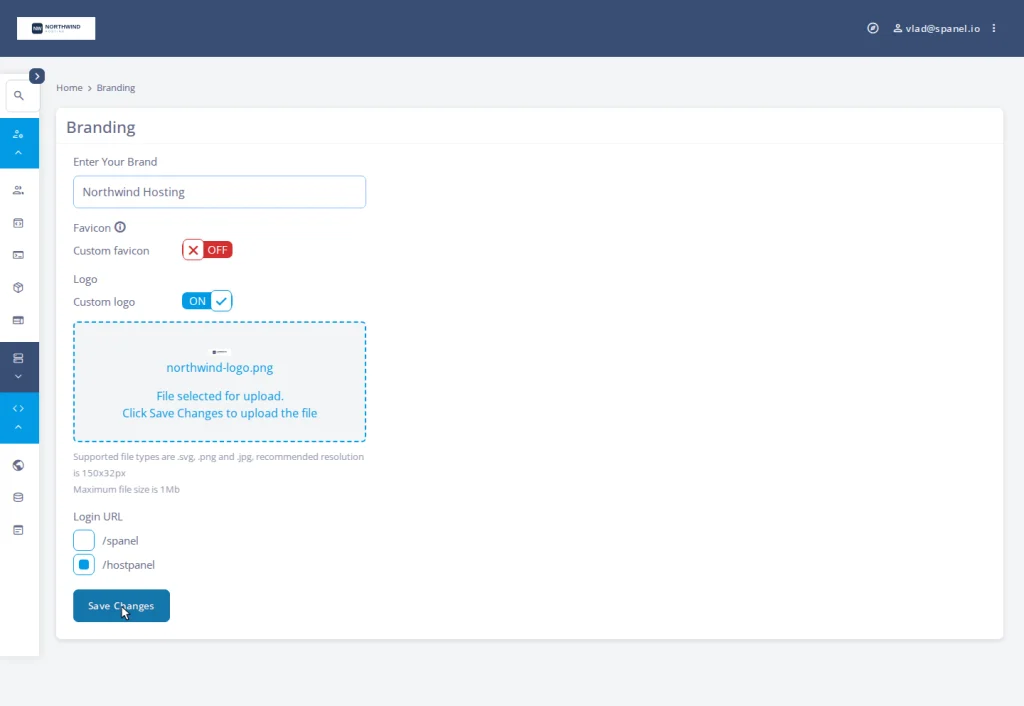
Enabling branding in the Admin Interface does more than swap a logo. SPanel rewrites the web server configuration for every hosted domain so the panel answers at the neutral /hostpanel path, updates the proxy that routes panel traffic, rewrites the webmail entry links, and records the brand for new accounts to inherit.
That work is deliberately server-wide; it’s what makes branding stick without you re-applying it.
The same scope is why one server can’t show brand A to some clients and brand B to others: there is one name, one logo, one login path recorded for the server, and every domain reads from it. The full per-brand setup is the short five-minute branding walkthrough, run once per server.
Why two servers is the cleaner architecture anyway
Treat “one brand per server” as planning guidance, and the two-server pattern is the design you’d choose on purpose.
Billing and identity stay separate. Two brands mean two storefronts and two inboxes; one server each keeps the books and client lists from bleeding together.
A problem on one brand doesn’t touch the other. A reboot, rollback, or migration on brand A never reaches brand B’s clients, and brand B’s busy launch day can’t starve brand A of CPU or memory. Separate servers contain both trouble and resource demand for the brand that caused or needed it.
| Planning question | One server, two brands | Two servers, one brand each |
| Branding | Not supported | One clean brand per server |
| Billing / support split | Tangled together | Naturally separate |
| Failure blast radius | Both brands affected | Contained to one brand |
| DNS & mail reputation | Shared, cross-contaminating | Independent per brand |
| Resource isolation | Brands compete for CPU/RAM | Each brand sized on its own |
Planning two brands? ScalaHosting offers several managed cloud VPS solutions designed for cost-effectiveness. If you prefer flexibility – you can always customize your server resources and add more in the future should the need arise. Along with many free features, you also receive SPanel at no added cost to each managed plan.
Planning your multi-brand setup, server by server
The work per brand is the same short checklist, run once per server.
- In the Admin Interface, open Server Management → Branding and type the company name into the Enter Your Brand field.
- Turn on Custom logo and upload that brand’s logo so it shows on the login page and inside the panel.
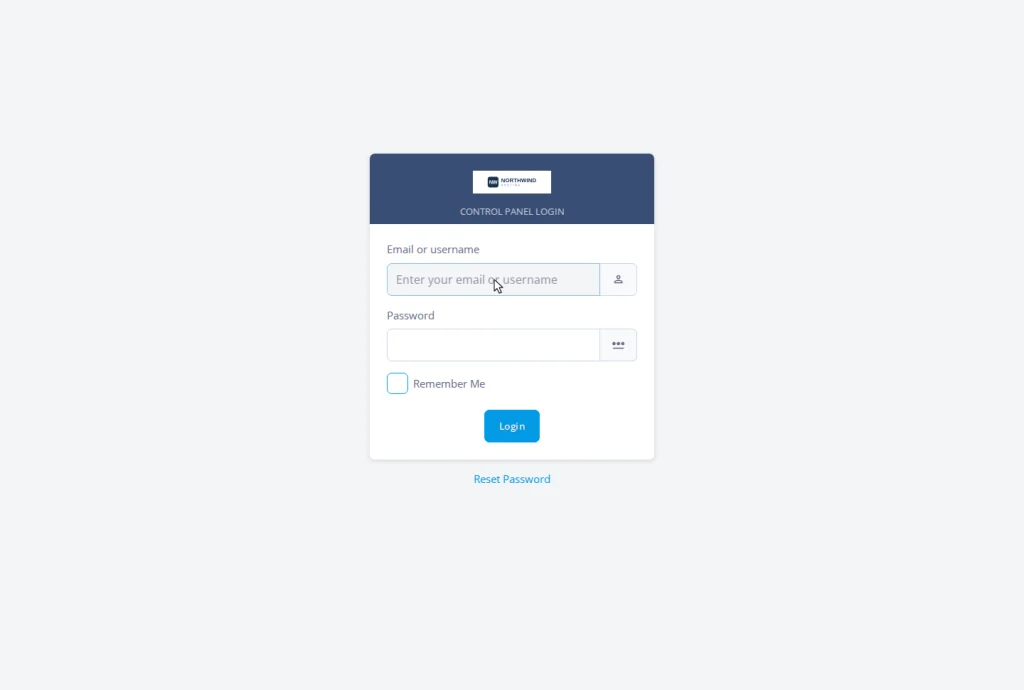
- Set the Login URL to the neutral /hostpanel path. SPanel moves the panel to that path across every domain and reloads the web services.
- In Server Settings → Basic Settings, set the Hostname to that brand’s domain (for example, server1.brand-a.com) so that mail and FTP settings reflect the brand.
- In the same screen, point the brand’s Name Servers (ns1/ns2) at that server so client DNS delegation shows the brand.
Steps four and five finish the white-label job and live in the branded hostname and nameservers settings.
Before you publish either brand, the complete white-label checklist lists every place a vendor name can still leak.
To summarize: “One brand per server isn’t a wall you hit. It’s the line that keeps two businesses from sharing one bad day.”
When you actually need the second server
Split when the second brand becomes real – you want to diversify different clients, pricing, and identity to a separate business name. Until then, one branded server is plenty.
It’s great that SPanel is engineered to use a fraction of the server resources that cPanel requires, so a single managed VPS can comfortably support a growing first brand. When brand two arrives, spin up another virtual server, run the five-step checklist, and you have two clean businesses instead of one crowded box.
If you’re still planning the first brand, the guide to starting a hosting business on a managed VPS is where to begin.
Plan it once, run it clean
Two brands on two servers sound like more configuration, but the VPS scalability fixes that. Each brand owns its identity, DNS, support queue, and uptime. SPanel makes the per-server part a short, repeatable checklist.
If you’d like multi-brand controls to evolve, the Cloud Democracy project is where ScalaHosting takes feature requests, and the SPanel API docs show how the branded endpoint behaves when you automate across branded servers.
FAQ
Q: Can I run two hosting brands on one SPanel server?
A: No. Branding is server-wide: one name, one logo, one login path per server. Two brands require two hosting servers, where each brand utilizes one.
Q: Is that a limitation I should worry about?
A: Not really. Separate servers keep billing, support, DNS, and resources cleanly divided, which is how you’d want two businesses structured regardless.
Q: Does a second server cost a lot more?
A: It’s a second managed VPS, sized for that brand. SPanel and all its features, branding included, are free, so there’s no per-brand white-label surcharge on top. The only cost is the server fee, but you can easily scale that by starting small and expanding as your business grows.
Q: Can I use a different login path per brand on one server?
A: No. The branded path is the neutral /hostpanel for the whole server, recorded once and inherited by every domain.
Q: Will updating SPanel reset the branding on either server?
A: No. SPanel’s updater reasserts the branded URL after each update, including the webmail entry links.
Q: Where do my clients log in once each brand is on its own server?
A: At their own domain plus the branded path, client-site.com/hostpanel/login, with the brand of whichever server hosts them.
