
ON THIS PAGE
Your storage says you have room. Your site says otherwise.
An inode is the filesystem record behind every file and folder you own, and most hosting accounts cap how many of them an account can hold. That cap is the one nobody mentions in the plan comparison, and it’s the one that bites: uploads start failing, orders won’t save, and the panel reports gigabytes of free space the whole time. Nothing is full. The account has simply run out of slots.
It’s a quiet kind of failure because the files doing the damage are the ones nobody thinks about. A busy store can accumulate 200,000 of them without trying: cache fragments, session files, plugin logs, thumbnail variants, each one a few kilobytes and each one an inode.
Four gigabytes of a 10 GB plan can look perfectly healthy while the file count hits a wall. That’s why SPanel, ScalaHosting’s proprietary server management platform, lets a server admin set a disk-space limit and an inode limit side by side on every account, so a million tiny files can’t quietly fill a filesystem that still shows room to spare.
What Is an Inode, in Plain English?
Every file on a Linux server, and every folder, has a small record noting where its data is stored, who owns it, when it changed, and its permissions. That record is the inode. The file’s contents take up disk space; the inode is the index card that says the file exists at all.
An inode is the filesystem’s index card for one file or folder, and the inode limit caps how many of those cards an account can hold.
On ext4, the filesystem’s inode count is fixed when the disk is formatted, so you can run out of index cards long before shelf space. (XFS allocates them dynamically, but a per-account inode limit works the same way on either.) A one-kilobyte session file costs one inode, the same as a four-gigabyte video. When they’re gone, the system reports the disk full and refuses new writes.
Why a 4 GB Site Can Hit a File-Count Wall
The files that exhaust inodes are rarely the ones you think about. The trouble is software that writes thousands of small files as a side effect of its job.
| Where the files come from | Why it’s file-heavy | Counts toward the limit? |
| WordPress core + plugins | Thousands of small PHP, JS, and CSS files | Yes |
| WooCommerce media & thumbnails | Several generated sizes per product image | Yes |
| Page / object cache | Many small files written and rewritten constantly | Yes |
| Mailbox storage | One file per email message | Yes |
| Old backups & build artifacts | Whole project trees copied into the account | Yes |
A gigabyte of cache fragments and old emails can burn through 200,000 inodes; a 5 GB photo gallery might use a few thousand.
How SPanel Pairs Disk Space With an Inode Limit
Most control panels treat disk space as the only storage limit worth setting. SPanel treats storage as a pair: a disk-space limit and an inode limit, set together on every account.
Both live in the package definition, the named bundle of limits a server admin assigns to an account. See our breakdown of the per-account limits SPanel can set, part of the same per-account resource limiting system as CPU and memory.
The disk-space dial stops one account eating the whole drive; the inode dial stops millions of tiny files exhausting the filesystem before the megabytes run out. Both are real filesystem quotas, enforced by the kernel’s quota machinery on ext4 and XFS, not a number a web page checks. At its inode ceiling, the operating system itself refuses the next file, whether it comes through the panel, over FTP, or from a plugin.
Megabytes are easy to picture. File counts are the limit that sneaks up on you, so we cap both and we show you both.
Setting up plans on a managed VPS? SPanel pairs a disk-space limit with an inode limit on every package it creates, so the file-count ceiling is something you set on purpose instead of discovering in an outage. Both limits come with SPanel on managed and self-managed servers alike.
Seeing It in SPanel: Setting and Watching the Inode Limit
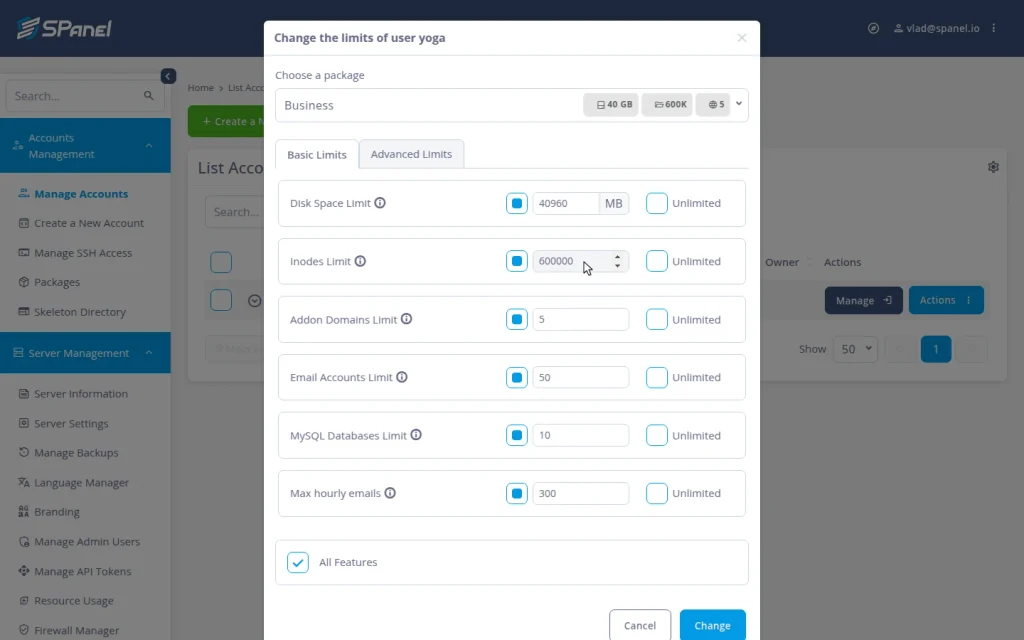
These steps run in the SPanel Admin Interface. For a closer look at the Change Limits form, see our guide on how to modify the disk and inode quotas of SPanel accounts.
- Open the Packages area and a package’s create/edit form. In the Basic Limits tab, the storage fields sit together: the Disk Space Limit (MB) and, just below it, the Inodes Limit.
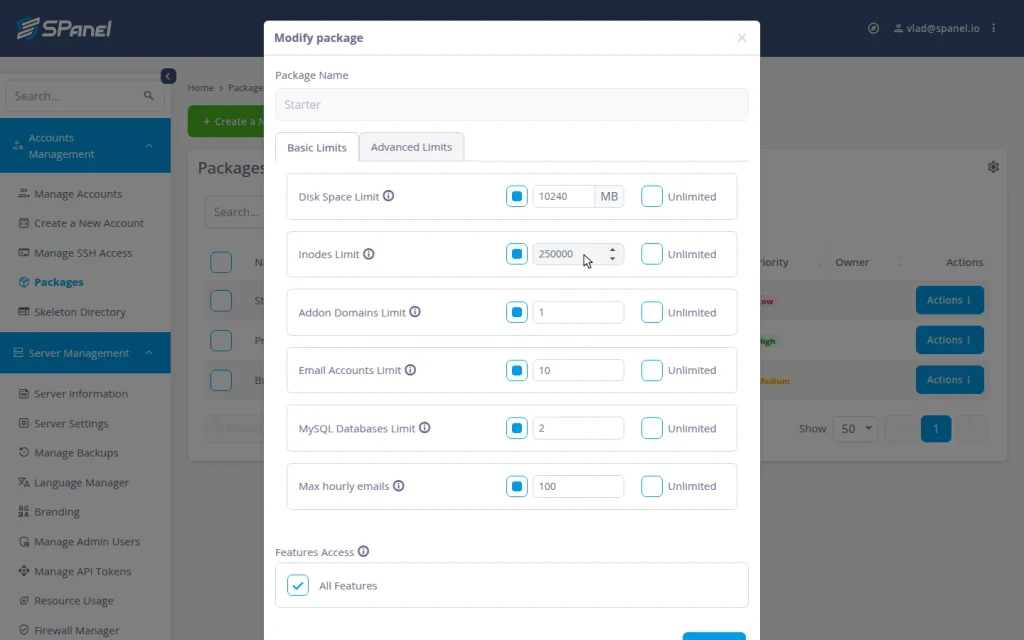
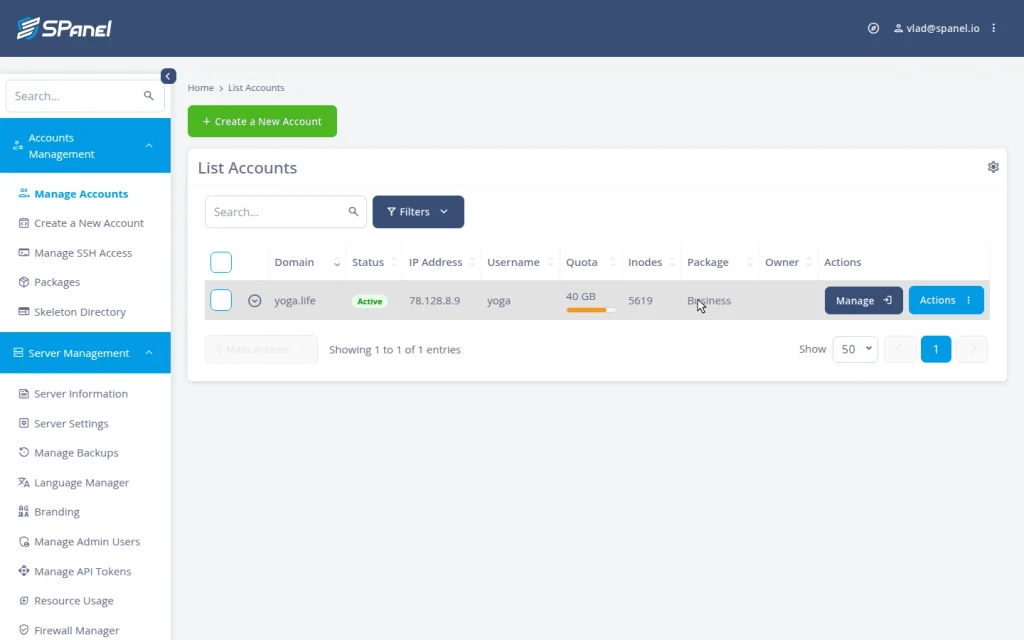
- Set both to match the plan and save; every account on the package inherits them. In the Manage Accounts page, each row shows a Quota column with a disk-usage fill bar and an Inodes column with inodes used; the inode ceiling lives in the package or Change Limits form.
- To override one account, open its row’s Actions → Change Limits. The same Inodes Limit field appears here, so a single account can run on its own value by switching the package dropdown to Use Custom Limits.
The accounts list shows each account’s inode usage at a glance. To find what’s eating an account’s files, its owner uses the User Interface File Manager’s disk-usage view, and the culprit is usually the cache folder, mail directory, or a forgotten backup.
Inodes and the Disk-Quota Warning
SPanel doesn’t let an account hit the wall in silence. At 95% of disk quota, it emails a warning to the account’s own contact address, with the server admin as a fallback recipient, so the owner hears about it before writes fail.
Shared hosts commonly cap inodes per account without ever explaining the number or showing you how close you are. SPanel’s difference isn’t a bigger ceiling; it’s a limit set deliberately, enforced at the filesystem, and visible to admin and owner.
FAQ
Q: What is an inode in hosting?
A: The filesystem record for one file or folder. The inode limit caps how many files an account can hold, separate from megabytes used.
Q: What uses the most inodes on a website?
A: Many small files: plugins, generated thumbnails, cache fragments, session files, stored email, and old backups. A few large files barely register.
Q: Does deleting files free up inodes?
A: Yes, each deleted file frees its inode. Clearing a bloated cache folder or a stale backup is usually faster than upgrading.
Q: Can I set an inode limit per account in SPanel?
A: Yes. It’s part of every package and can also be a custom per-account value, enforced as a real filesystem quota on ext4 and XFS.
Q: Does SPanel warn me before I run out?
A: SPanel emails a warning at 95% of disk-space quota, and inode usage shows per account in the accounts list.
Set Storage Limits That Match How Sites Actually Fail
Disk space is the limit everyone watches; inodes are the one that quietly takes sites down. SPanel lets you set both on every account, enforce them at the filesystem, and see usage at a glance, so a runaway cache can’t fill the drive in files while the gigabytes look fine. All of it comes with SPanel, on managed and self-managed servers alike. If there’s a limit you wish SPanel surfaced differently, the Cloud Democracy board at features.spanel.io is where ScalaHosting customers ask for it.
