If you run cPanel with CloudLinux and you’re sizing up SPanel as a potential alternative, you should know that almost every LVE limit has a direct SPanel equivalent. CPU percentage, memory, process count, disk I/O, IOPS, and inodes all map across cleanly. SPanel enforces them natively with cgroups v2 – no separate operating-system license – and it’s included free on every ScalaHosting managed VPS. Two honest gaps: there’s no separate entry-process dial, and no CageFS-style filesystem virtualization.
A migrating admin is already familiar with the vocabulary
John runs a 60-account reseller server. He uses cPanel with a CloudLinux license, and he thinks in LVE: SPEED at 100%, PMEM at 1 GB, NPROC at 100, EP at 20, lvetop open when a customer complains. He’s pricing a move to SPanel, and his first real question is “where do my numbers go?”
This guide answers exactly that: each LVE limit, its SPanel equivalent, and a straight word where the two differ. If you have any experience with LVE, you’ll be able to read SPanel’s limits in about five minutes – the model underneath is the same kernel.
What LVE actually is
LVE (Lightweight Virtual Environment) is CloudLinux’s per-account resource cage, a commercial operating-system layer that caps each hosting account’s CPU, memory, processes, and disk I/O so one account can’t sink the server.
SPanel does the same job with the Linux kernel’s own control groups – cgroups v2, the mechanism the entire container world is built on. CloudLinux earned its place by bringing this discipline to shared hosting; SPanel reaches the same outcome without a second vendor in the stack. Per-account limiting has traditionally required a paid OS add-on; SPanel builds it in.
The translation table
Every limit you set today, and where it lives in an SPanel package.
CloudLinux LVE limit
What it caps
SPanel equivalent
Notes
SPEED / CPU
CPU as a percentage of a core
CPU Limit
Same model – 100% = one full core, 50% = half, 200% = two cores
PMEM
Physical memory
Memory Limit (MB)
One ceiling per account
VMEM
Virtual memory
folded into the Memory Limit
cgroups v2 uses a single memory ceiling; no separate vmem dial
NPROC
Number of processes
Maximum Total Processes
Direct match – fork-bomb insurance
EP (entry processes)
Concurrent entry processes
Maximum PHP-FPM Processes
No separate EP dial; this PHP-FPM process ceiling is the comparable concurrency control
IO
Disk throughput
Storage Transfer Rate (MB/s)
Storage traffic only – not network bandwidth
IOPS
Disk operations per second
IOPS Limit
Direct match
Inodes
File and directory count
Inodes limit
Direct match
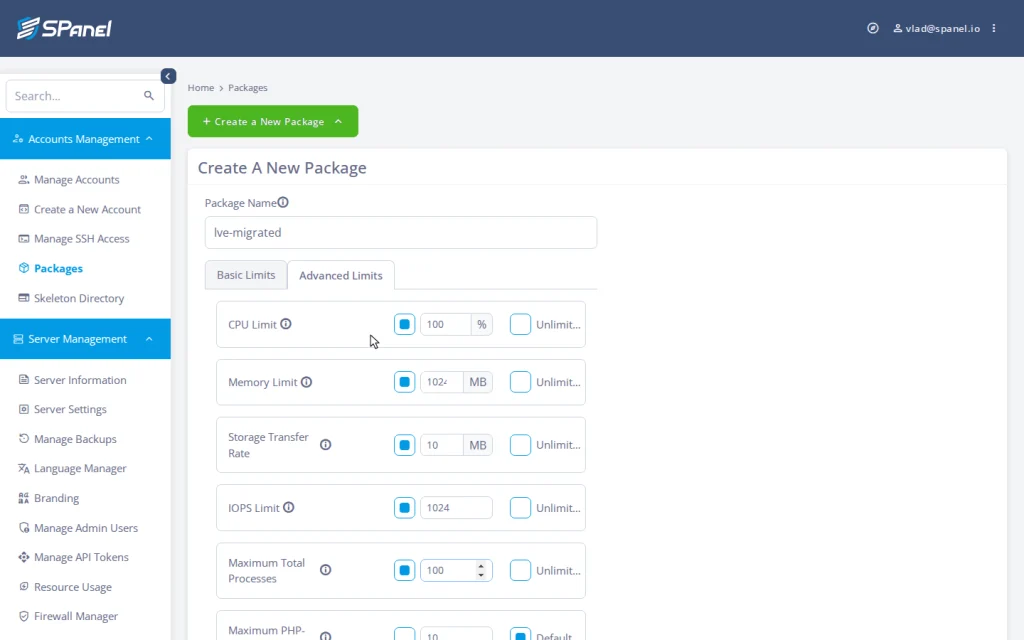
In an SPanel package these fields are split across two tabs: the four performance dials plus Maximum Total Processes and Maximum PHP-FPM Processes sit on the Advanced Limits tab, while disk space and Inodes live on Basic Limits. A few rows deserve a sentence each.
CPU is the easy one. Both systems express CPU the same way: a percentage of a single core, where 100 means one full core, 50 means half a core, and 200 means two cores. Your LVE SPEED values carry straight over – no “percentage of the whole server” trap.
Memory collapses two dials into one. CloudLinux historically split physical (PMEM) and virtual (VMEM) memory. SPanel sets a single memory ceiling in MB, because cgroups v2 manages memory as a single pool per account. Start from your PMEM number. When an account exceeds it, the kernel reclaims memory inside that account’s group only – in the worst case ending that account’s own offending process, never touching its neighbors.
Disk I/O and IOPS map directly, with one caution worth repeating: the Storage Transfer Rate limit governs storage traffic – how fast an account reads and writes files on disk – not internet bandwidth. ScalaHosting’s managed VPS plans come with unmetered network traffic; the two numbers are unrelated. Confusing them is the most common mistake in this topic.
The one row that isn’t a clean swap: entry processes
If you tune EP carefully, this is the honest difference. CloudLinux’s entry-process limit caps how many simultaneous “entries” – roughly, concurrent dynamic requests – an account can have in flight. SPanel has no dedicated EP dial.
The comparable control is the Maximum PHP-FPM Processes ceiling: how many PHP requests an account can process at once. For the failure mode EP usually guards against – a slow or popular site taking over all the request slots – capping workers does the same protective job from the PHP runtime itself. It’s not a one-to-one rename, but it’s the same goal, reached through the layer that actually serves the requests.
If you’re mapping these dials because you’re weighing the move, it’s worth knowing the engine itself isn’t a line item: SPanel – and this whole kernel-limits layer – is included on every ScalaHosting managed VPS, with no separate operating-system license to renew. The mapping holds the same whether you’re sizing a trial server or planning a full migration.
Your CLI muscle memory: lvectl and lvetop
LVE admins live in two commands. Here’s where that work happens in SPanel’s Admin Interface instead.
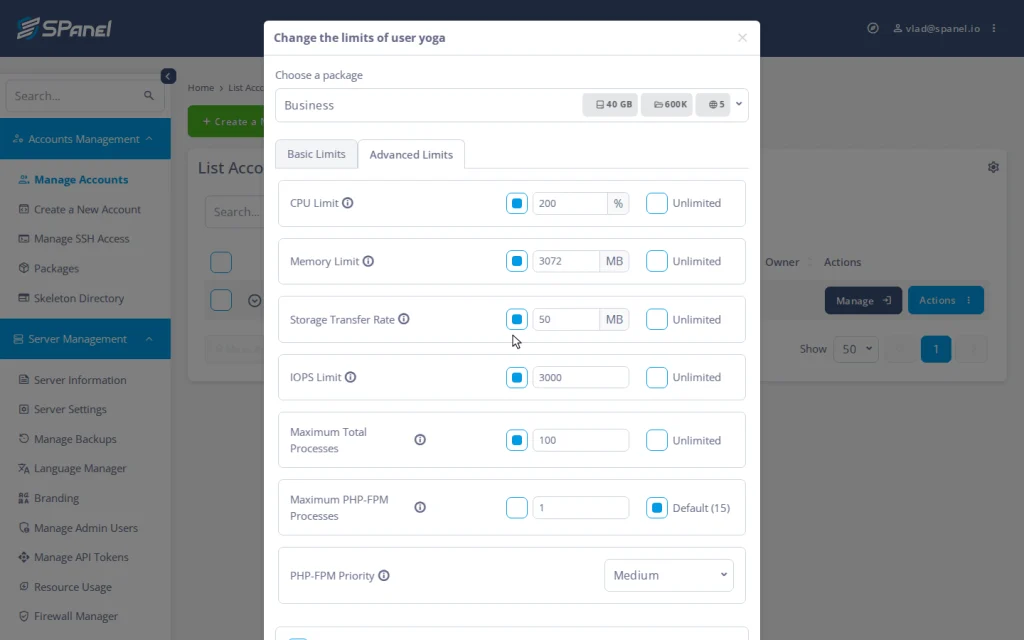
lvectl sets and applies limits. In SPanel, limits live in a package – a named bundle of fourteen dials – that you assign to an account from its Actions ▸ Change Limits menu in one move. Changing a plan re-applies every limit live, in place, with no migration. The reserved Use Custom Limits option handles the one-off deal that doesn’t fit a named plan.
lvetop shows who’s hot right now. SPanel answers that with several panel views: per-account usage against limits in the accounts list, continuous per-account CPU history for any date, an overloaders report listing accounts above a chosen CPU threshold (the default lens is accounts above 16% CPU), and a process viewer that lists running processes with kill actions – no SSH session required. To read an account’s limits back, open its Actions ▸ Change Limits modal and switch to the Advanced Limits tab: it shows the current five kernel-enforced values at a glance – the closest thing to reading an LVE config back.
What SPanel does not replicate
There are two clear boundaries.
No CageFS-equivalent filesystem virtualization. CloudLinux’s CageFS gives each account a virtualized view of the filesystem; SPanel doesn’t do that. SPanel’s account isolation comes from standard Linux users and permissions, document-root protection, and the security stack around SShield. What SPanel replicates is the resource limiting – CPU, memory, I/O, processes – not the filesystem cage.
No instant enforcement claim. SPanel’s enforcement service sweeps once per second, so a new process is confined within about a second of starting. For sustained overload – the thing these limits actually target – a one-second horizon is the right trade, not a marketing zero.
What SPanel adds that LVE doesn’t: burst mode
One feature has no LVE equivalent. Where burst mode is in effect, SPanel watches server load against the core count once per second. While there’s genuine spare capacity, accounts run unconfined and use idle headroom. The moment the server is busy, fair-share enforcement engages within about a second. Quiet server, full speed; busy server, strict fairness – limits that protect everyone rather than throttle paying customers for no reason. (Full mechanics in our burst mode write-up.)
To summarize: your LVE numbers aren’t lost in translation – they’re the same kernel limits, set in a panel instead of a license.
Demo flow: where the limits live in SPanel
The exact Admin Interface steps a migrating admin walks to set and verify per-account limits.
Log in to the SPanel Admin Interface with your admin username and password.
Under Accounts Management, open Packages, then Create a New Package (or Modify an existing one).
In the package form, switch to the Advanced Limits tab and enter your translated LVE values in CPU Limit, Memory Limit, Storage Transfer Rate, IOPS Limit, and Maximum Total Processes (plus Maximum PHP-FPM Processes for the EP-analog).
Save the package. To apply it on an account, go to Accounts Management ▸ Manage Accounts, open the account row’s Actions ▸ Change Limits, and pick the package from the Choose a package drop-down – every limit applies live, in place, with no migration.
In that same Change the limits of user modal, you can go to the Advanced Limits tab to read back the account’s current CPU Limit, Memory Limit, Storage Transfer Rate, IOPS Limit, and Maximum Total Processes – SPanel’s equivalent of confirming an LVE config.
At the ceiling: the behavior difference
Worth knowing before you switch. CloudLinux-style enforcement can surface a “508 Resource Limit Is Reached” page when an account tops out. SPanel doesn’t serve a 508 page. CPU over the limit is throttled, not killed – the site slows under its own load while neighbors retain full speed. Memory pressure is contained to the account, disk excess is queued, and only the fork past the process cap is refused. The limited account degrades gracefully; the others don’t degrade at all.
FAQ
Q:Do I need CloudLinux to limit CPU and RAM per account on SPanel?
A: No. SPanel enforces CPU, memory, disk throughput, IOPS, and process limits natively through cgroups v2 – no separate OS layer or license. It’s resource limiting, not CageFS-style filesystem virtualization.
Q:Do my LVE CPU percentages convert?
A: Yes, they do. Both systems use 100 = one full core, 50 = half, 200 = two cores. Copy your SPEED values into SPanel’s CPU limit.
Q:What’s the SPanel equivalent of EP (entry processes)?
A: There’s no dedicated EP dial. SPanel’s Maximum PHP-FPM Processes ceiling is the comparable control – it caps how many PHP requests an account processes at once.
Q:Where did PMEM and VMEM go?
A: SPanel uses one memory ceiling in MB per account, because cgroups v2 accounts memory as a single pool. Start from your PMEM value.
Q:Is the disk I/O limit my network bandwidth?
A: No. It governs storage throughput – disk reads and writes. ScalaHosting managed VPS plans include unmetered network traffic; the two are separate.
Q:What replaces lvectl and lvetop?
A: Packages and live assignment replace lvectl; the accounts usage view, per-date CPU history, the overloaders report, and the process viewer replace lvetop.
Where to go next
Once your LVE numbers map cleanly and the two gaps are acceptable, the move itself is the next step. Every limit covered in this guide is enforced natively through cgroups v2 and comes included on every ScalaHosting managed VPS, with no separate operating-system license to buy or renew. If you’re still weighing the two platforms side by side, the SPanel vs. cPanel comparison breaks down the differences beyond resource limits, and you can review the resources these limits ship with on our managed VPS plans page.
Working in the web hosting industry for over 13 years, Rado has inevitably got some insight into the industry. A digital marketer by education, Rado is always putting himself in the client's shoes, trying to see what's best for THEM first. A man of the fine detail, you can often find him spending 10+ minutes wondering over a missing comma or slightly skewed design.