
Did you know that you can move your reseller clients to an SPanel-powered managed VPS with ScalaHosting without changing anything they see? Their websites keep the same domains, their email keeps working, while the control panel login still carries your company name and logo. SPanel’s server-wide branding is included for free on every plan, so the surface your clients recognize remains identical as you swap the underlying infrastructure.
The migration every reseller is afraid of
Imagine that:
Priya runs a small hosting business out of Bristol – 38 client websites, mostly local trades and a couple of online shops. Her current panel is showing its age, and the per-account costs keep climbing, so she wants to move everyone to SPanel on a ScalaHosting managed VPS.
One thing stops her cold, though – the fear that a client logs in one morning, sees a different name on the screen, Googles it, and starts asking who really runs their hosting service. For a reseller, that question should never come up.
What does an “invisible migration” actually mean?
An invisible migration is one where every surface your clients can see – their domain, your brand, their login, their email – stays exactly the same, while the panel and server underneath are replaced.
That works because what a client recognizes is what you control, not what’s tied to the old panel. Clients identify their hosting by three signals: the domain their site runs on, the name and logo on the login page, and the email addresses they send from. None of those belong to the software you are leaving. The domain is theirs. The brand is yours. The email follows the domain.
The three surfaces your clients see
Their own domain stays their own domain. A client whose shop is at Bristol-Bikes.com, for example, keeps that address through the move. You copy the site to the new server, test it, then point the DNS over when you are ready.
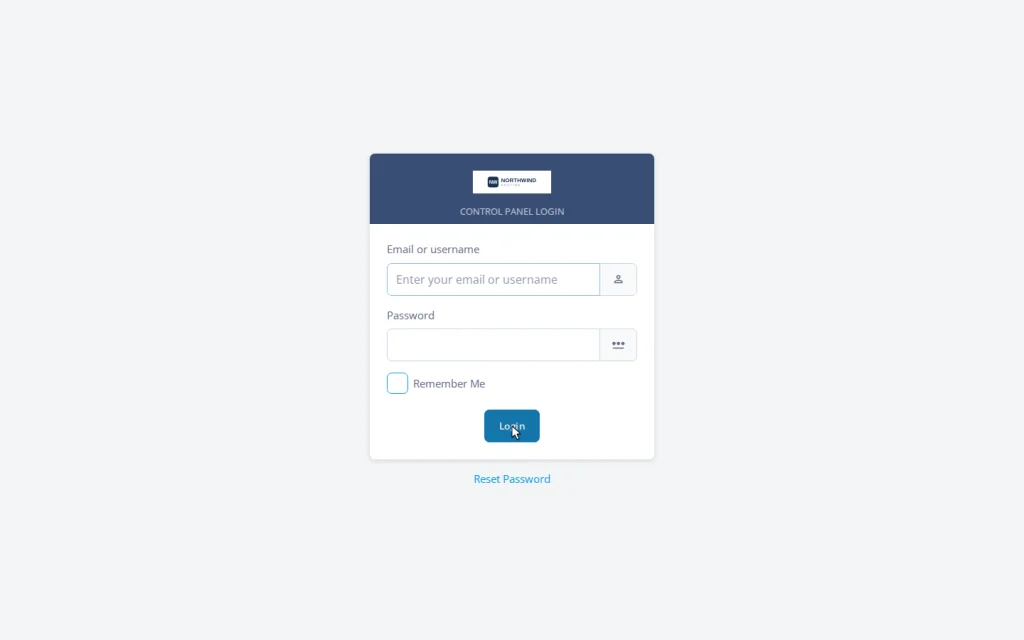
Your brand stays on the login page. This is where most control panel moves leak: the login screen carries the vendor’s name, or the login button drops the client onto the upstream provider’s domain. With SPanel branding on, the login page shows your company name and logo, served from the client’s own domain at the neutral /hostpanel path – and that branded login is the default behavior, not an assembly project.
Their email keeps flowing. Mailboxes move with the account, and because the domain is unchanged, addresses remain the same as well. With DNS planned properly, mail keeps delivering across the cutover.
To summarize: A migration your clients never notice is the best kind – same domain, same brand, same login, only the engine underneath has changed.
How SPanel keeps your name on the door
Branding in SPanel entails numerous options on a single screen, applied across the whole server.
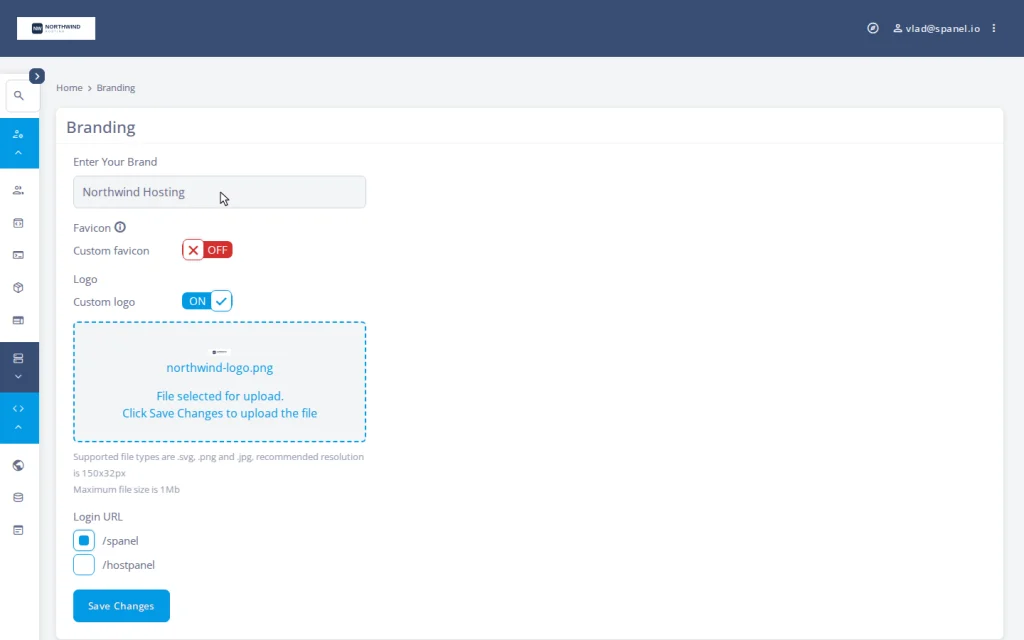
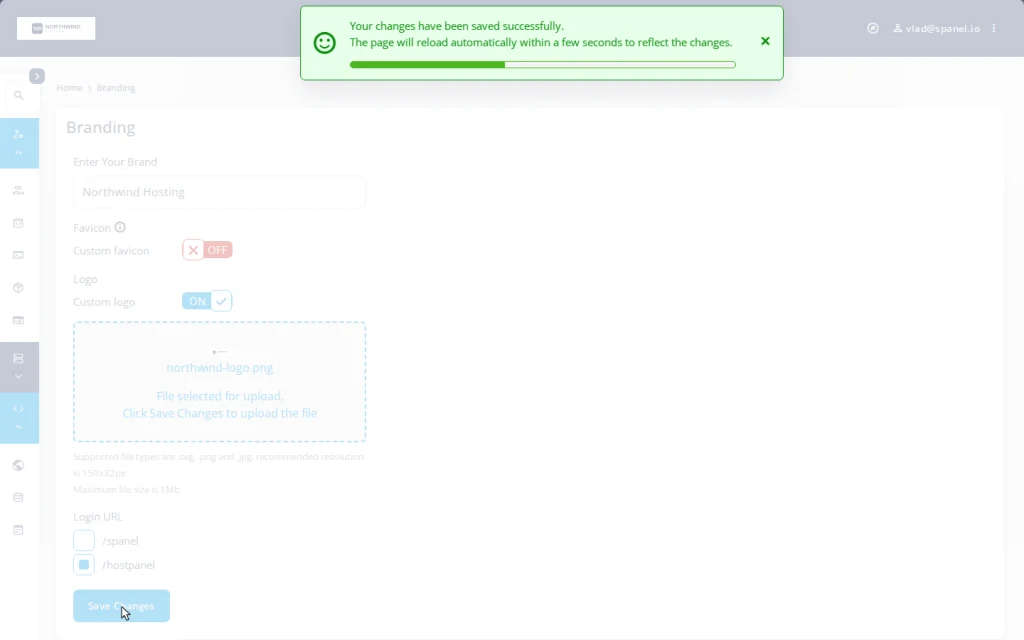
On the Branding screen in the Admin Interface (Server Management → Branding), you set your brand name, upload your logo, and switch the login URL from the default /spanel to the branded /hostpanel. Every hosted domain then serves a login page under your name, and every new account inherits it automatically – you never re-apply it per client. That matters during a migration, when you are creating dozens of accounts in a short window and want all of them branded from birth.
That same Branding screen is the heart of the five-minute white-label walkthrough.
This is included free on every ScalaHosting managed cloud VPS. In the wider control panel category, white-labeling has traditionally been available in a paid tier or charged per account. In comparison, SPanel treats it as part of the panel, with no surcharge.
Weighing a reseller migration? ScalaHosting’s managed VPS plans include SPanel and its server-wide branding at no extra cost, plus free website migration on every plan. Brand a server and test client sites before any DNS changes.
What stays, what changes
| Client-facing surface | Changes during migration? | Who controls it |
| Their website’s domain | No | You / the client’s DNS |
| Brand on the login page | No – stays yours | SPanel Branding screen |
| Login URL | No – their own domain + /hostpanel | SPanel |
| Their email addresses | No | The domain (unchanged) |
| The panel software underneath | Yes | You (invisible to the client) |
The only row that changes is the one your clients never look at.
Demo flow: brand the server before the first client lands
The exact SPanel steps to brand the new server before you move anyone:
- Log in to the Admin Interface of your SPanel server with your admin account.
- Open Server Management → Branding in the Admin Interface.
- In the Enter Your Brand field, type your company name (example here is Northwind Hosting); upload your logo under Custom logo; review the form before saving. The Login URL stays on the default /spanel here.
- Switch the Login URL option to /hostpanel and click Save Changes. SPanel applies the change server-wide, and the branded login goes live within a few seconds.
- In a browser, visit a hosted domain at the branded path – for example northwind-client.example/hostpanel/login – to confirm the login shows your name and logo, not the default /spanel page.
A timeline your clients never feel
A week before. Lower the DNS TTL on the domains you are migrating so the final cutover propagates fast. Provision the new ScalaHosting managed VPS, brand it once with the steps above, and set up your packages.
Migration window. Copy sites, databases, and mailboxes over. Recreate each client as an SPanel account – branded automatically – and test each site before touching public DNS. ScalaHosting includes free website migration on every plan, worth using for the heavy lifting.
Cutover. Point each domain’s DNS at the new server. Because the TTL is already low, visitors and mail follow within minutes, not days. The client’s address bar never changes; only the server answering it does.
After. Raise TTLs back to normal and decommission the old accounts once everything is confirmed on SPanel.
Finishing the white-label job so nothing leaks later
Branding the panel covers the screen clients look at most, but a complete reseller setup includes two more pieces that are best handled during the migration.
Set a server hostname on your own domain – something like server1.northwind.example – so mail and FTP client settings carry your name. Run branded nameservers (ns1/ns2 on your domain) so client DNS delegation points at you. SPanel supports all three, and together they leave no visible trace of who runs the metal underneath; the full sequence lives in the complete white-label checklist.
Be honest about the edges, too.
Third-party tools inside the panel – the webmail client’s own interface, application installers, phpMyAdmin – keep their own product names, as on every hosting panel. The branded surfaces are the panel identity, the login page, the login URL, and the webmail entry. Done across all three pieces, that invisibility is also why clients stay – the argument behind white-labeling as a retention feature.
Where SPanel fits
SPanel is ScalaHosting’s control panel, included free on every ScalaHosting managed VPS. Scala runs this solution across more than 700,000 websites in over 120 countries. The white-label setup resellers usually pay extra for elsewhere is the default here, with no per-account math.
Have the need of a new feature?
Branding requests are shaped openly through the Cloud Democracy Project. You can suggest a new functionality, and the most popular ones are quickly added to new SPanel versions.
You can also learn more about our free website migration to understand just how easy it is to switch your business to ScalaHosting.
FAQ
Q: Will my clients have to log in somewhere new after I migrate?
A: No. With SPanel branding enabled, each client logs in at their own domain plus the /hostpanel path – the same address they already use, carrying your name and logo.
Q: Will my clients see the SPanel name during or after the move?
A: The panel identity, login page, login URL, and webmail entry carry your brand. Embedded third-party tools keep their own names, as on any panel. Set a branded hostname and nameservers, and there is no vendor surface left to find.
Q: Does moving to SPanel mean downtime my clients will notice?
A: Not if you plan DNS properly. Lower the TTL ahead of time, copy and test on the new server, then cut over. Visitors and mail follow within minutes.
Q: Do my clients need to change their domain or DNS settings?
A: No. You manage the cutover; the client keeps the same domain and does nothing.
Q: Is migration to ScalaHosting actually free?
A: Yes. ScalaHosting includes free website migration on every plan, regardless of platform, size, or number of sites, with no downtime. Keep it distinct from the separate performance guarantee, which has its own conditions.
Q: Can I keep my own brand on the panel after I move?
A: Yes – that is the point. Branding is server-wide: one setting puts your name and logo on every hosted domain’s login page, existing and future accounts alike, so you never rebrand client by client.
