
In Spanel, you create an FTP sub-user under Files > FTP Accounts using the New FTP Account form, where you set a username, a document root, and a password. SPanel namespaces every sub-user under your account, so the name you type becomes <account>_<subuser>, and the document root confines that login to one folder. This gives a developer or contractor access to a single directory without your main credentials.
Note that plain FTP is unencrypted, so use FTPS for the connection.
Who this is for
This is for a site owner giving a developer, contractor, or agency FTP access to one part of their hosting account – a theme folder, a staging directory, or a single site root – without exposing everything. If you want a scoped, revocable login rather than your own credentials, this is the feature.
What problem this solves
Handing out your main FTP login is risky: it grants access to the entire hosting account, and you cannot revoke it without changing your own password and breaking your own clients. An FTP sub-user fixes that. You create a separate login, point it at one folder, and delete it when the work is done – your own access is untouched.
How SPanel solves this
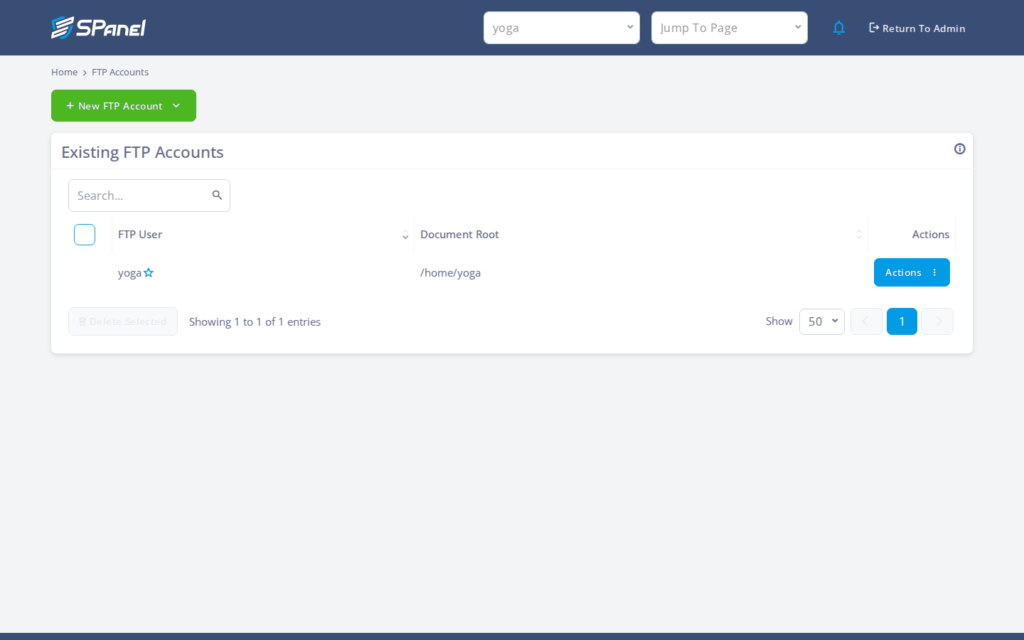
Open Files > FTP Accounts. The page lists any accounts you already have and shows a New FTP Account button.
Click it to open the create form, which has three fields: FTP username, Document Root (the home directory path the login is confined to), and Password, which shows the placeholder “Enter a Password”. Fill in those three fields and save; SPanel creates the account and it appears in the Existing FTP Accounts list. SPanel enforces the username format and binds the login to the folder you chose. You still choose a strong password, hand the credentials to the right person, and point their FTP client at the correct host and port.
Why this is different in SPanel
Two details are specific to SPanel.
First, username namespacing: SPanel keeps every sub-user under your account, so the effective login is <account>_<subuser>. You cannot create a bare username, and that format prevents collisions with sub-users on other accounts on the same server.
Second, the home directory is set at creation, so the sub-user stays in the document root you enter rather than browsing the rest of your account.
Before you start
- Sign in to SPanel with your normal account login – this is done in the user interface, no admin access required.
- Know the exact folder the sub-user should be confined to before you open the form.
- Have a strong, unique password; do not reuse your account password.
- Know the FTP host and port the person will connect to, since SPanel does not configure their client.
Step-by-step
- Open Files > FTP Accounts. You will see the FTP Accounts page with your existing accounts and the New FTP Account button.
- Click New FTP Account. The create form opens with the FTP username, Document Root, and Password fields.
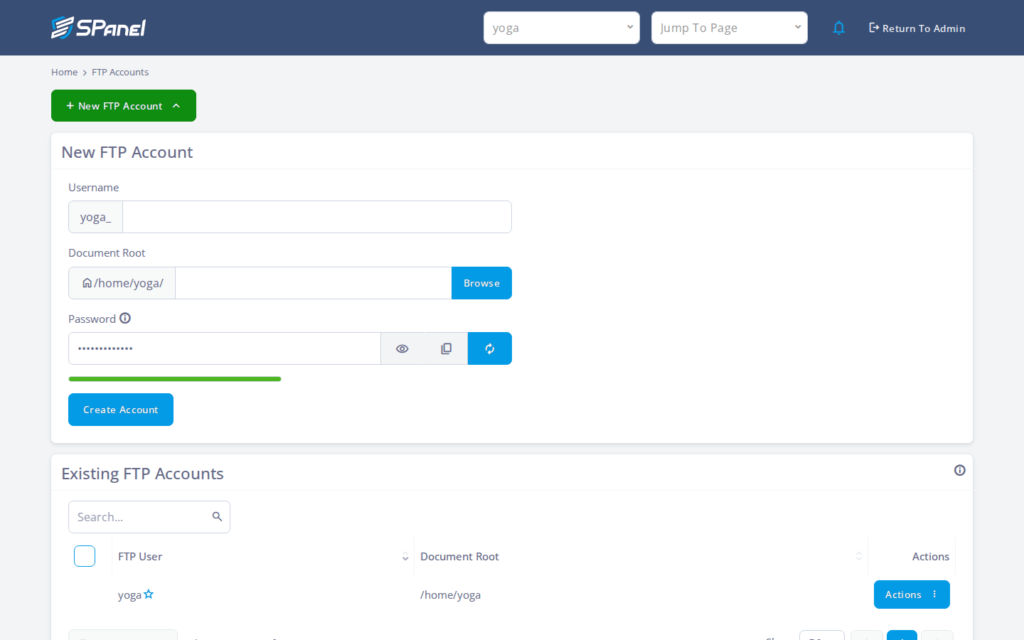
- Enter the FTP username. The effective login will be namespaced as <account>_<subuser>, so keep the part you type short and recognizable.
- Set the Document Root to the one folder this login should reach – in our example, /home/yoga/kb-test/. Double-check this path before saving: it is the boundary that keeps the sub-user out of the rest of your account, so a wrong path can over-expose your files.
- Enter a password in the Password field (it shows “Enter a Password”). Use something strong and unique.
- Save. The account is added and appears in the Existing FTP Accounts list. From there you can hand off the credentials and delete the account later when access is no longer needed.
What happens behind the scenes
When you save, SPanel registers the sub-user under your account name and ties it to the document root you entered. The namespacing keeps your sub-users distinct from everyone else’s on the same machine, and the home directory binding enforces the folder boundary – so the confinement is a property of how the account is created, not something the person connecting can opt out of.
Limitations and edge cases
- The username is namespaced. SPanel enforces the <account>_<subuser> format, so you cannot pick a standalone name. This means: tell the person their full login is the prefixed form, or their client will fail to authenticate with the short name alone.
- A sub-user is not a separate system identity. It is an FTP login scoped to a home directory, not a Linux user or a separate filesystem identity. If you need OS-level separation or shell access, an FTP sub-user is the wrong tool.
- Plain FTP is unencrypted. Credentials and file contents travel in clear text. Use FTPS so the login and data are encrypted in transit; see Connect over FTP and FTPS in SPanel for the host, port, and client settings.
Troubleshooting
| Symptom | Likely cause | What to do |
| Login is rejected with the name you typed | The client is using the short name, not the namespaced one | Connect with the full <account>_<subuser> login |
| Sub-user sees more or fewer files than expected | The Document Root was set to the wrong path | Delete the account and recreate it with the correct folder |
| New account is not in the list | The form was not saved, or a field was empty | Reopen New FTP Account, complete all three fields, and save |
| Connection works but credentials look exposed | Connecting over plain FTP, not FTPS | Switch the client to FTPS and reconnect |
When to use this / when not to use this
| Use this when | Skip or use something else when |
| You want to give one person scoped FTP access to a folder | You need shell or SSH access |
| The access should be easy to revoke later | You need a true separate system user identity |
| You want your own credentials to stay private | The person needs to manage databases or email |
| Work is limited to a known directory like a site root | The task is better done in WordPress Manager or the file manager |
FAQ
Q: What username will the developer log in with?
A: The namespaced form, <account>_<subuser>. SPanel enforces this, so the short name you type will not authenticate on its own.
Q: Can the sub-user reach folders outside the document root?
A: No. The home directory you set at creation confines the login to that folder. To change it, delete and recreate the account with the right path.
Q: Is the FTP sub-user a separate Linux user?
A: No. It is an FTP login scoped to a directory, not a system user or filesystem identity, and cannot be used for shell access.
Q: Is the connection encrypted?
A: Not over plain FTP – that is clear text. Use FTPS to encrypt credentials and data in transit; the FTPS article covers the settings.
Q: How do I remove access when the work is done?
A: Delete the account from the Existing FTP Accounts list. Your own account and other sub-users are unaffected.
Q: Does creating a sub-user change my main FTP login?
A: No. The sub-user is separate, so your own credentials and access stay exactly as they were.
Q: Can two accounts on the server have the same sub-user name?
A: The namespacing prevents a collision: each name lives under its own account, so the effective logins stay distinct even if the typed part matches.
