
In SPanel you deploy Redis from Software > Redis Cache by switching on “Activate Redis Cache for this account” and confirming. SPanel provisions a dedicated Redis instance on a private loopback with its own password, then shows the host, port, and credentials to copy into your app.
Deploying does not connect any site – you still point your app or WordPress Redis plugin at the host and password yourself.
Who this is for
You run a database-heavy site – often WordPress with a busy catalog, membership area, or comment load – and pages are slow because the same queries hit MySQL on every request. You want an object cache to hold those results in memory. This is for the account owner or whoever manages the site in SPanel; no SSH needed.
What problem this solves
When a site repeats expensive database work on every visit, response times climb under traffic and the database becomes the bottleneck. An object cache like Redis keeps frequently used query results in memory, so your application reads them back in microseconds instead of rebuilding them – lighter database load, faster pages during spikes. The usual catch is standing Redis up and securing it, which SPanel does for you.
How SPanel solves this
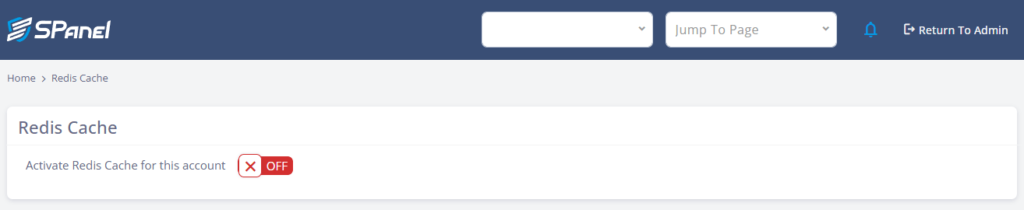
Open Software > Redis Cache in SPanel. You will see a single toggle labeled Activate Redis Cache for this account, which is OFF by default. Switching it on raises a confirmation – “Please confirm you want to deploy Redis Cache” – with No and Yes, your safety check before anything is provisioned. Choose Yes, and the page shows Redis Server
Details: the Redis Version, a private Redis IP (a 127.x.x.1 loopback), TCP Port 6379, and a masked Redis Password, plus Statistics and Redis Limits. SPanel handles installation and credentials; from here you copy the host and password into your app or WordPress Redis plugin so it uses the cache.
Why this is different in SPanel
Two things stand out. First, each hosting account gets its own dedicated Redis instance bound to a private loopback, with its own generated password and a memory limit, managed by systemd – not a shared multi-tenant Redis where accounts compete for memory or see each other’s keys. Second, deploying is a single panel action – no SSH, no root, no config files to edit.
Before you start
- Access to the SPanel user interface for the account that will run Redis.
- Know which application will use the cache – a WordPress site with a Redis object-cache plugin, or another app that speaks the Redis protocol.
- A place to paste the host, port, and password. The password is generated for you; keep it private.
- Nothing is destroyed by deploying, but confirming provisions a live instance, so deploy when you are ready.
Step-by-step
- In SPanel, open Software > Redis Cache. The page loads with the toggle OFF – “Activate Redis Cache for this account,” and no server details yet.
- Switch on Activate Redis Cache for this account. SPanel shows the confirmation Please confirm you want to deploy Redis Cache with No and Yes. Read it first – this provisions a live instance.
- Click Yes. The page then shows Redis Server Details: Redis Version, the Redis IP (for example 127.10.2.1), TCP Port 6379, and a masked Redis Password, plus Statistics and Redis Limits. In our screenshots this is the yoga account, password masked.
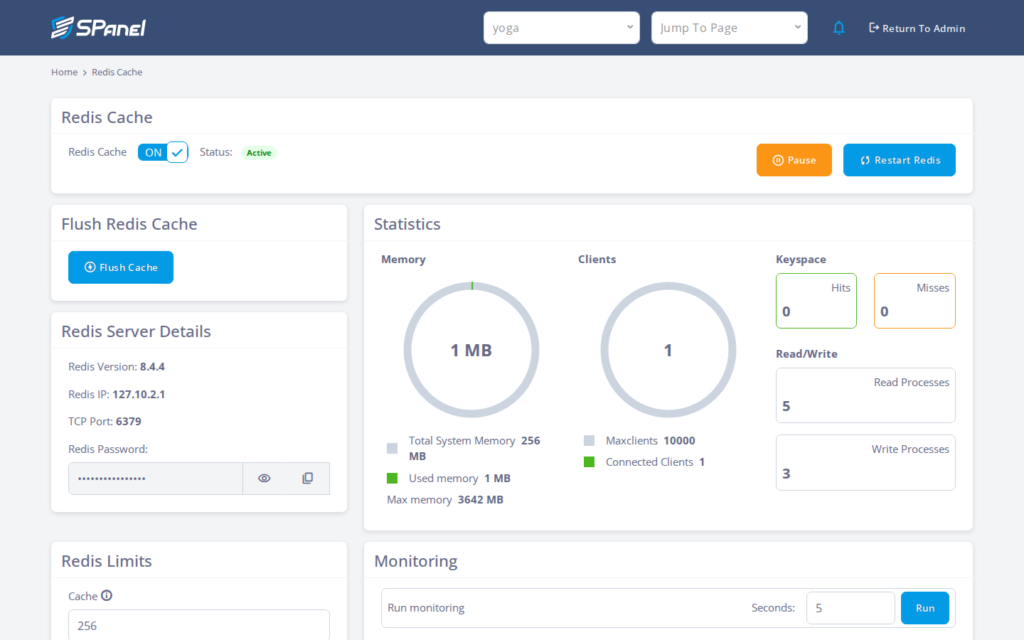
- Use the reveal and copy buttons to grab the password, then copy the Redis IP and port 6379. Paste them into your app config or WordPress Redis plugin settings, save, and confirm the plugin reports the cache connected. Deploying alone connects nothing – this step puts it to work.
What happens behind the scenes
SPanel provisions a Redis server scoped to your account and starts it under systemd, so it returns automatically after a restart. It binds Redis to a private 127.x.x.1 loopback rather than a public interface, so the cache is reachable only from your account and never exposed to the internet. A memory limit keeps it from growing without bound.
Limitations and edge cases
- Redis is per hosting account, not per site. Sites under one account share the same instance. To avoid collisions, give each app a distinct key prefix.
- Deploying does not connect any site automatically. SPanel gives you the host and password; you configure your app or plugin yourself. Until you do, nothing is cached.
- Redis is an in-memory cache, not durable storage. Treat its contents as disposable – anything in it can be evicted or cleared. Never store data you cannot regenerate.
Troubleshooting
| Symptom | Likely cause | What to do |
| Plugin reports “not connected” after deploy | App not pointed at the Redis host, port, or password | Copy the Redis IP, port 6379, and password into the plugin and save |
| No speed improvement after deploying | Instance provisioned but no app configured to use it | Confirm the plugin references the Redis host and shows the cache active |
| Two sites returning each other’s cached data | Sites share one instance with no key prefixes | Set a distinct key prefix per app |
| Cache entries disappear unexpectedly | Memory limit reached, so older keys are evicted | Cache only regenerable data; review Redis Limits |
When to use this / when not to use this
| Use this when | Skip or use something else when |
| A database-heavy site repeats the same queries on every request | The site is mostly static and the database is not the bottleneck |
| You want an object cache for WordPress or a Redis-aware app | Your app cannot speak the Redis protocol |
| You want managed setup without SSH or root | You need a public or cross-server Redis endpoint |
| You can configure the plugin with the credentials | You need durable storage that survives eviction |
FAQ
Q: Does deploying Redis automatically speed up my WordPress site?
A: No. SPanel provisions the instance, but you must install a Redis object-cache plugin and point it at the credentials. Until then it sits idle.
Q: Where do I find the Redis host and password?
A: After you confirm deployment, the Redis Server Details panel shows the Redis IP, TCP Port 6379, and a masked Redis Password with reveal and copy buttons.
Q: Is my Redis instance shared with other accounts?
A: No. Each account gets its own dedicated instance bound to a private loopback with its own password. It is not multi-tenant.
Q: Can two sites under one account use the same Redis?
A: Yes, but they share one instance. Give each site a distinct key prefix so their keys do not collide.
Q: Is the data in Redis safe to rely on long term?
A: No. It is an in-memory cache, not durable storage. Entries can be evicted when the memory limit is reached, so only cache data you can rebuild.
Q: Can I reach this Redis from another server?
A: No. The instance is bound to a private 127.x.x.1 loopback, reachable only from within the same account.
