
SPanel enforces per-account limits on CPU, memory, disk throughput, disk IOPS, and processes using Linux control groups (cgroups v2), the same kernel mechanism that container runtimes are built on. A small SPanel service, cpm, places each account’s processes into its own control group and re-checks once per second. You get that at no additional cost on every ScalaHosting managed VPS, with no separate operating system license.
What are cgroups v2
A control group (cgroup) is a kernel feature that groups processes together and caps what the group can consume. Cgroups v2 is the current generation, with a unified hierarchy and per-resource controllers for CPU, memory, disk I/O, and process count.
This is not an SPanel invention – it ships in the Linux kernel and underpins the container world. When you run a Docker container with a memory cap, that cap is a cgroup.
So SPanel points the machinery the industry already trusts for containers at hosting accounts instead; no parallel enforcement engine to learn, audit, or pay for. The kernel holds; SPanel configures.
One control group per account
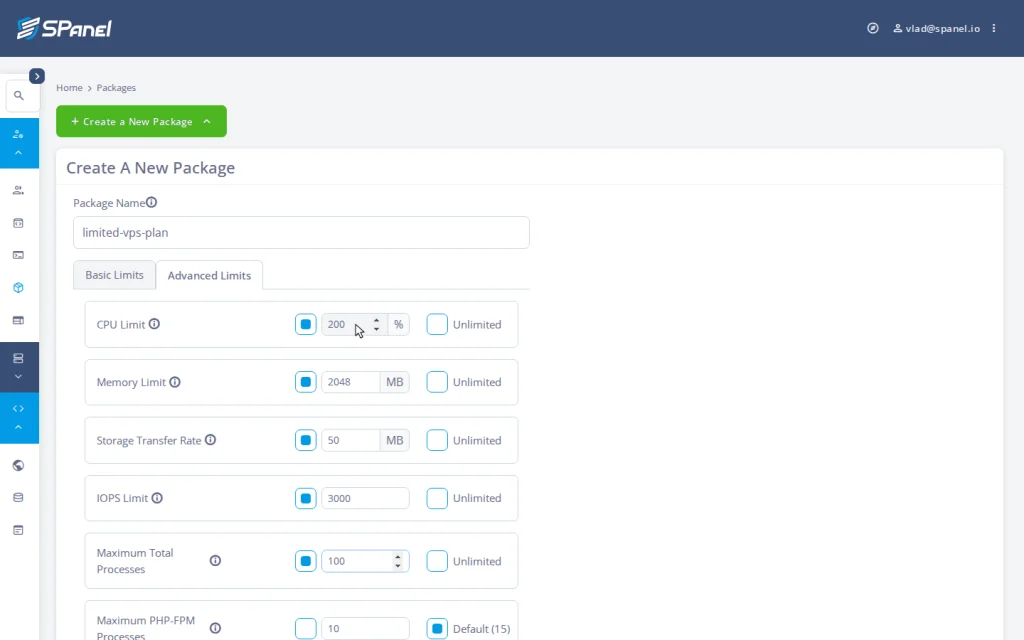
When an account has performance limits set (directly or through a package), SPanel creates a control group for it and writes the account’s ceilings in. On the package form’s Advanced Limits tab, five dials map to four standard cgroups v2 controllers:
| Limit (package dial) | cgroups v2 controller | What happens at the ceiling |
| CPU Limit – 100 means one full core | cpu | Throttled to its share, never killed |
| Memory Limit (MB) | memory | Reclaimed inside that account only; worst case ends its own process |
| Storage Transfer Rate (MB/s) | io | Queued and slowed to its lane |
| IOPS Limit (operations/sec) | io | Queued and slowed to its lane |
| Maximum Total Processes | pids | The fork past the cap simply fails |
Two rows need a note. The CPU number is a share of a core, not of the server: 100 is one full core, 50 is half a core, 200 is two cores. And the Storage Transfer Rate and IOPS Limit dials govern storage traffic, not network bandwidth. ScalaHosting’s managed VPS plans come with unmetered network traffic; the io controller has nothing to do with that.
The cpm sweep: one second, on purpose
A control group only contains the processes you put in it, and new processes spawn constantly: every PHP request, cron job, and shell. Something has to keep placing fresh ones into the right account’s group: cpm, SPanel’s control-group process manager.
cpm runs continuously and sweeps once per second: it walks the running processes, identifies which account each belongs to, and assigns it to that account’s control group. A process that started a moment ago is picked up on the next sweep.
That cadence sets the honesty boundary for the whole feature.
What the sweep promises: any sustained workload (a plugin stuck in a loop, a memory leak climbing all afternoon) is inside its ceilings within about a second of starting, and stays there.
What it does not promise: instantaneous enforcement. A new process runs unconfined for up to a second before its first sweep. For overload that lasts minutes or hours, that horizon is the right call. For sub-second microbursts, it is not a fence, and we won’t claim it is.
Pull quote: “The kernel holds the line; our job is to keep every process on the right side of it, once a second, forever.”
Want to see these dials on a live server? Every limit here ships with SPanel on a ScalaHosting managed VPS, with no separate operating-system license. Set them for a whole plan in the package form, or for one account in the Change Limits editor.
What the ceilings feel like
The behavior at each ceiling is chosen to degrade the offending account gracefully and leave its neighbors untouched. The table above lists them; two are worth dwelling on.
Memory is the honest one. At the ceiling the kernel reclaims inside that one account’s group, and in the worst case ends the account’s own offending process, not anyone else’s. An undersized memory ceiling can terminate the account’s own worker mid-task, so the fix is sizing the dial sensibly. SPanel’s monitoring tells the two apart: a server-wide out-of-memory event raises an admin alert; a per-account containment event is the limit doing its job.
The process ceiling is the other: a fork past it simply fails, which is why a fork bomb fizzles instead of taking down the process table. Throttled, contained, slowed, refused: four concrete verbs, no error page in sight.
Burst mode: enforcement that watches the load
An optional layer over the sweep, burst mode, answers an obvious objection: why throttle an account to half a core at 4 a.m. when seven cores sit idle?
With burst mode on, cpm compares server load to core count once per second. While load stays below the core count (real spare capacity), limited accounts run unconfined and use what’s free. The moment load reaches the core count, confinement engages within about a second.
One honest caveat is a conservative tail: when pressure subsides, processes already confined stay in their groups until they exit, and only new work runs free again. The effect is mild but real. The mechanics live in our burst mode write-up. The principle: limits protect, they don’t punish.
Where this came from
This is one of SPanel’s clearest Cloud Democracy stories. For years, the most common reason providers gave for staying on another panel was per-account resource limiting, historically a separate, paid operating-system layer. The requests asked for exactly this: CPU, RAM, IO, IOPS, and process caps per account, without buying another license. We built them on the kernel’s own control groups: native, with no CloudLinux license needed.
One scope note: this is resource enforcement, not filesystem virtualization. SPanel does not provide a CageFS-style per-account virtual filesystem. Account isolation comes from standard Linux users and permissions plus SShield and the security stack; resource limits come from cgroups v2.
Demo flow
Deterministic Admin Interface steps for the screens in this article.
- Log in to the SPanel Admin Interface with admin credentials.
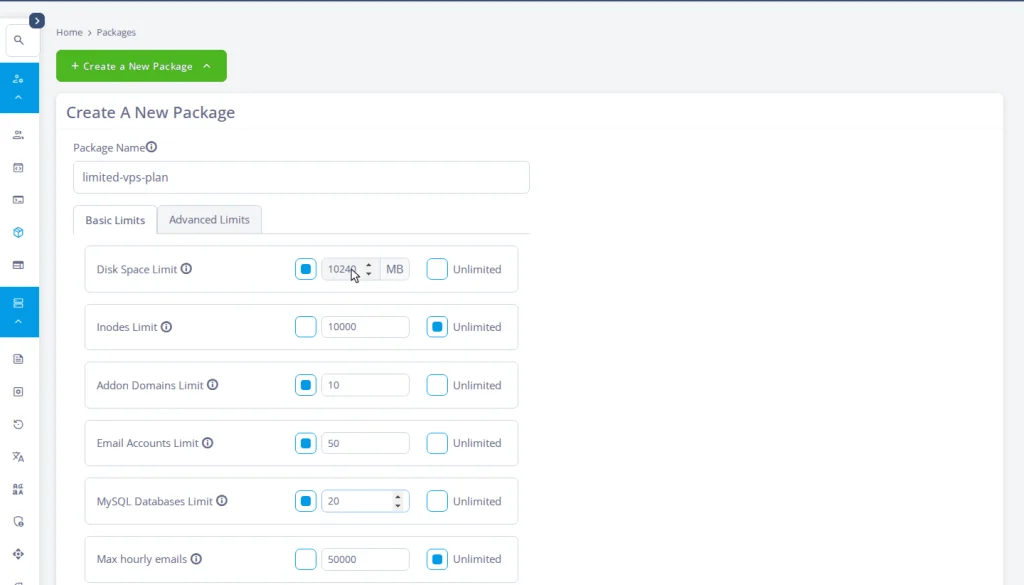
- Under Accounts Management, open Packages and click Create a New Package (or Modify an existing package).
- On the Advanced Limits tab, capture the five kernel dials: CPU Limit, Memory Limit, Storage Transfer Rate, IOPS Limit, and Maximum Total Processes.
- Switch to the Basic Limits tab and capture the storage and creation-count dials (disk space, inodes, addon domains, email accounts, databases).
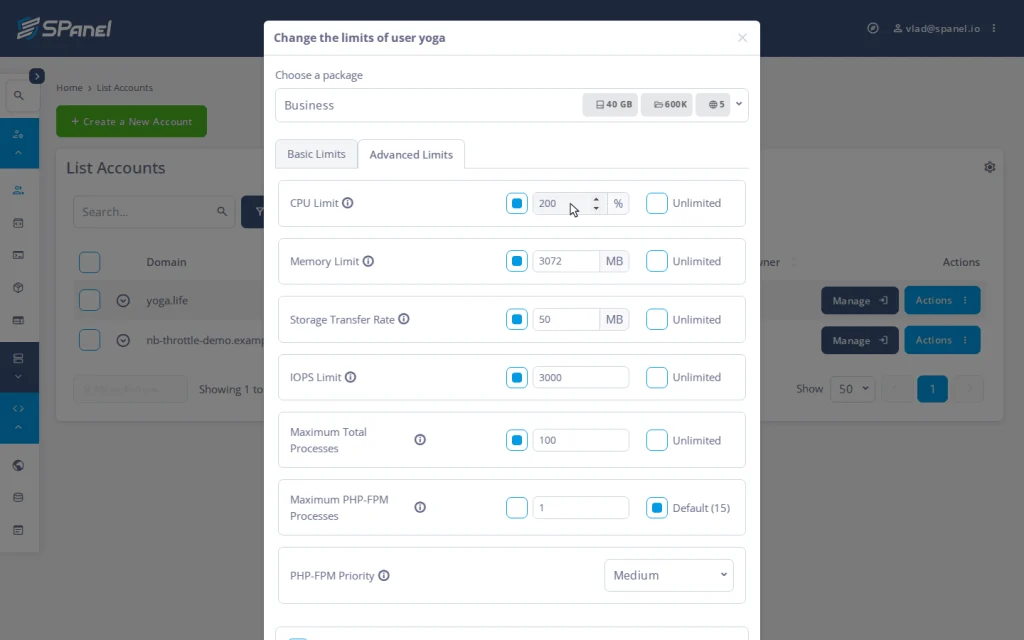
- From Manage Accounts, open a limited account’s Actions menu and choose Change Limits; in the Change the limits of user editor, open the Advanced Limits tab to read the account’s five current values.
Try it on a real server
To see the dials and a limited account’s current values on a live server, spin up a ScalaHosting managed VPS; SPanel and every limit here are included free, with no per-account fees or extra OS license. If there’s a feature you’re missing, the Cloud Democracy board is the place to suggest it and possibly see it in new SPanel versions. Field-level reference lives in the SPanel documentation.


FAQ
Q: Does SPanel use cgroups v1 or v2?
A: cgroups v2, the same generation modern container runtimes use.
Q: Do I need CloudLinux to limit CPU and RAM per account?
A: No. SPanel enforces CPU, memory, disk throughput, IOPS, and process limits natively through cgroups v2, with no separate OS layer or license. This is resource limiting, not CageFS-style filesystem virtualization.
Q: What does a CPU limit of 100 mean?
A: One full CPU core. 50 is half a core; 200 is two cores. The number is a share of a core, not of the whole server.
Q: How fast do limits take effect?
A: The cpm service sweeps every second, so a new process is confined within about a second. Sustained overload is contained; sub-second microbursts are not.
Q: What happens when an account hits its memory limit?
A: The kernel reclaims memory inside that account’s group only, in the worst case, ending the account’s own offending process. The rest of the server is unaffected.
Q: Is the disk throughput limit the same as my bandwidth?
A: No. It governs storage (disk) traffic in MB/s, not internet traffic. ScalaHosting managed VPS plans include unmetered network traffic.
