
ON THIS PAGE
If you run several brands, SPanel‘s Email Forwarders tool can send every message from one domain to another with a single rule. Set the Forwarding Type to Forward an Entire Domain, pick the source under Forward from, and enter one or more destination domains under Forward to Domain(s). Each address then maps to the matching mailbox: info@old-domain.com reaches info@new-domain.com, with no per-address setup.
- One rule mirrors an entire domain’s mail to one or more destination domains.
- Addresses map by name: whatever@source.com is delivered to whatever@destination.com.
- Per-address forwarders and the catch-all still exist for narrower jobs.
- It routes mail; it does not merge, deduplicate, or store a copy on the source.
This setup fits agencies and operators running several brands or client sites, where each domain keeps its own public address but the mail needs to reach one place. SPanel and its domain forwarding are included in every managed VPS solution from ScalaHosting.
Why This Matters
Running multiple brands usually means a number of scattered inboxes: one for support, one for invoices, one for business communication, etc. Messages slip. A customer emails hello@one-of-your-domains.com, and nobody sees it for a week.
The tidy version is one working inbox that everything flows into, while each brand keeps its own public-facing address. The hard part is getting there without setting up a forwarder for every address on every domain. SPanel does it all for you.
The Short Version
Domain-level forwarding takes all mail for a source domain to a destination domain, matched by local part. You create it once, and you don’t need to list the addresses yourself. Even inboxes you create later are handled automatically.
What Most People Get Wrong
The common assumption is that “forward my domain’s email” means one forwarder per mailbox. That works, but it scales badly, and you have to set up forwarders manually for every new address you create in the future.
A catch-all is not the same thing either. The Default Address in SPanel only collects mail sent to addresses that do not exist – a safety net for typos, not a mirror of every mailbox. Domain forwarding, per-address forwarders, and the catch-all are three tools for three different jobs.
How It Actually Works
In the SPanel User Interface, open Email Forwarders. The New Forwarder panel offers a Forwarding Type choice with two options: Forward an Email Address and Forward an Entire Domain.
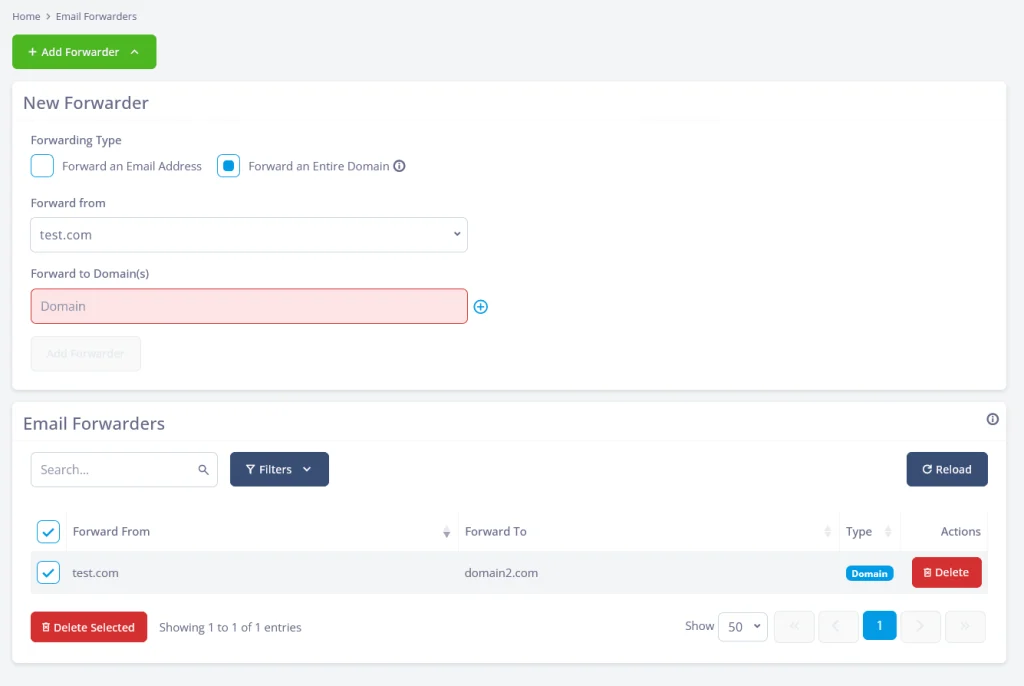
Choose Forward an Entire Domain. Use Forward from to select the source domain, then enter one or more destination domains in Forward to Domain(s), and click Add Forwarder. The rule goes live immediately.
Delivery then follows the local part of each address. Mail to billing@source.com arrives at billing@destination.com, and a new careers@source.com arrives at careers@destination.com without you touching the rule. You configure two domains once, not dozens of addresses.
Pick Forward an Email Address instead for the single-address path, with a Forward to Email Address field and a Pipe to a program option.
Where SPanel Is Different
Most panels forward one address to another, but few make whole-domain forwarding an option next to the single-address form, selectable from one Forwarding Type control. All forwarders are listed in the tool with the option for deleting them when they’re no longer needed.
Comparison: Which Forwarding Tool Fits
| Tool | What it does | Best for | Set up per address? |
| Forward an Entire Domain | All of a domain’s mail to a destination domain, matched by name | Consolidating a whole brand into another domain’s mailboxes | No |
| Forward an Email Address | One address to another, or piped to a program | A single mailbox or a script-driven address | Yes |
| Default Address (catch-all) | Mail sent to addresses that do not exist | Catching typos and unknown recipients | No |
Use domain forwarding to mirror a whole brand, per-address forwarders for exceptions, and the catch-all only for typos.
Limitations and Trade-Offs
Forwarding routes mail; it does not merge it. Messages from different brands land as separate emails, and replying from the right brand address is up to your mail client, not the forwarder.
Forwarding is not a backup either. A forwarded message is handed to the destination, and the source domain doesn’t keep a copy. If you need retained mail on both ends, forwarding alone will not do it.
Recommended Workflow
Pick your home base – the domain whose inboxes you actually read – and map every other brand toward it. For each source brand, create one Forward an Entire Domain rule rather than a stack of per-address forwarders, and reserve Forward an Email Address for exceptions. Leave the Default Address catch-all for unknown recipients only. After adding a rule, check the Email Forwarders list and send a test message. Solid email deliverability practices and accurate DNS records keep routed mail landing where it should.
Domain Forwarding in SPanel: Step-by-Step
- Open Email Forwarders in the SPanel User Interface.
- In the New Forwarder panel, find the Forwarding Type choice.
- Select Forward an Entire Domain.
- Under Forward from, choose the source domain to redirect.
- In Forward to Domain(s), enter one or more destination domains.
- Click Add Forwarder to create the rule.
FAQ
Q: How do I forward an entire domain’s email to another domain in SPanel?
A: Open Email Forwarders in the SPanel User Interface and set the Forwarding Type to Forward an Entire Domain. Choose the source under Forward from, enter one or more destination domains under Forward to Domain(s), and click Add Forwarder. Every address on the source then reaches its match on the destination domain.
Q: Does domain forwarding cover addresses I create later?
A: Yes. The rule matches by address name, not a fixed list, so a new address on the source domain is forwarded as soon as it receives mail. Add careers@source.com next month and messages reach careers@destination.com with no change to the rule.
Q: What is the difference between a domain forward and a catch-all?
A: A domain forward mirrors every address on a source domain to a destination domain. The catch-all, shown as Default Address in SPanel, only collects mail sent to addresses that do not exist. One handles real mailboxes across the whole domain; the other catches typos. They can be used together.
Q: Can I still forward a single address on its own?
A: Yes. The same Email Forwarders tool offers Forward an Email Address as the other Forwarding Type. It sends one specific address to another and includes a Pipe to a program option. Use it for exceptions while a whole-domain rule handles the rest.
Q: Does forwarding keep a copy of the email on the original domain?
A: No. Forwarding hands the message to the destination and keeps no copy on the source domain. If you need mail stored on both ends, keep a real mailbox where retention matters rather than relying on the forward.
Q: How do I remove or check my forwarding rules?
A: The Email Forwarders list shows all your active forwarding rules with a Delete button next to each one. You can search for and filter forwarders and use the checkboxes and Delete Selected button to remove rules in bulk.
Related Resources
To get the most from a consolidated setup, read up on managing email accounts in SPanel, pair forwarding with email deliverability practices so routed mail is not flagged, and keep your DNS records accurate so delivery stays reliable.
