
You can launch a self-branded hosting business on a single ScalaHosting managed VPS in a weekend. You have everything you need:
- SPanel – the control panel included for free on every managed cloud VPS. along with tons of customization options, site-building tools, and security solutions.
- White-label options – let you put your company name, logo, and login URL on the panel, define hosting plans as packages with enforced per-account limits, and create your first client account.
ScalaHosting runs the infrastructure; you own the brand and the client relationship. Simple as that!
A real weekend, a real business
Here is a story for you.
Dani runs a small web studio in Bristol. She already hosts eight client sites the awkward way: some on a shared plan she logs into for them, some on a reseller account whose panel still shows another company’s name.
When a client recently asked “who is ‘cPanel’, and why am I paying you instead of them?”, she decided to stop reselling someone else’s hosting and start running her own – under her own name, on her own terms.
She didn’t want to rack servers or hire a sysadmin. She only needed a weekend, a clear plan, and a panel that says her studio’s name when clients log in. That is exactly the build this article walks through.
What you’re actually building
A hosting business has two halves.
One is the infrastructure – the server, the operating system, the web stack, the security, the backups. The other is the product and the brand – the plans you sell, the limits that keep them fair, and the name your clients see.
The trick to starting a web hosting business is to rent the first half fully managed and own the second half completely.
White-label hosting means selling hosting under your own brand on infrastructure someone else maintains, so your clients see your company, not your provider.
That’s the model you can utilize on a ScalaHosting cloud VPS paired with SPanel. Scala has been running managed hosting since 2007, powering over 700,000 websites across 120+ countries. The server (Rocky Linux, the Apache-plus-Nginx or OpenLiteSpeed stack), the SShield security guard, and the panel itself (SPanel) are maintained for you.
What you add on top is your identity and your plans.
| What a hosting business needs | The traditional reseller path | Managed VPS + SPanel |
| Your brand on the panel | Often a paid reseller tier | One toggle, applied server-wide |
| Client login page | Frequently the provider’s domain | The client’s own domain at /hostpanel |
| Per-account resource limits | Historically, a separate paid OS add-on | Included, enforced at the kernel level |
| Panel licensing | Per-account or premium tier | Included free with the VPS |
| Time to a first paying client | Weeks of assembly | A weekend |
The right-hand column is the whole pitch.
Let’s see how to configure this setup.
Saturday morning: the server
Pick a managed cloud VPS sized for your first handful of clients. “Managed” is the load-bearing word: ScalaHosting handles the operating system, patching, the web and mail stack, and 24/7 support, and SPanel comes preinstalled.
You don’t configure Apache by hand or harden the OS yourself. By the time the VPS is provisioned, you have a working hosting server with a real control panel waiting at the default /spanel login path.
That’s the foundation. Everything from here is configuration you do inside the panel, in a browser, with no command line required.
Saturday afternoon: put your brand on the panel
This is the part that turns “I resell hosting” into “I run a hosting company.” In the SPanel Admin Interface, open the Branding screen (under Server Management) and set three things: your company name in the Enter Your Brand field, your logo under Custom logo, and the Login URL option that switches the panel’s login path from the default /spanel to the neutral /hostpanel.
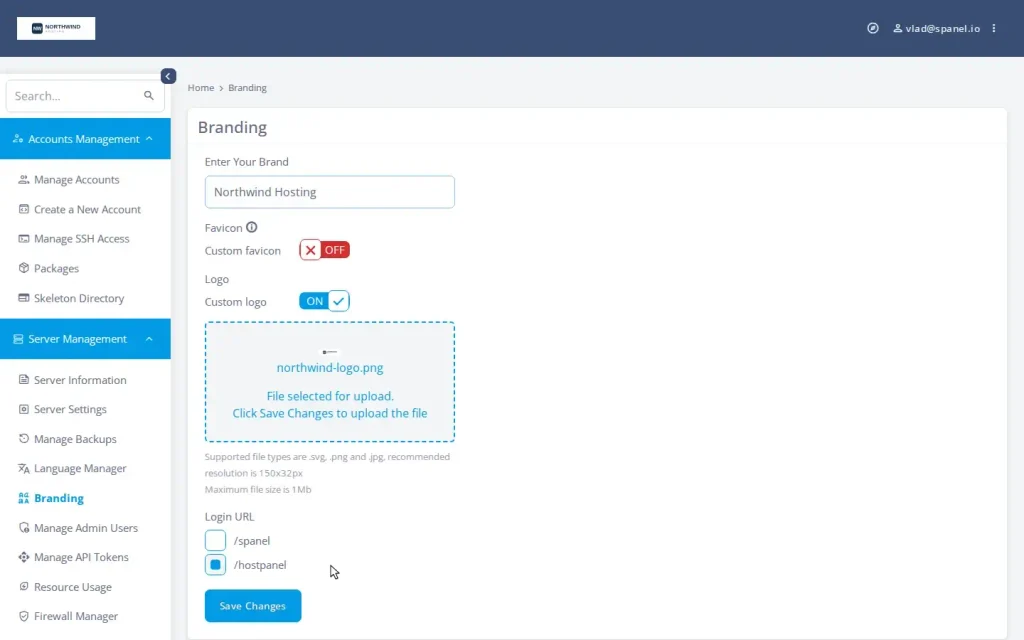
Select /hostpanel and SPanel rewrites the relevant configuration across the whole server: the virtual host of every hosted domain, the proxy configuration that routes panel traffic, and the webmail entry links.
This covers whichever web stack your server runs, Apache behind Nginx or OpenLiteSpeed, and reloads the services so the change is live immediately.
You never edit a config file. Better still, the branding is inherited automatically: every new account, addon domain, and subdomain you create later generates its configuration with your brand already in place, and SPanel updates reassert it rather than wiping it out.
The result your clients see is the point. A client whose site is client-site.com logs in at client-site.com/hostpanel/login, on a page carrying your logo and your name.
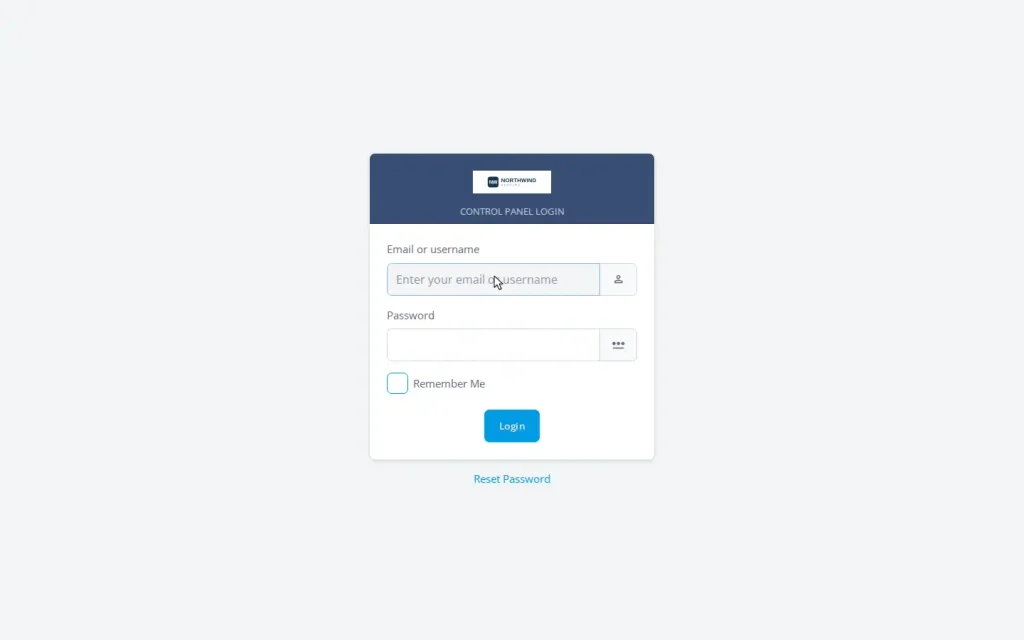
Two honest notes worth stating plainly.
Branding is server-wide: each server carries a single brand, so cleanly running two distinct hosting brands requires running two servers.
Second, the panel branding does not rename the server hostname or your nameservers – those are the other two steps of a complete white-label setup, both supported by SPanel. Set a hostname on your own domain (server1.yourbrand.com) and run ns1/ns2 on your domain, and no provider surface shows to clients at all.
We keep a full white-label checklist for resellers as a separate guide.
Remember – Branding isn’t just a decoration. It’s the difference between renting a client relationship and owning one.
Want to try the build before you take a client? Every managed VPS from ScalaHosting includes SPanel and all of the above white-label options. Shape your brand and sketch your first plans in the panel, then onboard your first client when the catalog is ready.


Sunday morning: design your package plans
Now you have a branded panel. Next, you need something to sell.
In SPanel, a hosting plan is a package – a named bundle of account limits you define once and assign to accounts in a single move. A package carries fourteen dials: disk quota and inodes; how many domains, email accounts, and databases an account may create; the hourly outgoing email limit; PHP workers and PHP priority; the kernel-enforced ceilings on CPU, memory, disk throughput, and disk operations per second (IOPS); the process count; and the feature set, which decides exactly which panel tools that plan exposes.
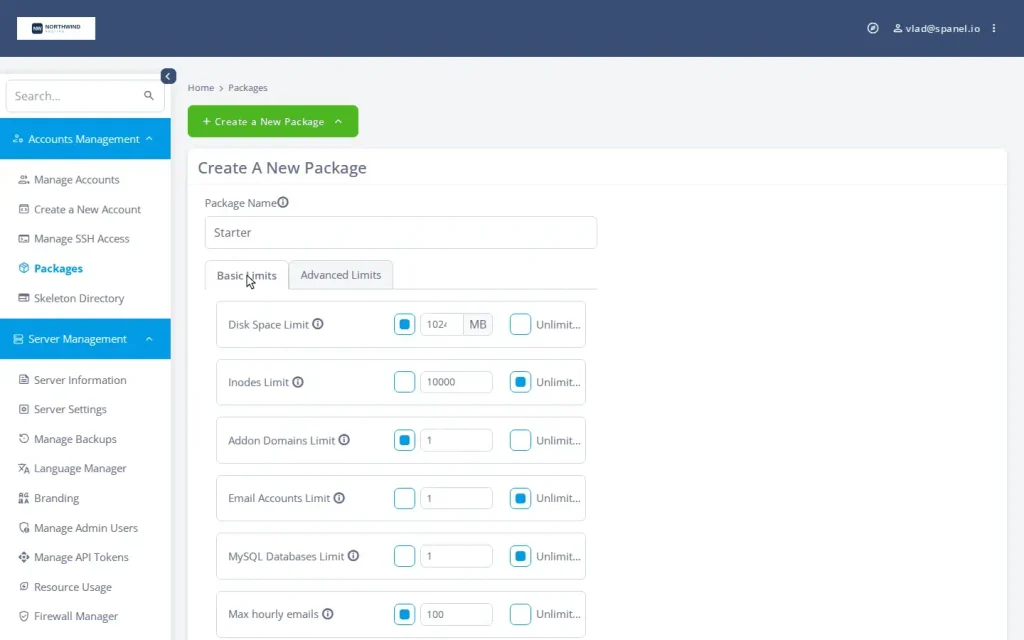
You don’t need to understand every dial to start.
Three plans cover most early catalogs. Here is a sensible starting shape – and to be clear, these numbers are plan-design choices to adapt, not SPanel defaults:
| Plan | Disk | Sites | CPU limit | Memory | Email/hour |
| Starter | 10 GB | 1 | 100 | 1024 MB | 100 |
| Business | 30 GB | 5 | 200 | 2048 MB | 300 |
| Pro | 75 GB | 15 | 400 | 4096 MB | 500 |
About that CPU column, because it trips people up – on SPanel, a CPU limit of 100 means one full core, 50 means half a core, and 200 means two cores. In the example above, the Business plan gives you two cores worth of CPU, and Pro will get you four. The kernel limits ride on Linux control groups (cgroups v2), the same mechanism containers are built on, and they behave humanely at the ceiling.
Here is another benefit.
If your CPU goes over the limit, it is throttled, not killed. Memory pressure is contained to the offending account; disk traffic is slowed to its own lane; and a process that would exceed the process cap simply fails to start. One account’s bad day stays that account’s bad day.
IMPORTANT: One disambiguation, since it’s the most common mix-up: the disk throughput limit is storage traffic in MB/s, not network bandwidth – ScalaHosting managed VPS plans come with unmetered network traffic.
Those per-account limits used to be the single biggest reason hosting providers stayed on other panels, because they historically required a separate paid operating-system add-on. SPanel built them natively instead.
You want to know the best thing? – The request came straight from the community. This is not uncommon when you learn about our Cloud Democracy project. In this forum, users can suggest new features and see the most popular ones added in future SPanel updates.
If you want the dial-by-dial reference, we wrote up what each package limit actually does.
Sunday afternoon: create your first client account
With a brand and a plan catalog in place, creating a client is the easy part.
In the Admin Interface, you create the account, point it at the client’s domain, and assign one of your packages. Every limit in that package – quotas, creation counts, mail rate, PHP settings, and the kernel ceilings – is applied immediately and in place.
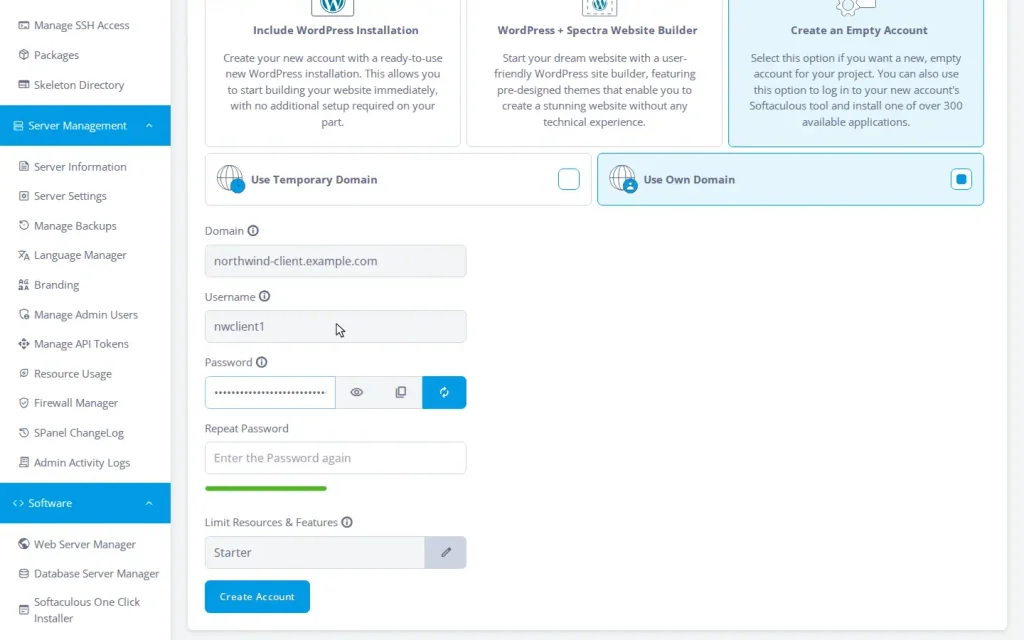
The client gets a login on their own domain, under your brand, and a clean User Interface scoped to whatever the plan’s feature set exposes. They never see a provider’s name, never memorize a server address, never ask who “cPanel” or “SPanel” is.
As far as they know, they’re a customer of your business.
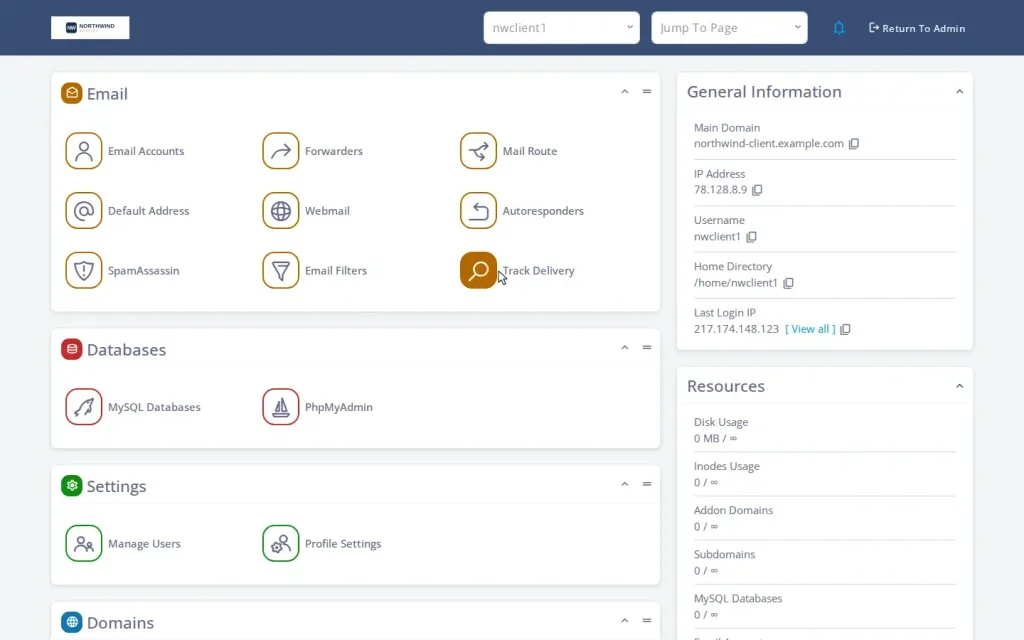
When that client outgrows the Starter plan, you don’t migrate anything. From the account’s Actions → Change Limits, you assign the Business package and all fourteen dials re-apply live, with no downtime. Upgrades are a one-action change, which is exactly what you want the day a client’s traffic finally takes off.
For the occasional big client who doesn’t fit a tier, that same Change Limits screen has a Use Custom Limits option that gives the account its own reserved Custom designation, so a negotiated deal doesn’t pollute your plan catalog.
What about billing and automation?
A weekend gets you a branded panel, real plans, and a first client you onboard by hand. The next layer to turning manual onboarding into “clients order and get provisioned automatically” is WHMCS, the billing platform most hosting businesses run their storefront on.
SPanel ships a WHMCS module that maps your packages to billable products, so an order on your storefront can create the account on the right plan, on the client’s domain, under your brand, with no one in the loop. And because the SPanel API endpoint follows your branding URL too (it’s in the official SPanel API documentation), every programmatic surface stays on-brand.
You actually don’t need WHMCS to start – plenty of small studios run their first dozen clients straight from the panel – but it’s the obvious next step, and we trace the whole order-to-branded-login pipeline separately.
The honest math
With reseller hosting, you set your own retail prices and keep the margin. The appeal is real: your costs are one managed VPS and your time, while your revenue scales with clients.
What changes the math in your favor is what you don’t pay. There’s no white-label surcharge to make the panel say your name, and no per-account licensing fee to enforce CPU and memory limits.
Both are included at no added cost on every managed VPS with Scala, and in the wider category, those two line items are commonly where the surcharges live. SPanel is also engineered to use a fraction of the server resources cPanel requires, so more client accounts fit comfortably on the same box.
Demo flow
Here are the steps to white-label your hosting business quickly and easily:
- Log in to the SPanel Admin Interface and open Server Management → Branding. In the Enter Your Brand field type “Your Brand Name”, set the logo under Custom logo, and choose /hostpanel for the Login URL.
- Open a new browser tab to a hosted demo domain at the /hostpanel/login path.
- Back in the Admin Interface, open Packages → Create a New Package. On the Basic Limits tab enter the Starter values: Disk Space Limit 10240 MB (10 GB), Addon Domains Limit 1, Max hourly emails 100. (CPU and Memory live on the Advanced Limits tab.)
- Open the Create a New Account screen. Enter your domain name (northwind-client.example.com), a username (nwclient1), and assign the Starter package from the dropdown.
- From Manage Accounts, use the account’s Manage login action to enter its User Interface.
Frequently asked questions
Q: Do I need to be a sysadmin to start a hosting business this way?
A: No. The server is fully managed by ScalaHosting – operating system, patching, web and mail stack, and support. You work entirely inside SPanel in a browser: branding toggle, package forms, account creation. No command line is required to get a first client live.
Q: How much does white-label branding cost on SPanel?
A: Nothing extra. Branding is included free on every ScalaHosting managed VPS, like every SPanel feature. There’s no white-label surcharge and no per-account fee.
Q: Where do my clients log in?
A: At their own domain plus the branded path – for example client-site.com/hostpanel/login. Every hosted domain serves your branded login page, so no shared server address ever appears in the instructions you give clients. The client’s-own-domain login is default behavior, not something you assemble.
Q: Can I really set all this up in a weekend?
A: The branded panel, a three-tier package catalog, and a first client account are realistically a weekend’s work. Adding automated billing through WHMCS and finishing branded nameservers and hostname is the following week’s polish, not a blocker to your first client.
Q: Do I need CloudLinux to limit CPU and memory per account?
A: No. SPanel enforces CPU, memory, disk throughput, IOPS, and process limits natively through the Linux kernel’s control groups (cgroups v2) – no separate OS license. To be precise about scope: this is per-account resource limiting, not a claim of CageFS-style filesystem virtualization; account isolation comes from Linux users, permissions, and the SShield security stack.
Q: Can I run two different brands on one server?
A: No – branding is server-wide: one company name, one logo, one login path per server. Two brands means two servers, which is also the cleaner way to keep two books of business separate.
Q: What happens when one client’s site gets busy and heavy?
A: It’s contained, not catastrophic. CPU over the plan’s limit is throttled, memory is contained to that account, and disk traffic is queued in its own lane – so the busy account slows under its own load while every other client keeps full performance.
Q: Does updating SPanel wipe out my branding?
A: No. The update process reasserts your branded URL in the configuration it touches, including the webmail login and logout links. Your customization survives the upgrade cycle without manual patch-up.
