
To forward every address on a domain to another domain in SPanel, open Email Forwarders, add a New Forwarder, set Forwarding Type to Forward an Entire Domain, choose the source under Forward from, enter the target under Forward to Domain(s), and click Add Forwarder. One rule then mirrors the whole domain, so there’s no need for additional per-address setup. SPanel is unusual in keeping per-address, catch-all, and whole-domain forwarding together in one place.
Domain-level forwarding matches each address to the same name on the destination automatically, and covers addresses you add later. It shares the Email Forwarders screen with per-address forwarders; the Forwarding Type selector switches between them. Per-address forwarders, the catch-all, and whole-domain forwarding do three different jobs – test a couple of real addresses after you save.
When domain forwarding matters
You changed domains. The company rebranded, or you bought a cleaner name, and everything old still points at the old mailbox – customers keep writing to orders@old-domain.com, and a supplier still has accounts@old-domain.com saved from years ago.
The usual advice is to set up forwarders address by address. That works for two or three mailboxes. It falls apart at scale, and breaks the moment someone emails an address you forgot. What you want is one rule: everything for the old domain goes to the new domain, names unchanged. SPanel does that in a single form.
The short version
Whole-domain forwarding delivers every address on a source domain to the same-named address on a destination domain. It matches by pattern. Messages sent to info@old-domain.com are automatically forwarded to info@new-domain.com. Addresses you add later are covered too. In SPanel this is the Forward an Entire Domain type.
What most people get wrong
The common mistake is treating a catch-all as if it were domain forwarding. A catch-all collects mail sent to addresses that do not exist on your domain – the salez@ when you only have sales@. It says nothing about where your real addresses go. Domain forwarding is the opposite: it sends every real address to its twin on another domain, name for name.
A second mistake is assuming per-address forwarders and domain forwarding cancel out. They can coexist as separate solutions to two distinct problems.
How it actually works
Open the tool from the SPanel user area under Email Forwarders. A new account shows the empty state: “You haven’t created any Email forwarders yet.”
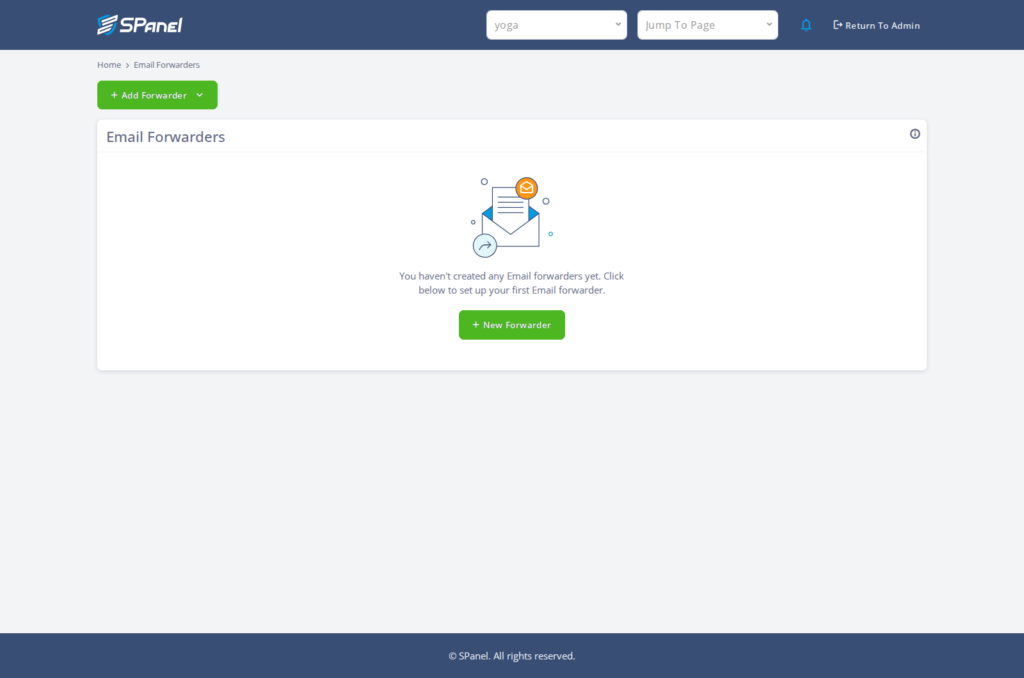
To create a rule click New Forwarder. The first choice is Forwarding Type, with exactly two options: Forward an Email Address and Forward an Entire Domain. Pick the second, and the form adjusts.
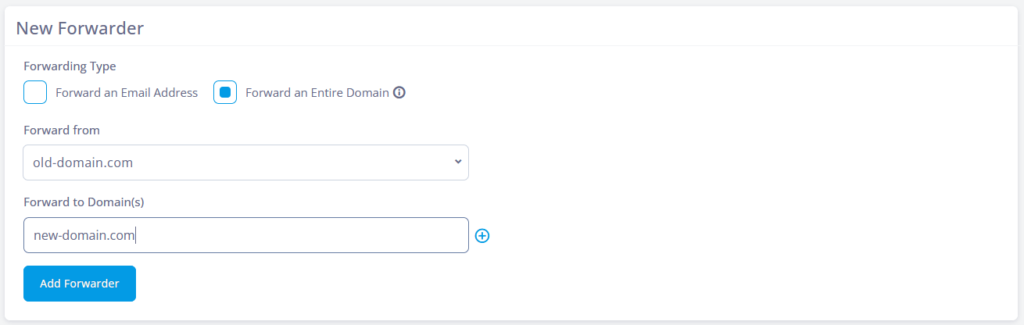
Now set Forward from, the source domain, and Forward to Domain(s), the destination. Click Add Forwarder and the rule goes live. The single-address form differs, offering Forward to Email Address and a Pipe to a program option instead.
Where SPanel is different
SPanel keeps all three forwarding behaviors in one place. On the Email Forwarders screen you build a per-address redirect and, via the Forwarding Type switch, a whole-domain mirror. The catch-all sits nearby as a separate Default Address tool, keeping unmatched-mail handling distinct.
The list view helps once you have a few rules: Domain and Type filters with Reset and Apply, columns including Forward to and Actions, and a Delete Selected control. SPanel is available on all ScalaHosting services at no extra cost.
Practical example
Think of a development agency that consolidates a client’s two brands under a single domain. To make the transition as smooth as possible, each brand keeps its public addresses, but staff need to use the inboxes associated with the newly-assigned primary domain. A whole-domain forward from the old brand mirrors every address in one rule without the need for dozens of hand-made redirects.
Comparison: which forwarding tool fits
| Question | Per-address forwarder | Catch-all (Default Address) | Forward an Entire Domain |
| What it moves | One named address | Mail to non-existent addresses | Every address on the domain |
| Keeps the name on the other side | You choose the target | Sends to one chosen mailbox | Yes, name for name |
| Covers new addresses automatically | No | Yes (as unmatched mail) | Yes |
| Best for | A single redirect or a script pipe | A safety net for typos | A full domain move or brand mirror |
| Where in SPanel | Email Forwarders | Default Address tool | Email Forwarders |
Limitations and trade-offs
Domain forwarding mirrors addresses; it does not move mailboxes. Mail is redirected to the destination, so the source account is not where messages come to rest once the rule is active. If you want copies kept on the source as well, that is a different setup – confirm your retention needs first.
It also assumes matching names on both sides. If no support@ exists at the destination, that mail needs somewhere to go on the receiving domain, typically that domain’s own catch-all. Overlapping rules deserve a test too: if you keep a per-address forwarder or a catch-all alongside a domain-level rule, send a few real messages before trusting it.
How you should approach domain forwarding
List the addresses that receive mail today, so you have something to test against. Create the rule, set Forward from and Forward to Domain(s), and save with Add Forwarder. Send test messages to your busiest addresses and confirm they arrive before retiring any old per-address forwarders you no longer need.
Step-by-step
- From the SPanel user area, open Email Forwarders.
- In the New Forwarder panel, set Forwarding Type to Forward an Entire Domain.
- Choose the source domain under Forward from.
- Enter the destination under Forward to Domain(s).
- Click Add Forwarder to create the rule.
- In the Email Forwarders list, filter by Type and click Apply to confirm the new rule appears, with its destination under Forward to.
FAQ
Q: What is the difference between a catch-all and forwarding an entire domain?
A: A catch-all receives only mail sent to addresses that do not exist on your domain, and delivers it to one chosen mailbox. Forwarding an entire domain is the opposite: it takes every real address and sends each to its match on another domain, name for name.
Q: Do I need to set up each address separately?
A: No. That is the point of the Forward an Entire Domain type in SPanel. One rule covers every address on the source domain, and it keeps working for addresses you add later, because it matches by pattern rather than from a fixed list.
Q: Will info@old-domain reach info@new-domain automatically?
A: Yes. Domain-level forwarding preserves the part before the @ and changes only the domain, so info@old-domain is delivered to info@new-domain, sales@ to sales@, and so on across every address. You never name the individual addresses one by one, and any you add later are carried by the same rule.
Q: Can I still use per-address forwarders at the same time?
A: Yes. SPanel keeps per-address forwarders, the catch-all, and whole-domain forwarding as separate tools that coexist. If you run more than one rule that could match the same address, send test messages and confirm the result before relying on it in production.
Q: Where do I find domain forwarding in SPanel?
A: It’s in SPanel’s User interface at Home > Email Forwarders. Add a New Forwarder and set the Forwarding Type to Forward an Entire Domain. The catch-all is a separate tool, the Default Address.
Q: What happens if the destination domain has no matching address?
A: Whole-domain forwarding does not create addresses on the destination. If mail arrives for a name that does not exist there, it needs somewhere to go on the receiving side – usually that domain’s own catch-all. Set the destination up to receive the names you expect first.
