
In SPanel, open your Redis Cache section and use the Redis Limits section to set the Cache field (the memory ceiling) and the Mempolicy dropdown (the eviction policy), then click Save Changes.
SPanel ships sensible defaults – 256M of memory and the allkeys-lfu policy – so you only need to change these if your cache is too small or you want different behavior when it fills up. Note that the noeviction policy makes writes fail once memory is full, so pick it only when losing cached data is worse than failing.
Who this is for
This is for site owners and the people running a managed VPS with ScalaHosting. Redis is pre-deployed there and you want to control how much memory the cache uses and which keys it drops when memory runs out. If your application leans on Redis for sessions, page caches, or object caching and you have noticed memory pressure, this is the page you adjust.
What problem this solves
A cache that is too small evicts entries constantly, lowering the hit rate and pushing load back onto your database. The wrong eviction policy might drop the keys you most wanted to keep, or refuse new writes at the worst moment. SPanel lets you set both directly, so you can match Redis to how your site uses it.
How SPanel solves this
On the Redis Cache section in SPanel, the Redis Limits section holds the settings you need. The Cache field sets the maxmemory size – the hard memory ceiling. The Mempolicy dropdown sets the eviction policy that decides which keys Redis removes when it reaches that ceiling. The section also exposes Maxconn, Timeout, and Keep Alive for connection tuning.
Set the Cache value, pick a policy from Mempolicy, and click Save Changes. SPanel applies the new limits to your instance, and the fields then reflect what you saved. You choose the numbers and the policy; SPanel applies them.
Why this is different in SPanel
Two things stand out. First, you get a customer-tunable memory ceiling and eviction policy on a dedicated instance, with defaults already chosen: 256M and allkeys-lfu – a working cache out of the box. Second, every common policy is selectable in plain language from one dropdown – allkeys-lru, allkeys-lfu, the volatile-* variants, volatile-ttl, and noeviction – so you choose behavior by name rather than editing a config file by hand.
Before you start
- Confirm Redis is already deployed; these fields appear in the Redis Cache section.
- Know roughly how your application uses Redis (sessions, object cache, full-page cache) – it determines which policy fits.
- Remember these settings are per-account, not per-site, so the change affects everything pointing at this instance.
Step-by-step
- Open the Redis Cache section in SPanel. You should see the Redis Limits section with the current default values.
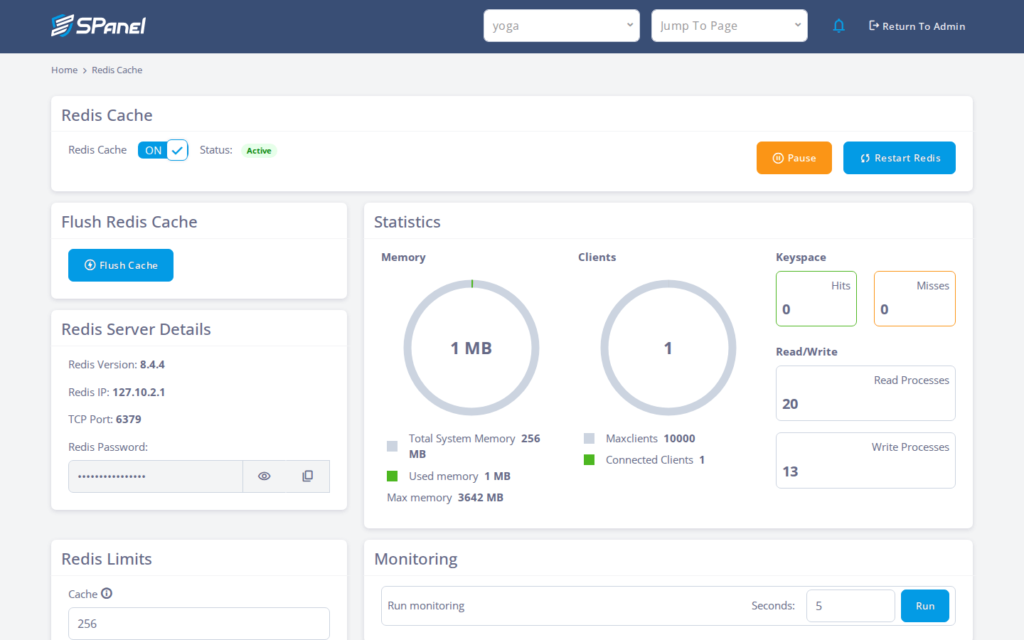
- In the Cache field, enter the memory ceiling you want (for example, the default 256M). This is the maxmemory size – the point at which eviction begins.
- Open the Mempolicy dropdown to see the available eviction policies.
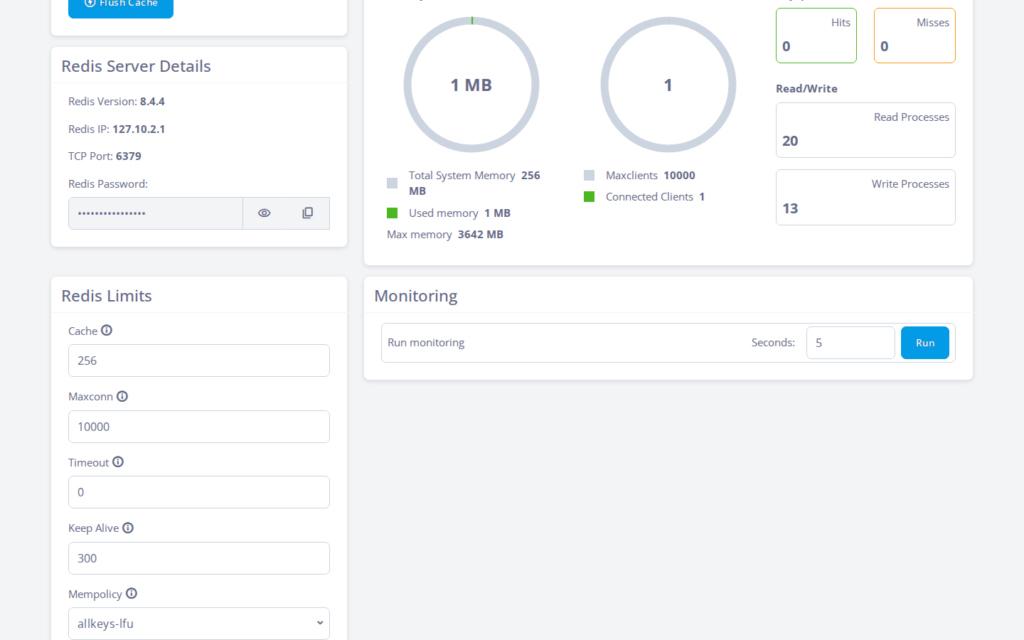
- Choose the policy that matches your needs. allkeys-lfu (the default) evicts the least-frequently-used keys across the whole cache; volatile-* variants only touch keys with an expiry set; noeviction stops evicting entirely. Before selecting noeviction, be sure failed writes are acceptable.
- Click Save Changes. The Redis Limits section should refresh and display the values you entered.
What happens behind the scenes
The Cache field maps to Redis’s maxmemory setting and the Mempolicy dropdown maps to maxmemory-policy. When you save, SPanel writes those values to your dedicated Redis instance and applies them. The eviction policy is what Redis consults when it hits the ceiling, deciding which key to remove to make room. Because the instance is dedicated to your account, the memory you set is yours alone.
Limitations and edge cases
The policy controls which keys are dropped, and settings are per-account. Switching policies changes which keys survive under pressure (all keys vs. only those with a TTL). These limits apply to the whole account’s instance, not a single site, so confirm the change suits all of them.
A too-small Cache means more evictions. If maxmemory is lower than your working set, Redis constantly drops keys and your hit rate falls, sending more requests to the origin. Raise the Cache value to fit your data.
noeviction makes writes fail when memory is full. Instead of dropping keys, Redis returns errors on writes once it is out of room. Choose it only where losing cached data is worse than a failed write.
Troubleshooting
| Symptom | Likely cause | What to do |
| Hit rate dropped after a change | Cache (maxmemory) set too low for the working set | Raise the Cache value and save again |
| Writes to Redis are failing | Policy is noeviction and memory is full | Free memory, raise Cache, or switch to an eviction policy |
| Keys you expected to stay are gone | The policy evicted them under memory pressure | Pick a policy that matches which keys you need to keep |
| One site behaves unexpectedly | Settings are per-account, not per-site | Confirm the limits suit every site using this instance |
When to use this / when not to use this
| Use this when | Skip or use something else when |
| Your cache is too small and evicting too often | The defaults (256M, allkeys-lfu) already perform well |
| You need a specific eviction strategy for your workload | You are unsure how your app uses Redis – measure first |
| You want to protect keys without a TTL using a volatile-* policy | You only need to clear or restart the cache |
| Failed writes are acceptable but data loss is not | You expect per-site isolation – these limits are per-account |
FAQ
Q: What is the default memory and policy in SPanel?
A: SPanel defaults to 256M of memory and the allkeys-lfu policy. These work for many sites, so only change them if you see eviction pressure or need different behavior when the cache fills.
Q: What is the difference between allkeys-lru and allkeys-lfu?
A: allkeys-lru evicts the least-recently-used keys; allkeys-lfu evicts the least-frequently-used. Both consider every key. lfu, the default, tends to keep popular keys even if not touched recently.
Q: When should I use a volatile-* policy?
A: Use a volatile policy when you want eviction limited to keys with an expiry set, protecting keys without a TTL. The trade-off is that Redis can run out of room if too many keys never expire.
Q: Do these settings apply to one site or the whole account?
A: They are per-account, not per-site. The instance is shared across everything pointing at it, so any change affects every site using it.
Q: Will increasing the Cache value fix a low hit rate?
A: Often, yes – a low hit rate is frequently caused by a maxmemory ceiling smaller than the working set. Raise the Cache value, but remember the memory is finite.
Q: Does changing the policy delete my existing keys?
A: Changing the policy does not flush the cache; it changes which keys get dropped under future memory pressure. To clear the cache, use the flush or restart options.
