SPanel’s Auto-Optimized WordPress vs. Kinsta, WP Engine, and Cloudways

TL;DR
SPanel auto-optimizes WordPress at install time, then verifies the result. It installs LiteSpeed Cache at a maximum profile, wires in a dedicated Redis object cache, removes conflicting caching plugins, raises PHP versions below 8.1 up to 8.3 where available, replaces the visitor-triggered wp-cron with a real five-minute server cron, cleans the database, and warms the cache until it confirms a hit before reporting success.
That tuning ships on every managed ScalaHosting VPS at no extra charge – the structural difference from Kinsta, WP Engine, and Cloudways, where optimal performance is part of a paid service. The one firm requirement: OpenLiteSpeed or LiteSpeed Enterprise as the web server.
- Optimization is a default on new installs, and on demand for existing ones – not a plan tier you buy.
- Database hygiene is automatic: revisions capped at 10, autosave at 120 seconds, trash emptied after 14 days.
- It can’t promise a speed number for your site and needs a LiteSpeed-family web server.
What Is Auto-Optimized WordPress?
Auto-optimized WordPress is a hosting setup in which the server applies a complete WordPress performance-enhanced profile automatically the moment the site is created, rather than leaving that work to a plugin, a support ticket, or a paid plan tier.
On a managed ScalaHosting VPS, SPanel’s WordPress Manager runs this profile for you.
That is the difference between a host that merely supports WordPress and one that actively tunes it – and it is the same difference that separates SPanel from the platform-managed model that Kinsta, WP Engine, and Cloudways are built on.
Why WordPress Performance Is a Hosting Decision, Not a Plugin
A slow WordPress site costs money you cannot see on your invoice. Visitors leave before the page fully loads, carts stall, and search engines rank the site lower. So people buy a managed WordPress host and assume the speed issue is already handled.
Sometimes it is.
But more often than not, the reader is paying for a curated stack and a support team, then still tuning cache settings or wondering why their WordPress website runs scheduled tasks late. The real question is simple: who does the performance work – you, a support ticket, or the platform itself, the moment the site is created?
That is the comparison we are making here, not “which brand wins a speed test.”
Managed WordPress vs. Optimized WordPress: The Difference

The common assumption is that “managed WordPress hosting” and “optimized WordPress” mean the same thing.
They do not.
Managed WordPress is a commercial category: a host that specializes in WordPress and supports it, which most managed WordPress hosting brands sell. Optimization is a set of concrete actions – a page cache, an object cache, a current PHP version, real cron, and database cleanup.
The second mistake is thinking a caching plugin equals optimization. A plugin with no server-side backend and a bad profile can add overhead. Caching is a stack that has to agree with itself – web server, page cache, and object cache pointing the same direction.
Assembling that agreement, then verifying it, is the part SPanel handles for you.
SPanel treats WordPress performance as a default, not a product. When a site is installed through the WordPress Manager, the platform applies a full performance profile on the way in and confirms the cache is serving before it calls the install done. No tier to choose, no ticket to file – it comes with running WordPress on a managed VPS, alongside the per-account Redis instance and the staging tools.
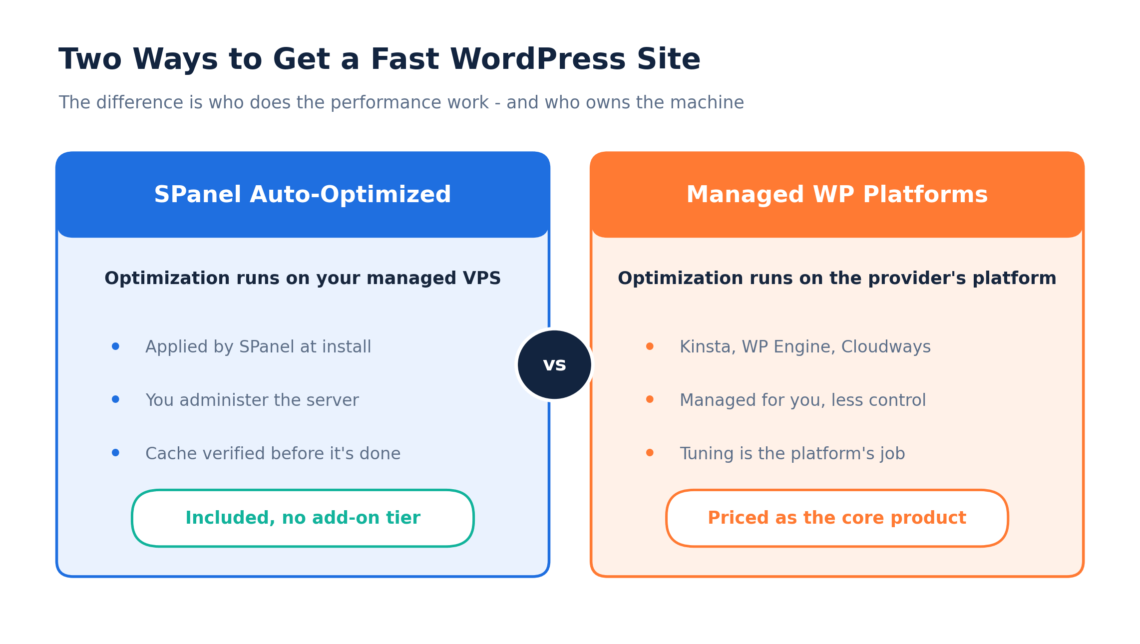
Kinsta, WP Engine, and Cloudways answer the same problem from the other side. They run WordPress on a platform they control end-to-end, cache it at the platform layer, and charge for it as the core offering. Both approaches produce a fast site. The differences are ownership, pricing structure, and what happens when you need to change something.
How SPanel Optimizes WordPress at Install
SPanel installs LiteSpeed Cache on its maximum-performance profile and deploys a dedicated Redis instance for the account, wired in as the object cache so repeated database queries come from the operating memory. Before that, it removes conflicting caching plugins, which is often a reason for slow page loads. Additionally, it raises PHP versions below 8.1 up to 8.3 (whenever possible), since older PHP is slower and less secure. Then it replaces WordPress’s default wp-cron with a real server cron that runs every five minutes, so scheduled posts always appear on time.
To top it all off, SPanel’s optimized WordPress installation cleans the database: post revisions are capped at 10, the autosave interval is set to 120 seconds, and trashed items are emptied after 14 days. Finally, it warms the cache and checks that the site is serving cached responses (x-litespeed-cache: hit) before reporting success. If the cache is not serving, the job is not done.
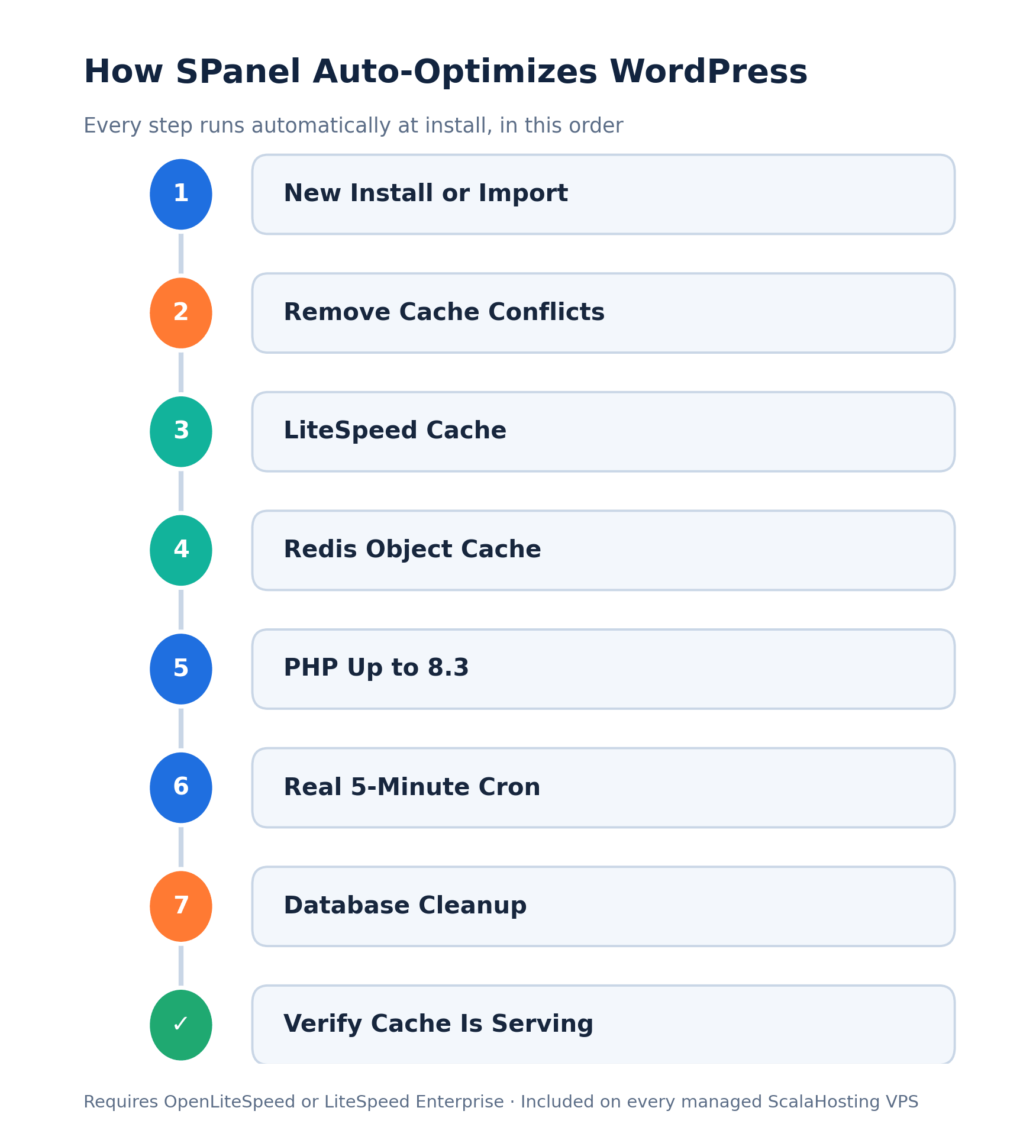
IMPORTANT: The account must run OpenLiteSpeed or LiteSpeed Enterprise, since the LiteSpeed Cache plugin at full strength depends on that server operating system.
SPanel vs. Kinsta, WP Engine, and Cloudways: The Core Difference
Kinsta, WP Engine, and Cloudways all run capable caching. The difference is that SPanel performs the whole sequence automatically, verifies the result, and charges nothing extra.
How Each Provider Handles WordPress Optimization
Here is how the four approaches line up, drawn from each provider’s own current documentation. Cache stacks, plan tiers, and prices change often, so treat the specifics as a snapshot and confirm current details on each provider’s site before buying.
- SPanel (ScalaHosting). LiteSpeed Cache at a maximum profile for page caching, a dedicated per-account Redis instance for object caching, PHP raised up to 8.3, a real five-minute server cron, and automatic database cleanup applied at install and verified before completion. Included on every managed VPS, with no separate optimization tier. Requires an OpenLiteSpeed or LiteSpeed Enterprise web server.
- Kinsta. Full-page server caching on every plan, plus edge caching across Cloudflare’s global network. Redis object caching is a paid add-on, provisioned as a dedicated in-container instance and billed per site each month, so it is optional rather than automatic.
- WP Engine. EverCache page caching plus an edge full-page cache layer (on by default across most plans since April 2026), a CDN, and object caching with Redis on higher plan tiers. Front-end work such as image compression, critical CSS, and minification comes through its NitroPack add-on.
- Cloudways. A server-level stack of Nginx, Varnish for full-page caching, and Redis for object caching, managed through the platform and paired with the Breeze plugin at the WordPress layer. Object Cache Pro is included at no extra cost on larger servers, and you toggle the caching services yourself in the dashboard.
SPanel vs. Managed WordPress Platforms: Feature Comparison
This table compares how each provider delivers WordPress performance. The competitor columns describe categories and current defaults, not fixed prices, so confirm the live details on each provider’s own documentation.
| Aspect | SPanel (ScalaHosting) | Kinsta | WP Engine | Cloudways |
|---|---|---|---|---|
| Page caching | LiteSpeed Cache, maximum profile | Full-page cache on every plan | EverCache plus edge full-page cache | Varnish, server-level |
| Object cache (Redis) | Dedicated per-account, included | Paid add-on, per site | Redis on higher plan tiers | Included; Object Cache Pro free on larger servers |
| Where tuning runs | Your managed VPS | Provider’s platform | Provider’s platform | Provider’s platform |
| Optimization cost | Included, no separate tier | Bundled; Redis billed extra | Bundled into the plan price | Included in the server price |
| You control the server | Yes | No | No | Partly, managed via the platform |
| Web server | OpenLiteSpeed / LiteSpeed Enterprise | Provider-set (Nginx) | Provider-set (Nginx) | Provider-set (Nginx + Apache) |
Real-World Examples: When Auto-Optimization Helps
Here are two real-world examples that many of you might find way too familiar.
Maria runs a bakery site in Berlin on a shared plan with two caching plugins she installed a year apart. Her scheduled “fresh loaves” post went out four hours late last week because wp-cron waited for a visitor. On a managed ScalaHosting VPS, SPanel would remove the conflicting plugins, set a single cache profile, and schedule her tasks on the server’s 5-minute cron. The late-post problem disappears with no documentation to read.
A small agency moving eight client sites off a generic host wants speed, but also wants to keep administering PHP versions, staging, and databases itself. Each fresh install with ScalaHosting’s SPanel arrives pre-tuned and cache-verified, and the team still controls the box. When a client needs PHP 7.4 for a legacy theme, the account exposes PHP 7.4 through 8.5, and they can make the same choice for each site.
Limitations of Automatic WordPress Optimization
Auto-optimization requires a LiteSpeed/OpenLiteSpeed web server. If the account is not using one of those operating systems, the LiteSpeed Cache portion of the profile does not apply – the single hardest requirement in the whole feature. Furthermore, you should not expect a quantitative performance number for your site, because real speed depends on your theme, plugins, image weight, and traffic. Anyone quoting a guaranteed millisecond figure is selling, not measuring.
You can still adjust the LiteSpeed Cache settings afterward from the plugin’s own dashboard in wp-admin, the same as on any WordPress site – the profile is a strong starting point, not a locked box.
Optimization does not replace good habits: it caps revisions and clears trash, but it will not fix a bloated plugin, an 8 MB image, or a database a bad plugin hammers on every request. And it is a performance layer, not a backup or a security guarantee. Pair it with scheduled backups and the WordPress security lock for what speed tuning does not cover.
For the wider picture, our guide to speeding up WordPress covers the habits that tuning cannot automate.
How to Get the Most From WordPress Auto-Optimization
- Confirm the account runs a LiteSpeed/OpenLiteSpeed web server.
- Install WordPress through the WordPress Manager and let the automatic optimization finish.
- Load the site to check it renders.
- Remove any leftover caching plugins the optimizer flagged as conflicts.
For an existing site you brought in, use the Scan & Import flow to register it, then apply optimization on demand. Leave the database hygiene defaults alone unless you have a reason to change them. To test a risky plugin update, stage the site, rehearse the change, and push live only once it holds.
Related Resources
The WordPress Manager covers installs, staging, and the security lock, and the per-account Redis object cache speeds up repeated queries. If you are weighing hosts more broadly, our guide to choosing WordPress hosting sets out what to look for.
And if a feature you want is missing, the Cloud Democracy board is where ScalaHosting customers request and vote on upcoming features in SPanel.
Frequently Asked Questions
Q: Is auto-optimized WordPress the same as managed WordPress hosting?
A: No. Managed WordPress hosting is a commercial category – a host that specializes in WordPress and supports it. Auto-optimized WordPress is the concrete performance work applied to the site: a page cache, an object cache, a current PHP version, real cron, and database cleanup. A host can be “managed” without applying that profile automatically, and that’s exactly where SPanel makes a difference.
Q: Does SPanel really optimize WordPress automatically or do I need to turn it on?
A: New installs are optimized automatically during setup, with no button to press. SPanel applies the LiteSpeed Cache profile, wires in Redis as the object cache, sets a real cron, and cleans the database while installing the site. Existing installs can be optimized on demand, and no manual tuning step is required for a fresh site.
Q: What performance stack does SPanel use for WordPress?
A: The LiteSpeed Cache plugin on SPanel’s maximum-performance profile handles page caching, and a dedicated Redis instance for the account handles object caching, so repeated queries are served from the operating memory. Conflicting caching plugins are removed first so the stack is self-consistent. This requires OpenLiteSpeed or LiteSpeed Enterprise as the web server.
Q: How is SPanel different from Kinsta, WP Engine, or Cloudways?
A: Kinsta, WP Engine, and Cloudways are managed WordPress platforms in which optimization runs on the provider’s own infrastructure and is priced as a core product. SPanel applies optimization on a managed VPS you administer yourself, includes it with the hosting plan, and verifies the cache is serving before finishing. Both yield a fast site; the difference is ownership, price structure, and how much you control.
Q: Will SPanel make my site faster by a specific amount?
A: No honest host can promise a specific number, and ScalaHosting’s SPanel is no exception. Real page speed depends on your theme, plugins, image sizes, and traffic. What SPanel guarantees is the mechanics: a verified page cache, an object cache, a current PHP version, real cron, and a cleaner database.
Q: Does the optimization replace WordPress’s built-in wp-cron?
A: Yes. WordPress’s default wp-cron only runs when a visitor loads a page, so on a low-traffic site, scheduled posts can fire late. SPanel replaces it with a real server cron job every 5 minutes during optimization, so scheduled work runs on the server’s clock instead of waiting for visitors to trigger it.
Q: What does SPanel change in my WordPress database?
A: Optimization applies hygiene with specific defaults: post revisions are capped at 10 so drafts do not pile up into endless copies. The autosave interval is set to 120 seconds to reduce write churn, and trashed items are emptied after 14 days. These reduce table bloat that slows queries over time. They do not repair a plugin that queries inefficiently.