
Rekeying your SSL certificate requires accessing your current web server and your SSL provider dashboard. The process will create a new private key for the certificate, which is important for encryption and decryption of data transiting your website. Here’s what you need to do.
- Step 1. Generate a Certificate Signing Request (CSR) on your hosting server.
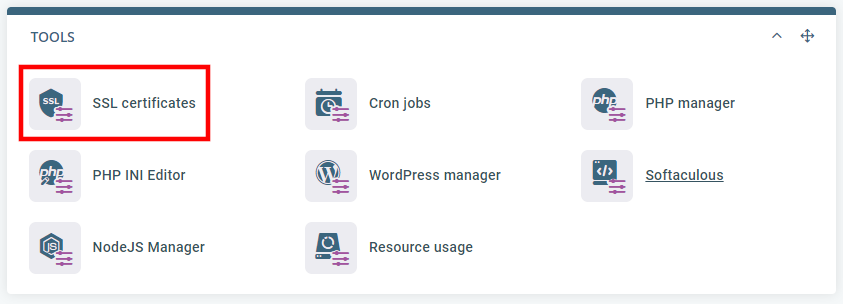
The exact steps you need to take depend on your control panel. For example, if you use ScalaHosting’s SPanel, you need to log into the User Interface and click the SSL Certificates icon under the Tools section.
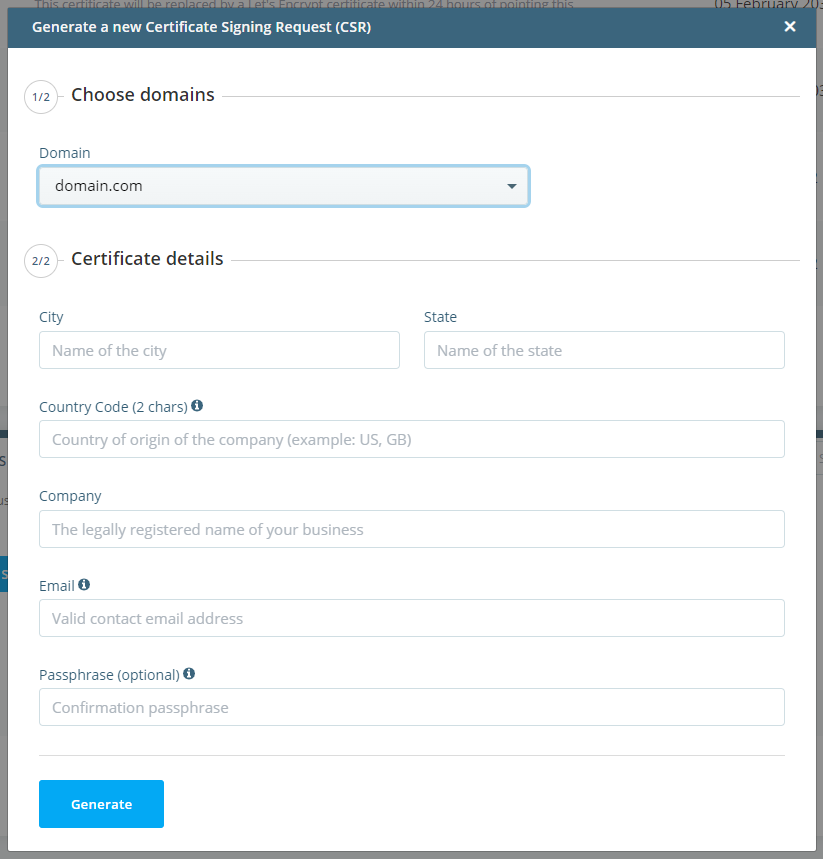
At the bottom of the page, you’ll see the Self-signed SSL certificates & signing requests (CSRs) section. Click the Generate a new Certificate Signing Request (CSR) button and fill in the details.
- Step 2. Log in to the control panel for the service provider which issued your SSL Certificate and select “Rekey your certificate.”
- Step 3. You can then paste your new CSR into the corresponding field then save the changes made.
Remember that the rekey process only issues new private keys for the SSL. You will still need to download the new SSL certificate and install it on your server. You must complete the process within 72 hours of the rekey.
When to Rekey your SSL Certificate
You should rekey SSL certificates if:
- The domain name associated with the SSL certificate changes.
- You want to amend the SSL certificate’s issuing organization.
- You are transferring a website to a new server.
- Your server crashes.
- The private key is somehow lost.
