
SPanel lets you turn ModSecurity on or off for a single domain from the domain’s Settings dialog, using the Mod_security ON/OFF toggle. The setting applies only to the domain you edit, so you can disable the WAF on one site that hits a false positive without touching the others on your account. ModSecurity is ON by default, and disabling it removes a protection layer – so use it to debug a false positive and turn it back on once you have a fix.
Who this is for
This is for developers and site owners who run a legitimate request – a form post, a file upload, an API call – and get a 403 error from the web application firewall. You suspect the rule is wrong for this site and want to confirm that before rewriting the request, without weakening the other domains under the same SPanel account.
What problem this solves
A ModSecurity rule that fires on bad traffic can also fire on traffic that is fine for your app – think of a page builder, an import tool, or a webhook posting content the WAF reads as an attack. Without a per-domain control you would either live with the block or ask for an account-wide change that exposes every other site. The toggle narrows the blast radius: you change one domain, prove the WAF was the cause, and leave the rest protected.
How SPanel solves this
The control lives in each domain’s Settings dialog. In SPanel, go to Domains, find the domain’s row, open the Actions menu, and choose Settings. Inside that dialog is a Mod_security ON/OFF toggle (the UI spells it Mod_security). It applies to that one domain only, and the default state is ON.
To change it, flip the toggle and Save. The dialog then reflects the new state, and the change takes effect for incoming requests to that domain – there is no separate restart step. Rule-level tuning – switching off one specific rule rather than the whole engine – is not exposed here and may require admin-level access.
Why this is different in SPanel
Two things are worth calling out. First, the toggle is genuinely per-domain: disabling the WAF for one site that trips a false positive leaves every other domain on the account protected, so you are not making an account-wide trade-off to fix one site.
Second, the toggle sits in the same Settings dialog as the document root and hotlink protection controls, so the per-domain settings you reach for most often are in one place rather than spread across separate screens.
Before you start
- Access to the SPanel User Interface for the account that owns the domain.
- The correct domain in mind – the toggle changes only the domain whose Settings you opened.
- An understanding of the trade-off: turning Mod_security OFF removes a protection layer for that domain until you turn it back on.
- A plan to re-enable it, ideally a specific request to retest, so the WAF does not stay off longer than the debugging window.
Step-by-step
- Open the Actions drop-down menu and select Settings. You should see the per-domain controls, including the Mod_security toggle.
- In SPanel, open Domains and find the row for the domain you want to change, for example yoga.life.
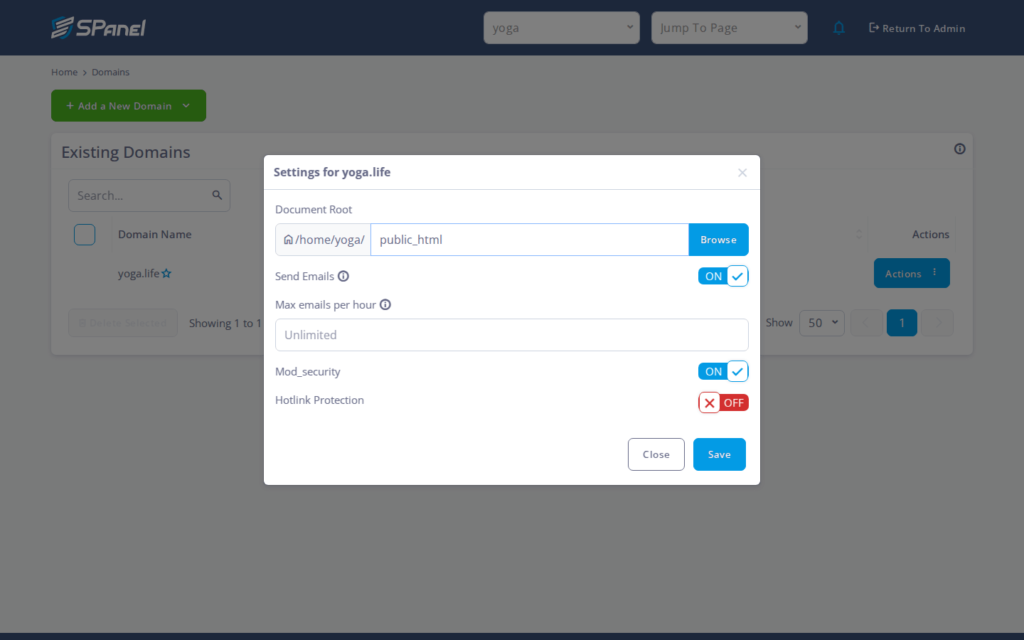
- Safety check before you disable: confirm this is the right domain and that you intend to remove WAF protection for it. Turning Mod_security OFF leaves the site without the firewall layer until you re-enable it.
- Flip the Mod_security toggle to OFF to disable the WAF, or to ON to re-enable it. The default is ON.
- Click Save. The dialog should now show the toggle in its new position, and the change applies to requests to that domain.
- Retest the blocked request. If it now succeeds with the WAF off, you have confirmed ModSecurity was the cause. Turn the toggle back ON and Save once you have a longer-term fix.
What happens behind the scenes
The toggle enables or disables the ModSecurity engine for that domain’s web server configuration. SPanel applies the change for you, so you do not edit a config file or restart a service by hand. Because the setting is scoped to the single domain, the result is a controlled test: you isolate one variable – the WAF – for one site, with no account-wide side effects.
Limitations and edge cases
- Disabling the WAF removes a protection layer. With Mod_security OFF, that domain no longer gets firewall filtering. Only disable it to debug a false positive, then re-enable it as soon as you have a fix.
- The control is per-domain, not per-URL or per-rule. You cannot turn the WAF off for a single page or a single rule from this dialog – it is the whole engine for the whole domain. If only one rule is the problem, plan for a narrower fix rather than leaving the engine off.
- Individual rule tuning may require admin-level access. Switching off a specific rule is not part of this per-domain toggle, so you may need to escalate to whoever administers the server.
Troubleshooting
| Symptom | Likely cause | What to do |
| Request still blocked after turning off ModSecurity | Edited the wrong domain’s Settings | Reopen Domains, confirm the row, and check the toggle in that domain’s dialog |
| 403 returns even with WAF off | The block is not coming from ModSecurity | Re-enable the WAF and look at app logs, permissions, or other rules |
| Want to disable just one rule | Per-domain toggle covers the whole engine | Ask the server administrator about rule-level tuning |
When to use this / when not to use this
| Use this when | Skip or use something else when |
| A legitimate request on one site is blocked by the WAF | You want protection off for every domain at once |
| You need to confirm ModSecurity is the cause of a 403 error | You only need one specific rule disabled |
| You can re-enable the WAF promptly after testing | The site handles sensitive data and cannot run unprotected |
| You want to isolate one domain without touching others | The block is clearly an app bug, not the WAF |
FAQ
Q: Does turning off Mod_security affect my other domains?
A: No. The toggle is per-domain and changes only the domain whose Settings you opened. Other domains remain protected.
Q: Is ModSecurity on or off by default?
A: It is ON by default. You have to open the Settings dialog and change the toggle to disable it.
Q: Can I disable the WAF for just one page or URL?
A: No. This control is per-domain, not per-URL or per-rule – it enables or disables the engine for the whole domain.
Q: How do I turn protection back on?
A: Open the same domain’s Settings dialog, flip the Mod_security toggle to ON, and click Save. Re-enable it as soon as your debugging is done.
Q: Can I turn off a single ModSecurity rule instead of the whole engine?
A: Rule-level tuning may require admin-level access; ask the server administrator.
Q: My request is still blocked after disabling the WAF. Now what?
A: Confirm you edited the correct domain. If the block persists, the cause is likely elsewhere – re-enable the WAF and check your application logs and permissions.
