MySQL is one of the most widely used relational database management systems, powering a large share of today’s websites and web applications. Your project likely relies on it too, and your hosting account may hold several databases: live ones, staging copies, and leftovers from apps you removed long ago.
Getting rid of the databases you no longer need keeps your account tidy and removes data you don’t want lying around. Deletion is permanent, though, so it pays to do it carefully.
This guide walks you through five ways to delete a MySQL database, plus the checks to run before you start and the cleanup to do afterward.
Quick answer: Log in to MySQL with an account that has the DROP privilege on the database and run DROP DATABASE database_name;. MySQL deletes the database and every table in it immediately, with no confirmation and no undo, so back it up first.
Which method should you use?
Method
Best for
What you need
Asks you to confirm?
Command line (DROP DATABASE)
Developers, scripts, servers without a graphical interface
SSH access and a MySQL account with the DROP privilege
No
mysqladmin
Quick one-line deletion from the shell
SSH access and a MySQL account with the DROP privilege
Yes (unless you use –force)
phpMyAdmin
Point-and-click deletion on shared or managed hosting
phpMyAdmin login
Yes
SPanel
ScalaHosting customers who want to remove databases and users in one place
SPanel login
Yes
Before You Delete a MySQL Database
A deleted database can’t be restored unless you have a backup. Spend two minutes on these checks first.
If a website or application is still connected to the database, deleting it will take that site offline. WordPress, for example, will show an “Error establishing a database connection” message.
Check your application’s configuration file for the database name. In WordPress, it’s the DB_NAME value in wp-config.php. Other applications usually keep it in a .env or config file.
2. Check what’s inside
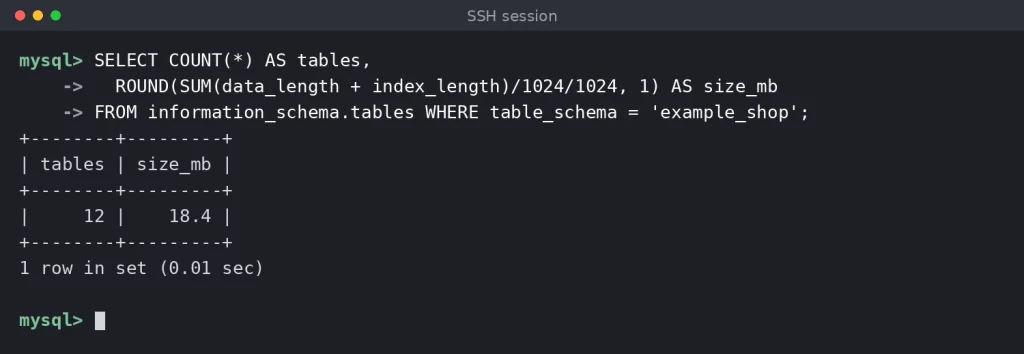
Once you’re logged in to the MySQL console (see Method 1), this query shows how many tables the database holds and how much space they take up:
SELECT COUNT(*) AS tables, ROUND(SUM(data_length + index_length)/1024/1024, 1) AS size_mb FROM information_schema.tables WHERE table_schema = ‘database_name’;
Checking the number of tables and the size of the database before deleting it.
If you see more tables or data than you expected, stop and double-check that you have the right database.
3. Back up the database
Even if you’re sure you’ll never need the data again, a backup costs nothing and protects you from deleting the wrong database. From the command line, use mysqldump:
Exporting the database to a .sql file with mysqldump before dropping it.
Download the .sql file to your computer or keep it somewhere outside the database server. You can also use your control panel’s backup tool, if it has one.
4. Check your privileges
To delete a database, your MySQL account needs the DROP privilege on it. Accounts with the global DROP privilege, such as root, can delete any database on the server. Regular hosting accounts can usually delete only the databases assigned to them.
Method 1: How to Delete a MySQL Database From the Command Line
The traditional way to delete a MySQL database is with the DROP DATABASE statement in the MySQL console.
If you don’t have much experience with the command line, you may find it a bit intimidating. In practice, there’s little that can go wrong if you approach the task carefully and check each command before you press Enter.
You can use your operating system’s built-in command-line tool. On Windows, that’s Command Prompt or PowerShell. On macOS and Linux, you have the default Terminal app as well as plenty of third-party alternatives.
The command for opening a shell looks like this:
ssh [username]@[server_IP]
If the server uses a custom SSH port instead of the default port 22, add -p followed by the port number, for example ssh example_user@203.0.113.10 -p 6543. After you authenticate, the server starts the session.
Connecting to the hosting account over SSH on a custom port.
A second option is a dedicated client such as PuTTY. Native SSH support is now available on all major operating systems, but some people still prefer dedicated clients for their extra features and saved sessions.
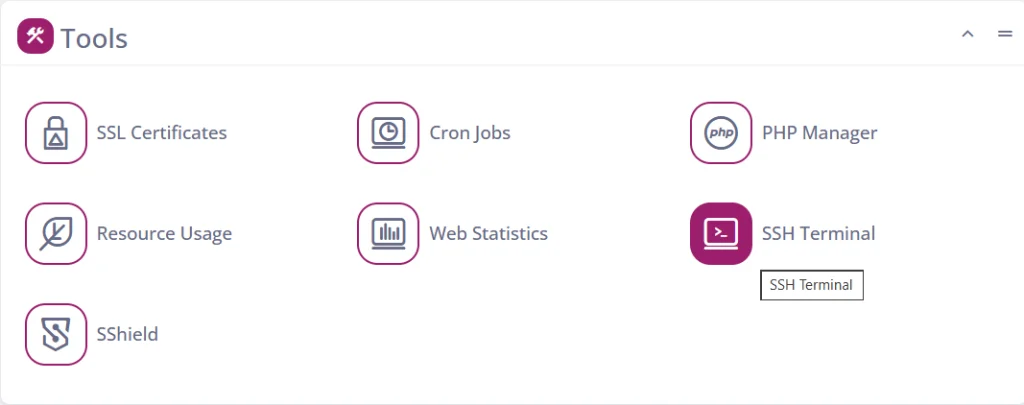
If you use SPanel, you have a third option: log in to the User Interface and open the SSH Terminal. SPanel opens a shell for you right in the browser.
Step 2: Log in to the MySQL console
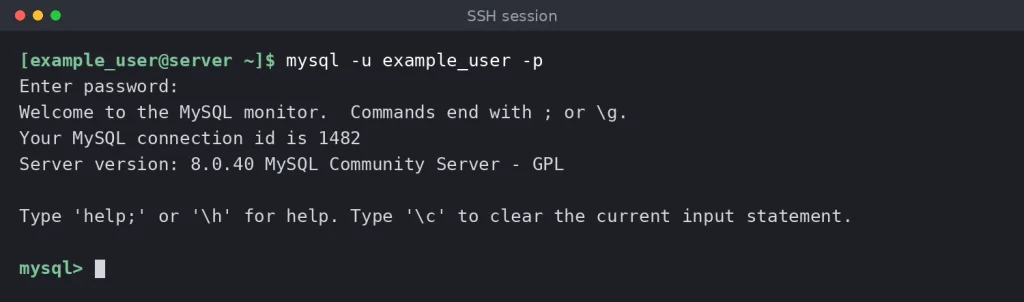
Log in with a MySQL account that has the DROP privilege on the database you want to remove:
mysql -u [username] -p
Logging in to the MySQL console.
Enter your password when prompted. Once you’re in, the prompt changes to mysql>.
Step 3: Find the exact name of the database
From now on, you’ll be typing SQL statements. The syntax for simple tasks like this one is straightforward, but a few details tend to catch beginners out:
SQL keywords aren’t case-sensitive. Writing them in uppercase (DROP DATABASE rather than drop database) is a convention that makes statements easier to read, not a requirement.
Database names usually are case-sensitive. On Linux servers, Example_Shop and example_shop are two different databases.
Every SQL statement ends with a semicolon. If you forget it, MySQL shows a -> prompt and waits for more input. Type ; and press Enter to run the statement.
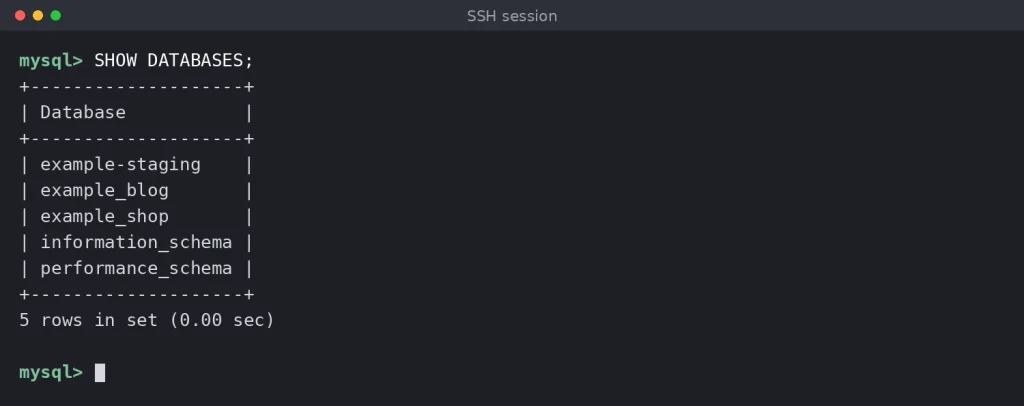
Because there’s no undo, make sure you have the exact name of the database. List all the databases your account can see with:
SHOW DATABASES;
SHOW DATABASES lists every database your MySQL account can access.
Note the exact name of the database you want to delete. Leave the system schemas (information_schema, performance_schema, mysql, and sys) alone: MySQL needs them to work.
Step 4: DROP DATABASE in MySQL
The DROP DATABASE statement looks like this:
DROP DATABASE [database_name];
DROP DATABASE removes the database and all of its tables.
The “rows affected” number in the output is the number of tables MySQL removed. There’s no “Are you sure?” prompt, so double-check the name and your backup before you press Enter.
Some useful variations:
DROP DATABASE IF EXISTS [database_name]; doesn’t return an error if the database doesn’t exist, which is handy in scripts.
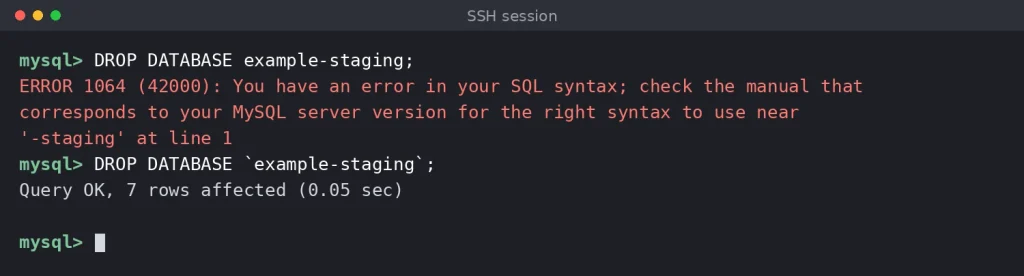
If the name contains a hyphen or other special characters, wrap it in backticks, as in DROP DATABASE `example-staging`; otherwise MySQL returns a syntax error.
DROP SCHEMA is a synonym for DROP DATABASE and works exactly the same way.
Database names with hyphens must be wrapped in backticks.
Step 5: Confirm the database is gone
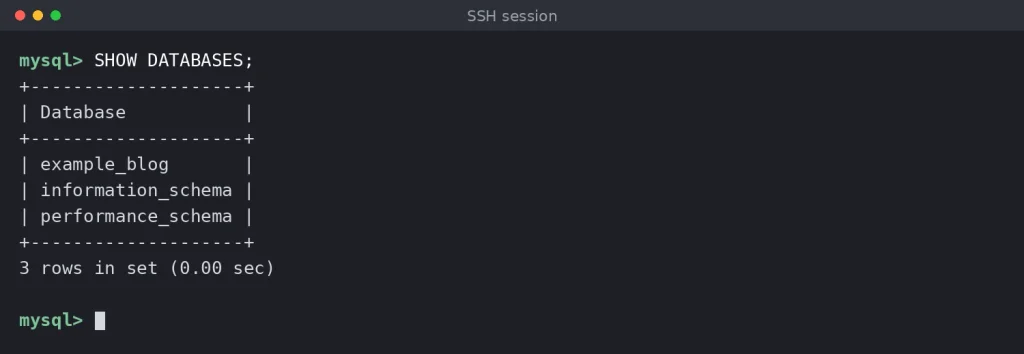
MySQL’s output isn’t very descriptive: all you get is a Query OK message. To confirm the deletion, run SHOW DATABASES; again and check that the database is no longer listed.
The example_shop database no longer appears in the list.
Step 6: Clean up the database user (optional)
Deleting a database doesn’t delete the MySQL users connected to it, and it doesn’t remove the privileges granted on it. Those stay until you remove them yourself.
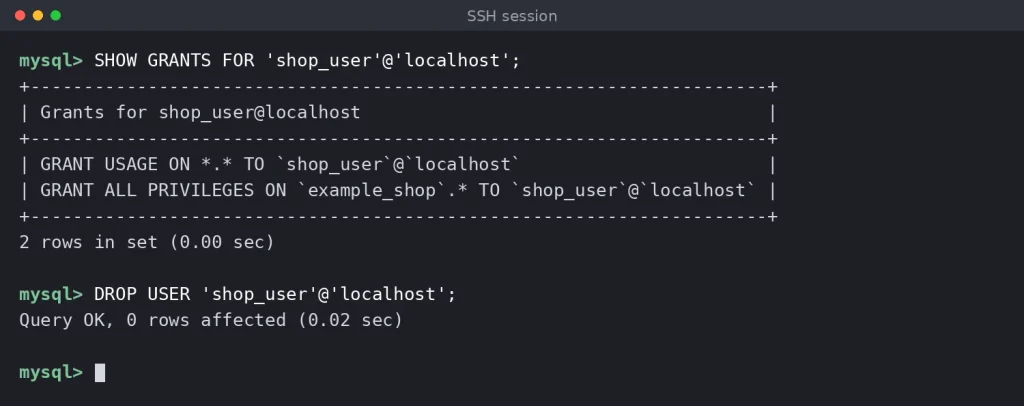
If the user existed only to access this database, check its grants and then delete it:
SHOW GRANTS FOR ‘[user]’@’localhost’; DROP USER ‘[user]’@’localhost’;
Checking a user’s grants before removing the user with DROP USER.
If the user also works with other databases, remove only the privileges for the deleted one with REVOKE ALL PRIVILEGES ON [database_name].* FROM ‘[user]’@’localhost’;. If you created the user in a control panel such as SPanel, delete it there instead, so the panel’s records stay in sync.
Method 2: How to Delete a Database With mysqladmin
mysqladmin is a command-line client for MySQL administration. It can set and change passwords, check status variables, list client threads, and more. It can also delete databases.
It runs from the shell, so you first need to log in to your hosting account via SSH. You’ll also need the database name and the login details of a MySQL account that has the DROP privilege on it.
The command looks like this:
mysqladmin -u [username] -p drop [database_name]
This isn’t an SQL statement. You run it directly from the shell without logging in to the MySQL console, so it doesn’t need a semicolon at the end.
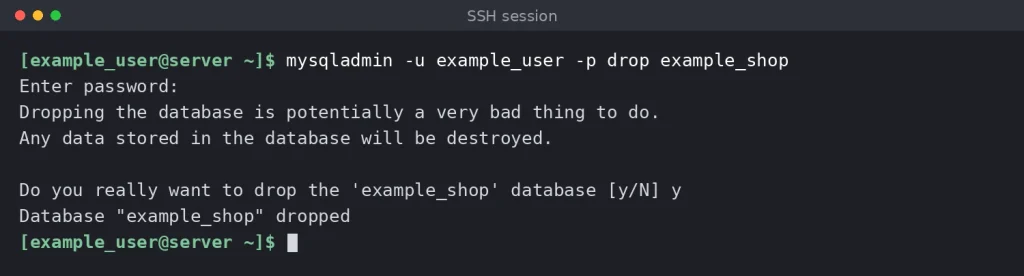
Unlike DROP DATABASE, mysqladmin warns you that dropping the database will destroy all of its data and asks you to confirm. Type y and press Enter, and mysqladmin tells you the database has been dropped.
mysqladmin asks for confirmation before it drops the database.
Tip: The –force (-f) option skips the confirmation prompt. That’s useful in automated scripts, but it also removes your last safety net, so use it with care.
Method 3: How to Delete a Database in phpMyAdmin
phpMyAdmin is a web-based tool for managing MySQL databases that comes with many shared and managed hosting accounts. It’s built into several popular control panels, including cPanel and SPanel.
Its graphical interface means you don’t need to remember any commands. Deleting a database takes just a few clicks.
Step 1: Log in to phpMyAdmin
Use a MySQL account that has the DROP privilege on the database. You can usually open phpMyAdmin from your control panel. The default standalone address is https://[server_IP]/phpmyadmin/, but many hosting providers change it for security reasons.
Step 2: Open the Databases tab and select the database
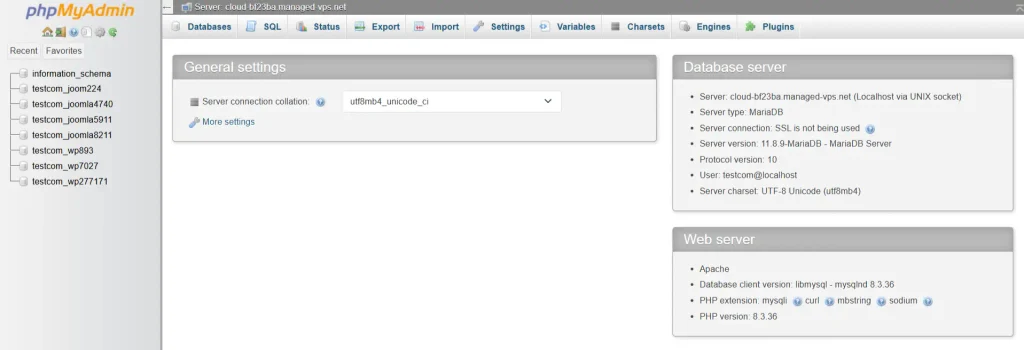
The Databases tab lists your account’s databases along with a couple of system schemas such as information_schema and performance_schema. Find the database you want to delete and tick the checkbox next to it.
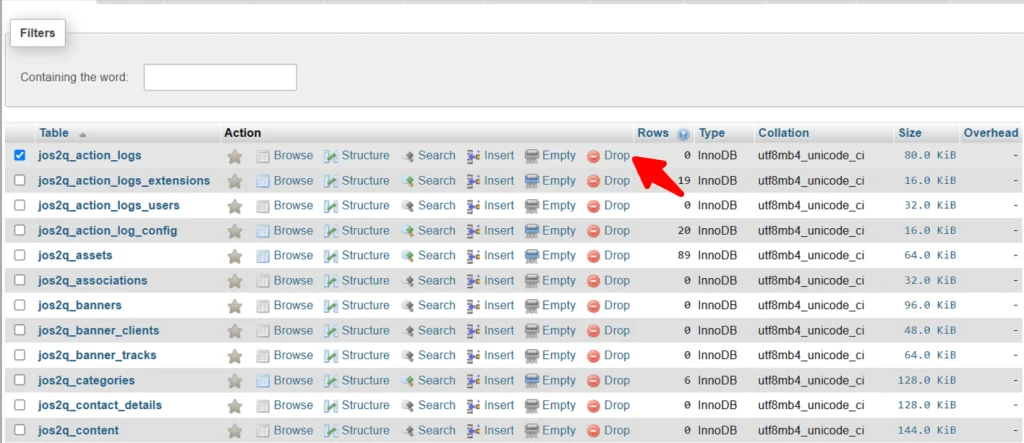
Step 3: Click Drop and confirm
Click Drop below the list of databases. The exact position can vary slightly between phpMyAdmin versions and themes. phpMyAdmin then shows the DROP DATABASE query it’s about to run and asks you to confirm. Click OK (or Yes) to delete the database.
Alternatively, click the database name in the left sidebar, open the Operations tab, and click Drop the database (DROP).
Note: Some hosting providers disable deleting databases from phpMyAdmin. If you don’t see the Drop option, delete the database from your control panel instead (see Method 4 for SPanel).
Method 4: How to Delete a Database in SPanel
SPanel is ScalaHosting’s all-in-one server management platform. It includes tools for creating, managing, and deleting MySQL databases and their users, so removing a database takes just a few clicks.
Step 1: Log in to SPanel’s User Interface
First, open the SPanel account that hosts the database. There are two ways to do this.
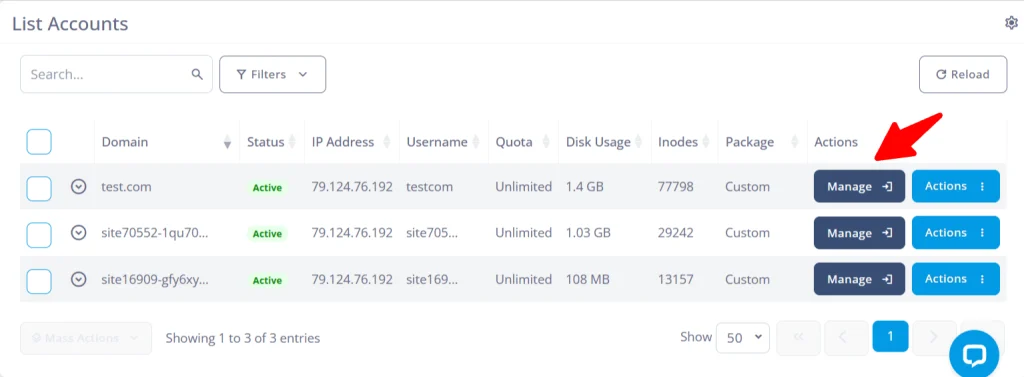
If you’re the server administrator, log in to the Admin Interface. The homepage lists all accounts on the server. Find the one you need, open its Actions menu, and click Manage. SPanel takes you straight to that account’s User Interface.
If you have the account’s login details, you can also sign in directly at https://[your_domain]/spanel/.
Step 2: Open MySQL Databases and find the database
Click MariaDB Databases on the homepage of SPanel’s User Interface.
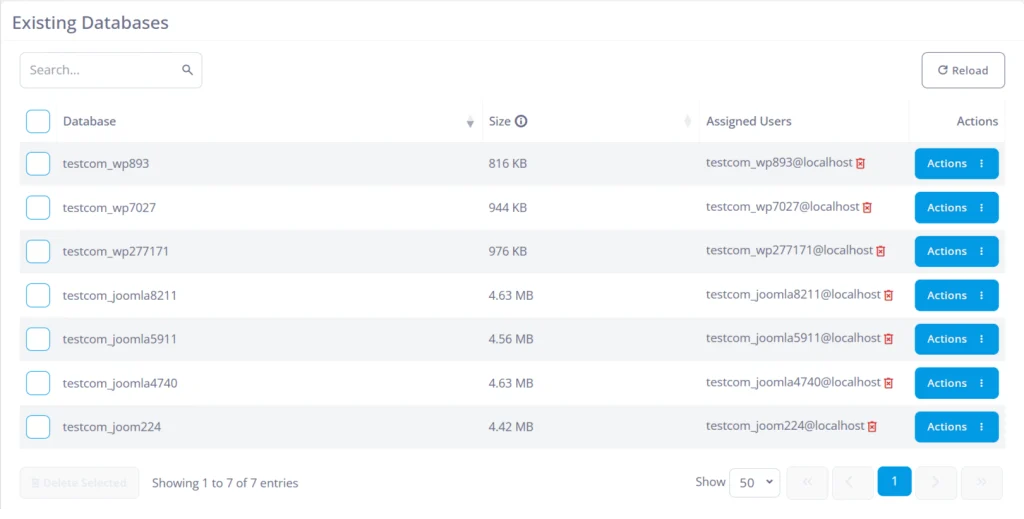
Your existing databases are listed below the forms for creating databases and users. If you have many databases, use the search box or move to the next page of results.
Step 3: Delete the database
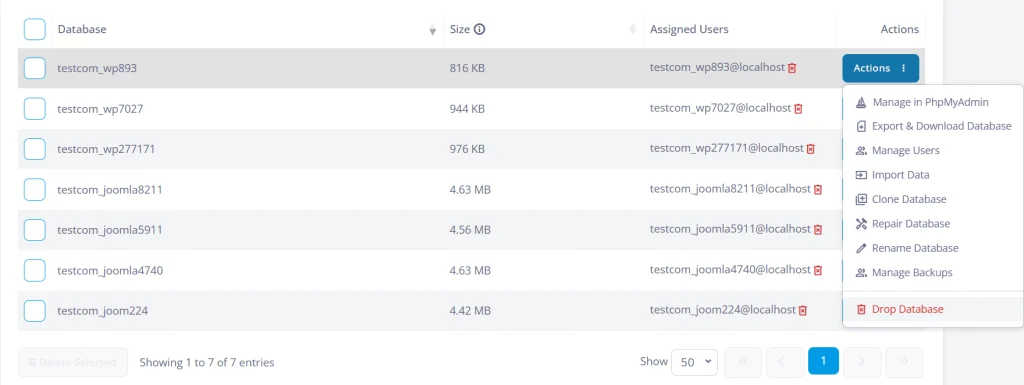
To delete a single database, open the Actions drop-down menu next to it and select Drop Database.
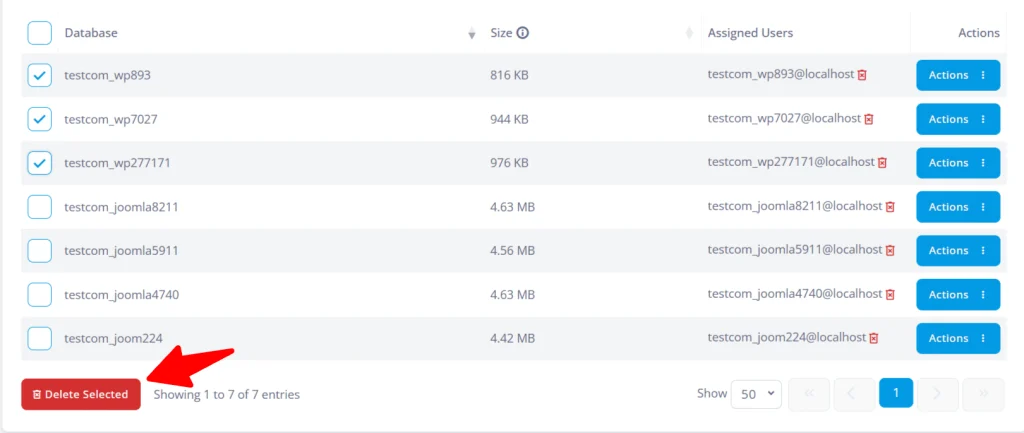
To delete several databases at once, tick the checkboxes next to them and click Delete Selected.
SPanel asks you to confirm before it deletes anything.
Step 4: Remove unused database users
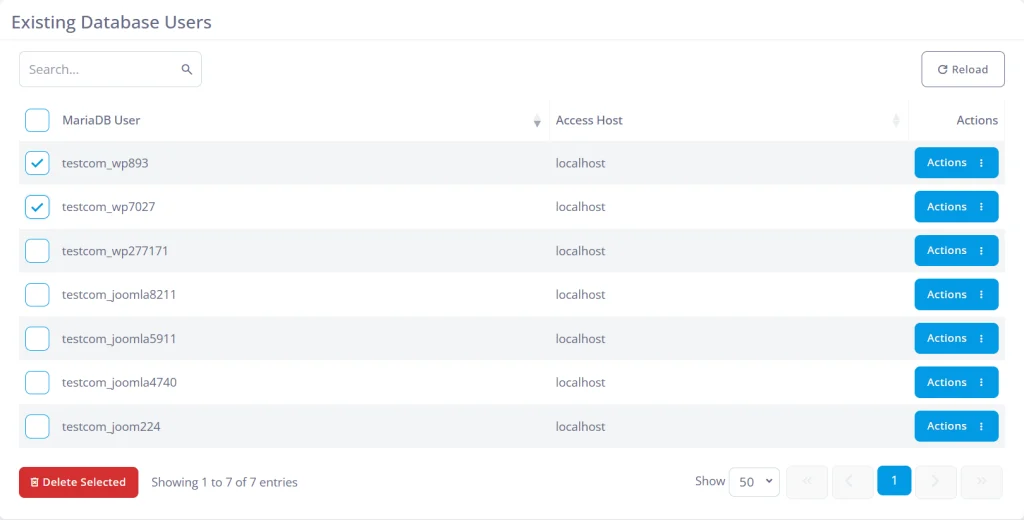
Database users aren’t deleted together with their databases. Scroll to the list of MySQL users at the bottom of the page and remove any you no longer need, either with the Delete button next to each user or by ticking several checkboxes at once.
Troubleshooting Common Errors
Error or symptom
What it means
How to fix it
ERROR 1044 (42000): Access denied for user … to database …
Your MySQL account doesn’t have the DROP privilege on this database.
Log in with an account that has the privilege, or delete the database from your control panel.
ERROR 1008 (HY000): Can’t drop database …; database doesn’t exist
The name is wrong (check the spelling, letter case and any username prefix), or the database is already gone.
Run SHOW DATABASES; to get the exact name, or use DROP DATABASE IF EXISTS.
ERROR 1064 (42000): You have an error in your SQL syntax
Usually caused by a database name with a hyphen or other special characters.
Wrap the name in backticks: DROP DATABASE `my-database`;
Files that MySQL didn’t create are still in the database’s directory on the server.
On your own server, remove the leftover files from the database directory and run the statement again. On managed hosting, contact support.
The statement hangs with no output
Another connection, such as your website, is using the database’s tables, and MySQL is waiting for it to finish.
Stop the application or wait for its queries to finish. SHOW PROCESSLIST; shows the active connections.
The prompt changes to ->
You pressed Enter without ending the statement with a semicolon.
Type ; and press Enter.
Frequently Asked Questions
Q:Can I recover a deleted MySQL database?
A: Not from MySQL itself: there’s no recycle bin or undo. You can restore the database only from a backup, such as a mysqldump file or your host’s backups. If binary logging was enabled on the server, a point-in-time recovery may also be possible. That’s why you should always back up the database before you drop it.
Q:Does deleting a database also delete its users?
A: No. MySQL users and the privileges granted on the database remain until you remove them yourself with DROP USER or REVOKE, or in your control panel.
Q:What’s the difference between DROP DATABASE, DROP TABLE and TRUNCATE?
A: DROP DATABASE removes the whole database with all its tables. DROP TABLE removes individual tables and leaves the database in place. TRUNCATE TABLE empties a table but keeps its structure.
Q:Is DROP SCHEMA the same as DROP DATABASE?
A: Yes. In MySQL, “schema” and “database” mean the same thing, and the two statements work identically.
Working in the web hosting industry for over 13 years, Rado has inevitably got some insight into the industry. A digital marketer by education, Rado is always putting himself in the client's shoes, trying to see what's best for THEM first. A man of the fine detail, you can often find him spending 10+ minutes wondering over a missing comma or slightly skewed design.