Magento Themes: Enhancing Your Store’s Identity

First impressions matter – we all know that.
But that rule doesn’t only apply to personal relationships. It rings true for your Magento store as well. You need your website to stand out in order to engage potential customers more.
And how do you achieve that?
With a beautiful but functional theme. Sounds easy enough, right?
With this article, we’ll help you decipher all the necessary information and craft a visually stunning website.
So, let’s discuss Magento website themes.
Introduction to Magento
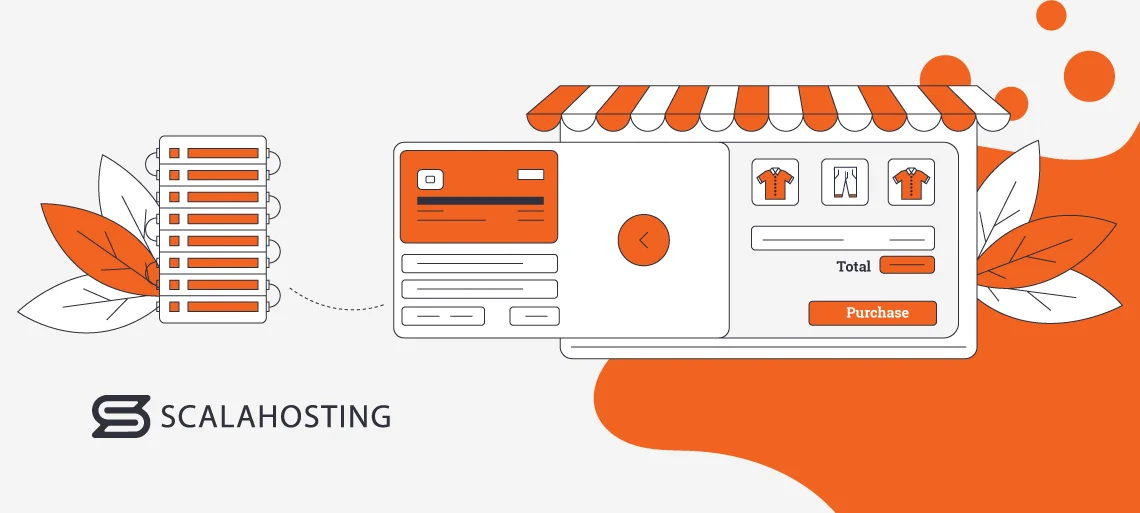
Magento Commerce is an open-source ecommerce platform that offers unparalleled flexibility and scalability. It became part of Adobe’s suite of digital experience solutions in 2018 and is now known as Adobe Commerce.
From customizable themes to numerous extensions and integrations, Magento allows merchants to create a unique ecommerce experience. It also comes with vital features, such as advanced product management and inventory control tools, plus marketing options. In addition, Magento offers unparalleled support and resources to help you succeed. It boasts a vast community of developers, merchants, and experts to guide you on your ecommerce journey.
The platform brings numerous advantages. It is easily one of your best options if you want to build a successful ecommerce store.
What are Magento Website Themes?
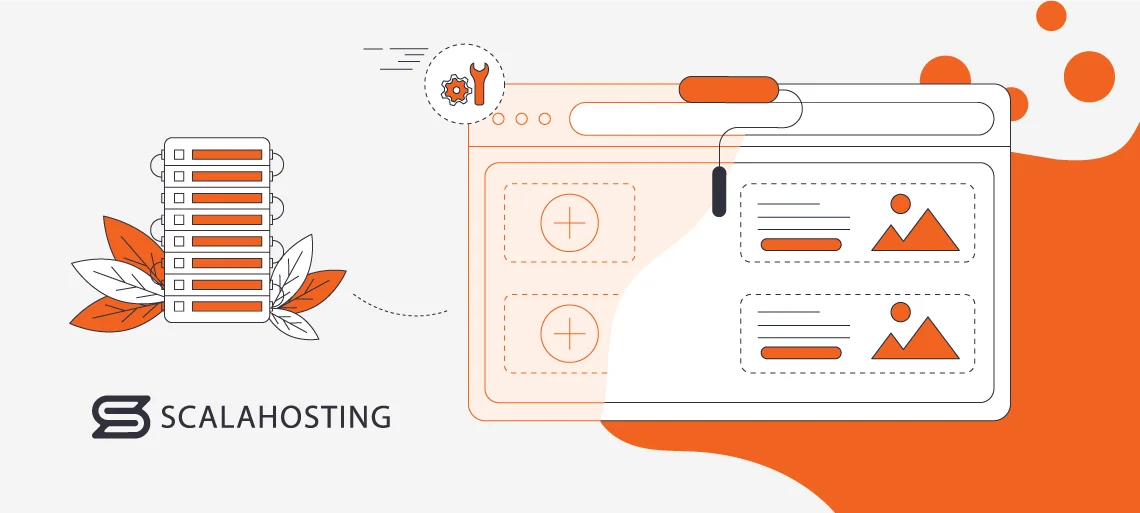
Magento website themes are pre-designed templates that determine the visual appearance of your store. They serve as the foundation for the overall user interface.
The theme you choose will еstablish your site’s layout. This includes the arrangement of different elements on the webpage, such as headers, sidebars, and content sections. It also determines how navigation menus, links, and buttons are displayed and organized on the website. The Magento template also includes typography (fonts), color schemes, graphics, and other visual elements that contribute to the aesthetic of the online store. It will dictate how your products are showcased, too.
In other words, choosing a suitable theme is extremely important.
Thankfully, there’s a wide range of pre-designed themes available. Of course, you can also opt for a custom one and tailor it to your needs. However, there are several things you need to keep in mind:
Magento Theme Architecture
Magento themes are organized into directories that contain the files responsible for different aspects of the template’s appearance and functionality. The main directories are:
- app/design/frontend/{Vendor}/{theme}/ – contains the core files of the Magento theme, including layout files, template files, and web assets.
- etc/ – has the configuration files for the template, including module configuration, theme configuration, and other settings.
- Magento_Theme/ – stores configuration files specific to the Magento theme, including theme registration, fallback mechanisms, and theme inheritance.
- web/ – has static web assets such as CSS, JavaScript, images, and fonts used by the theme.
- Magento_Theme/layout/ – contains layout XML files that define the structure and content of different pages in the theme.
- Magento_Theme/templates/ – stores template files written in HTML and PHP that determine the presentation of different elements on the frontend.
The files you need to pay attention to include:
- Layout Files (.xml) – define the structure and content of pages in the theme. They specify the placement of blocks, containers, and other elements on the page.
- Template Files (.phtml) – contain HTML and PHP code that determines the presentation of specific elements on the frontend. They are responsible for rendering dynamic content and integrating it with Magento’s backend logic.
- CSS Files (.css) – provide the stylesheets that define the visual appearance of the theme, including colors, typography, layout, and responsive design.
- JavaScript Files (.js) – responsible for the interactivity and functionality of the theme, such as dynamic effects, animations, and client-side validation.
- Images and web assets – stored in the web directory of the theme and are used to enhance the visual presentation and user experience of the website.
Magento ecommerce website templates follow a hierarchical structure known as theme inheritance.
Parent themes serve as the base from which other skins get information. They contain the core layout and web assets inherited by child templates. They can, on the other hand, override and extend specific elements, such as layout files, templates, and stylesheets. This enables you to customize the theme’s appearance and functionality.
Thanks to child templates, developers can create custom skins based on existing ones while maintaining compatibility and consistency.
Choosing a Pre-Built Theme
Many people usually start by choosing a pre-built Magento theme. The standard one is called Luma and has a modern and responsive design. Porto is another popular one. It offers extensive customization options and also adjusts to screens easily. It comes with various pre-built layouts and allows integration with most Magento extensions. Ultimo is another widely used option. It also has a responsive layout, customizable color schemes, and a comprehensive set of features enabling you to tailor it.
When choosing a skin for your store, several key considerations should be kept in mind. The first one is scalability. Ensure that the template supports the expansion of your product catalog, accommodates increased website traffic, and integrates seamlessly with add-ons.
You also need to carefully evaluate the customization options. Check for flexibility in tailoring colors, fonts, and other design elements. After all, your site needs to align with your brand identity and business requirements.
Responsiveness is key. You must ensure a seamless and consistent user experience across desktop, tablet, and mobile devices. Mobile optimization is particularly crucial, considering most people shop on the go.
Also, check the page load speed, optimization for search engines, and compatibility with caching mechanisms. A fast and SEO-friendly theme can positively impact both the user experience and the search engine rankings.
And last but not least, you need a theme that gets regular updates and offers support. You want timely assistance, documentation, and new versions that address issues.
Customization of Pre-built Magento Templates
Choosing a pre-built theme doesn’t mean that you have to settle for its initial looks.
In fact, you can customize most of them to fit your brand’s aesthetic.
The Magento ecommerce templates follow an inheritance model. It allows you to take functionalities from a parent theme and create a child one that fits your needs. This is the easiest way to customize a pre-built theme.
Once you make a child template, you’ll need to create directories and files to override specific elements of the parent theme. For example, to modify the layout or styling of a specific page, create layout XML files or CSS files. It will change the visual appearance and behavior of elements on the frontend. Use CSS preprocessors like LESS or SASS for efficient styling and organization. You can also implement JavaScript enhancements for interactive elements and functionality.
IMPORTANT: Document your Magento theme customizations. It will help with future updates and maintenance.
After you’re done tailoring, thoroughly test your child theme across different devices and browsers. You’ll need to ensure responsiveness, functionality, and compatibility. Don’t forget to regularly back up your custom files and database. This will prevent data loss and enable you to revert to a previous state if necessary.
Responsive Design and Mobile Optimization
Nowadays, people do everything via mobile devices. That includes shopping.
So, choosing responsive Magento templates is crucial.
One of the first things you need to check is whether the theme you like can adapt seamlessly to various screen sizes and resolutions. You want your website to look good and function well on desktops, tablets, and smartphones.
Once you install a Magento ecommerce theme, you’ll need to test it across multiple devices to ensure it displays correctly and functions smoothly. You can use tools like Google’s Mobile-Friendly Test or browser developer tools to simulate various screen resolutions and identify any responsiveness issues.
It’s always a great idea to optimize images and media assets for mobile devices. This will help reduce load times and improve performance. You can use image compression techniques and leverage modern image formats like WebP for better compression and quality.
Navigation should also be made easy. Prioritize essential content and features to ensure they are prominently displayed and easily accessible on mobile devices. Optimize the menus, product listings, and call-to-action buttons for smaller screens. You’ll also need to streamline the checkout process for mobile users. You can do this by minimizing form fields, optimizing input fields for touchscreens, and implementing guest checkout options. This reduces friction and increases conversion rates for mobile shoppers.
Integration of Third-Party Themes
So, what should you do if you want to integrate a third-party Magento skin?
It’s easy enough.
The first step is crucial:
Always verify a theme’s compatibility with your Magento version before purchasing or downloading. Check its documentation or description to find the necessary information.
Log in to your Magento Admin Panel, navigate to Find Partners and Extensions, and go to the Magento Marketplace.
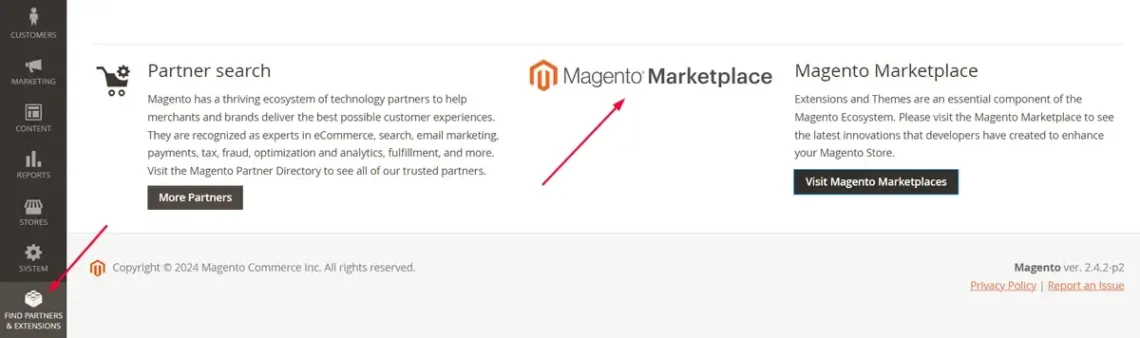
It’s the most reputable theme marketplace, which brings several benefits – version compatibility, security, and support being the top three.Choose a theme and purchase or download it. Then, you’ll need to upload the template to your server. You can use WinSCP, FileZilla, or any SFTP client to help. Upgrade the setup using the following commands:
- php bin/magento setup:upgrade
- php bin/magento setup:static-content:deploy
Go back to the admin panel and navigate to Content > Design > Themes. You’ll see all the available templates and will be able to customize them.
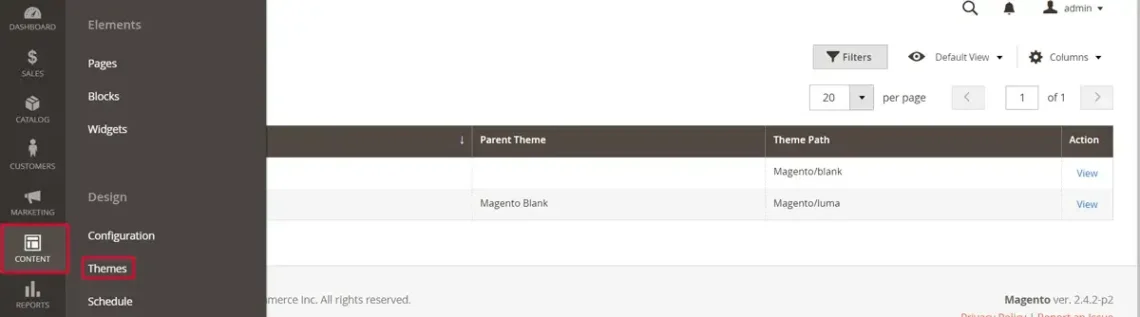
Magento Theme Marketplaces Overview
There are numerous Magento theme marketplaces available online, and it can be a bit confusing to determine which are reputable.
That’s why we recommend using the official Magento Marketplace. The templates there undergo a rigorous review process to ensure quality, security, and compatibility with the ecommerce platform.
Using the Marketplace is easy. You can filter your search based on price, features, ratings, and more to find the most suitable option. Then, simply add the desired theme to your cart, proceed to checkout, and complete the purchase via your Magento account.
Reputable third-party marketplaces include ThemeForest (part of Envato Market), TemplateMonster, and Creative Market. The Magento templates offer various design styles, features, and pricing options to cater to different business needs. You can browse based on categories, popularity, ratings, and price. Once you’ve chosen, you can make your purchase directly from the respective marketplace website.
And some tips on how to choose a good theme:
- Define your specific requirements and preferences in terms of design, features, functionality, and budget.
- Ensure the template is compatible with your Magento version and any existing extensions.
- Review theme documentation, support policies, and licensing terms provided by the developer.
These simple steps will save you a headache or two down the road.
Multi-store and Multi-language Magento Theme Management
Best case scenario, your Magento store will become a global phenomenon.
Even if we’re not aiming for the moon, you will still need to cater to customers from different countries.
Magento’s multi-store functionality allows you to manage multiple stores from a single installation, each with its own unique theme and settings. Go to Stores and click on General. You’ll see Country Options, representing language, region, or storefront variation. Choose the one that you’re interested in.
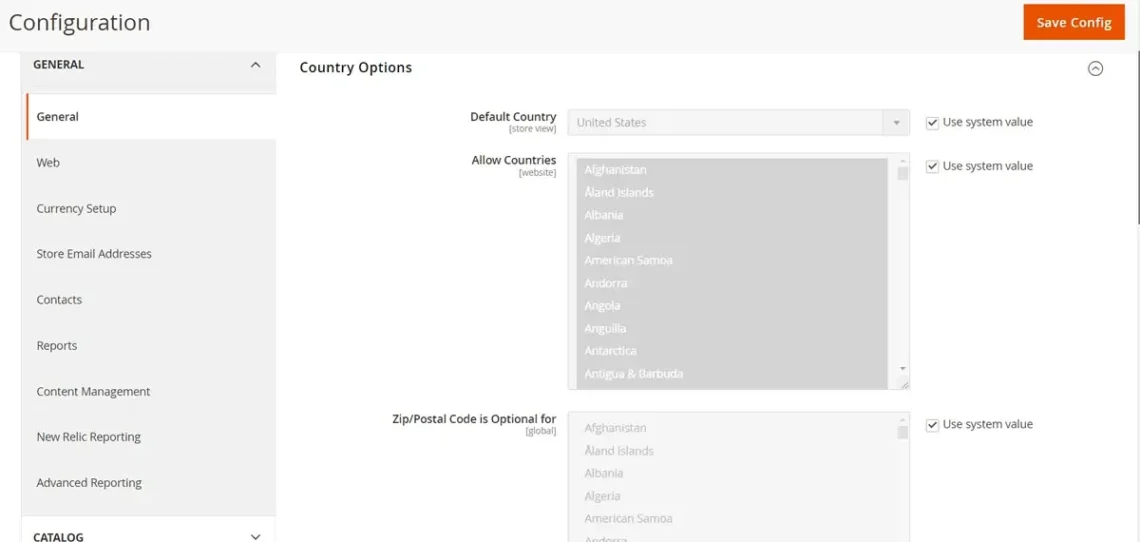
You’ll then need to customize theme settings and configurations for each store view as needed. This includes adjusting colors, fonts, layout options, and other design elements to match the branding and requirements of each store.
You should install language packs for each one you want to support. Those provide translations for Magento’s core functionality, as well as theme-specific strings. They can also translate product descriptions and custom text strings into each supported language. However, we advise you to thoroughly check every text before publishing. Ensure that date formats, currency symbols, and other regional preferences are configured correctly for each locale.
Of course, you’ll also need to test to ensure that the assigned theme renders correctly and functions as expected across different devices and browsers. Test key functionalities, such as product browsing, checkout process, and localization features.
Theme Customization and Performance Best Practices
If you want a successful and high-performing Magento store, you’ll need to customize your theme and optimize its performance.
Don’t worry, it sounds more complicated than it actually is. Here are some best practices and strategies to consider:
We’ve established that responsiveness is key. Make sure the Magento theme you’ve chosen adapts seamlessly to different screen sizes and resolutions. You can employ flexible grid systems and layout techniques to create responsive designs that adjust fluidly to various screen sizes and orientations. A good example is the CSS Grid Layout, a powerful layout system that will enable you to create complex grid-based layouts with ease.
You can also minify CSS and JavaScript files. This minimizes HTTP requests and improves loading times. It’s a good idea to utilize CSS preprocessors like LESS or SASS to organize stylesheets, define variables, and leverage features.
You should also optimize image sizes and formats to reduce file sizes. You can employ image compression techniques and tools to help. For example, PNGOUT, OptiPNG, and ImageOptim utilize lossless compression to reduce the size of PNG and GIF images without sacrificing image quality. On the other hand, Adobe Photoshop, TinyPNG, and JPEG Optimizer reduce sizes by discarding unnecessary image data.
Another option is to implement lazy loading. This is the process of deferring the loading of non-essential images until they are needed. It improves initial page load times and reduces bandwidth usage.
Also, leverage browser caching and Magento’s built-in caching mechanisms. The latter include full-page cache, block cache, and HTML cache. It improves overall performance and reduces server response times.
Don’t forget to regularly conduct performance testing. You can use tools like Google PageSpeed Insights, GTmetrix, or Pingdom to identify performance bottlenecks and areas for improvement. Magento also has built-in profiling features that help you spot and identify inefficient code, database queries, or resource-intensive processes that impact performance.
SEO-friendly Theme Practices
Ranking high in search engine directories will get you more customers.
As simple as that.
So, you’ll need to implement SEO (search engine optimization) elements through your website.
The first thing you can do is use a clean, semantic HTML markup that accurately represents the content structure of the webpage. Properly utilize heading tags (H1, H2, H3, etc.) to organize content hierarchically. This provides context to search engines about the importance of different sections.
Google prioritizes mobile-friendly websites in search results, making mobile responsiveness crucial for SEO. You’ll need to choose a Magento shop template that automatically adjusts to different screen sizes. You’ll also have to optimize it for fast page load times. You can do so by minimizing file sizes, reducing HTTP requests, and leveraging browser caching.
SEO-friendly URLs that are descriptive, keyword-rich, and easy to read is another good piece of advice. The same goes for title tags and meta descriptions – they need to accurately describe the content and feature keywords. Detailed filenames and alt attributes also help search engines understand the content of images, improving image search visibility.
IMPORTANT: Regularly update and refresh your Magento site content to keep it relevant and valuable to users. This signals to search engines that the website is active and authoritative in its niche.
Follow these tips, and you’ll notice improvement in organic traffic and increased online visibility soon.
Magento Theme Security Guidelines
There’s one thing you need to remember when dealing with other people’s data:
Constant vigilance.
There are simple security measures you can implement to guarantee data safety.
The first is to get your Magento website templates from trusted sources, such as official marketplaces or reputable theme developers. Avoid downloading themes from unknown or unverified sites, as they may contain malicious code or security vulnerabilities.
You’ll need to regularly update the skins to ensure they are patched with the latest security fixes and updates. You’ll also have to conduct security audits to identify and address potential vulnerabilities or weaknesses. You can use scanning tools or plugins to analyze theme files for known security issues or malware. Disabling unnecessary features or functionalities, such as file uploads or user-generated content, will also help in the long run.
Validate and sanitize theme options and settings to prevent injection attacks or malicious input. You’ll have to check for user inputs of potentially harmful code. This includes HTML tags, JavaScript, or SQL injection attempts. If you find any – remove them immediately to prevent security vulnerabilities.
Ensure that both your marketplace of choice and your website use HTTPS (HTTP Secure) for secure communication between the server and the client. Use SSL/TLS certificates to encrypt data transmitted over the network and protect against eavesdropping and data interception.
Magento Templates Support
When selecting a Magento skin, it’s essential to consider the level of support provided by the developer. Especially if you lack technical knowledge – you need either a team to turn to or a knowledgebase.
Many theme developers offer dedicated forums where users can ask questions, report issues, and interact with each other and developers. This provides a community-driven system and is a great place for troubleshooting. On the other hand, premium Magento themes offer direct support from a dedicated team via email, ticketing systems, or live chat. This is by far the best option for you.
If there is no support team, at least check for a knowledge base. Many Magento theme developers have FAQ sections on their websites. Those feature tutorials, documentation, and step-by-step guides for using and customizing the template.
Remember to always read user reviews when choosing skins for your ecommerce store. Check for developers or providers with a track record of offering timely support or at least vast knowledge bases. This ensures you have the resources and assistance you need to use and customize the theme for your website effectively.
Magento and ScalaHosting
Having an aesthetically pleasing Magento online store is important but not enough. You also need a secure environment that will help you grow your business.
That’s where ScalaHosting enters the scene.
Our cloud VPS packages are scalable and flexible, created with growth in mind. All of our customers can add and remove resources according to their needs. They can also control and tailor the server to fit their traffic demands. Think of things like installing custom software, including themes, optimizing performance, configuring settings, and more. It’s thanks to our intuitive in-house developed hosting managed – SPanel. It’s also integrated with Softaculous, which makes the Magento installation a breeze.
We know that ecommerce stores operate with a lot of data. That’s why each of our clients gets access to SSHield – an AI-integrated tool that successfully blocks 99.998% of the attacks online.
We also offer the highest level of technical expertise. You can talk to our support team 24/7 via live chat and email – they are ready to ease all your Magento worries and help you with pesky themes.


Wrap Up
Magento website themes might not unlock your store’s full potential, but they sure play a vital part in retaining customers. After all, they shape the visual identity of your site, offering a canvas for your brand. As a rule, there are three things to focus on when choosing a theme:
- Captivating and responsive design
- Seamless functionality
- Unwavering user experience
Don’t forget that you can and should optimize your Magento theme for speed and responsiveness. It will ensure easier navigation and fast load times. And be mindful of the security part – only get themes from reputable sites. After all, you’ll be storing a lot of data, and a hacker attack is the last thing you want.
You now have all the knowledge needed to create a stunning ecommerce website. Let your imagination run wild!
FAQ
Q: What are Magento themes?
A: Magento themes are a collection of files, including templates, layout files, stylesheets, JavaScript files, and other assets. They collectively define the appearance and layout of your ecommerce website. Put simply, themes determine how your product listings, checkout pages, headers, etc., will look like. This makes them crucial for shaping the user experience of the store.
Q: What is the Magento standard theme?
A: The standard Magento theme is Luma. It comes pre-built and serves as the default option. It has a modern and responsive design. Users can choose a second option after successfully installing Magento—Blank. This is the basis for configuring a custom theme.
Q: What is the best Magento version?
A: The best Magento version will always be the latest one. At the time of writing, this is Magento 2.4.7. It offers various improvements, bug fixes, security patches, etc.