This guide walks you through configuring Redis cache for a Joomla site hosted on SPanel. By the end, Redis will be deployed on your account, connected inside Joomla’s Global Configuration, and confirmed to be handling live cache traffic. You’ll need SPanel access, administrator access to your Joomla site, and the PHP Redis extension enabled for your site’s PHP version.
One thing to note – Redis only speeds up Joomla once Joomla is configured to use it. Deploying Redis on its own changes nothing until the connection is made and verified, which is why the verification step matters as much as the setup.
Redis is one of several performance and management tools included at no extra cost on every ScalaHosting managed VPS, alongside the rest of SPanel. Deploy Redis, connect Joomla, confirm it in the monitor, and you’ll have a faster site with the controls to keep it that way.
What Redis Does for Joomla
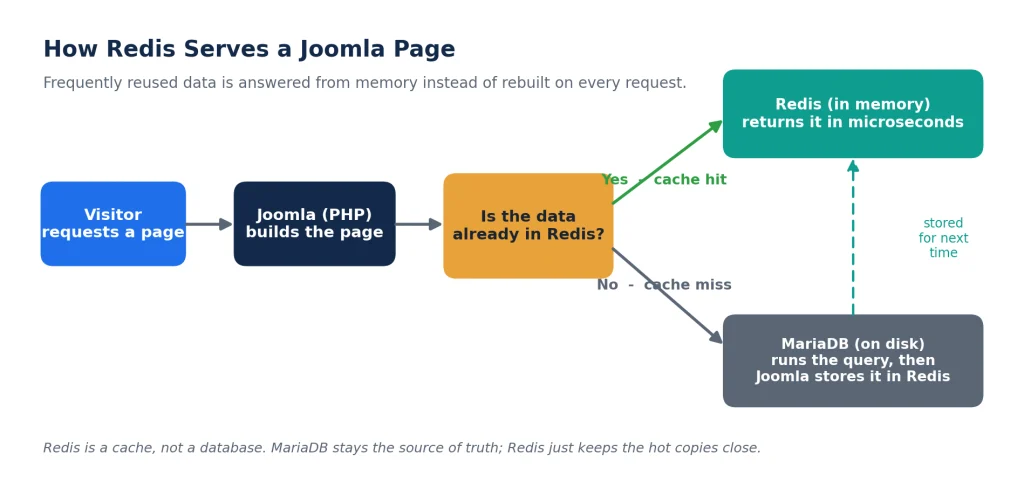
Redis is an in-memory data store. Joomla can use it as a cache, which means that instead of rebuilding the same data on every request, Joomla keeps frequently reused results in memory and serves them from there. The database does less repetitive work, and pages that lean on that data come back faster.
Figure 1. On a cache hit, Joomla answers from Redis in memory. On a miss, it queries MariaDB, then stores the result for next time.
It helps to be clear about what Redis will not do, because setting expectations up front saves troubleshooting later:
Redis does not replace MariaDB. Your database stays the source of truth. Redis only holds fast copies of some of its data.
Redis is a cache, not a speed switch. It does nothing for Joomla until Joomla is pointed at it, which is the whole reason for this guide.
Redis cannot fix unrelated bottlenecks. A slow third-party API, an inefficient extension, or heavy uncompressed images and JavaScript on the front end are separate problems with separate fixes. Caching database work will not paper over them.
Prerequisites
Confirm each of these before you start:
Administrator access to your Joomla site. The cache settings described here appear in Joomla’s Global Configuration and are the same across the current Joomla 5.x and 6.x releases.
The PHP Redis extension enabled for the PHP version your site runs. Joomla’s Redis cache handler talks to Redis through this extension, and you can enable or check it in PHP Manager.
SPanel access to deploy Redis on your hosting account.
A recent backup of your site. Cache configuration is low risk, but a backup means any change here can be rolled back in one step.
Part 1: Deploy Redis in SPanel
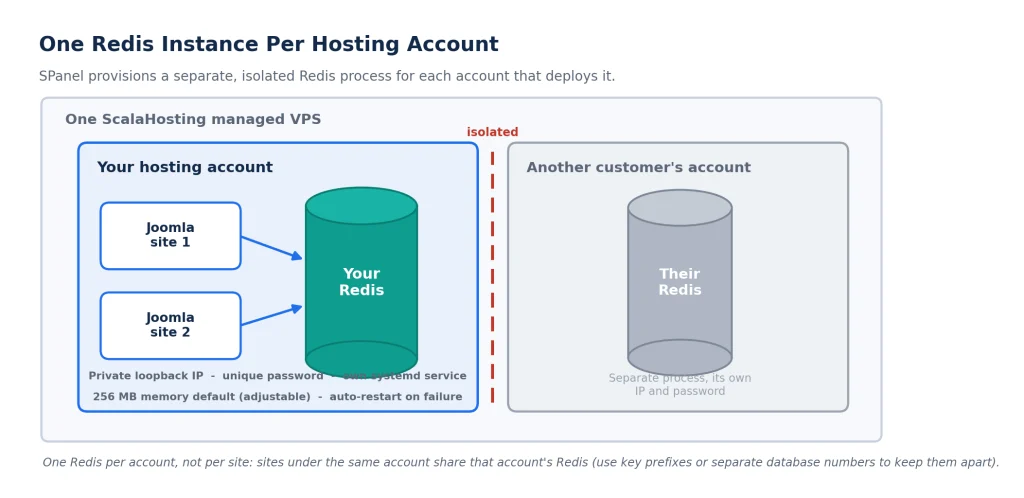
SPanel provisions a separate Redis instance for your hosting account on demand. Deploying it takes one click and gives you the two values Joomla needs: a host and a password.
Log in to SPanel and open the Redis Cache screen.
Click Deploy. SPanel creates a Redis instance for your account with a private loopback address, a unique password, a 256 MB memory budget, and the allkeys-lfu eviction policy, all running as their own service.
Note the Redis host and password shown on the screen. These are the values you will enter in Joomla. Keep the password private.
Confirm the status shows the instance running. You are now ready to connect Joomla.
Note: SPanel provisions one Redis instance per hosting account, not one per site. If you run several sites under the same account, they will share this Redis. Part 2 and Part 5 explain how to keep them separated and what that means when you flush.
Part 2: Connect Joomla to Redis
With Redis deployed, point Joomla at it from the administrator dashboard. The connection fields live in Joomla’s Global Configuration.
Log in to your Joomla administratordashboard.
Go to System, then under Setup, click Global Configuration.
Open the System tab and find Cache Settings.
Set Cache Handler to Redis. The Redis connection fields appear once you select it.
Set System Cache to ON – Conservative caching to start. Conservative caching serves the same cached output to all visitors and is the safer default. Progressive caching stores a version per visitor and suits a narrower set of sites.
Enter the connection values from the SPanel Redis Cache screen:
Redis Server Host: the private loopback address shown in SPanel.
Redis Server Port: the port shown in SPanel (the Redis default is 6379).
Redis Server Authentication: the password shown in SPanel.
Redis Database: 0, unless you are separating multiple sites (see the note below).
Click Save & Close. Joomla will start routing cache operations to Redis.
Note: Running more than one site under the same account? Give each site a different Redis Database number (0, 1, 2, and so on) in its Joomla configuration. All sites still use the same Redis instance, but numbered databases keep their keys from colliding.
Part 3: Verify That Joomla Is Actually Using Redis
Do not assume the connection worked because Joomla saved without an error. Confirm it. This is where SPanel’s built-in monitor and stats earn their place, because they show you the actual traffic reaching Redis rather than leaving you to guess.
Browse a few pages on your Joomla site, front end and administrator, so the cache has something to do.
On the SPanel Redis Cache screen, start the monitor for a duration you choose. It streams every command Redis executes in real time. As you browse, you should see reads and writes appear. If nothing shows up, Joomla is not talking to Redis, so recheck the Cache Handler and the connection fields in Part 2.
Open stats to see memory used, keys stored, and hit and miss counts. Keys climbing and hits accumulating are a sign that the cache is doing real work.
Tip: The monitor is a debugging tool. It displays the real keys and commands your site sends, which is exactly what you want when confirming a setup or chasing a caching bug, so treat its output as sensitive and run it only as long as you need.
Part 4: Memory and Eviction
A fresh deploy gives you a 256 MB memory budget and the allkeys-lfu eviction policy. Both are set on the SPanel Redis Cache screen and both are adjustable.
How Much Memory to Give Redis
There is no single correct number, and Joomla-specific sizing depends on your extensions, traffic, and what you cache. Rather than borrow figures from a different platform, use what your own instance tells you:
Rule of thumb: Start with the SPanel default, observe Redis memory and eviction statistics, and adjust based on actual usage.
If the stats show Redis sitting well under its budget, you have headroom to spare. If it is constantly full and evicting keys to make room, that is the signal to raise the memory limit or reconsider what you are caching.
What Eviction Policy Means
Eviction policies are simply the rules Redis follows when memory fills up and needs room for new keys. The default, allkeys-lfu, discards the least-frequently-used keys first, which protects the data your site reaches for most. SPanel exposes the full set of eight Redis policies in a dropdown, so you can match the policy to your workload. For a standard Joomla cache, the default is the right starting point, and there is no need to change it unless your usage gives you a specific reason to.
Part 5: Flushing Redis
When you deploy new code, change a template, or update an extension, Redis can keep serving the old cached data. The fix is a flush, and SPanel puts that button in your hands rather than behind a support ticket.
On the Redis Cache screen, click Flush Cache. It wipes every key, and Joomla rebuilds the cache as visitors browse. Joomla’s own Clear Cache tool under System does a similar job from the application side; flushing at the SPanel level clears the instance itself.
Warning: Flush removes every key in your account’s Redis instance. Because one Redis serves the whole account, flushing affects all sites that share it, not just the one you have in mind. There is no partial flush.
Part 6: Troubleshooting
Most Redis-and-Joomla issues come down to a handful of causes. Work down this table from the symptom you are seeing.
Problem
Likely reason
What to check
Redis deployed, but the monitor shows no commands from Joomla
Joomla is not actually using Redis
Cache Handler is set to Redis, System Cache is ON, and you clicked Save & Close
Authentication error or connection refused
Wrong password, host, or port
Re-copy the host and password from the Redis Cache screen and confirm the port matches
Site errors right after enabling Redis
The PHP Redis extension is missing
Enable the Redis extension for the site’s PHP version in PHP Manager, then retry
Redis shows as stopped
The service was stopped or crashed
Start or Restart it from the Redis Cache screen; SPanel also auto-restarts on failure
Keys constantly evicted or memory always full
Cache is larger than the memory budget
Review stats, then raise the memory limit or reduce what you cache
Stale content after an update
Old keys are still cached
Use Flush Cache, then reload the affected pages
Two sites showing each other’s cached data
Sites share one account Redis on the same database number
Give each site a different Redis Database number in its Joomla configuration
Why Redis Is Easier to Operate With SPanel
On an unmanaged server, configuring Redis means installing the daemon, creating its service, assigning a private address, generating a password, configuring auto-restart, and building your own way to watch it. That is a real amount of setup before you cache a single key.
SPanel does that infrastructure work for you. Deploying Redis provisions the instance, its private loopback address, its unique password, and its service, with auto-restart on failure already configured. From then on, the lifecycle controls, configuration, stats, monitor, and flush are all buttons on one screen.
Figure 2. Each account gets its own isolated Redis. Sites under the same account share that account’s single instance.
Note: SPanel manages the Redis infrastructure, not your Joomla settings. It does not configure Joomla for you, so Part 2 is still a step you complete yourself.
Security and Limitations
A few boundaries are worth knowing so the setup matches what Redis on SPanel actually offers:
One Redis instance per hosting account, not per site. Sites under the same account share it.
Single-node Redis. Clustering, replication, and high-availability modes are not exposed through this screen.
Password authentication (requirepass), not Redis ACLs. That is sufficient for a single-tenant instance like this one.
Flush is global for your Redis. It clears everything at once, with no per-key or partial flush.
The monitor shows real key and command activity. It is a debugging tool, so treat its output as sensitive.
Redis shares your account’s server RAM. Size its memory against what your plan actually has available.
Redis is in-memory with periodic snapshots, not a durable primary database. Treat it as a cache you can always rebuild from your source data.
Frequently Asked Questions
Q:Do I need to be a developer to set up Redis for Joomla?
A: No. Joomla has a built-in Redis cache handler, so the setup is a matter of deploying Redis in SPanel and entering the host and password in Joomla’s Global Configuration. No code changes are required.
Q:Does Redis replace my Joomla database?
A: No. MariaDB stays the source of truth. Redis holds fast copies of frequently used data so the database does less repeat work, but the database still stores everything permanently.
Q:How much memory should I give Redis for Joomla?
A: Start with the SPanel default of 256 MB, watch the Redis memory and eviction stats, and adjust from there. Raise the limit if the instance is constantly full and evicting keys.
Q:Can I run Redis for more than one Joomla site on the same account?
A: Yes. The sites share one Redis instance, so give each one a different Redis Database number in its Joomla configuration to keep their keys separate.
Q:How do I clear Joomla’s Redis cache after an update?
A: Click Flush Cache on the SPanel Redis Cache screen to wipe the instance, or use Joomla’s own Clear Cache tool under System. Remember that a SPanel flush clears every site sharing that Redis.
Working in the web hosting industry for over 13 years, Rado has inevitably got some insight into the industry. A digital marketer by education, Rado is always putting himself in the client's shoes, trying to see what's best for THEM first. A man of the fine detail, you can often find him spending 10+ minutes wondering over a missing comma or slightly skewed design.