Joomla 6 ships with most of what a fast website needs already in the box: built-in caching with two modes, a full-page cache plugin, a native Redis cache handler, and a core that requires PHP 8.3 or newer. On a well-configured server, Joomla builds pages quickly even as traffic climbs.
This changes how you speed up Joomla. When a Joomla site feels slow, the core is rarely the cause. The problem usually has to do with something added on top, like a heavy extension or a bloated template. It could also lie in the configuration, e.g., an outdated PHP runtime or a cache functionality that someone forgot to turn on.
Both are fixable, but it’s important to tackle them correctly. Measure first, repair the application second, and then tune the infrastructure. The checklist below follows that order and separates the changes that move business results from the ones that only affect benchmark scores.
Do This First: Five Steps for Busy Site Owners
Let’s start with the simple stuff. None of the following steps requires server administration skills, but together they can help you determine where the bottleneck is:
Record a baseline. Test the pages that earn money, not just the homepage: a category or listing page, a product or article page, site search, and your checkout or contact form. Save the results before you change anything.
Check your PHP version. Joomla 6 requires PHP 8.3 and recommends PHP 8.4. If your site runs anything older, be sure to upgrade it to one of the supported versions.
Turn on Joomla’s cache and retest. Enable conservative caching in Global Configuration and compare the new numbers against your baseline.
Find your heaviest extension. On a copy of the site, disable nonessential extensions one at a time and note which one changes load times the most.
Set up uptime and speed monitoring. The sooner you catch any potential problems, the better.
If those five steps don’t explain the performance issues, work through the full checklist.
The Joomla 6 Performance Checklist
The 12 steps below are ordered by impact. Early steps are easy to tick off and can save you a lot of headaches later on. Further down the list, you’ll find tasks that can help you improve the performance once you make sure the application itself is clean.
1. Measure before you optimize
Changing 10 things and then trying to figure out if they made a difference is not a good strategy. If the site gets faster, you don’t know which change helped. If it gets slower, you don’t know what to undo. Some changes even cancel each other out, so a useful fix can hide behind a harmful one.
Free tools such as Google’s PageSpeed Insights and WebPageTest give you the numbers you need. Both report how quickly the server responds as well as how long the full page takes to load, and WebPageTest also lets you choose the location your test runs from.
Time to first byte (TTFB) is the time between a browser’s request and the first byte of the server’s response. It measures server-side work rather than page weight, which makes it the clearest signal of whether a slowdown comes from Joomla and the server or from what the browser downloads afterward.
Treat performance work like a controlled experiment:
Test the same pages, from the same location, with the same tool, several times, and average the results.
Separate TTFB from total page load time. A slow TTFB points at PHP, the database, or the server. A fast TTFB with a slow page load suggests that the problem lies with images, scripts, or stylesheets.
Test pages both logged out and logged in. Joomla caches very little for logged-in users, so stores and membership sites often feel slower to their best customers than to anonymous visitors.
Change one thing, retest, and write down the result.
A baseline turns every later decision from a guess into a comparison.
2. Keep Joomla and extensions compatible and current
Updates regularly include bug fixes and efficiency improvements, and Joomla 5.4 and 6.0 introduced automatic core updates. But “update everything” isn’t a strategy. One extension that isn’t ready for a new Joomla or PHP release can wreak complete havoc.
A safer routine looks like this:
Run the pre-update check in Joomla Update, which shows whether your installed extensions declare compatibility with the target version.
Apply the update to a copy of the site first and test thoroughly. Make sure everything, from forms, search, checkout, and login to regular static pages, works as expected.
Update production only after the copy passes, with a fresh backup in hand.
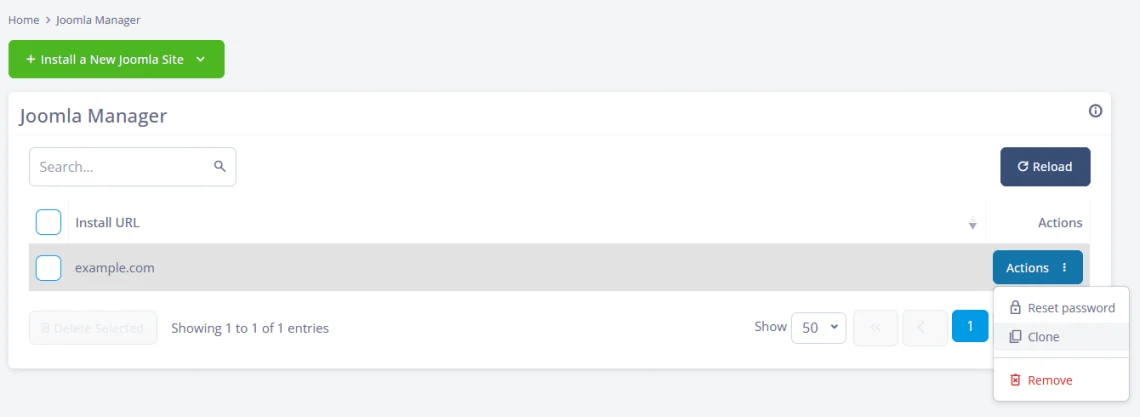
ScalaHosting customers can easily build a testbed for new updates. SPanel’s Joomla Manager can clone an existing Joomla installation, allowing you to test all new versions and the changes they bring without affecting the live site.
3. Check the PHP runtime
PHP executes every uncached Joomla request, so the PHP version and its limits shape how fast the site responds. According to the official Joomla 6 technical requirements, Joomla 6 requires PHP 8.3 at minimum and recommends PHP 8.4 as well as a PHP memory limit of at least 256 MB.
Four things deserve attention:
The PHP version. Newer supported versions are generally faster and more secure. Run the version Joomla recommends unless an extension holds you back, and plan to replace that extension if it does.
memory_limit. Set it too low, and heavy pages or admin tasks fail with fatal errors. Joomla’s 256 MB recommendation is a sensible floor for most sites.
max_execution_time. This setting caps how long a single request can run. Imports, exports, and large updates may need more time, but normal page views shouldn’t.
Extension compatibility. A PHP upgrade that breaks one extension isn’t an upgrade. Test the new version on a copy of the site, away from the production environment.
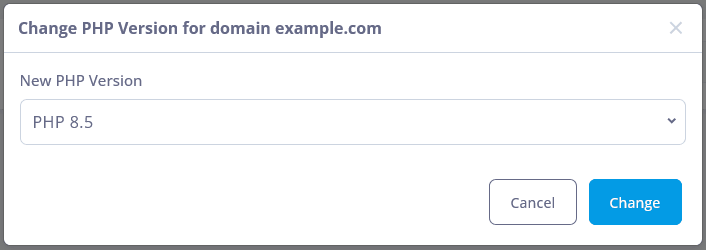
In SPanel, the PHP version is set per document root, so each Joomla site on an account can run its own version. Every PHP version Joomla 6 supports is available, and new stable releases are added as they ship.
In addition, SPanel’s PHP Manager exposes common settings such as memory_limit, max_execution_time, post_max_size, and upload_max_filesize through a graphical user interface, and an advanced editor accepts any other php.ini directive.
SPanel’s per-site PHP settings mean a legacy extension that needs an older PHP version doesn’t hold every other site on the account back.
4. Find slow extensions and templates
A Joomla page is assembled from the core code, several modules, plugins that run on every request, and a template that wraps everything. One inefficient link in the chain can completely alter the experience.
For example, a related-articles module that scans the full content table, a social feed that calls an outside service on every view, or a page builder that loads dozens of scripts can each cost more time than the rest of the page combined.
Here’s how to find the culprit:
Turn on Debug System in Global Configuration on a cloned copy of the site. Joomla will show you a profile of where page-generation time goes and a list of all database queries. Keep debug mode off in production, since it slows pages and exposes internal details.
Disable suspect modules and plugins one at a time on the clone and retest after each change.
View a slow page with Joomla’s default Cassiopeia template on the clone. If it speeds up noticeably, your template is part of the problem.
The server side can point at the same culprit. SPanel includes a PHP-FPM slow log: you set a threshold in seconds, and any PHP request that runs longer gets logged with a stack trace. Joomla keeps each extension in its own folder under /components/, /modules/, or /plugins/, so the file paths in those traces usually name the offending extension. The slow log covers the whole hosting account and keeps writing until you turn it off, so disable it once you’ve found the problem.
5. Investigate database work
Nearly every uncached Joomla page runs database queries. That’s normal. Trouble starts when a page runs hundreds of queries on every view, especially if some of them turn out to be quite slow.
In business terms, the database-heavy pages are often the ones customers use the most: filtered product categories, site search, member directories, event calendars, and reports. They tend to slow down as the catalog, member list, or archive grows, which is why sites with rapidly expanding databases can be particularly prone to performance drops.
Watch for these signs:
Debug mode on your clone shows a high query count, or individual queries taking a large share of the page time.
The slow pages are the ones with filters, search, or long lists, while simple pages stay fast.
Response times climb with traffic even though the CPU isn’t maxed out.
The fixes start at the source. Replace or reconfigure the extensions that generate heavy queries. Many have settings that limit result counts or cache their output. Delete data you no longer need, such as long-retired content and years of action logs. Then cache the results of work that doesn’t change on every request, which is what the next two steps cover.
6. Configure Joomla’s native caching correctly
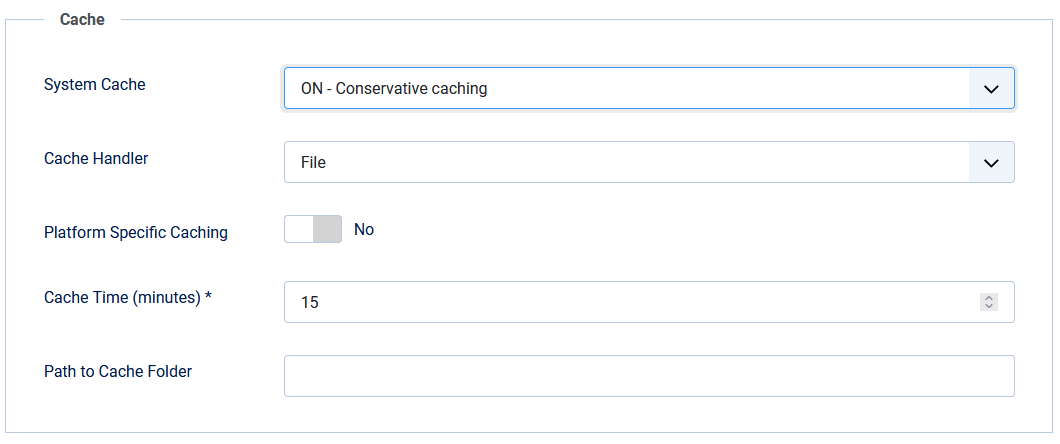
Joomla’s built-in cache stores the output of components and modules so Joomla doesn’t rebuild it on every request. You’ll find the settings on the Global Configuration page under the System menu. Open the System tab and scroll down to the Cache section. Cache Time controls how long stored output stays valid, and Cache Handler controls where it’s stored: on disk by default, or in a memory store such as Redis.
The two cache modes behave differently:
Conservative caching caches component views and the modules that allow caching. It’s the safer choice for most sites.
Progressive caching caches every module for logged-out visitors, overriding each module’s own caching setting. It can be faster, but it can also serve stale or incorrect content from modules designed to change output per request.
The System – Page Cache plugin goes a step further and stores entire pages by URL for visitors who aren’t logged in. It’s powerful for publishers and brochure sites but risky for stores and membership areas, where carts, prices, and personalized content change per visitor. The plugin lets you exclude specific menu items, so leave out cart, checkout, account, and form pages if you enable it.
Don’t forget that caching isn’t a be-all and end-all. It adds little for logged-in sessions, it doesn’t speed up the first request after cached output expires, and it doesn’t make a slow extension efficient. It only minimizes its impact during repeat views.
The table below compares Joomla’s caching options. Redis is included because it often comes up in the same decision, although it changes where cached data lives rather than what gets cached. The next step covers it in detail.
Option
What it caches
Best for
Avoid or limit it when
Conservative caching
Component views and the modules that allow caching
Most sites, as the default starting point
Rarely; it respects each module’s own caching setting
Progressive caching
Every module for logged-out visitors, overriding module settings
Public sites whose modules show the same content to everyone
Modules show per-visitor or frequently changing content
System – Page Cache plugin
Entire pages by URL for logged-out visitors
Publishers and brochure sites
Pages include carts, checkout, accounts, or forms (exclude those menu items)
Redis cache and session handler
Nothing extra; it stores cached output and sessions in memory instead of on disk
Busy sites and sites with many logged-in users
The site is small and low-traffic, so file caching is fast enough
For most sites, the right sequence is conservative caching first, the Page Cache plugin only for pages that look the same to every visitor, and Redis once traffic or logged-in activity justifies it.
7. Decide whether Redis is useful
Redis Cache is an in-memory data store. For Joomla, it can replace the disk as the location where cached output and visitor sessions are stored. The main advantage of using memory rather than disk is that reading and writing that data is faster.
Joomla supports Redis natively in two places in Global Configuration: as the Cache Handler for cached output, and as the Session Handler for visitor sessions. Both rely on the phpredis PHP extension.
Redis tends to help in three situations:
Busy sites where the same cached output gets read over and over, and file-based cache reads start competing for disk time
Sites with many concurrent logged-in users, where storing sessions in Redis takes a steady stream of writes off the database
Sites whose extensions use Joomla’s cache API, since their cached data moves into Redis too
It won’t make much of an impact on small, low-traffic sites, where the file caching is already fast enough and Redis just adds unnecessary complication.
There are a few other problems Redis can’t fix:
Badly written extensions
Slow external APIs that pages rely on
Oversized images, fonts, and other frontend assets
Inefficient database queries that aren’t cached
Poor JavaScript or frontend code that slows browser rendering
ScalaHosting customers manage Redis themselves in SPanel. From the Redis Cache screen, you deploy a dedicated Redis instance for your hosting account. It binds to a private loopback address, authenticates with its own randomly generated password, and starts with a 256 MB memory limit and the allkeys-lfu eviction policy, which keeps frequently used keys and discards cold ones. You can change the memory limit, eviction policy, and connection settings from a form, and restart or flush the instance from the same screen.
To connect Joomla, copy the host address and password from the Redis Cache screen into Global Configuration, set the Cache Handler (and, if you like, the Session Handler) to Redis, and save. Then confirm Joomla actually uses it. SPanel’s Redis stats show memory use, key counts, and hit and miss ratios, while the monitor streams every command Redis receives for as long as you choose. Load a few pages. If Joomla’s reads and writes don’t appear, the connection isn’t working.
There are a couple of things you should bear in mind if you run multiple Joomla sites on one account. The Redis instance belongs to the hosting account, not to each site, so give each site its own Redis database number in Global Configuration to keep their data apart. And SPanel’s Flush Cache button wipes every key in the instance, including sessions if you store them there, which logs out every visitor on every site that shares it. For routine clearing, use Joomla’s own Clear Cache tool under System > Maintenance instead.
8. Optimize images and static assets
Images are usually the heaviest part of a page, and caching doesn’t reduce their impact on a visitor’s first view. One oversized image can outweigh every script on the page.
Work through these checks:
Resize images to the largest size they actually display at, then compress them. Modern formats like WebP and AVIF produce much smaller files than older JPEG and PNG images.
Make sure images below the fold load lazily, so the browser fetches them only when a visitor scrolls near them.
Audit what the template loads on every page. Unused icon libraries, sliders, animation scripts, and extra web fonts all add weight.
Confirm that HTML, CSS, and JavaScript are compressed in transit. Joomla offers a Gzip Page Compression option in Global Configuration, but check whether your server or CDN already compresses responses before you enable it.
This work shapes how the site feels on mobile connections, and it’s the part of page speed that Google measures through Core Web Vitals.
9. Evaluate CDN and edge delivery
A content delivery network (CDN) stores copies of your static files on servers around the world and serves each visitor from a nearby location. If your audience spans countries or continents, a CDN shortens the distance those files travel and takes load off your server.
SPanel integrates with Cloudflare in its DNS Editor. You connect your own Cloudflare account with a scoped API token and point the domain’s nameservers to Cloudflare. SPanel then exposes the controls you’ll use most often: per-record proxying, security levels, a cache purge button, and a development mode that bypasses Cloudflare’s cache for three hours while you test changes. Purge the cache after template or asset updates so visitors don’t keep receiving old files.
10. Look at CPU, memory, and disk I/O pressure
Once the application is clean, check whether the server has room to run it. Each resource fails in a recognizable way:
CPU. Pages slow down most during traffic peaks and recover when things calm down. Uncached PHP work is the usual consumer.
Memory. Requests fail or processes get killed intermittently, often during imports, backups, or heavy admin tasks.
Disk I/O. Even simple pages turn slow in bursts because requests wait on reads and writes. Large file caches, logs, and busy databases compete for the same disk.
Fixing the application often frees more capacity than an upgrade would. But when a well-optimized site still maxes out its CPU during normal traffic, it has outgrown its resources.
On a ScalaHosting server, SPanel tracks CPU and memory use per hosting account over time and lists each account’s running processes, so you can check whether a slowdown lined up with a resource spike. When the numbers show you need more headroom, you can add CPU and RAM to your managed cloud server without migrating the site.
If your numbers point at the server rather than Joomla, you can test that theory risk-free: the Speed Up Joomla campaign migrates a copy of your site for free and pays you $100 if it doesn’t load faster.
11. Monitor performance over time
A site that’s fast today may be slow tomorrow. An extension update, a growing database, a traffic surge, or an expired certificate can undo months of tuning, and monitoring catches that drift before customers do.
Useful checks go beyond “is it up”:
The HTTP status, so you know when the site returns errors
Response time against a threshold you define
The presence of specific text on the page, which catches pages that load but render broken, such as an empty product listing
SSL certificate expiration
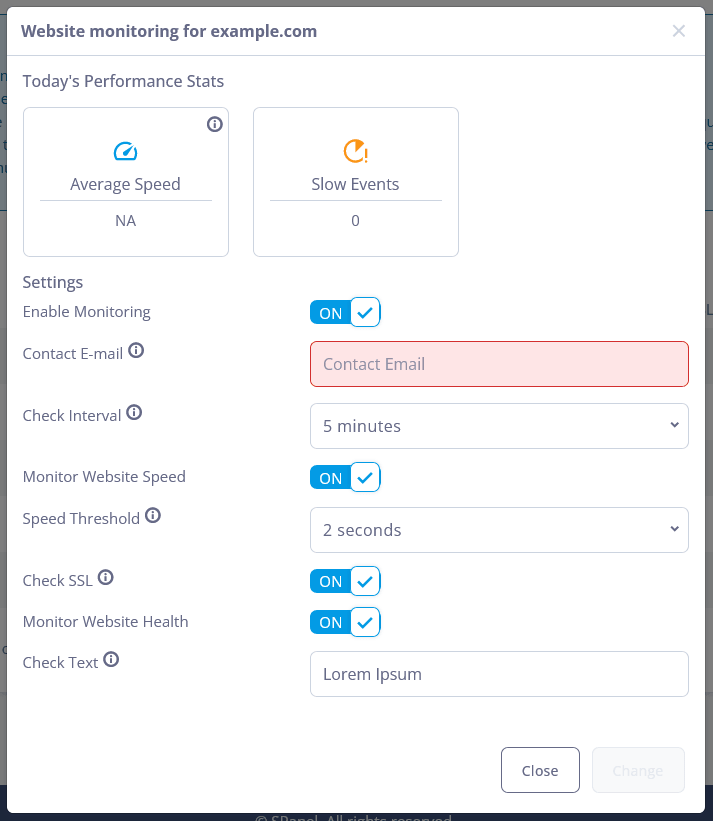
ScalaHosting customers get all four through SPanel’s website monitoring. You choose a check interval of 1, 5, 10, or 15 minutes, set a speed threshold, and optionally add a text-presence check and SSL expiration alerts, which warn you 72 hours before a certificate expires. SPanel records response time and time to first byte on every check. It emails you when the site goes down, loses the expected text, or crosses your speed threshold 15 times in one day. Keep your account’s contact email current, since that’s where the alerts go.
12. Ensure you have a recovery path before every major change
PHP upgrades, cache handler changes, template swaps, and extension updates all carry some risk of breakage. How much a mistake costs depends on how quickly you can undo it.
Before any major change:
Test it on a clone first.
Take a fresh backup of the files and database right before you change production.
Write down every setting you change so you can reverse them one at a time.
SPanel covers the recovery side. You can create an on-demand backup of chosen folders and databases right before a change, restore individual files from a restore point, and restore a database under a different name to compare it with the live version. If point-in-time recovery is enabled for MariaDB on your server, a database can roll back to a snapshot taken as recently as five minutes earlier.
Which Joomla Optimizations Matter Most for Your Business
The table below maps each optimization to the business result it supports and the problem it can’t solve. Use it to decide where your next hour of work should go.
Optimization
What it improves
Business benefit
Complexity
When it matters
What it does not fix
Baseline measurement
Decision quality
No time or budget spent on the wrong fix
Low
Always, before anything else
Nothing directly; it shows what to fix
Joomla and extension updates
Bugs, security, efficiency
Fewer outages and emergency fixes
Low to medium
Every release cycle
Extensions that are inefficient by design
Supported PHP version and limits
Server response time, stability
Faster pages, fewer fatal errors
Low
Always
Slow queries or heavy extensions
Removing slow extensions
Page generation time
Faster key pages, lower server load
Medium
When one page type is slow
Resource shortages on the server
Database cleanup and query fixes
Response time on data-heavy pages
Faster search, filters, and checkout
Medium to high
Growing catalogs, archives, or member lists
Frontend weight
Joomla caching
Repeat views for logged-out visitors
More traffic handled on the same hardware
Low
Content-heavy public sites
Logged-in and personalized pages
Redis
Cache and session read and write speed
Steadier performance under concurrent load
Medium
Busy sites, many logged-in users
Bad code, slow APIs, frontend assets
Image and asset optimization
Load time, Core Web Vitals
Better mobile experience and search visibility
Low to medium
Image-heavy pages, mobile audiences
Slow server response
CDN
Static file delivery distance
Consistent speed for distant visitors
Medium
International audiences
Dynamic, uncached pages
CPU and RAM upgrades
Capacity under load
Headroom for growth and campaigns
Low
After the application is clean
Inefficient code, which only runs faster
Monitoring
Visibility over time
Problems caught before customers report them
Low
Always
Problems it isn’t set up to check
The pattern is clear: the cheapest fixes sit at the top, and the ones that depend on a clean application sit at the bottom.
What SPanel Changes About Joomla Performance Management
Everything in this section is available to ScalaHosting customers, because these tools come with SPanel, our server management platform.
Most of the checklist above is application work that you or your developer do inside Joomla. The rest depends on infrastructure: the PHP runtime, a cache store, monitoring, and backups. In many hosting setups, each of those pieces requires a separate tool, a support ticket, or a call to a server administrator. As a result, infrastructure tuning is often overlooked.
SPanel brings the important infrastructure-side Joomla performance controls into one managed environment. It doesn’t optimize Joomla for you. It puts the controls where you can use them, so diagnosing and fixing a slow site becomes one continuous workflow instead of a chain of tedious, tricky tasks.
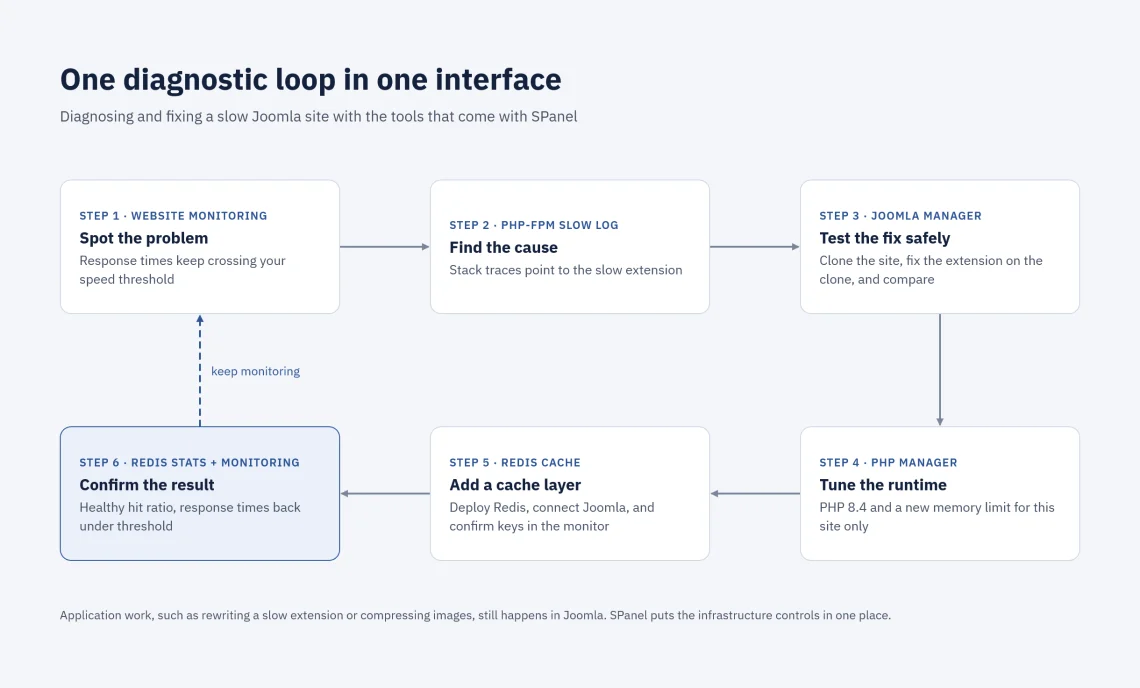
One diagnostic loop in one interface
Here’s what that workflow looks like on a slow Joomla site with a large member area:
Spot the problem. Website monitoring emails you when response times keep crossing your speed threshold.
Find the cause. You switch on the PHP-FPM slow log, and its stack traces point to the directory extension.
Test the fix safely. You clone the installation with Joomla Manager, reconfigure the extension on the clone, and compare the results.
Tune the runtime. In PHP Manager, you move the site to PHP 8.4 and adjust its memory limit without affecting any other site on the account.
Add a cache layer. Because the site serves many logged-in members, you deploy Redis, point Joomla’s cache and session handlers to it, and use the monitor to confirm Joomla is reading and writing keys.
Confirm the result. Redis stats show a healthy hit ratio with memory use under the limit, and monitoring shows response times back under your threshold.
Why that matters for the business
Running the loop in one place changes the economics of performance work:
Less administrative overhead. PHP settings, Redis, monitoring, and backups live in one interface and are easier to maintain.
Fewer support dependencies. Flushing a cache, raising a memory limit, or switching PHP versions doesn’t wait on a ticket.
Faster troubleshooting. The evidence, from slow-log traces to Redis stats and monitoring history, sits next to the controls that act on it.
More control. Each site gets its own PHP version and settings, and your Redis instance is isolated from other accounts on the server.
Easier scaling. When a clean site needs more capacity, CPU and RAM scale up on the same server without a migration.
No custom stack to build. You don’t have to assemble and maintain your own caching, monitoring, and configuration tooling to run a serious Joomla setup.
SPanel won’t rewrite a slow extension or compress your images. Those are related to the CMS itself. What changes is how quickly you can see a problem and act on it.
Avoid These Joomla Performance Mistakes
Most wasted performance effort traces back to a handful of habits:
Stacking cache systems without measuring. Joomla’s cache, the Page Cache plugin, a third-party cache extension, and a CDN can overlap, serve stale content, and make problems hard to trace. Add one layer at a time and retest.
Assuming more RAM fixes everything. Memory helps only when memory is the constraint. A slow query or a blocking API call runs just as slowly on a bigger server.
Enabling Redis without confirming Joomla uses it. Check that caching is on and the Cache Handler is set to Redis, then watch for Joomla’s traffic in Redis before you credit it with anything.
Raising PHP limits blindly. An unlimited memory_limit or a max_execution_time of several minutes hides runaway requests instead of fixing them and lets one bad request hold resources longer.
Benchmarking different sites and calling it a hosting comparison. A demo site on one host and your real site on another differ in content, extensions, and caching. Compare the same site, copied to both environments and tested the same way.
Testing only the homepage. The homepage is often your most cached page. Test the category, search, account, and checkout pages where revenue happens.
Changing production without a way back. Every change on this list deserves a clone to test on and a backup to restore from.
When Joomla Is Clean but the Site Is Still Slow
Sometimes you work through the whole checklist and the numbers barely move. The extensions are lean, caching is on, the images are compressed, and server response times are still high. At that point, the bottleneck is likely the hosting environment itself.
That’s why we launched the Speed Up Joomla campaign mentioned in Step 10. We run it in partnership with the Joomla project, and it lets you test the answer on your own site before you commit:
Free migration. Our engineers copy your files, database, and configuration to a managed cloud server.
A three-day trial. You benchmark the copy against your current host, with no credit card required.
A $100 speed guarantee. Load times are compared with the same tools, location, and method before and after the move, so the result reflects the server rather than the test setup.
Support for Joomla itself. Campaign sign-ups support Open Source Matters, the nonprofit that funds Joomla’s development.
Because the test runs on a copy of your own site, it avoids the benchmarking mistake above. The Joomla speed guarantee terms cover eligibility and how to make a claim.
Speed Up Joomla by Working in the Right Order
Joomla 6 can be very fast in the right environment. The most efficient way to build a quick Joomla website is to prioritize your tasks correctly. Set a measurable baseline first, fix the application, then tune PHP and caching, and add resources only if you still need them. Each step makes the next one easier to judge. When you’re ready to run that work from one place, explore ScalaHosting’s Joomla hosting and see how SPanel fits your setup.
Frequently Asked Questions
Q:What PHP version should Joomla 6 use?
A: Joomla 6 requires PHP 8.3 or newer and recommends PHP 8.4. Running the recommended version gives you current performance improvements and security fixes. Test your extensions on a copy of the site before switching production.
Q:Does Joomla 6 support Redis?
A: Yes. Joomla supports Redis as both a cache handler and a session handler in Global Configuration, as long as the phpredis PHP extension is installed. Redis helps most on busy sites with many repeat views or many logged-in users.
Q:Should I use conservative or progressive caching in Joomla?
A: Start with conservative caching. It caches component views and the modules that allow it, which suits most sites. Try progressive caching only after testing, because it caches every module for logged-out visitors, including modules meant to change per request.
Q:Will a CDN make my Joomla site faster?
A: A CDN speeds up images, stylesheets, and scripts for visitors far from your server. It does little for dynamic pages such as carts, search results, and member areas, which your server still generates. Fix slow server response first.
Q:How can I tell if my hosting is making Joomla slow?
A: Compare time to first byte across different page types. If simple pages are fast and only complex pages are slow, the application is the likely cause. If every page responds slowly, including simple ones, and the application is already lean, the hosting environment is the likely bottleneck.
Q:Can several Joomla sites share one Redis instance?
A: Yes. In SPanel, one Redis instance serves the whole hosting account. Give each Joomla site its own Redis database number in Global Configuration so their data stays separate, and remember that flushing Redis clears every site at once.
Q:Does more RAM make Joomla faster?
A: Only when memory is the limiting resource. Extra RAM prevents failures from memory exhaustion and leaves room for caches, but it won’t speed up an inefficient extension, a slow query, or heavy images.