Moving Joomla From Shared Hosting to Managed Cloud – What Actually Changes?

Your Joomla site works. It loads, it takes inquiries or orders, and nobody has complained loudly enough to force a decision. But it matters more than it did two years ago, and every slow afternoon or unexplained outage now costs something real.
So what do you actually gain when you move Joomla from shared hosting to managed cloud?
More than CPU cores and RAM.
You gain reliability, security, and an environment that helps your business grow.
On ScalaHosting managed cloud with SPanel, you get CPU and RAM that aren’t oversold, a PHP version and php.ini settings for each site, your own Redis instance, a PHP slow log that points at the exact script dragging a page down, and database recovery points as frequent as every five minutes. All of that while our team keeps managing the server, so you don’t inherit a sysadmin job along with the extra power.
This guide covers not only the benefits of a more powerful hosting plan, but also how to make the transition seamlessly.
What Is Managed Cloud Hosting?
Managed cloud hosting is a virtual server with its own allocated CPU, RAM, and storage, where the hosting provider handles server administration: operating system updates, security patching, service monitoring, and technical support.
You run Joomla. The provider runs the machine underneath it.
Shared hosting pools resources across many accounts and gives you little say over the server. A managed VPS gives you your own environment plus the expert staff to help you run it without having to dive deep into technicalities.
Three Ways to Host a Growing Joomla Site
The real decision isn’t “small server or big server.” It’s how much control your business needs, and how much operational work you’re willing to own to get it.
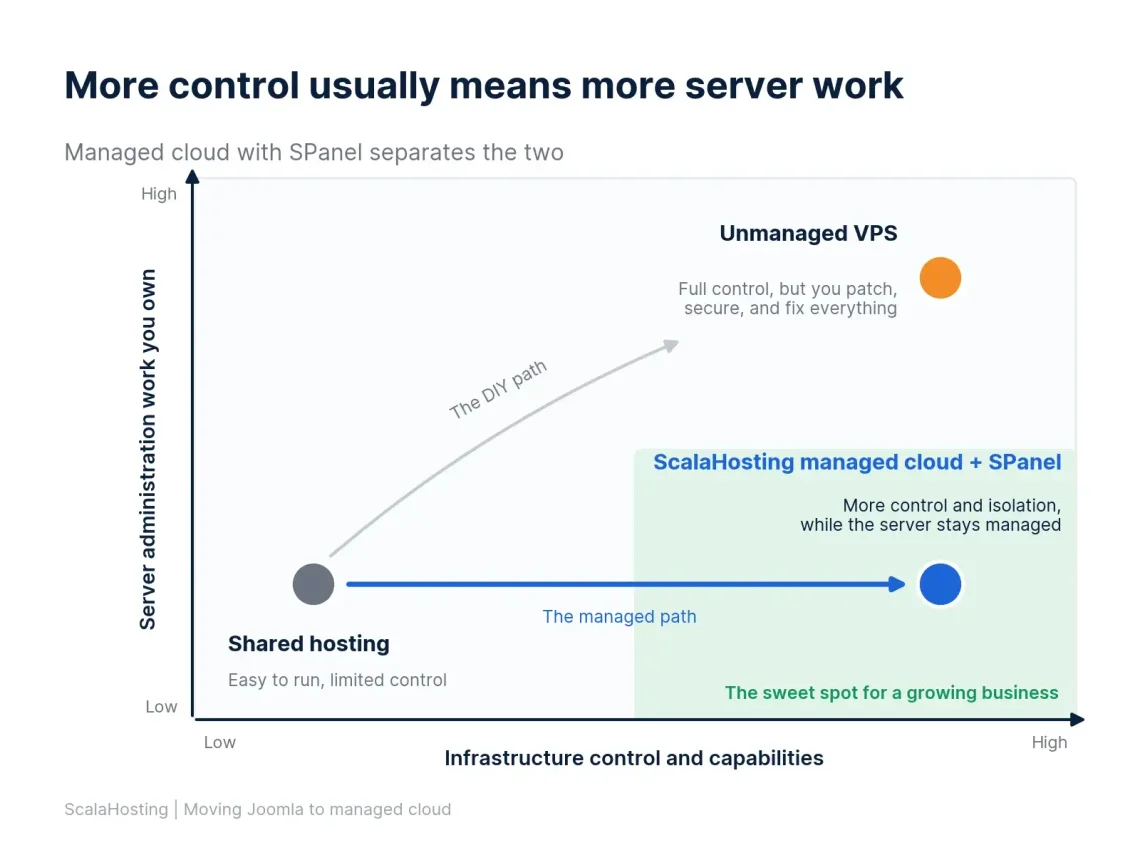
Here’s how the three models compare in practice:
- Shared hosting is easy to operate, but control and resources are limited. The provider runs the server; you share it and can change very little about it.
- An unmanaged VPS gives you much more control, but you (or someone you pay) handle updates, hardening, web server and PHP configuration, monitoring, and backups. That trade-off is the core of managed vs. unmanaged VPS hosting.
- ScalaHosting managed cloud with SPanel gives you greater control, isolation, and infrastructure capabilities, while our team keeps managing the server.
The table below shows who does what under each model.
| Task | Shared hosting (typical) | Unmanaged VPS | ScalaHosting managed cloud + SPanel |
|---|---|---|---|
| Server resources | Pooled with other accounts | Allocated to you | Allocated to you, not oversold |
| OS updates and security patches | Provider | You | Our team |
| PHP version per site | Depends on the provider | You install and configure | Picked per site in SPanel |
| Restarting crashed services | Provider | You | Checked every five minutes and restarted automatically |
| Backup setup and destinations | Provider’s policy | You build it | Built into SPanel |
| Joomla core and extension updates | You | You | You |
That last row is deliberate.
On every model, Joomla itself is your application. Managed cloud takes the server off your plate, not the website.
One note for existing ScalaHosting customers: our shared plans run SPanel too, so some site-level tools may already look familiar. What changes on managed cloud is where they run. They sit on a server whose resources are reserved for you, with server-level settings and features like a dedicated Redis instance available on top.
What Actually Changes When You Move Joomla to Managed Cloud
Seven essential things change with an upgrade to a managed VPS. Some you’ll notice on day one, others only on a bad day.
1. Resources and Workload Isolation
On typical shared hosting, your site draws CPU and memory from a pool that many other accounts use too. Oftentimes we are talking about 1000+ accounts. When a neighbor’s site spikes, yours slows down, and you can’t see why.
On ScalaHosting managed cloud, the CPU and RAM in your plan are allocated to your server and aren’t oversold. Another customer’s traffic surge doesn’t eat into your capacity.
The business result is predictability. Peak-hour slowdowns caused by contention stop, and when the site is slow, you can rule out the neighbors.
Here’s the caveat. More CPU does not fix inefficient Joomla code. If a component runs hundreds of database queries per page, faster hardware finishes each one a little sooner, but the page still runs a lot of them. More resources buy headroom, not efficiency.
2. PHP and Runtime Control
Joomla’s PHP requirements shift with each major release, and extensions don’t always keep pace. A growing business often ends up juggling a production site on a current PHP version, a staging copy testing the next upgrade, and an older application that can’t move yet.
SPanel handles this by setting the PHP version per document root, not server-wide. Your main Joomla site can run PHP 8.3, a staging subdomain can test a newer release, and a legacy microsite can stay on PHP 7.4, all on the same server. You change versions from a dropdown in PHP Manager, and the change applies immediately.
A few details matter for Joomla owners:
- On Rocky Linux 10, the current default platform, SPanel offers PHP 7.4 through the latest stable release.
- Servers on Rocky Linux 8 also offer older versions back to PHP 5.6 for genuinely legacy applications.
- A validated form covers eight common php.ini settings, including memory_limit, upload_max_filesize, post_max_size, max_execution_time, and max_input_vars.
- An advanced editor accepts a full php.ini for anything the form doesn’t cover.
Treat that advanced editor with care. A typo in a custom php.ini can stop PHP from starting, so load a page after saving and roll back if errors appear.
3. Caching with a Dedicated Redis Instance
Joomla can use Redis as its cache handler and session handler through Global Configuration, as long as the PHP Redis extension is available. On managed cloud, SPanel lets you deploy your own Redis instance from a single screen.
This is not a shared cache. Each instance runs as its own process on a private loopback address, with its own password and memory budget (256 MB by default, adjustable). You copy the host and password into Joomla, and repeated database work starts coming from memory instead.
Two honest limits apply. Redis is dedicated per hosting account, not per site, so separate Joomla sites under one account should use different key prefixes or database numbers. And Redis only speeds up work Joomla repeats. It won’t shorten a page that spends its time waiting on an external API.
4. Visibility and Troubleshooting
“The site feels slow” is a hard problem to fix. “This script took 6 seconds on these URLs” is an easy one to hand to a developer.
SPanel gives you several ways to get from the first sentence to the second:
- PHP-FPM slow log. Set a threshold, such as 3 seconds, and every slower request is logged with a stack trace pointing at the exact script and line. Switch it off when you’re done, because it doesn’t expire on its own.
- Website monitoring. Checks run every 1, 5, 10, or 15 minutes and track HTTP status and load speed. A text-presence check flags a page as down when expected text is missing, even if the server returns HTTP 200.
- SSL expiry alerts. You get an email when a certificate is within 72 hours of expiring.
- Service watchdog. Every five minutes, SPanel checks the web server, MariaDB, mail services, and every installed PHP-FPM version, and restarts anything that has stopped.
- Redis stats and monitoring. See memory use and hit rates, or watch live cache traffic to confirm Joomla is really using Redis.
One limit to know: monitoring runs from your own server, so a single-server setup can’t alert you if the whole server is unreachable. Pair it with a lightweight external uptime check.
5. Backups and Recovery
For a business, backups aren’t about files. They answer two questions.
- How much recent data can you afford to lose (your recovery point)?
- How quickly do you need the site back (your recovery time)?
SPanel’s backup system is built for those questions:
- Scheduled backups at hourly, daily, weekly, and monthly tiers.
- Up to four destinations at once: local disk, a separate server over SSH, any S3-compatible storage, and Backblaze B2.
- Granular restores: bring back one file, one database, or a whole account.
- Side-by-side database restores: restore an older copy under a different name to compare it with the live one.
- Locked restore points that rotation never deletes.
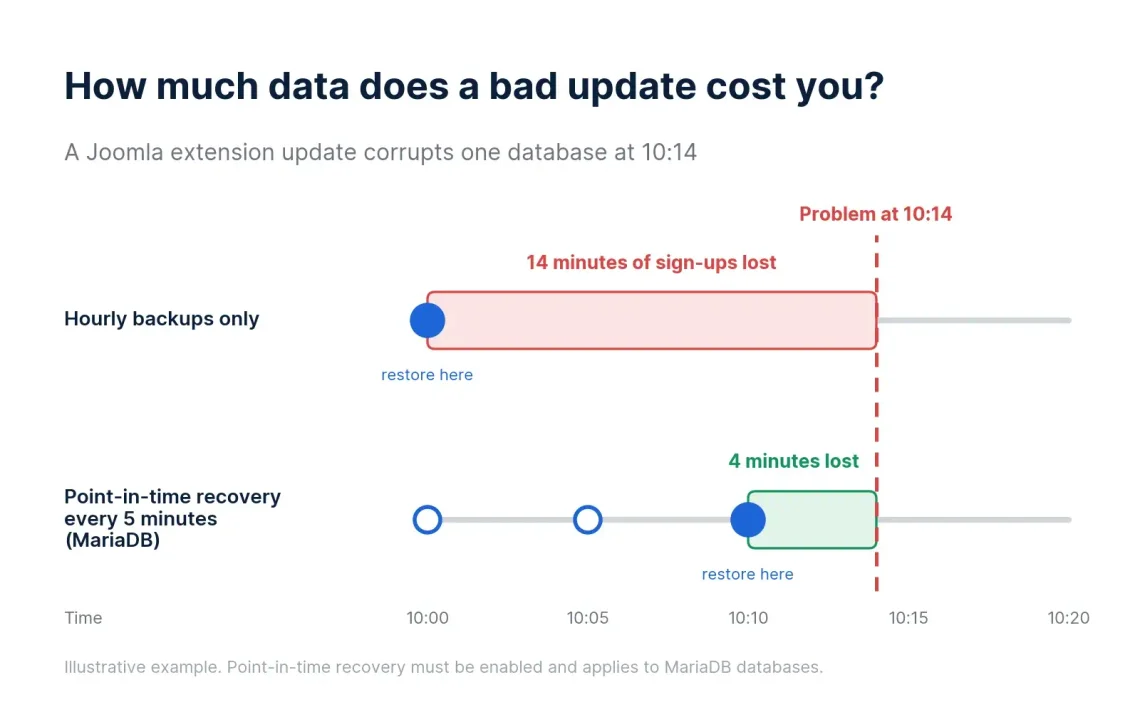
- Point-in-time recovery for MariaDB, with snapshots as often as every five minutes and up to 168 hours of history.
Picture a Joomla extension update that corrupts your registrations table at 10:14. With hourly backups alone, you’d roll back to 10:00 and lose 14 minutes of sign-ups. With point-in-time recovery at five-minute intervals, you restore just that database to 10:10.
Keep the limits in view.
Point-in-time recovery covers MariaDB only and needs to be enabled. The backup schedule and destinations are set at the server level, so confirm them with our team when you move. Local backups sit on the same hardware as the live site, so an offsite destination is what protects you from a lost server.
6. Scaling as the Business Grows
Scaling on managed cloud is a practical business idea, not a magic switch. You start on a plan sized for today’s traffic, and your resources can be adjusted as the site grows without changing providers.
For businesses that eventually need more than one server, or can’t tolerate a single point of failure, ScalaHosting’s Managed Cluster Hosting runs several servers as one unit so that one node failing doesn’t take the site down. Every cluster is designed around the specific workload, so it starts with a conversation, not a checkout page.
7. Management: More Server Without More Server Work
This is the difference most comparisons skip.
Owning more server resources and being responsible for operating an entire server are two separate things. With an unmanaged VPS, the extra power comes bundled with patching the OS, hardening security, tuning the web server and database, configuring backups, and answering alerts at night.
On ScalaHosting managed cloud, our team handles server administration, and SPanel gives you the controls you actually need. Security runs in the background too. SShield, the real-time security monitoring built into SPanel, blocks 99.998% of web attacks before becoming a real threat to your online project.
That doesn’t mean zero technical knowledge, though.
You’ll still update Joomla and its extensions, choose extensions responsibly, and paste Redis credentials into Global Configuration. The good thing is you won’t need a sysadmin to keep the server alive.
What You Actually Gain Beyond More CPU and RAM
If you remember one section, make it this one. The table compares typical shared hosting across the industry with ScalaHosting managed cloud running SPanel.
| Area | Typical shared hosting | ScalaHosting managed cloud + SPanel | Business impact |
|---|---|---|---|
| Resource control | CPU and RAM pooled with other accounts | CPU and RAM allocated to your server, not oversold | Predictable speed during peaks |
| PHP configuration | Versions and settings depend on the provider | PHP version per site, validated php.ini form, full php.ini editor | Production, staging, and legacy apps each run what they need |
| Caching | Redis often unavailable or shared | Your own Redis instance with a private address and password | Less repeated database work under load |
| Troubleshooting | Little insight into slow requests | PHP-FPM slow log with stack traces, Redis stats and live monitor | Developers fix the right problem faster |
| Monitoring | Often needs a third-party service | Checks every 1 to 15 minutes, text-presence checks, SSL alerts, five-minute service watchdog | Outages found in minutes, crashed services restarted |
| Backups and recovery | Provider’s schedule, restores often by ticket | Hourly to monthly tiers, up to four destinations, single-file restores, MariaDB point-in-time recovery | Smaller data-loss window, faster self-service recovery |
| Server management | Managed, but you can change very little | Managed by our team, controlled by you through SPanel | Control without hiring a sysadmin |
| Scaling | Move up shared tiers, then migrate | Adjust resources as you grow; cluster option for high availability | A growth path without replatforming |
When Managed Cloud Will Not Fix Joomla
Better web hosting fixes hosting-related problems. It doesn’t fix site problems, and a new server won’t change that.
Moving hosts probably won’t help if the slowdown comes from:
- Broken or inefficient extensions
- Slow third-party APIs your pages wait for
- Huge, uncompressed images
- Poor frontend code, such as render-blocking scripts
- Badly designed database queries in custom components
- Template problems, like dozens of stylesheets and scripts per page
- A compromised Joomla installation
That last one deserves a warning. Moving an infected site copies the infection. Clean the site first, and check your extensions against the Joomla Vulnerable Extensions List.
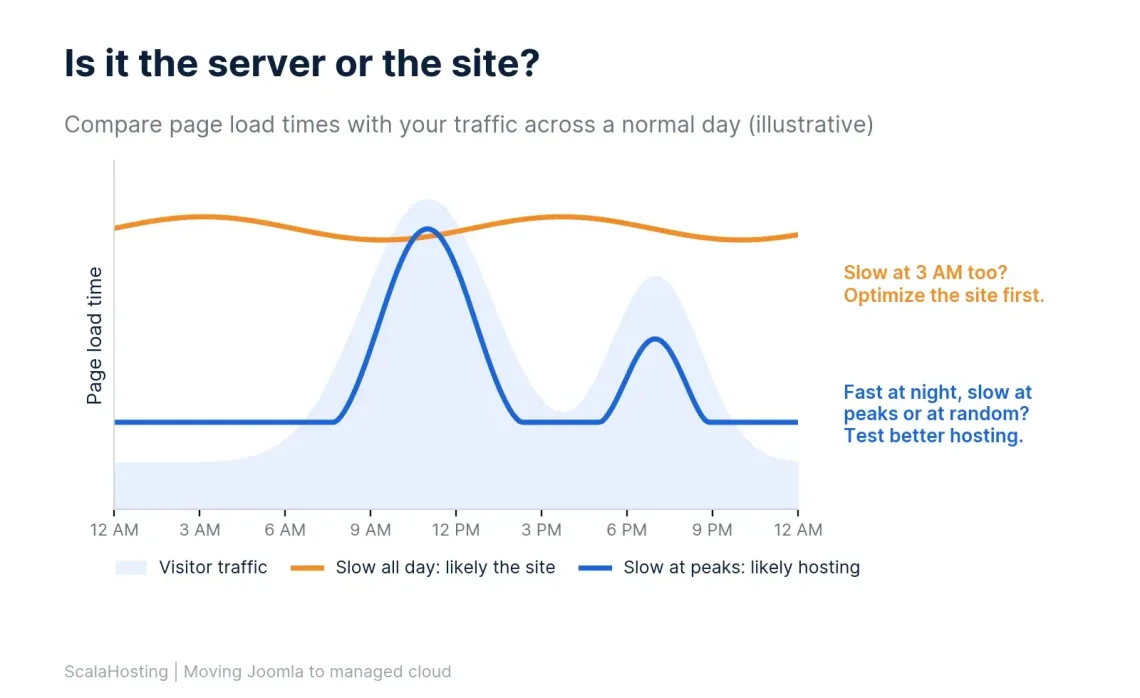
Is It the Server or the Site? A Quick Test
Load your slowest pages at a quiet hour and again at a busy one. If they’re slow at 3 AM when almost nobody is visiting, the problem is probably the site. If they’re fast at night and slow at peaks, or slow at random, hosting is a likely suspect.
Five Signs You May Have Outgrown Shared Hosting
Not every Joomla site needs to move. These signs suggest yours might:
- Traffic peaks cause instability. A newsletter, a campaign, or a seasonal rush reliably makes the site slow or unavailable.
- Resource limits keep coming back. You see recurring limit warnings, throttling, or errors that clear up once traffic drops.
- Downtime now has a price. The site brings in leads, bookings, or revenue, and an hour offline costs more than a month of better hosting.
- The business needs more control. You need a specific PHP version for staging, custom php.ini values, or Redis, and your plan can’t provide them.
- Recovery requirements got stricter. A client, a partner, or your own risk appetite no longer accepts losing a day of data.
One sign is worth watching. Two or more that keep repeating are worth testing.
Who Should Probably Stay on Shared Hosting?
Plenty of Joomla sites belong on shared hosting. A small brochure site with steady, modest traffic, no custom runtime needs, and little cost when it’s briefly offline doesn’t need managed cloud. For those sites, good shared hosting, regular Joomla updates, and an offsite backup might be the right call.
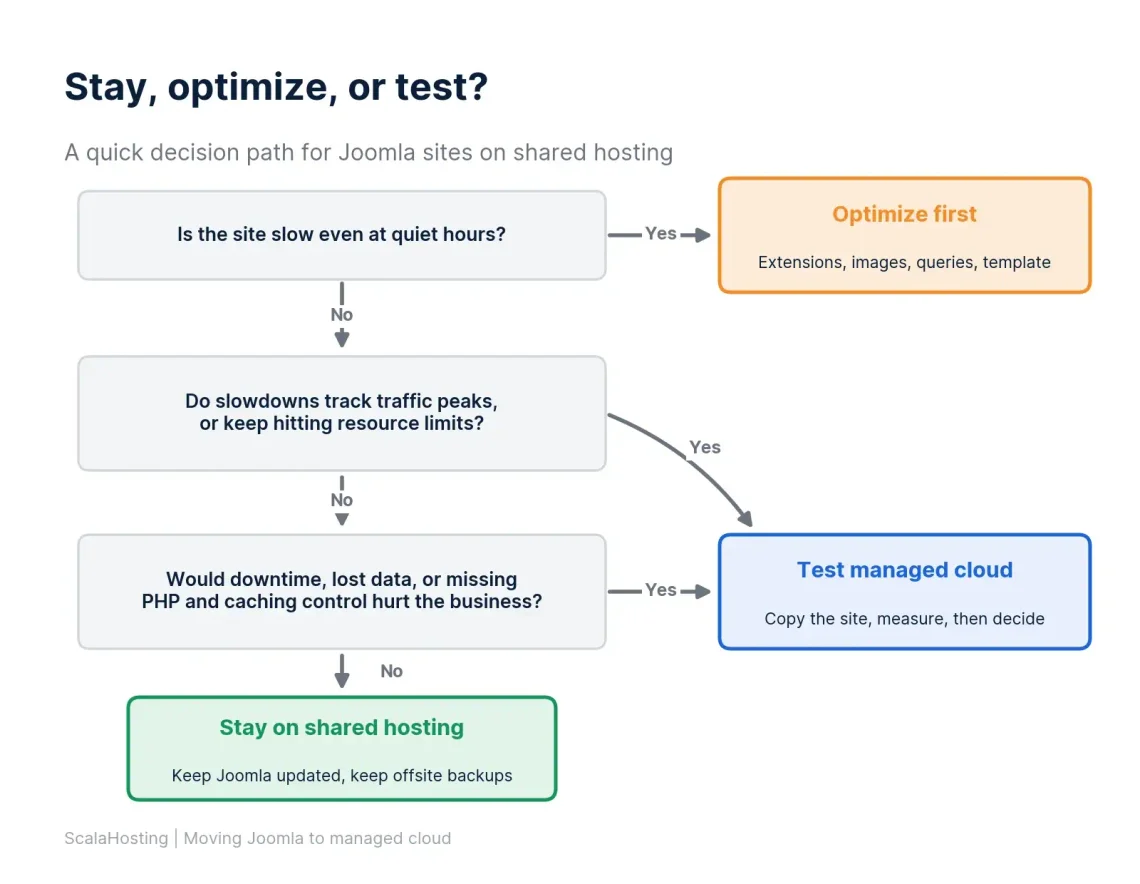
Stay, Optimize, or Test? A Joomla Hosting Decision Matrix
Use this matrix to pick your next step.
| Next step | When it fits | Typical signals | What to do |
|---|---|---|---|
| Stay on shared | Low, stable traffic and low downtime cost | Fast most of the time, no special PHP or caching needs | Keep Joomla updated and keep an offsite backup |
| Optimize first | The site itself is the bottleneck | Slow even at quiet hours, one page or extension dominates load time | Audit extensions, compress images, enable Joomla caching, profile the slowest pages |
| Test managed cloud | Hosting limits and business risk are the bottleneck | Slow at peaks, recurring resource limits, costly downtime, stricter recovery needs | Test a copy of the site on managed cloud and compare measured load times |
Test Before You Migrate Your Joomla Site
Before you permanently move a production business website, test a copy and gather evidence. That’s the idea behind the performance partnership with Joomla, the program ScalaHosting runs as a Joomla hosting partner.
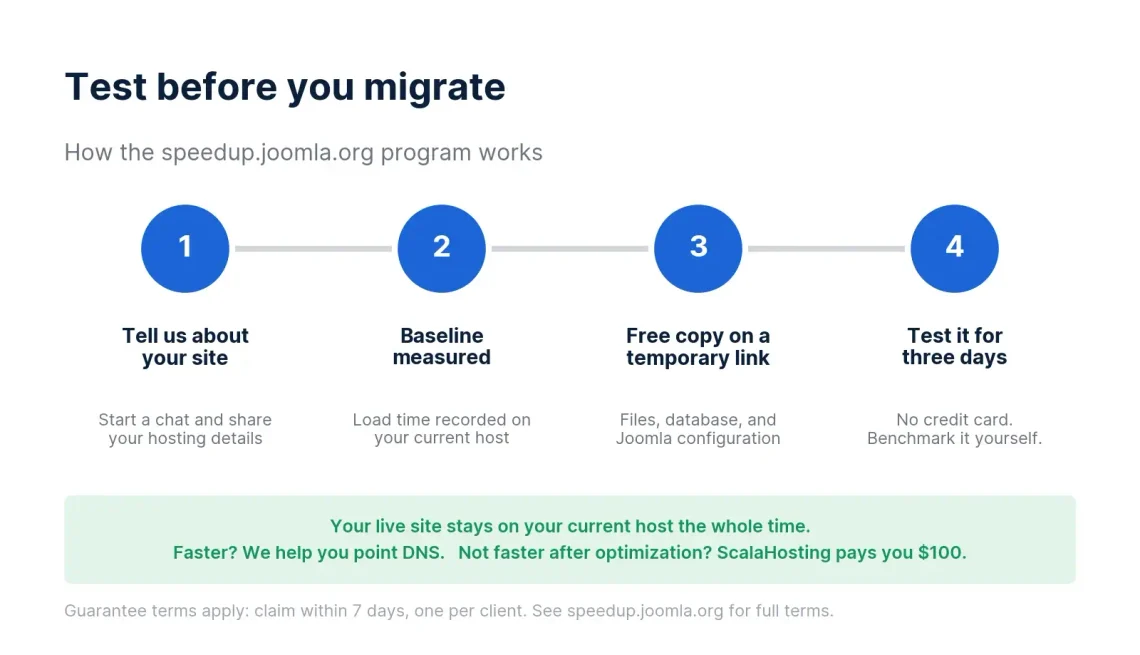
Here’s how it works:
- You start a chat. Our team asks for your current hosting details and confirms what your site needs.
- We measure your current speed. Before anything moves, we record your site’s load time on your current host. That becomes the baseline.
- We copy the site for free. Our engineers copy the files, database, and Joomla configuration, then test it and give you the green light when it’s ready to point your domain name. Your live site isn’t touched.
- You test it for three days. No credit card is required. Benchmark it with the tools you trust and click through everything that matters. If you’re happy, we help you make a seamless transition. If not, we delete the copy.
The offer comes with a guarantee. If, after server-level optimization, the site still loads slower than the recorded baseline, ScalaHosting pays you $100. Claims must be made within seven days of migration, one per client. The guarantee doesn’t cover changes you make after the move, third-party services, or site-level issues that already existed on your original host.
ScalaHosting reports that Joomla sites load 30% faster on average after the move. Treat that as a reason to test, not a promise. Your own before-and-after numbers are the ones that count.
Use the three days well. Check these before you decide:
- Your heaviest pages, such as large category or search pages
- Forms, bookings, and checkout flows
- Admin actions like saving menus and articles
- Extensions that call external services
- Scheduled tasks and outgoing email
Keep your old hosting account active for a while after you switch. It’s a cheap safety net while you build confidence in the new setup.
Why ScalaHosting for a Growing Joomla Business
ScalaHosting gives a growing Joomla business a path to more infrastructure control without forcing the owner to build and manage the hosting stack alone.
We build SPanel in-house rather than licensing someone else’s control panel, so per-site PHP control, dedicated Redis, slow logs, monitoring, and point-in-time recovery all live in one place. Our team manages the server. And the speedup program lets you prove the difference on your own site before you commit.
The Joomla community has noticed. Joomla co-founder Brian Teeman moved his own sites and his clients’ sites to ScalaHosting:
“I’ve moved all my sites, all my clients’ sites over to using ScalaHosting.” (Brian Teeman, Joomla co-founder)
The Bottom Line
Moving Joomla to managed cloud changes who controls the environment and who carries the operational load, not just how much CPU and RAM you have. If your web hosting plan is holding your site back, that combination is what a growing business needs. The smart first step is evidence, not a leap.
Get a free copy of your Joomla site on ScalaHosting managed cloud and test it for three days.
Frequently Asked Questions
Q: Will Moving Joomla to Managed Cloud Make My Site Faster?
A: It usually will if web hosting is the bottleneck. Guaranteed resources remove contention, and tools like Redis and per-site PHP tuning add headroom. If the slowdown comes from extensions, images, or templates, the site needs optimization, not a new server.
Q: Do I Need Technical Skills to Run Joomla on Managed Cloud?
A: You need fewer than you would on an unmanaged VPS. Our team handles server administration, and SPanel covers everyday tasks through forms and dropdowns. You’ll still manage Joomla itself, including core and extension updates.
Q: What Does ScalaHosting Manage, and What Do I Manage?
A: Our team manages the server: the operating system, security patching, core services, and server-level tuning. You manage the Joomla application: core and extension updates, templates, content, and users. SPanel gives you the site-level controls in between, like PHP versions, Redis, and backups.
Q: Is Managed Cloud the Same as a Joomla VPS?
A: Technically, yes. Managed cloud runs your Joomla site on a virtual private server with its own resources. The difference from a typical Joomla VPS is the word “managed”: the server administration that an unmanaged VPS leaves to you is handled by our team. Additionally, getting a “cloud” server means that you are tapped into an entire network of interconnected machines, so adding resources is practically limitless.
Q: Can My Joomla Site and Its Staging Copy Run Different PHP Versions?
A: Yes. SPanel sets the PHP version per document root, so a staging subdomain can test a newer PHP release while production stays on the current one.
Q: Does Joomla Work with Redis on ScalaHosting?
A: Yes. Joomla supports Redis as a cache and session handler when the PHP Redis extension is available, and SPanel lets you deploy a dedicated Redis instance for your hosting account. You enter the host and password in Joomla’s Global Configuration.
Q: Will My Joomla Site Go Down During Migration?
A: Not with the speedup program. Your site is copied to a ScalaHosting server while the original keeps running, and nothing changes on your current host until you switch DNS.
Q: Can I Move an Older Joomla 3 Site?
A: Yes. ScalaHosting runs multiple PHP versions, which supports older Joomla installs. Joomla 3 no longer receives official security updates, though, so plan an upgrade path separately from the hosting move.