Is Web Hosting or Joomla Making Your Site Slow? Here’s How to Tell

It’s 8:40 on a Monday morning. A potential client finds your company on Google, taps the link, and waits. Three seconds pass. Then four. By the time your homepage appears, they’ve hit the back button and called the next business on the list.
You’ll never know they were there.
When you run a slow Joomla site, the natural instinct is to blame Joomla: too many extensions, a heavy template, maybe the CMS itself. Sometimes that’s fair. More often, the delay starts one layer below your website, on a server too busy to answer quickly.
Below, you’ll learn how to tell which one is holding you back, what each problem costs your business, and how our new speed-up program with the Joomla Project lets you prove a faster setup before you switch.
Web Hosting or Joomla: Which One Usually Slows a Site Down?
In most cases, a slow Joomla site is a hosting problem first and a site problem second. Joomla’s core is a mature PHP application that performs well on a properly resourced server. When a page takes more than a second before anything appears, that time is usually spent on the server, before Joomla sends a single byte to the visitor’s browser.
Every page view goes through two phases:
- Server time. The server runs PHP, Joomla queries the database, and the finished HTML page is assembled. Your hosting controls this phase almost entirely.
- Browser time. The visitor’s browser downloads images, stylesheets, and scripts, then renders the page. Your template, extensions, and media control this phase.
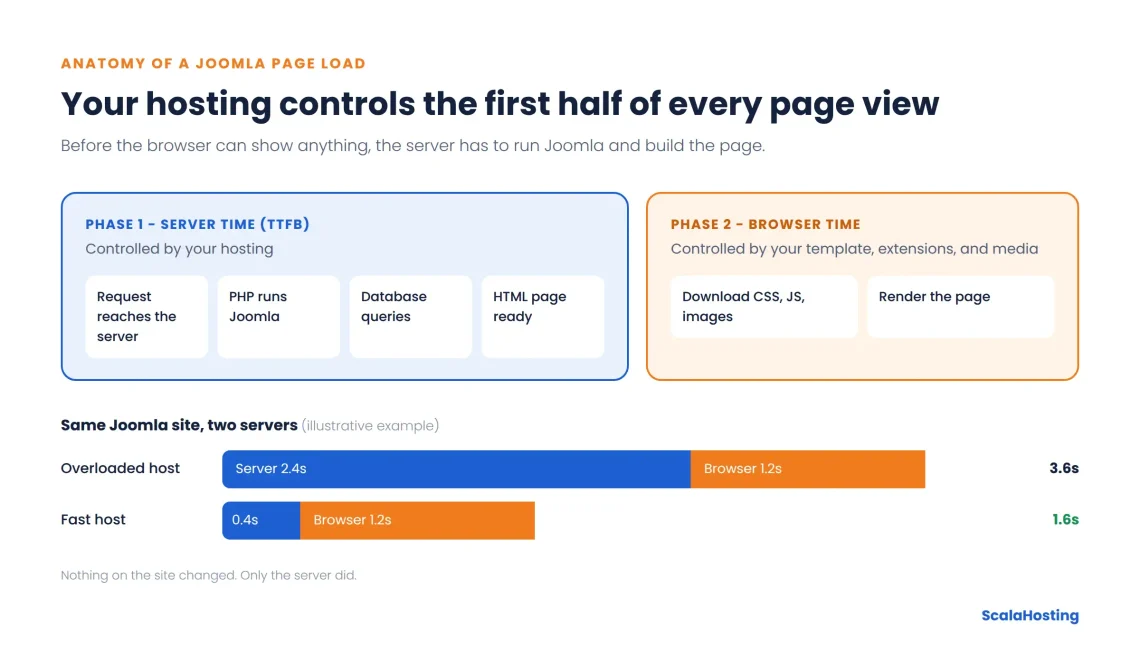
We see the same pattern across the Joomla sites our team reviews. Most slow Joomla sites aren’t badly built. They sit on shared servers where hundreds of accounts compete for the same CPU and memory, and no amount of extension pruning wins back the seconds lost to an overloaded machine.
What a Slow Joomla Site Really Costs Your Business
Speed isn’t a vanity metric. It decides whether visitors stay long enough to buy, book, or get in touch.
Two large studies put numbers on it.
Portent’s analysis of more than 100 million page views found that a B2B site loading in 1 second converts 3 times better than one loading in 5 seconds, while ecommerce sites at 1 second convert 2.5 times better than at 5 seconds. Deloitte’s Milliseconds Make Millions study found that improving mobile speed by just 0.1 seconds lifted retail conversions by 8.4% and travel conversions by 10.1%.
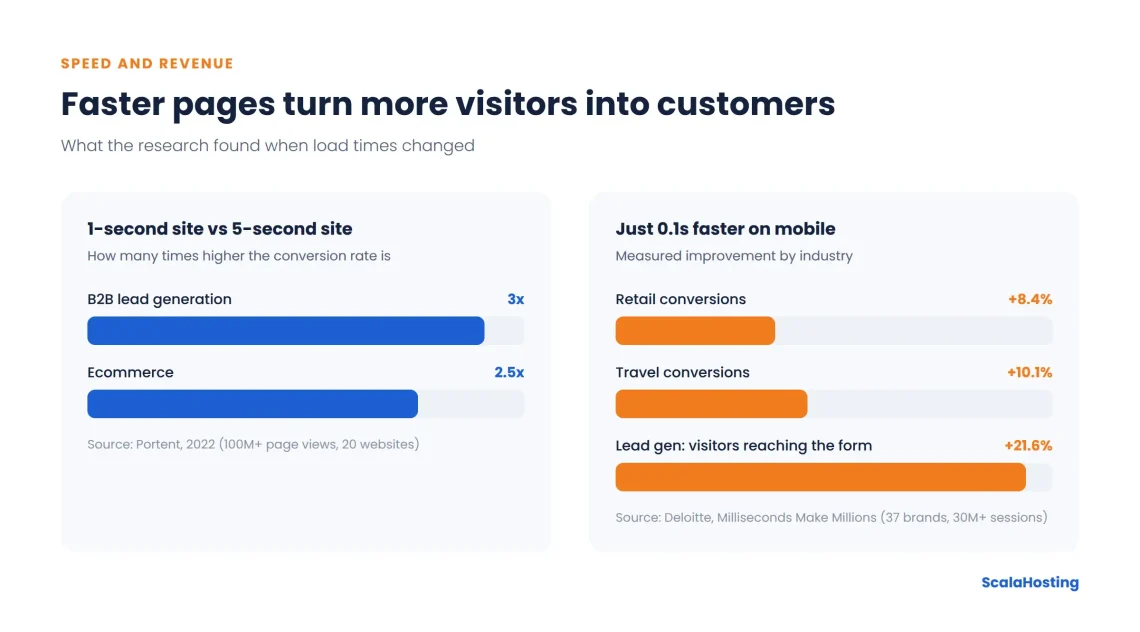
Here’s what those numbers look like in everyday businesses.
The Online Store That Loses the Sale at Checkout
A small outdoor gear shop runs its catalog on Joomla with a shopping cart extension. It launches a weekend sale and emails 8,000 subscribers. Traffic triples within an hour, the shared server can’t keep up, and product pages take 6 seconds to load. Carts time out at payment. The email budget and the discount margin are already spent, and a chunk of the sale disappears.
On a fast, properly resourced server, the same spike is just a busy afternoon. Pages load in under 2 seconds and checkout completes on the first try. Portent’s own example shows the gap: with 1,000 visitors and a $50 product, a store converting at 3.05% with a 1-second load earns roughly $1,190 more than one converting at 0.67% with a 4-second load.
The Local Clinic Whose Booking Form Won’t Load
A dental clinic uses Joomla for its website and online appointment form. Most visitors arrive on their phones, often on mobile data. When the form takes 8 seconds to appear, patients don’t wait. They call the practice down the road.
A fast site turns the same visit into a booked appointment in under a minute, with no phone call for the front desk to handle. In the Deloitte study, lead generation sites saw 21.6% more visitors reach the form submission page after a 0.1-second improvement.
The Membership Site Where Page Caching Can’t Help
Associations, online course platforms, and community portals are some of Joomla’s strongest use cases. They also depend heavily on server speed. Logged-in members usually bypass page caching, so every click triggers fresh PHP processing and database queries.
On a slow server, members wait for every lesson, forum thread, and profile page. Engagement drops, renewals slip, and support inboxes fill with “is the site down?” messages. On a fast server, the experience feels instant, and members keep coming back.
The Agency Juggling Client Sites
A web agency manages 15 Joomla sites for local clients. One client’s site slows down every afternoon. The client blames the agency, the agency spends hours auditing extensions, and nothing changes, because the real problem is a neighbor on the same shared server.
Isolated, guaranteed resources end that cycle. Fewer “why is my site slow” calls mean more billable hours for actual client work.
How to Tell If Hosting or Joomla Is Slowing Your Site
Time to First Byte (TTFB) is the time between a visitor’s request and the first byte of the page arriving from your server. It’s the clearest single signal of web hosting performance, because it measures everything that happens before the browser can start drawing the page.
You can narrow down the cause in about 15 minutes. Work through these checks in order:
- Measure your server response time. Run your homepage through Google PageSpeed Insights or your browser’s developer tools and find the TTFB value. Google’s web.dev guidance on TTFB treats 0.8 seconds or less as good and anything above 1.8 seconds as poor.
- Test a simple page. Check a lightweight page such as your contact page. If even that page responds slowly, the server is the bottleneck.
- Test at different times of day. If speed swings between morning and evening, you’re likely competing with other accounts for shared resources.
- Check the Joomla administrator. The backend isn’t cached, so a sluggish admin panel usually points to the server or the database.
- Turn on Joomla’s debug mode on a staging copy. The Debug System setting in Global Configuration shows page load time, memory use, and database queries, which helps you spot a heavy extension. Avoid enabling it on your live site, because visitors can see the debug output.
- Compare server time with total load time. A fast TTFB with a slow full load means the problem sits in the browser phase: images, scripts, or the template.
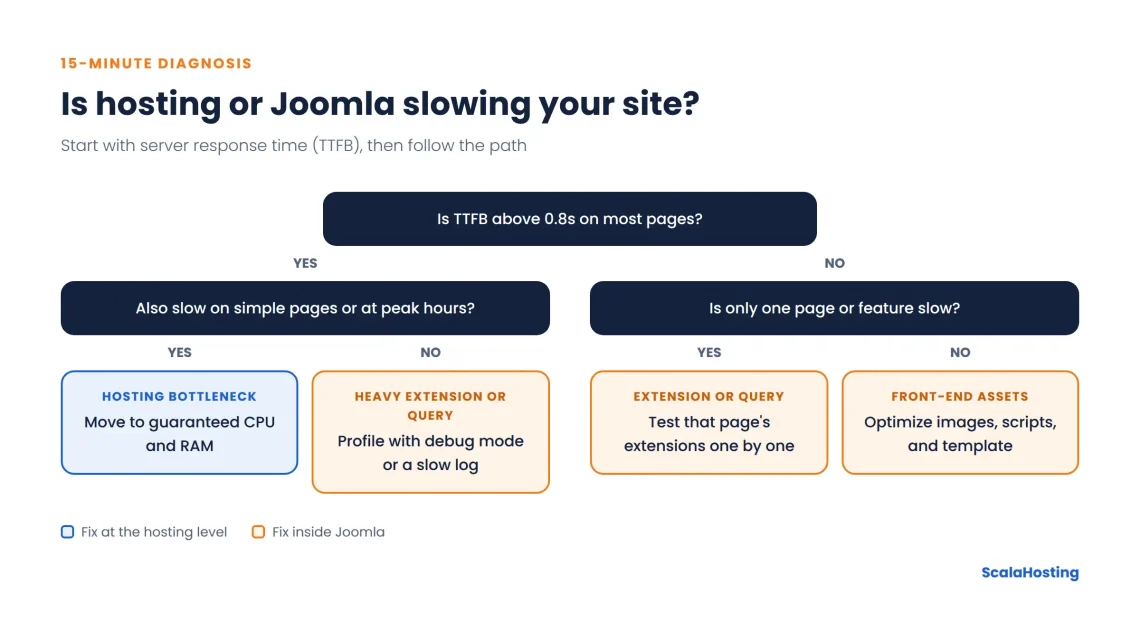
This table sums up the most common symptoms and what they usually mean:
| Symptom | Likely cause | What to do |
|---|---|---|
| TTFB above 0.8s on most pages | Web Hosting | Move to guaranteed resources |
| Speed changes with time of day | Shared server contention | Move off shared hosting |
| Slow admin panel | Server or database | Check hosting resources and PHP version |
| One page slow, others fine | Extension or database query | Profile with debug mode or a slow log |
| Fast TTFB, slow full load | Images, scripts, or template | Optimize front-end assets |
Why Joomla Sites Slow Down on the Wrong Hosting
Think of shared hosting as an apartment building where everyone draws from the same water supply. When a neighbor runs every tap at once, your shower slows to a trickle. You can’t control it. You usually can’t even see it happening.
Several hosting issues hit Joomla sites especially hard:
- CPU and RAM shared with hundreds of other accounts
- Resources advertised on the plan but not guaranteed in practice
- Outdated PHP versions that run Joomla slower than current releases
- No object caching, so every page rebuilds from the database
- Server settings tuned for packing in accounts rather than for speed
If you’re weighing your options, the difference between VPS and shared hosting explains why dedicated resources change the picture.
What You Can Fix Inside Joomla Today
Some speed problems do live inside your website. Before you blame your host, cover these basics:
- Enable Joomla’s built-in caching in Global Configuration, plus the System – Page Cache plugin for guest visitors
- Turn on Gzip page compression in the Server settings
- Disable extensions you no longer use and test plugins one at a time
- Resize and compress images before uploading them
- Run a PHP version listed in Joomla’s technical requirements for your release
- Keep Joomla core, your template, and extensions up to date
For a detailed walkthrough, see our guide to Joomla speed optimization.
But here’s the thing.
You can do all of that and still lose two seconds to a server that’s simply too busy.
How ScalaHosting and Joomla Make Speed Something You Can Prove
The hardest part of fixing a slow site is knowing whether a new host will actually help. Most providers ask you to take their word for it. Together with the Joomla Project, we launched the Joomla speed-up program so you can measure the difference on your own site before you commit.
Here’s what’s included and why it matters for your business:
| What you get | What it means for you |
|---|---|
| Baseline speed test on your current host | A real before-and-after comparison under identical conditions, not a marketing claim |
| Free migration of files, database, and Joomla configuration, plus SSL setup | No developer invoice and no lost weekend |
| 3-day trial with no credit card | Zero financial commitment while you test |
| Private test link on our platform | Your live site stays online and untouched until you switch DNS |
| Server-level tuning by an engineer | The environment is adjusted for your specific site, not a generic template |
| Honest review of site-level issues | You learn whether the problem is hosting or Joomla, which is the question that matters |
| $100 speed guarantee | If your site isn’t faster after optimization, you get $100 (claim within 7 days, one per client) |
| Support for PHP 7.2 and newer | Older Joomla 3.x sites can move without an immediate rebuild |
According to our program data, Joomla sites load 30% faster on average after moving. Each sign-up also supports Open Source Matters, the non-profit organization behind Joomla.
The process takes four steps:
- Chat with our team about your site, traffic, and extensions.
- We record your current load time with an industry-standard tool before anything moves.
- Our engineers copy your site for free and migrate the copy to our server.
- You test and decide. If you’re happy, we guide you through the DNS switch.
The speed comparison is fair by design. The baseline and the new result use the same site files, database, caching settings, testing tool, and test location, so the only variable is the server.
Joomla co-founder Brian Teeman moved his own sites and his clients’ sites to ScalaHosting, citing price, performance, features, and support quality as the main driving factors behind the switch.
What Keeps Your Joomla Site Fast After the Move
The migration is only the start.
With managed VPS hosting, your site runs on guaranteed CPU and RAM that no neighbor can take, and our team handles server updates, security, and monitoring. You can choose a data center in Dallas, Seattle, New York, or Sofia to keep your site close to your customers, and reach 24/7 human support whenever you need it.
Every managed VPS plan includes SPanel, our in-house control panel. You can set the PHP version for each domain, and if one page stays slow, the PHP-FPM slow log records every script that runs longer than the threshold you choose. That turns “the site feels slow” into a named extension you can fix.
For membership sites and stores with logged-in users, SPanel’s Redis Cache tool gives your hosting account its own dedicated Redis instance, isolated from other customers. Joomla supports Redis as a cache and session handler, so frequent database lookups come straight from memory. If you run several Joomla sites under one account, they share that instance, and a unique cache key prefix per site keeps their data separate.
When Moving Hosts Won’t Fix It
A faster server solves server problems. It won’t fix everything, and we’d rather tell you that upfront:
| Move to better hosting when | Fix Joomla first when |
|---|---|
| TTFB is above 0.8s on most pages | TTFB is fast, but pages still load slowly |
| Speed drops at peak hours | Only one page or feature is slow |
| The admin panel is sluggish too | Images are large or uncompressed |
| Logged-in users wait on every click | A recently added extension caused the slowdown |
Our team reviews your site during migration and points out extension conflicts, unoptimized queries, or template issues when we find them, so you know exactly where the remaining time goes.
Is It Time to Test Your Joomla Site?
A slow Joomla site is rarely a Joomla problem alone. Measure your TTFB, fix what lives inside your site, and if the server turns out to be the bottleneck, test a faster one without putting your live site at risk.


Frequently Asked Questions
Q: Why is my Joomla site so slow?
A: The most common cause is slow server response time on overloaded shared hosting. Other causes include heavy or conflicting extensions, unoptimized images, disabled caching, and outdated PHP versions. Measure TTFB first to see which side of the problem you’re dealing with.
Q: Is Joomla slower than WordPress?
A: No, not inherently. Both are PHP applications that perform well on a properly configured server. Real-world speed depends far more on web hosting, caching, and extensions than on the CMS itself.
Q: What is a good load time for a Joomla website?
A: Aim for a TTFB of 0.8 seconds or less and a Largest Contentful Paint (the moment your main content appears) of 2.5 seconds or less. Google’s Largest Contentful Paint guidance treats 2.5 seconds as the threshold for a good user experience.
Q: Does Joomla have built-in caching?
A: Yes. Joomla offers conservative and progressive caching in Global Configuration, plus the System – Page Cache plugin for full-page caching of guest visits. Logged-in users typically bypass page caching, which is why server speed and object caching matter so much for membership sites.
Q: Will moving to a new host fix my slow Joomla site?
A: It will if the server is the bottleneck. If the delay comes from extensions, images, or the template, you’ll need site-level fixes as well. The speed-up program’s baseline test shows you which case applies before you commit.
Q: Can I move an older Joomla 3 site?
A: Yes. We run multiple PHP versions, starting from PHP 7.2, so Joomla 3.x sites can move without an immediate rebuild.