SPanel Brings Passkey Login to Web Hosting Control Panels

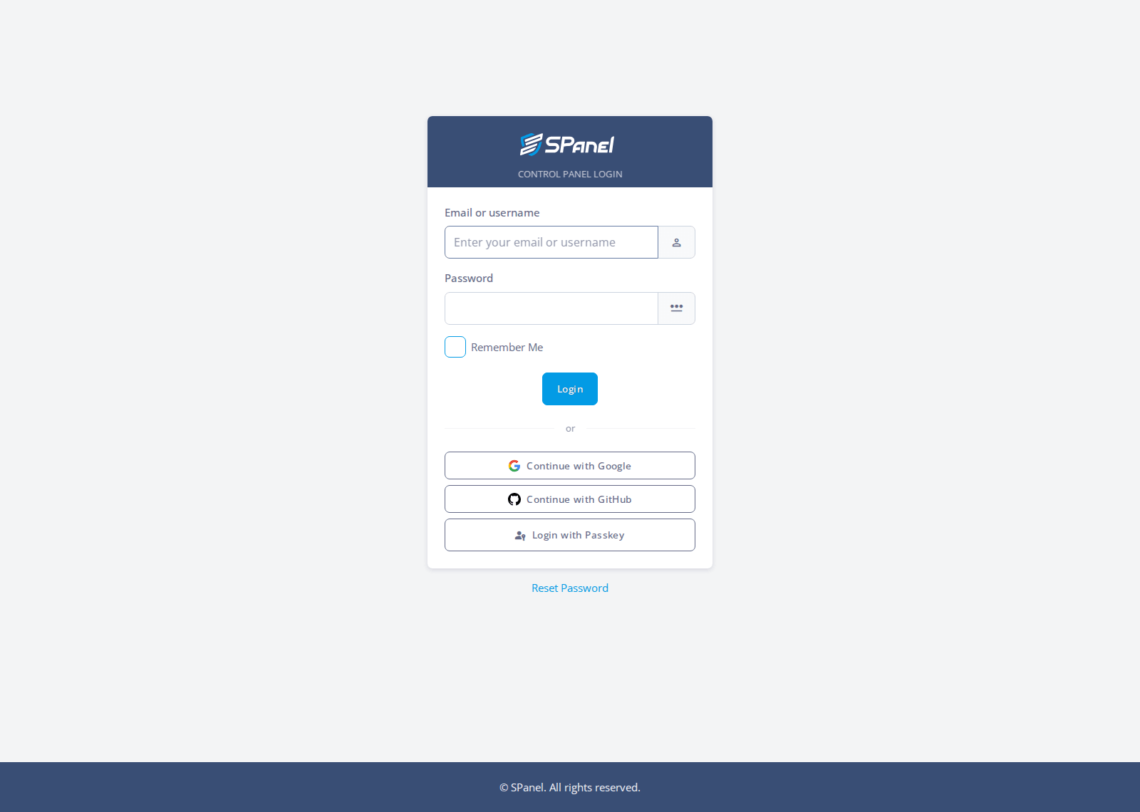
SPanel now offers three added ways to sign in to the control panel: a Google account, a GitHub account, or a passkey.
A passkey uses your device’s biometrics or a security key – no password to type or reuse. Your password login and TOTP (Time-Based One-Time Password) two-factor both stay available.
- New buttons: Continue with Google, Continue with GitHub, and Login with Passkey.
- Passkeys are phishing-resistant: no shared secret sits on the server.
- Nothing is removed; password login still works.
- These options are free on every managed ScalaHosting cloud VPS plan.

Why SPanel Passkey Login matters
Control panel logins are a favorite target for hackers. One reused password or one fake login email can expose your sites and databases. A passkey ties that check to hardware you actually hold, which makes your credentials much harder to steal remotely.
The SPanel login page keeps the usual email and password fields. A divider reading “or” then offers the extra options – Google, GitHub, or Login with Passkey.
People often treat a passkey as a fancier stored password.
It is not.
A passkey is like a key pair: your device has the private half, and SPanel only keeps the public half.
How SPanel Passkey Login actually works
Passkeys use WebAuthn, the standard behind Touch ID, Face ID, Windows Hello, and hardware keys. Your device signs a one-time challenge, and SPanel verifies it against the stored public key. Google and GitHub confirm you through the provider.
Where SPanel is different
SPanel is free on every managed ScalaHosting cloud VPS plan, and these sign-in options cost nothing extra. ScalaHosting has hosted sites for over 15 years, now more than 700,000 across 120+ countries.
Login methods compared
| Method | What you present | Password typed? | Phishing-resistant |
|---|---|---|---|
| Email + password | Something you know | Yes | No |
| Google or GitHub | A provider account | No | Provider-dependent |
| Passkey | Device biometric or key | No | Yes |
One thing to note – passkeys are not a fix-all solution.
A passkey still lives on a device, so losing every enrolled device without a backup can lock you out – so always keep password and TOTP as a fallback.
Recommended workflow
Keep your password and TOTP active.
Add a passkey on a daily device, and enroll a backup device or key so a lost phone never locks you out. Teams on Google or GitHub can also use those buttons.
Steps to use Passkey Login in SPanel
- Open the SPanel login page at /spanel/login.
- Find the Email or Username field (most likely named “Enter your email or username”), and the Password field.
- Note the Remember Me checkbox and the Login button.
- Under the divider reading “or”, find the three buttons: Continue with Google, Continue with GitHub, Login with Passkey.
- Choose Login with Passkey to use your device, or a provider button for Google or GitHub.
- For a classic login, the Reset Password link sits below the card.
Related resources
SPanel users play an active role in suggesting and voting for new features on our hosting management platform. Check out our SPanel Features Forum to see what we have cooking or propose a functionality that you will find most useful.
FAQ
Q: What is a passkey?
A: A passkey is a login credential stored on your device instead of a password. It uses WebAuthn, the standard behind Touch ID, Face ID, Windows Hello, and hardware keys. Your device holds a private key and proves it, so nothing reusable is stored on the server.
Q: Do I have to stop using my password?
A: No. The email or username and password login works exactly as before, and TOTP two-factor stays available next to it. Passkeys, Google sign-in, and GitHub sign-in are added choices on the login page, not replacements for how you sign in today.
Q: Why are passkeys phishing-resistant?
A: Because there is no shared secret to steal. A passkey signs a one-time challenge with a private key that never leaves your device, so a fake login page has nothing to capture and replay. A stolen password works anywhere; a signature does not.
Q: How do I sign in with Google or GitHub?
A: On the login page, below the divider reading “or”, pick Continue with Google or Continue with GitHub. You approve access at the provider, and it confirms your identity back to SPanel. This suits teams that already protect those accounts with two-factor authentication.
Q: What happens if I lose my device?
A: Keep a second sign-in method so a lost device cannot lock you out. Your password and TOTP two-factor still work, and a passkey on a second device or hardware key is a backup. Treat it as an added door, not your only key.
Q: Is passkey login free?
A: Yes. SPanel is free on every managed ScalaHosting cloud VPS plan, and these login options are included at no extra cost. There is no per-feature licensing and no add-on to buy. You get the panel and its sign-in choices with the plan.