Developer Hosting Tools: Full Root, Git, SSH, and More

Content Management Systems (CMS) like WordPress are more newbie-friendly than ever, and the development of site builders and AI-powered tools enables even people with zero technical background to launch a fully functional site in minutes. It may sound surprising, but all this convenience has created a unique challenge for web hosting providers.
Today’s hosts are expected to serve two very different audiences at once. On one side are beginners who need simplicity, guidance, and a smooth, frustration-free start. On the other are the developers and advanced users that demand flexibility, performance, and full control over their environments.
Balancing these needs is quite a challenge. A platform that is too simplified will feel restrictive for professionals, while a developer-focused setup can overwhelm newcomers. Yet, the expectation remains the same – a single solution that does it all.
Is it really possible?
Yes, it is. At ScalaHosting, we’ve combined the reliable hosting environment of a managed VPS with SPanel’s ease of use and added a broad range of powerful developer tools, including full root access, Git integration, and command-line utilities. With this, we created a truly versatile hosting solution, and today, we’ll show you exactly how we did it.
Why Developer Tools Matter?
For a modern developer, hosting isn’t merely a place to store files. It’s an active part of the development workflow. Programmers have to write code, push updates, test new features, fix bugs, and collaborate with other teammates. If the right tools aren’t built into the hosting environment, even simple everyday tasks can become slow and error-prone.
A developer-friendly hosting solution should mirror how programmers actually work. Professionals don’t rely on graphical interfaces alone. They depend on automation, version control, and direct server interaction, and sometimes need to tailor their setup to specific requirements. When the right development tools are embedded into their hosting packages, progress becomes smoother, deployments are quicker, and troubleshooting is far more efficient.
In practice, a typical development workflow might involve pulling code from a repository, making local changes, pushing updates via Git, and deploying or testing new code on the server through the command-line interface.
A managed VPS streamlines the entire cycle by providing a reliable platform that hosts the project without making developers waste time on server maintenance or setup. At the same time, the right tools can give them the freedom to launch and steer their project exactly as they want.
But what are these tools?
Key Developer Tools That Power Modern Workflows
A robust toolkit is an essential part of any developer-friendly hosting setup. Some of the most essential developer-focused features include:
- Full root access
Root access gives you complete control over the server environment. It allows developers to install custom software, tweak configurations, and run specialized applications without restrictions. This is all critical for complex, non-standard projects.
- Git integration
Git is the backbone of modern web app development. It allows developers to track changes, collaborate with teams, and deploy code efficiently across environments. Your hosting solution should either include Git pre-installed or at least be easy to set up.
- SSH access
Direct server access via SSH allows developers to execute commands, manage files, run scripts, and automate tasks. They can often do it much more quickly than through a graphical interface.
- FTP/SFTP
The command-line interface can be powerful, but file transfer protocols still play a key role in moving files between the local machine and the production server.
- Staging environments
Staging environments are a must-have for testing. They allow developers to safely experiment with new features before pushing them to the live website, reducing the risk of introducing any bugs to the user-facing pages.
- Support for multiple languages and frameworks
Whether it’s PHP, Python, or JavaScript, flexibility in supported stacks ensures developers can work with their preferred technologies.
- An integrated control panel
A powerful control panel bridges the gap between ease of use and advanced functionality, allowing both beginners and professionals to manage domains, databases, cron jobs, server resources, and many more through a graphical interface.
- Automation and scheduling
Automating tasks like backups, scripts, and data syncs is essential for an efficient production environment.
- Built-in security and monitoring
Developers should focus on building rather than patching vulnerabilities. Integrated security systems can monitor threats and protect your applications in real time.
- Collaboration and project management integrations
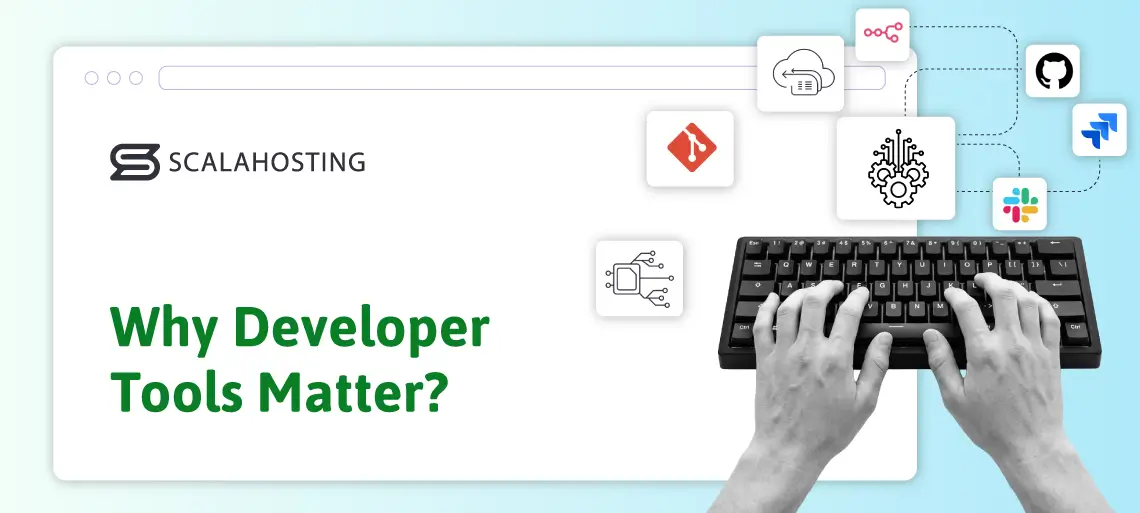
Tools like GitHub, GitLab, Jira, Slack, and n8n can integrate seamlessly into a managed VPS and help teams stay aligned and productive.
The development of many modern applications would be impossible without the features you see above. Integrating them into a properly configured managed VPS solution gives programmers full control of the hosting environment without the burden of server management and configuration.
The only problem is that they’re not always part of the hosting account, at least not out of the box.
Why Many Hosts Still Lock Down Developer Tools in 2026?
Put simply, they’re unable to strike a balance between simplicity and flexibility. Most providers prefer a simple approach, splitting their services into two distinct paths.
On the one hand, they have beginner-friendly plans designed to get a website online quickly and with minimal effort. On the other, they build more advanced, feature-rich solutions aimed at developers and advanced users who need more control and customization.
It must be said that there are some objective reasons for this. For instance, giving full root access to someone without technical experience isn’t necessarily a very good idea. A single misconfigured setting or incompatible package installation can disrupt the performance, break applications, and even compromise security. As a result, many hosting providers limit features like full root access, SSH access, and command-line utilities on their more newbie-friendly plans.
There are other considerations. A beginner launching their first WordPress website is unlikely to use Git version control, interact with the server via SSH, or rely on command-line automation. Integrating and maintaining some of these features across an entire portfolio of services costs money, and providers that put too much emphasis on margins choose to reserve advanced functionality for higher-tier packages only.
This approach creates a problem. Developers and power users are forced into more expensive plans to access essential tools for their everyday work. Sometimes, they’re also left to manually install and configure the utilities they need, which takes time and introduces unnecessary complexity. Instead of a seamless development environment, they are faced with a series of workarounds.
The end result is a trade-off – a cheaper, easy-to-use hosting plan with limited capabilities, or a more expensive solution packed with developer features.
Unless, of course, you use ScalaHosting.
ScalaHosting’s Free Developer Toolkit: What You Actually Get
At ScalaHosting, we believe users shouldn’t be forced to choose between usability and functionality. That’s why our managed cloud VPS solutions are designed to serve everyone – from complete beginners launching their first website to seasoned developers building complex applications. Instead of splitting features across different tiers, we focus on delivering a platform that is both intuitive and powerful right out of the box.
Usability is a big part of this. SPanel – our proprietary server management platform – allows users to control every aspect of their virtual machine through a clean, straightforward interface. Tasks like installing site-building applications, managing domains, creating email inboxes, and monitoring resource usage are all simplified. On top of that, because you’re getting a managed service, essential services like backups, security protection, and server monitoring are either fully automated or handled by our experienced server administrators. You don’t need to spend hours setting up a firewall, configuring backup schedules, or patching vulnerabilities – everything is done behind the scenes.
This approach benefits both beginners and professional developers. New users can focus on building and growing their websites without worrying about the technical side of server management. At the same time, developers get a ready-to-use environment that allows them to start coding, testing, and deploying their project straight away. Instead of wasting time on setup and maintenance, they can concentrate on what really matters – development and performance.
They have plenty of tools and features that make their lives easier, as well:
- Full root access
Root access is not enabled by default on our managed VPS solutions to prevent accidental misconfigurations by less experienced users. However, if you need to install additional software or tweak core server settings, you can simply get in touch with our technical support team, and you’ll have root access within minutes.
- Built-in SSH terminal
SPanel gives you full control over who has access to your server and how they do it. From the Admin Interface, you can enable and disable remote shells for individual accounts. Account owners can set up SSH keys for more secure access, and as an added level of protection, all SSH connections to ScalaHosting’s VPS servers are opened on a custom port. A special SSH Terminal is built into SPanel’s User Interface that helps you connect to the server more easily.
- Native Git integration
Git is pre-installed on all managed VPS and can be controlled via SSH. This ensures you have easy access to your repositories and can track changes and deploy code more efficiently.
- WP-CLI, Composer, npm, Yarn
Command-line utilities like WP-CLI, Composer, and Yarn can make a world of difference when it comes to a developer’s efficiency. They’re all available on our managed cloud VPS solutions out of the box.
- Multiple PHP versions
SPanel includes an advanced PHP management utility that lets you change the PHP version for individual domains and subdomains with just a couple of clicks. SPanel is actively maintained and updated to ensure PHP’s latest versions are always available. In addition to changing the PHP version, you can also easily edit the php.ini file from SPanel’s User Interface and view PHP error logs.
- Node.js support and seamless n8n integration
You can easily deploy your Node.js application through SPanel’s User Interface. If you want to automate your workflows with n8n, you can let SPanel install it for you and boost your efficiency with minimum effort.
- Support for multiple web servers
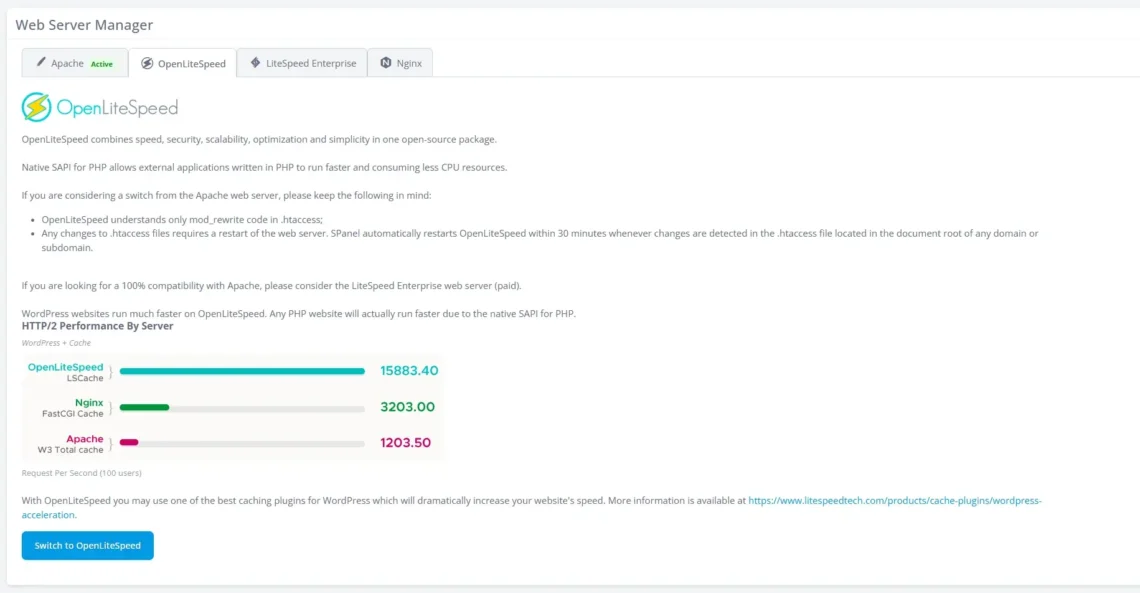
By default, all managed VPSs are deployed with Apache. However, users can easily switch to a different web server and boost their website’s speed. Nginx can act as a reverse proxy for Apache, and you can also use OpenLiteSpeed, which, especially when combined with the available CMS caching plugins, can make a real difference. Crucially, you can switch between these setups through SPanel’s Admin Interface. All you have to do is click the mouse a few times and wait for the VPS to reboot.
By combining the ease of use delivered by SPanel’s graphical interface with the broad range of advanced tools, our managed cloud VPS solutions allow you to eliminate the traditional compromise between usability and power. You get a hosting environment that adapts to your needs, no matter your level of experience.
How ScalaHosting’s Developer Tools Make Your Life Easier: 8 Real-World Examples
Now that we know what’s included in ScalaHosting’s managed cloud VPS solutions, let’s see how it all works in practice.
Bear in mind that this isn’t meant to be a step-by-step tutorial – such a thing would be impossible given that every project has its own requirements, stack, and workflow. Instead, the goal is to give you a few practical examples that highlight the level of control and flexibility you get with a ScalaHosting managed cloud VPS.
Choosing a VPS solution and enabling root
The first step is to pick a VPS that matches your project’s needs. At ScalaHosting, we have four preset builds, but your choice isn’t limited to them. Because our virtual servers are deployed in a proper cloud environment, you’re free to customize your hardware configuration and select exactly how much processing power, memory, and storage you’ll have at your disposal.
If you’re not sure what configuration you need, you can always get in touch with our technical support specialists, who can help you find the solution you’re after.
To get full root access to your new server, simply contact our technical support experts via live chat or through a support ticket, and you’ll have it in minutes.
Opening an SSH shell
Inside SPanel’s Admin Interface, you’ll find the SSH Access menu. From there, you can enable and disable access for individual user accounts. Account owners can then use their SPanel login credentials to connect to the server via SSH. It’s also possible to set up an SSH key pair.
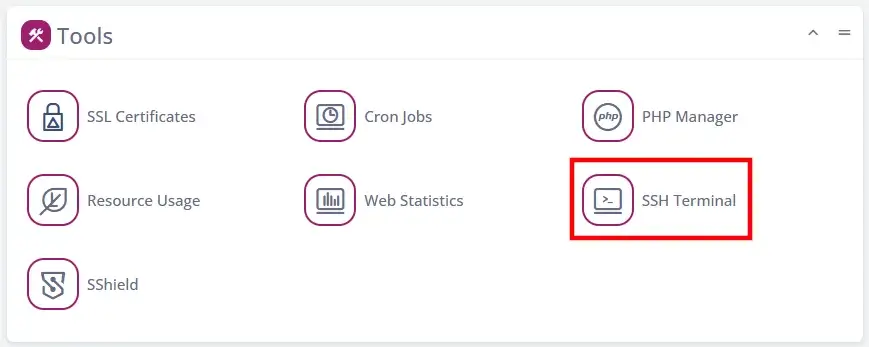
If SSH access is enabled for your account, you can also open a shell using the built-in terminal. It’s available on SPanel’s User Interface homepage.
Cloning a repository with Git
With Git available out of the box, deploying your code is about as straightforward as it gets. For example, cloning a repository requires a single SSH command:
$ git clone https://github.com/username/repository.git
In addition to GitHub, this also works with GitLab, Bitbucket, and pretty much every other Git-based platform. Pulling a project directly onto the server has never been easier.
Switching to a different PHP version
While it is always recommended to use PHP’s latest version, sometimes, you need to switch to an older variant for compatibility or performance reasons. With SPanel, doing this is easy.
On the homepage of the User Interface, you’ll see the PHP Manager utility under the Tools section. After you open it, you’ll see a list of all the domains and subdomains along with the PHP versions they’re using. Under the Actions menu, you have the Change PHP Version option.
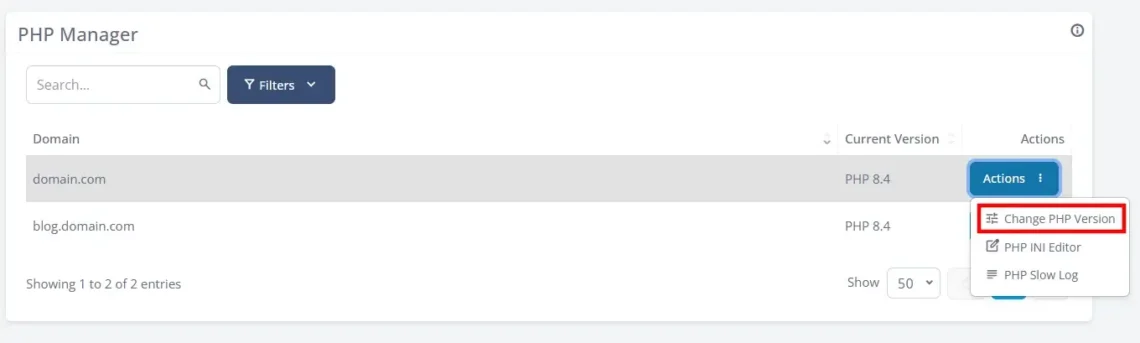
Simply select the PHP version your project requires and click Change.
Setting up cron jobs
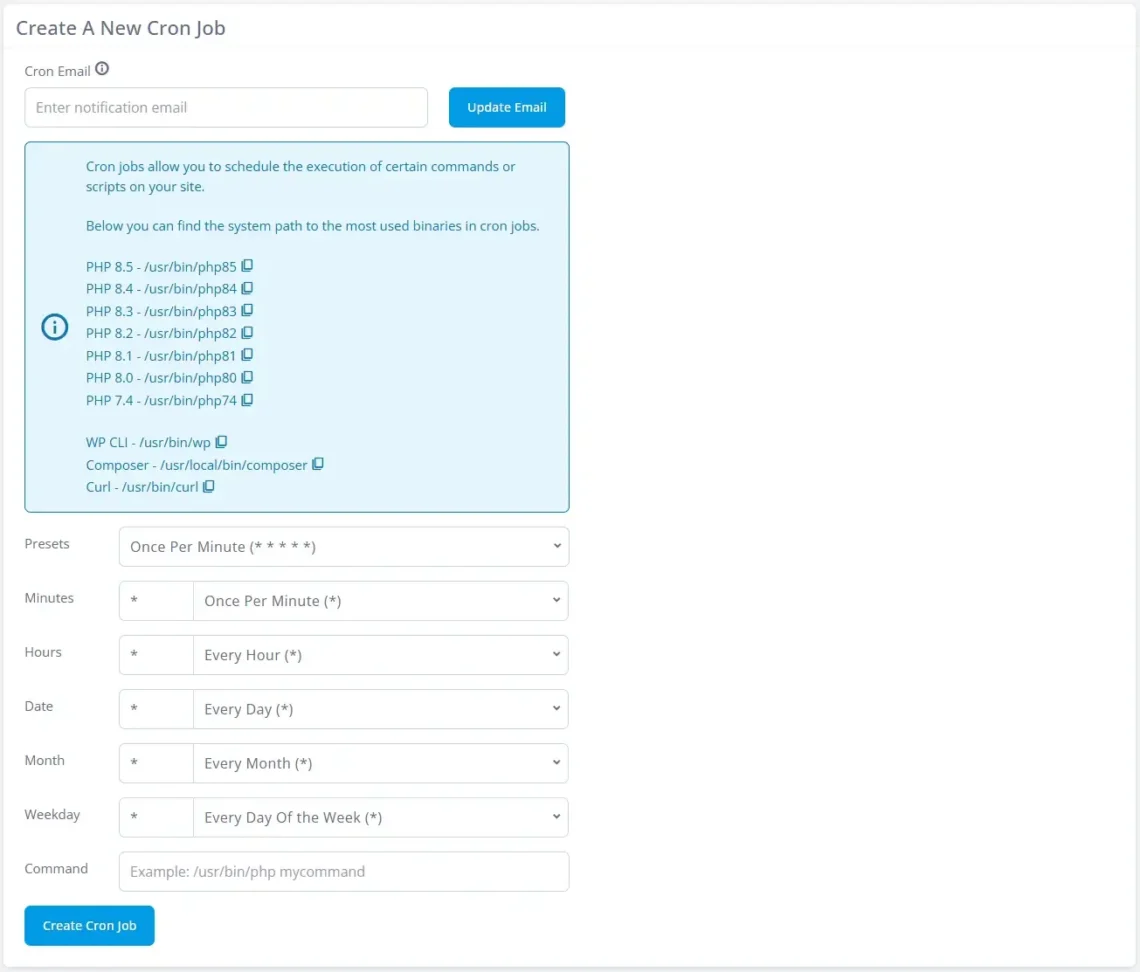
Cron jobs let you automate repetitive tasks, such as running scripts, clearing caches, or scheduling backups. You can always set up cron jobs from the command line.
However, with a ScalaHosting managed VPS, you have a point-and-click tool available on the homepage of SPanel’s User Interface. You just need to set how frequently you want the cron job to be executed and the command.
Switching between different web server setups
The Web Server Manager utility in SPanel’s Admin Interface allows you to easily change the web server setup on your VPS. The options are:
- Apache – The default option, and therefore highly compatible and widely supported.
- Nginx as a reverse proxy for Apache – Improved performance and better handling of high traffic.
- OpenLiteSpeed – Lightweight and optimized for speed, especially when dealing with dynamic content.
- ListeSpeed Enterprise – Premium performance with advanced caching and scalability features.
Other providers usually lock you in with a particular web server, and moving away from it is either impossible or requires a lot of effort and technical expertise. At ScalaHosting, you can easily switch to the setup that delivers the best possible performance and stability.
Setting up a staging environment
Testing changes and new features before rolling them out to the production site is essential. In theory, you can do it on your local machine, but a proper staging environment is a much better option, as it gives you a much more realistic idea of what works and what doesn’t when it’s deployed on the server.
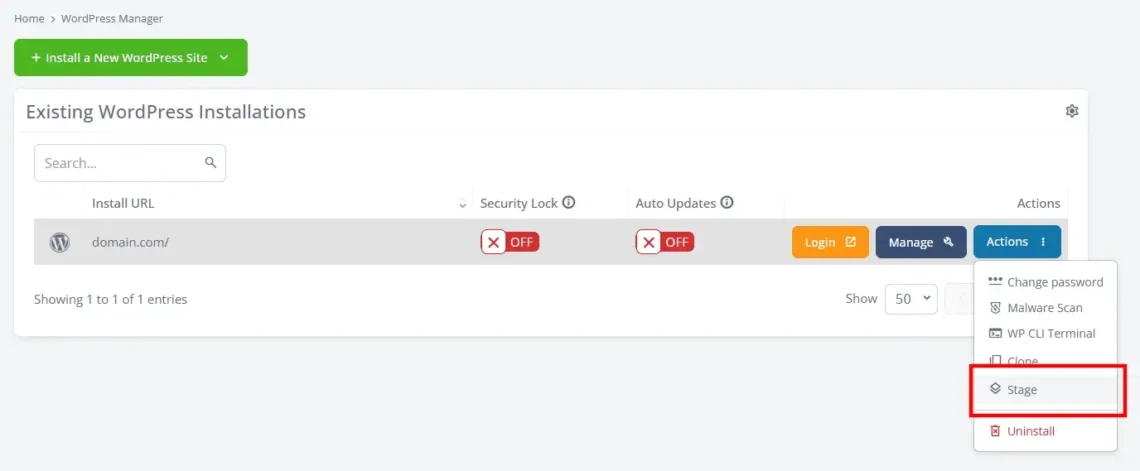
With SPanel, creating a staging environment is a two-click job for WordPress users. The unique WordPress Manager is accessible from the User Interface, and inside it, you’ll see a list of all your currently active WordPress installations. To create a staging site, simply click the Actions menu, select Stage, and specify a URL for your testing environment. SPanel will do the rest for you.
Scaling your VPS as your project grows
One of the biggest advantages of using ScalaHosting’s cloud infrastructure is its flexibility. Your website’s popularity and complexity will increase, and you need to ensure your VPS can scale alongside them. Because our virtual servers are deployed in a true cloud environment, you have infinite options to adapt your server’s hardware configuration to your specific requirements.
You can easily upgrade the available processing power, memory, and storage from your Client Area. The new resources are added automatically, and your site can start using them pretty much instantly.
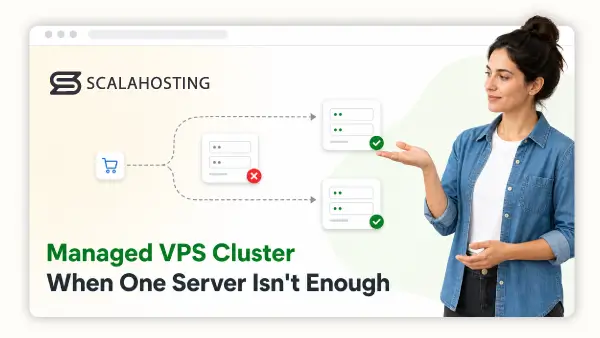
There’s no upper limit on how big your hosting account can be. Even if you exceed the limit of a single VPS, you can get in touch with our technical experts, who can build a completely custom cloud VPS cluster suitable for handling everything from websites with millions of clicks to mission-critical applications.
With ScalaHosting, the sky literally is the limit.
The Product-First Philosophy Behind These Tools
All these features don’t exist by accident. They are the result of a deliberate product philosophy. At ScalaHosting, we’ve always believed that great hosting isn’t just down to infrastructure. It’s about building a platform that genuinely reflects how people create, deploy, and manage their projects in the real world.
This philosophy is built around three key principles.
Build it in-house
A big part of what makes all this possible is the fact that we develop SPanel ourselves. We don’t rely on third-party control panels, so we’re not constrained by external limitations, licensing models, or someone else’s roadmap. We’re free to design and evolve our platform as we see fit – or, more importantly, as our users need it. Whether it’s integrating developer tools, simplifying workflows, or improving usability, we can implement the changes quickly and with a clear purpose.
Listen to the users
Our Cloud Democracy Project has been at the core of SPanel’s development for years now. What was initially a simple feature request platform has turned into one of the main drives behind SPanel’s development.
You can access it either through SPanel’s User Interface or directly from SPanel Features. It lets you request new functionality that you think may be useful, and you can also see what other people have suggested and vote for the ones you like the most.
The tools and features with the most votes end up in the development pipeline and eventually make their way to our proprietary server management platform.
This approach is built on a simple belief: the people who use hosting services every day are the ones who understand best what’s missing and what could be improved. Developers, site owners, and agencies all bring different perspectives, and by listening to them, we ensure SPanel continues to evolve in a way that’s practical, relevant, and forward-thinking.
Upselling is not the objective.
It’s important to ensure SPanel’s continuous improvement isn’t locked behind paywalls or reserved for premium users only. We don’t believe access to essential development tools should depend on how much you’re willing to spend. Developers shouldn’t have to pay extra just because they rely on features like SSH or Git as part of their daily workflow.
That’s precisely the challenge we’ve set ourselves – not just to balance usability and functionality, but to deliver both without hidden costs. It’s this commitment that allows ScalaHosting to offer a platform where beginners and professionals alike get the same powerful toolkit, built to support them every step of the way.
Conclusion
In today’s hosting landscape, users are often forced to choose between simplicity and power. Entry-level plans are designed to be accessible but limited, while advanced solutions offer flexibility at a higher cost and complexity. For developers, this usually means paying extra or spending valuable time configuring tools from scratch.
ScalaHosting’s approach is different. By combining an intuitive interface with a full suite of built-in developer tools, our managed cloud VPS solutions eliminate the need for compromise. Beginners get a platform that is easy to use out of the box, while developers gain the freedom and control they need to build, test, and deploy their projects efficiently.
The combination of plenty of pre-installed development tools and scalable cloud infrastructure means that everything is ready from day one and is more than likely to serve as a long-term solution.
In short, whether you’re launching your first site or managing a range of complex applications simultaneously, ScalaHosting gives you the tools to do it – no limitations, no hidden costs, and no unnecessary complications.
FAQ
Q: Do I need technical experience to use ScalaHosting’s managed cloud VPS?
A: Not at all. The platform was designed to be beginner-friendly, with an intuitive interface courtesy of SPanel and a fully managed environment. Taste like backups, security, and server maintenance are handled by our technical experts, so you can focus on building your website or app.
Q: Can I get full root access on a managed VPS?
A: Yes, while root access is not enabled by default (to prevent accidental misconfiguration), you can request it at any time. Simply contact our support team, and they will enable it for you within minutes.
Q: What developer tools are included in ScalaHosting’s managed VPS plans?
A: All managed cloud VPS packages offer essential development tools like SSH access, Git, WP-CLI, Composer, npm, Yarn, etc. You also get support for multiple PHP versions, Node.js, cron jobs, and flexible web server setups – all without additional fees.
Q: Can I scale my VPS as my project grows?
A: Absolutely. ScalaHosting’s cloud infrastructure lets you upgrade your CPU, RAM, and storage with just a few clicks. For larger or more complex projects, custom cluster solutions are also available to ensure your hosting environment grows alongside your needs.