You know your business needs a website. You’ve probably known for a while. But every time you start looking into it, you hit the same wall: developer quotes that cost more than a month’s rent, timelines measured in weeks, and a pile of jargon – hosting, DNS, SSL, CMS – that reads like a foreign language. So the project slides down the list again.
Here’s the good news.
That wall came down a long time ago, and a site builder is the tool that knocked it over. In a 2025 Clutch survey of 406 U.S. small-business owners, 83% said they had a website, up from 64% in Clutch’s 2018 research. Building a professional online presence no longer takes a big budget or a technical background. For a straightforward website with prepared content, an initial version can often be created in a few hours. Final review, legal checks, domain setup, and content refinement may take longer.
A website builder helps a small business launch and maintain a website without coding. It reduces initial cost and development time by providing templates, visual editing, AI-generated starting content, and built-in business tools. Its main limitations are reduced customization, platform dependence, and weaker suitability for complex applications.
Let’s look at what a site builder actually is and the concrete ways it helps a small business grow.
What a Site Builder Actually Does
Here is a short story for you.
A local plumbing company enters its services, location, opening hours, and contact details. The builder creates a homepage, services page, contact page, and initial copy. The owner then replaces generic images, checks service claims, adds real customer reviews, connects the domain, tests the contact form, and publishes.
A site builder is software that lets you create and manage a website without writing code. Instead of hand-coding pages, you work with ready-made templates and a visual editor – you point, click, type, and drag things into place. The builder handles the technical plumbing underneath so you never have to see it.
The newest generation goes a step further with AI.
Rather than starting from a blank screen, you describe your business in a sentence or two, and the builder generates a complete, structured website for you – pages, layout, text, and images included. At Site.pro, this is exactly what we’ve built our platform around: you bring the idea, and the AI assembles the first draft in seconds.
From there, everything is yours to shape.
IMPORTANT: AI-generated layouts and copy are drafts. Business owners should verify factual claims, prices, contact details, legal text, accessibility, and image usage before publishing.
You Can Launch This Week, Not This Quarter
Speed is the first thing that changes.
A traditional web project involves briefs, mockups, revisions, and a developer’s schedule. A site builder collapses that into a single sitting. You type what your company does, review what the AI produces, swap in your own details, and you’re most of the way to a finished site before lunch.
Cost follows the same pattern. Hiring a developer for a custom build can run into the thousands, while the Site.pro AI website builder starts free, and scales in small, predictable steps as your needs grow. For a business watching every dollar in its first year, that difference isn’t a nice-to-have – it’s what makes the website happen at all.
Here’s how the three common paths compare:
Hire a developer
Code it yourself
Use a site builder
Upfront cost
Often $500–$3,000+*
Low, but your time isn’t free
From a few dollars a month
Time to launch
Weeks to months
Weeks of learning
An afternoon
Skills needed
None (you outsource)
HTML, CSS, hosting setup
No coding required; basic editing, content preparation, and business decisions are still needed
Who makes updates
The developer (for a fee)
You, if you know/remember how
You, in a few clicks
Best for
Complex, custom platforms
Developers and hobbyists
Straightforward business, portfolio, landing-page, and small-store projects
For a straightforward small-business website, a builder often offers the fastest and least technical route. A developer remains the better choice when the business needs custom functionality, unusual integrations, complex ecommerce, or a distinctive design system. * Pricing varies significantly by provider and project complexity. Compare the full cost of the builder, hosting, domain, email, ecommerce features, support, and renewal rates.
It Looks Professional, Even If You’re Not a Designer
First impressions online happen fast, and a dated or clumsy site quietly costs you customers before they ever read a word.
This is where templates earn their keep.
A good builder ships with a library of professionally designed layouts – Site.pro offers more than 200 – each one already balanced for spacing, color, and typography by people who do this for a living.
Just as important, those designs are mobile-responsive by default. Your site reshapes itself to look right on a phone, a tablet, or a desktop without any extra work on your part. Given that most local searches now happen on a phone, that single feature protects a huge share of your potential traffic. You get a polished, consistent brand without hiring a designer to build it.
It Builds Trust Before You Say a Word
Most people look a business up online before they call, visit, or buy. When they search for you and find a clean, current website, that’s a quiet vote of confidence: you’re established, you’re serious, and you’re easy to deal with. When they find nothing – or a broken page from three years ago – they often move on to a competitor who looks more legitimate, even if your work is better.
A social media page alone doesn’t close that gap.
Those profiles sit on rented land, where an algorithm change can bury your reach overnight, and you never truly own your audience. Your own website is property you control. It’s the one place online that’s unmistakably yours, and a site builder makes owning that space realistic for any budget.
One Tool That Does More Than a Brochure
A modern site builder isn’t limited to an About page and a contact form. The same platform can run most of the functions a growing business needs, keeping everything in one place rather than scattered across separate services and subscriptions.
Depending on the platform and selected plan, a capable website builder may also offer:
Open an online store and take payments, turning your site into a sales channel rather than a digital flyer.
Set up a business email on your own domain, so you’re writing from you@yourbusiness.com instead of a generic address. Site.pro also offers related services such as custom-domain email, while many hosting providers include business email alongside website hosting. Check whether the email is part of your selected plan or purchased separately.
Configure basic SEO settings – A capable builder should let you create clear page titles, descriptions, readable URLs, a sitemap, and mobile-friendly pages. AI can help draft these elements, but you should review them carefully. Search visibility still depends on useful content, technical accessibility, performance, authority, and how well the website answers customers’ real questions.
Answer common questions automatically with an AI support widget that responds to visitors in multiple languages, reducing repetitive emails.
Each of those used to mean another tool, another login, and another bill. Folding them into the builder is a quiet but real saving of time and money.
You Stay in Control of Your Own Website
With a custom-coded site, every small change – a new price, an updated phone number, a seasonal banner – usually means emailing your developer and waiting. Those little requests add up, in both delays and invoices.
A site builder hands that control back to you.
Utilizing an AI editor, you can make changes just by chatting with the assistant in plain language – by text or even voice. Ask it to add a page, move a section, or change your colors, and it does the heavy lifting. You can update your own site from your desk or from your phone on the way to a meeting without touching a line of code or requesting every minor change from a developer.
What to Look For in a Site Builder
Not every builder fits every business.
When you’re weighing your options, a few features separate the ones that will still serve you in two years from the ones you’ll outgrow in two months:
Genuine ease of use. You should be able to build and edit without a manual. AI generation and plain-language editing are the clearest signs a tool was designed for non-technical owners.
A strong template library. More quality starting points means a better-looking result with less effort. Check that the designs are modern and mobile-responsive.
Room to add functions. An online store, business email, and SEO tools should be available when you need them, not locked behind a separate product.
Where the Builder Ends and Your Host Begins
A website builder handles creation and editing. The published website must still run on a hosting infrastructure, though that hosting may be bundled with the builder plan or provided separately by a hosting provider. When the builder is integrated into a hosting service, customers can create the website in the builder while the host manages the server, domains, email, security, and support environment.
The two jobs fit together like two halves of the same tool, which is exactly why we’re glad to share this on the ScalaHosting blog. We handle the building; a strong host handles the running.
When you’re choosing where your new site will live, three things matter most for a small business:
Reliability and speed. A site that loads slowly or drops offline undoes all the work you put into it. Dependable web hosting keeps your pages loading quickly and your business reachable when customers come looking.
Security that works in the background. Small businesses rarely have someone watching server traffic around the clock. SShield adds continuous monitoring and automated attack protection at the hosting layer. It reduces routine security exposure, but it works best alongside software updates, strong access controls, SSL, monitoring, and recoverable backups.
Room to grow. A starter plan is perfect on day one. As your traffic climbs, managed VPS hosting gives you dedicated resources and a simple SPanel dashboard for your domains, email, and files – the natural next step when you start to outgrow shared hosting. The website itself does not normally need to be redesigned when the hosting environment is upgraded, although migration, DNS, email, and server configuration may still need to be handled.
Put simply: the builder gets you online, and the right host keeps you there.
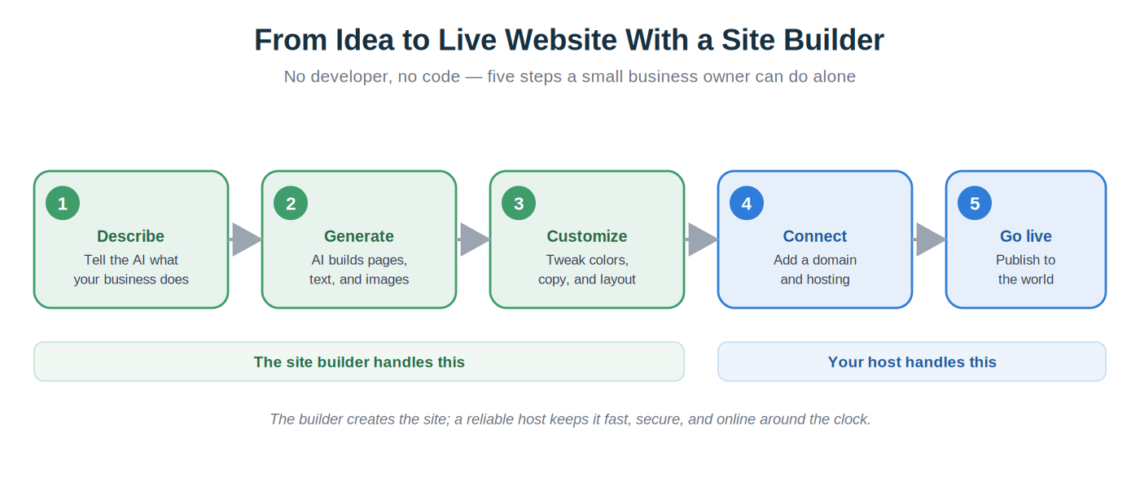
Here’s the whole journey at a glance.
A guided five-step process that a non-technical owner can complete with the right tools and support.
Disclaimer: The Site.pro site-builder is a hosted solution, meaning you get the platform + hosting in a bundle package. If you decide to change the host, that is only possible if the new provider also uses Site.pro as a site-building solution.
The Bottom Line
A site builder removes the three barriers that keep small businesses offline – cost, time, and technical skill – and replaces them with a website you can launch this week and manage yourself. Pair that ease of building with hosting that keeps your site fast and secure, and you have a complete online presence working for your business around the clock. Try building yours with AI, and let a dependable host like ScalaHosting take care of the rest.
Disclaimer: This article was produced as part of a content partnership between Site.pro and ScalaHosting. The ScalaHosting Team reviewed the hosting and security sections for technical accuracy.
Frequently Asked Questions
Do I need any technical skills to use a site builder?
No. That’s the entire point. If you can describe your business and click around a screen, you can build and run a site. Modern AI builders remove even the design decisions by generating a first version for you. Keep in mind that although you do not need coding skills, you still need to make business decisions, prepare or verify the content, configure your domain, review the design, and test the website before publishing.
Is a website built with a site builder good for SEO?
Yes, provided the builder gives you control over page titles, meta descriptions, headings, readable URLs, internal links, image alt text, mobile presentation, and sitemap generation. A builder supplies the technical foundation, but it does not guarantee rankings. Search visibility still depends on useful content, crawlability, performance, authority, and how well each page answers the audience’s search intent.
Can I actually sell products through a site builder?
You can. Most capable builders include online store features – product pages, a cart, and payment processing – so a small business can start selling without a separate ecommerce platform.
What happens when my business outgrows its starter setup?
You move up a tier rather than starting over. A heavier plan or a managed VPS gives you more resources. When a site outgrows shared hosting, it can be migrated to a managed virtual server without redesigning it. The hosting provider moves the website, databases, email, and configuration to the new environment, while the VPS provides more allocated CPU, memory, and storage.
Should I use a site builder or something like WordPress?
It depends on your priorities. A site builder gets a professional, low-maintenance site live fastest with no technical work, which suits most small businesses. A CMS like WordPress offers deeper customization but asks more of you in setup and upkeep. A builder is often the better starting point when speed, simplicity, and low maintenance matter more than extensive customization or complete code-level control.