n8n Hosting: Which Option Is the Best for You?

We’re in the middle of quite a few shifts in the IT world right now, but one of the most significant changes we see in our everyday lives is what is often referred to as the automation revolution. Everyone, from solo creators to global companies, is increasingly relying on tools that automatically handle repetitive, time-consuming tasks – moving data between apps, sending notifications, updating databases, generating reports, and much more.
One of the tools at the center of this revolution is n8n. Like other platforms of this kind, it allows you to create workflows and procedures, integrate tools, and adapt company policies in order to optimize your workday and ensure your business runs more efficiently.
n8n stands out in a few key areas – it’s highly flexible, developer-friendly, and offers a visual workflow builder that makes even complex automations easier to understand. On top of that, its open nature and integration with countless other platforms and apps mean you’re not locked into a rigid ecosystem.
Perhaps the biggest advantage, however, is the ability to self-host n8n.
Self-hosting gives you complete control over your automations and data. You don’t send anything to a third-party platform, so you can run n8n on your own infrastructure, tailor the environment to your needs, and scale it however you want. For organizations concerned with privacy, security, and customization, this is a major benefit.
But this raises an obvious question: Isn’t hosting a complex platform like n8n expensive and difficult, especially if your technical experience is limited?
Not necessarily.
With the right n8n hosting solution, running your own instance can be surprisingly simple and cost-efficient. Today, we’ll explore all available options and help you choose the one that best fits your needs.
n8n Hosting: What Are the Options?
One of the reasons n8n has become so popular is its flexibility – not just in how you build your workflows, but also in how you host the platform itself. Unlike many automation tools that lock you into a single deployment model, n8n offers several hosting options, allowing you to choose the one that best suits your technical skills, budget, and infrastructure preferences.
The first step is to ask yourself: Who will host my n8n instance?
Hosted vs. Self-Hosted n8n
If you want the easiest possible way to get started, you don’t need to think about hosting it yourself at all. The platform’s developer, n8n GmbH, offers a fully managed SaaS version called n8n Cloud.
In this setup, n8n’s developers own and manage the servers hosting your instance. They handle updates, security patches, and scaling, and ensure the platform remains available. All workflows and data run through their infrastructure, so you don’t need to worry about system administration at all. On the flip side, the availability and security of your data are dependent entirely on a third-party service. If your business handles a lot of sensitive information, this setup is less than ideal and, in some cases, could lead to compliance issues.
Cost is another thing you need to consider. n8n Cloud operates under the Software-as-a-Service (SaaS) model – the automation platform and the infrastructure that hosts it are bundled. n8n’s license allows you to use the application for free. Theoretically, you can install it on your home computer without owing a penny.
However, as an n8n Cloud user, you pay for the hosting infrastructure powering your instance and its management. The price depends on factors such as the number of projects and concurrent executions, as well as additional features. The cheapest plans start at a little over $20 per month, but as your requirements grow, the price can shoot into the three- and even four-figure ranges.
The alternative is self-hosting. Because n8n’s “fair-code” license allows you to run it on your own infrastructure, you can download it for free and deploy it on a server you control. Renting and maintaining the hosting infrastructure for your n8n instance isn’t free, but it’s likely to be more cost-efficient than n8n Cloud, especially in the long run. Plus, you retain full ownership of your data and have more customization options.
Self-hosting certainly has its advantages, but it also introduces another dilemma: Who manages the server that runs n8n?
Managed vs. Self-Managed n8n Hosting
In theory, it’s possible to self-host n8n on a cheap shared plan. In practice, however, it’s not a good idea. n8n runs as a Node.js application, and although some shared plans support the technology, they can’t really deliver the reliability and performance you want from your workflows.
What you need is an isolated environment with guaranteed resources and flexible scalability options. In other words, your best bet is to use a cloud-based VPS solution. That’s not the end of the story, though.
When you start looking at the available options, you’ll see managed and self-managed VPS packages. Choosing the right option for you will significantly influence the way you deploy and manage your n8n instance.
A self-managed server is essentially a bare-bones machine with an operating system. Components like the web server, database management system, and email services are likely to be pre-installed, but it’s up to you to configure them to your exact specifications.
It’s not just the initial setup, either. You’re also responsible for installing updates, applying security patches, and updating the server configuration when needed. All these tasks require root access, so you can expect to have it with your self-managed server. Some packages may include a control panel, but in most cases, it’s an optional extra that
increases the package’s cost.
Then, there’s the matter of deploying n8n on the server. If you use a self-managed solution, you’ll likely have to do it through the command line, but before you even start, you’ll have to install dependencies, configure Docker or Node.js, and set up the database. After the automation platform is up and running, you’ll be responsible for updating it and maintaining its security.
A managed server is a much more user-friendly option. All managed machines are equipped with a GUI-based control panel, and n8n is often set up through it rather than via commands. With most control panels, you can deploy it as a Node.js app, but with SPanel, you get a fully automated deployment utility specifically designed for n8n (more on that in a second).
Most of the server configuration and maintenance complexity is removed with a managed server. The machine usually comes ready to use, with all the critical components pre-installed and configured by your hosting provider’s technical experts. Root access is usually unavailable, but since you don’t need to modify any core server settings, its absence shouldn’t be felt.
All in all, self-managed hosting solutions are aimed at more experienced users who have the skills and resources to set up their hosting environment and tailor it to the specific requirements of their n8n instance. By contrast, a managed server is for users and businesses who seek a standardized setup that allows them to spend more time and resources on building their workflows and optimizing their operations, rather than on server configuration and administration.
In short, the difference isn’t just technical – it directly impacts your day-to-day experience running n8n.
Here’s a brief summary highlighting the pros and cons of all n8n hosting options:
| n8n Cloud | Self-Managed Server | Managed Server | |
|---|---|---|---|
| Setup Complexity | Very low – sign up and start building workflows | High – manual installation and configuration | Low to medium – simplified deployment, usually through a control panel |
| Maintenance | Fully handled by n8n | You manage updates, security patches, backups, etc. | Your hosting provider handles most system maintenance tasks |
| Cost | A subscription model based on the scale and resources required by your n8n instance | You pay for the server infrastructure only | Slightly higher cost than the self-managed server because of the additional management services |
| Data Sovereignty | Data is processed by n8n’s infrastructure | Full control over the data and its environment | Full control over the data |
| Scalability | Tiered scalability, with upgrades handled entirely by n8n | Requires manual resource scaling | Easier scaling and limitless possibilities, especially in a cloud environment |
Technical Requirements: What n8n Actually Needs
Before you choose a hosting platform for your workflows, it’s important to understand what kind of resources n8n actually requires. The good news is that, compared to many other web applications, the automation platform is relatively lightweight. However, it’s important to ensure it has enough resources to run. Otherwise, your workflows can slow down, fail, or experience reliability issues, especially as your business grows.
Let’s break down the key resources n8n depends on and how usage affects them.
RAM (Memory)
Minimum requirement: ~2 GB RAM for very light usage.
n8n runs as a Node.js application, meaning it loads workflow data, execution states, and integration responses directly into memory. For a small setup – for example, a web developer or a designer optimizing their day-to-day routines – 2GB of RAM should be enough.
However, memory usage grows rapidly when you start scaling workflows. Here are some of the factors affecting it:
- The number of users accessing the n8n instance simultaneously
- The number of concurrent workflow executions
- The size of the payloads (API responses, files, JSON datasets) your workflows process
- Additional nodes that temporarily store data between steps
For a small- to medium-sized business, a typical production environment should have at least 4GB of RAM. This will ensure n8n has enough headroom to run multiple workflows concurrently without slowing down or crashing.
CPU (Processing Power)
Minimum requirement: 2 CPU cores.
n8n uses CPU resources to process nodes, execute logic, and communicate with external APIs. A simple workflow with a limited number of nodes is unlikely to significantly impact your server’s CPU, but things change dramatically once your automations become more complex.
CPU usage increases with:
- Concurrent executions (especially when running in Queue Mode)
- Large or complex workflows with many nodes
- Data transformation steps (e.g., filtering, mapping, code nodes, etc.)
- Frequent triggers (webhooks, polling, scheduled jobs, etc.)
Two CPU cores will ensure your n8n installation can process multiple executions simultaneously. However, this doesn’t necessarily mean they will be enough for your particular project. In fact, larger teams with high-volume automation setups are more likely to require 4 or more CPU cores to maintain consistent performance.
Storage (Disk Performance)
Minimum requirement: Fast SSD (preferably NVMe)
Storage performance is often overlooked, but in reality, it plays a major role in how smoothly n8n operates. The automation platform uses a database to store everything from workflow definitions to node data and execution logs.
Each step of the workflow generates data, and the sooner it’s written to the database, the sooner n8n moves on to the next node. A slow storage facility can quickly become a bottleneck, so be sure you don’t underestimate its importance.
When it comes to speed, NVMe SSD storage devices are unmatched. Compared to traditional SSDs and HDDs, they handle database operations much faster, which improves:
- Workflow executions logging
- Job queue processing
- Database queries and retrievals
- Overall system responsiveness
People tend to focus on storage capacity when choosing a hosting platform for their projects, but with n8n, this is rarely the issue. The platform itself doesn’t take up that much space, and execution history can always be cleaned. However, if the storage speed is not up to par, you won’t have the stable workflows you expect from n8n.
A Reliable Database
By default, when you install n8n via Docker or npm, the automation platform sets up and uses an SQLite database. SQLite is a lightweight, file-based database that is often preferred by developers working on embedded systems, IoT, and mobile apps, as well as on projects with read-heavy workloads. In n8n’s case, SQLite is the default choice mostly because it’s easy to deploy and configure automatically.
The database is suitable for testing and light workflows, but its limitations become apparent as the project grows. When automations expand and execution volume increases, the database will have to handle:
- More frequent simultaneous read/write operations
- Lots of execution logs and metadata
- Multiple parallel workflow workers
SQLite isn’t designed for this kind of workload, which is why most production deployments switch to PostgreSQL – a fully-featured database engine built for concurrency and reliability.
Switching to PostgreSQL provides:
- Better performance, especially under load
- Support for multiple concurrent executions
- Improved data integrity and stability
- Compatibility with advanced scaling features like Queue Mode
In short, while n8n itself is far from the most resource-hungry application, in the end, the way you use it determines what sort of server you need. Deploying your automations on a server with sufficient hardware resources is essential for building your workflows, but it’s not the only thing you need to consider.
Choosing the Right n8n Hosting Option
With several hosting options available, the obvious question becomes: Which one actually makes the most sense for running n8n in the long run?
The exact answer obviously depends on your project’s requirements, but for most people, the sweet spot is a cloud-based managed VPS.
Let’s explain why and see how to choose the best virtual server for your needs.
Why a Managed Cloud VPS Works Best
Running n8n in the cloud gives you access to infrastructure designed for reliability and scalability. Cloud environments are built on distributed systems, meaning your instance benefits from redundant networking, enterprise-grade hardware, and high uptime guarantees. Compared to a dedicated server or a VPS based on traditional hardware infrastructure, this dramatically reduces the risk of downtime disrupting your automations and workflows.
A managed VPS adds another layer of convenience. Instead of wasting time configuring everything from scratch, the hosting provider handles system maintenance, OS updates, security patches, and infrastructure monitoring. Even if you have the expertise to deal with all these tasks yourself, your host definitely has more resources to handle them efficiently and ensure high-quality service.
Meanwhile, you have a graphical control panel, making it much easier to deploy and manage Node.js applications like n8n without relying entirely on the command line.
The result is a setup that gives you full control over your data and workflows while removing most of the operational complexity of running your own server. Effectively, you’re a server owner but not a server administrator.
Look for Flexible Scaling Options
Flexibility is one of the main characteristics of a VPS, and it’s one of the primary reasons why you’d choose a virtual server over a dedicated machine. It allows you to easily scale your hosting solution without downtime or data migration.
However, the exact upgrade options depend on the technology each host uses and how they’ve set up their infrastructure. Once you start browsing different providers’ offerings, you’ll see quite a few differences in scaling options and how they are managed.
It may not seem like the most important factor when you’re just getting started, but evaluating how easily a hosting provider lets you scale your server resources is critical for the smooth operation of your n8n instance in the long run.
For example, you’ll want to:
- Increase RAM as workflow concurrency grows
- Add more CPU cores when running multiple executions in parallel
- Expand storage capacity as workflows become more complex and execution logs accumulate
Ideally, upgrades should be flexible and granular. Choose a provider that allows you to upgrade individual components independently. The more flexible the scaling options, the easier it will be to adapt your hosting infrastructure to your automation requirements.
The idea is to start with a small server that won’t strain your budget, and gradually add power as your project grows. This is the best way to ensure your hosting solution delivers the performance you’re after and is as cost-efficient as possible.
Features That Make Running n8n Easier
Beyond the raw infrastructure and setup, the right hosting provider must also offer features that make operating an n8n instance smoother and more secure.
First, ensure the technology you need to run your automations is supported. First, ensure the control panel you’ll use has a straightforward interface for installing and managing Node.js applications. If you’re planning to deploy n8n in a production environment, you’ll want to use PostgreSQL. Double-check with your potential host and see if it is available.
Security should be a top priority. Look for built-in protections such as automated backups, firewall management, DDoS mitigation, and easy SSL certificate installation. n8n often handles API keys, webhook data, and sensitive workflow logic, so protecting the environment that runs it is essential.
Reliable support is also an important factor. Even experienced users occasionally run into issues with deployments, networking, or performance tuning. Having access to knowledgeable support staff can save hours of troubleshooting when something goes wrong.
Last but not least, consider the add-ons and integrations your host offers. These may include one-click application installers, database management tools, utilities for creating staging environments, and monitoring dashboards. Features like these may not be essential for deploying n8n, but they could make workflow building and day-to-day tasks much easier.
When you combine cloud infrastructure, managed maintenance, and the right platform features, you get a hosting environment that lets n8n do what it does best: automate work reliably in the background while you focus on building better workflows.
Let’s see how we, at ScalaHosting, have done that.
Why ScalaHosting Is the Best for n8n Hosting
At ScalaHosting, we know how much you can benefit from n8n, and we know that most of you would prefer to self-host the platform on your own cloud-based VPS solution. However, you also want to deploy it with as little effort as possible.
That’s why we’ve invested a lot of time and resources in providing the best possible environment for your workflows, on the one hand, and in removing all the technical friction of self-hosting n8n, on the other.
Here’s what you get with our specialized n8n hosting packages.
n8n Native Integration & One-Click Installer
Normally, deploying n8n involves a long list of technical steps, including installing Docker or Node.js, configuring reverse proxies, setting up an SSL certificate, creating the database, and, sometimes, configuring Redis for queue processing.
With ScalaHosting, none of this is necessary.
Inside SPanel, n8n is treated as a first-class application. You simply select the n8n Automation radio button in the NodeJS Manager, select the installation URL, and deploy it with a single click. The system automatically configures the environment, installs dependencies, sets up the SSL certificate, and prepares the database. The installation is ready within minutes, and there are absolutely no additional steps – SPanel does everything for you.
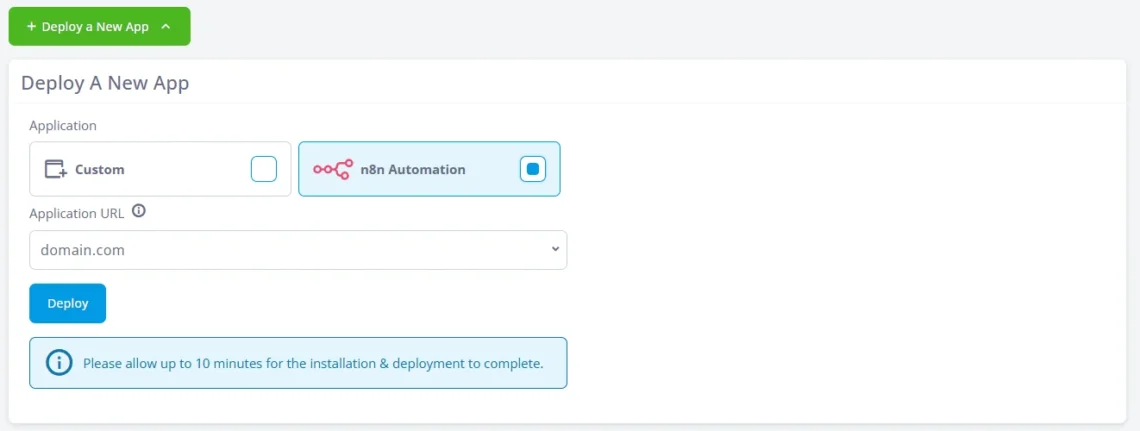
Click here for a detailed explanation of all the steps.
Automatic Updates: “Set It and Forget It”
Staying on top of n8n’s update cycle can be a challenge. The platform evolves quickly, and staying up to date usually requires manually downloading new versions, testing compatibility, and applying updates through SSH. With SPanel, you don’t need to think about any of this.
Our server management platform automatically handles n8n version updates, security patches, and maintenance tasks. You get all the latest performance enhancements and protections without any interruptions to your workflows.
Yet again, the idea is simple – to allow you to focus on what really matters: building your automations and optimizing your business operations.
Zero-Downtime Scalability
Automation workloads can be unpredictable. Changes to the business environment, integration of new tools, or an expansion of your team can mean that a workflow processing a few dozen events today may need to handle thousands tomorrow.
This means you’ll need to upgrade the VPS powering your n8n instance, and with many providers, this seemingly simple task is a lot more painful than it looks at first. Sometimes, changes to your virtual server’s hardware configuration require a reboot. In other cases, it may even involve migrating your data and pointing the domain to a new IP.
ScalaHosting’s managed cloud infrastructure was built from the ground up to ensure this isn’t necessary.
With our virtual servers, you scale resources instantly. You can upgrade individual components from your Client Area without rebuilding your server or interrupting your workflows, so the automations keep running as your infrastructure grows.
SShield: Enterprise Security for Automations
All of ScalaHosting’s managed cloud VPS solutions include SShield – an AI-powered security system that monitors your server around the clock and blocks malicious activity before it reaches your application.
It analyzes traffic patterns, detects suspicious behavior, and automatically blocks threats, stopping over 99.9% of attacks before they can cause any actual harm.
Given that n8n deployments handle API keys, credentials, webhook endpoints, and tons of sensitive customer data, this additional protection can mean the difference between a properly configured automation platform that optimizes your business operations and a vulnerable system that could leak information.
An Environment Built for Production Automation
The features listed above make n8n deployment and management on our servers much smoother than you’d expect. However, they wouldn’t amount to much if the underlying environment isn’t suitable for a production-level n8n instance.
Decades of server administration experience have enabled us to build a number of capabilities into our packages that make them ideal for deploying n8n and using it day to day. Here are some of them:
- Managed PostgreSQL databases for optimized n8n workflows
Your n8n instance relies on a fully managed PostgreSQL database that provides excellent reliability, performance, and scalability for your automations. It’s automatically set up when you install n8n, and you don’t need to worry about backups, optimization, or monitoring – we handle it all for you.
- Redis Queue Mode
Redis Queue Mode enables your managed cloud VPS to handle high-volume automation workflows and execute thousands of simultaneous jobs without performance issues. We’re on hand to help you enable and configure it and scale your n8n instance to handle traffic spikes effortlessly.
- Free SSL certificate
Your workflow data is protected by a free SSL certificate from Let’s Encrypt, and the great news is, you don’t need to lift a finger to set it up. As soon as you point your domain to your VPS, SPanel installs it and configures it to encrypt all API connections, webhook triggers, and other sensitive information handled by n8n.
- Daily automated backups
Backups are set up and configured out of the box. Every day, a copy of your n8n instance’s files and database is generated and sent to an offsite location. Your backup is stored in a completely separate data center from your production server, so it remains safe in almost any scenario.
- Dedicated resources
We’ve used state-of-the-art virtualization technology to ensure every VPS is completely isolated from other virtual machines deployed on the same infrastructure. You get a dedicated IP, and the processing power, memory, and storage included in your plan are available at all times, so you can expect consistent loading speeds and reliable performance.
- 24/7 expert support
In a world of AI chatbots and canned responses, ScalaHosting does things differently. We have a team of highly trained and experienced technical support specialists who know how n8n works and can solve technical issues quickly and efficiently. Couple this with industry-leading response times over both live chat and tickets, and you have technical support you can really rely on. Not every n8n user can say that.
- Free workflow migration
If you have existing automation workflows, we can transfer them to your new ScalaHosting virtual server. It doesn’t have to be another self-hosted n8n instance, either. Even if your automations are based on n8n Cloud, Zapier, or Make.com, we can migrate the information, database, and automation logic from your old host. You just need to give us access to it.
All this adds up to an environment where self-hosting n8n becomes simple, scalable, and secure – without sacrificing the control and flexibility that make the platform so appealing in the first place.
Conclusion
Choosing the right hosting setup for n8n isn’t merely a technical question – it directly affects the reliability, security, and scalability of your automations over time.
There are several ways to deploy the platform, each with its own advantages. For example, n8n Cloud may make sense if you’re looking for the simplest onboarding process. Meanwhile, a self-managed server is probably the right choice for people who want maximum control over their deployments and have the technical skills to install and manage everything.
For many users, a managed cloud VPS strikes the perfect balance. It gives you the freedom and data ownership of self-hosting while removing much of the operational overhead that typically comes with server management. With modern cloud infrastructure, flexible resource scaling, and a managed environment that handles updates, security, and maintenance, you can focus on building workflows rather than maintaining the system that runs them.
Ultimately, the “best” n8n hosting option is the one that fits your workflow volume, technical comfort level, and long-term automation goals. The important thing is choosing an environment that allows your automation to grow smoothly as your needs evolve.
FAQ
Q: What is the best hosting option for n8n?
A: Ultimately, the answer to that question depends on your needs and technical experience. Many users choose a managed cloud VPS because it combines the control of self-hosting with the convenience of a managed environment. This approach provides reliable infrastructure while removing much of the complexity of server administration.
Q: Can I run n8n for free on my own server?
A: Yes, n8n’s fair-code license allows you to self-host the platform without paying any licensing fees. However, you still need to pay for the server itself and have someone on hand to manage updates, security, and maintenance.
Q: How much RAM does n8n need to run properly?
A: n8n’s minimum requirements state that the automation platform can be deployed on a server with as little as 2GB of RAM. However, this amount of memory is only suitable for testing and small projects with low-volume automations and no more than a couple of users. For businesses deploying n8n in a production environment, at least 4GB of RAM is recommended.
Q: Do I need a PostgreSQL database for n8n?
A: For small test environments, n8n can use the SQLite database, which is automatically set up during manual installation. However, most production deployments switch to PostgreSQL, as it can handle concurrent workflows and larger workloads more reliably.