G2 Hosting Support Comparison: ScalaHosting Scores 99% (Fall 2026)

Uptime figures and CPU benchmarks describe a host on a good day. Hosting support quality decides how it handles a bad one.
In G2’s six-provider comparison using reviews collected as of August 2, 2026, ScalaHosting received the highest displayed Quality of Support score: 99%, based on 433 responses.
That number comes from G2 reviewers, not from us. G2 validates reviewers through LinkedIn or a verified business email and manually checks feedback before it counts toward a score.
Because we’re one of the six providers being rated, we’ve reported every score exactly as G2 displays it, with its response count, pointing out where other hosts match or come close to us. Use the data to narrow your shortlist. Then use the four questions further down to test any host’s support, ours included.
Key Takeaways
- The headline: ScalaHosting scored 99% on G2’s Quality of Support metric (433 responses, reviews collected as of August 2, 2026), the highest displayed score among six providers.
- The field is strong: every provider scored between 86% and 99%.
- Sample sizes differ: responses range from 83 to 933, so read each score next to its count.
- Scores aren’t the whole story: ask about availability, migration, infrastructure troubleshooting, and escalation before you buy.
- Support has a scope: hosting support fixes the platform; your developer fixes the application.
The G2 Quality of Support Results at a Glance
G2’s comparison report covers ScalaHosting, Cloudways, Hosting.com, Hostinger, InMotion Hosting, and Liquid Web. The table below shows each provider’s Quality of Support score and the number of reviewer responses behind it:
| Provider | Quality of Support | Responses |
|---|---|---|
| ScalaHosting | 99% | 433 |
| Cloudways | 92% | 933 |
| InMotion Hosting | 90% | 83 |
| Hosting.com | 88% | 176 |
| Liquid Web | 88% | 86 |
| Hostinger | 86% | 702 |
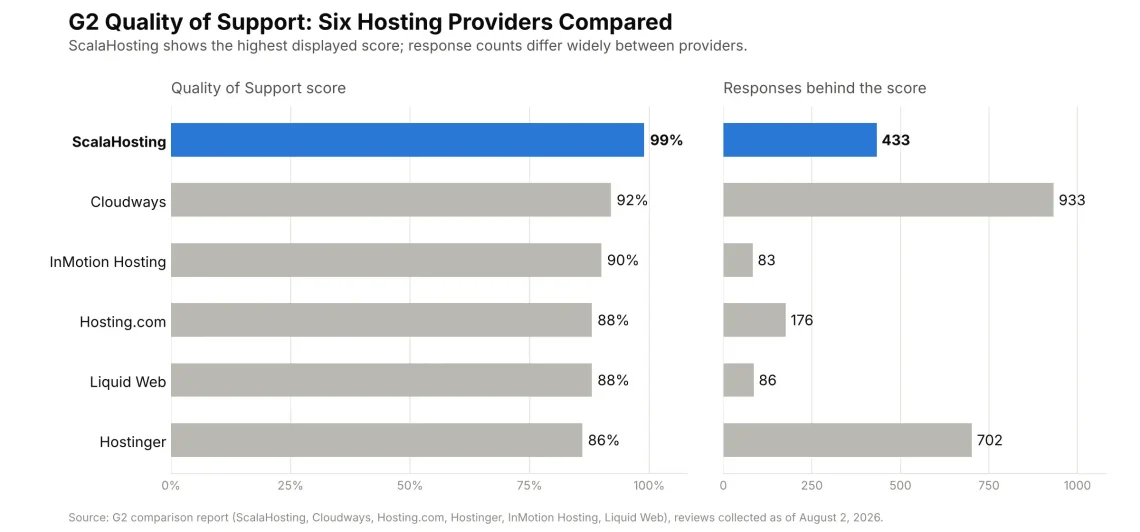
Every provider in the comparison scored 86% or higher. That’s a strong field, and it means the gap between “good” and “best” is narrower than a ranking suggests.
How to Read Hosting Support Quality Scores Fairly
A percentage alone hides an important detail: how many people produced it.
Response counts in this report range from 83 (InMotion Hosting) to 933 (Cloudways). A score built on more responses moves less when a single new review arrives, so Cloudways’ 92% from 933 reviewers is a well-supported result. Our 99% rests on 433 responses, the third-largest sample in the group after Cloudways and Hostinger (702).
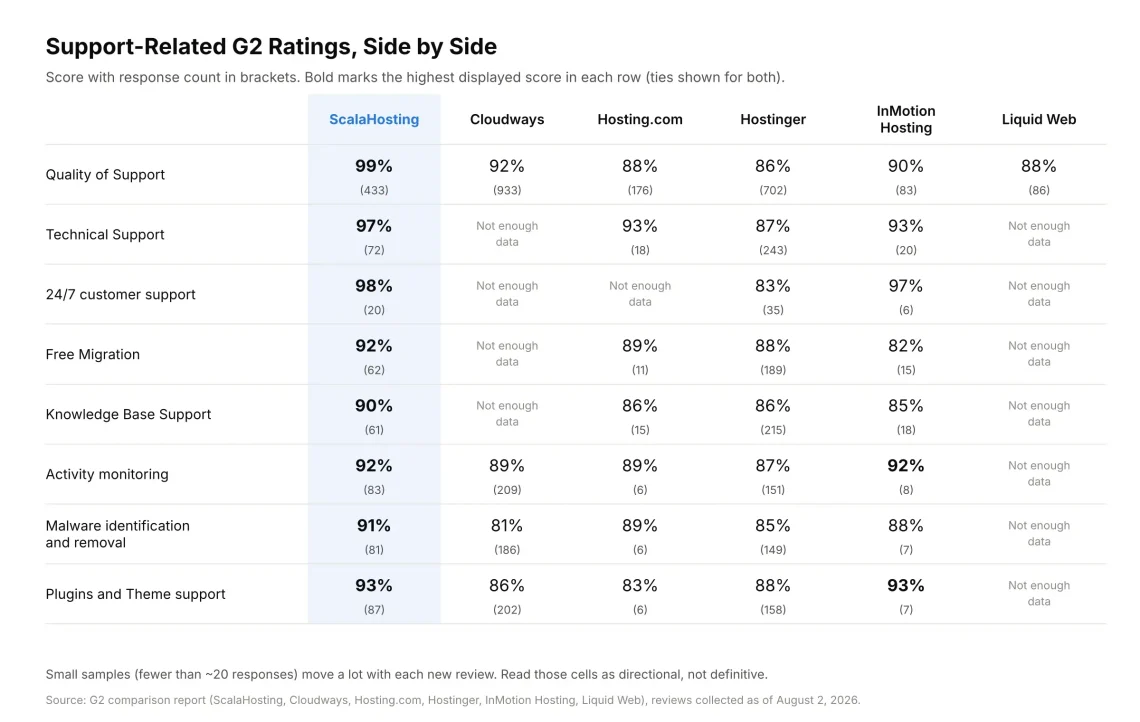
Here’s the thing. G2 also breaks out narrower support categories, and several of those cells rest on fewer than 20 responses. The most relevant rows look like this:
- Technical Support: ScalaHosting 97% (72), Hosting.com 93% (18), InMotion Hosting 93% (20), Hostinger 87% (243)
- 24/7 customer support: ScalaHosting 98% (20), InMotion Hosting 97% (6), Hostinger 83% (35)
- Free Migration: ScalaHosting 92% (62), Hosting.com 89% (11), Hostinger 88% (189), InMotion Hosting 82% (15)
- Knowledge Base Support: ScalaHosting 90% (61), Hosting.com 86% (15), Hostinger 86% (215), InMotion Hosting 85% (18)
On some rows, the lead is shared. For example, InMotion Hosting matches ScalaHosting at 92% on activity monitoring and 93% on plugins and theme support, though from seven or eight responses. Cloudways and Liquid Web show “not enough data” on several rows. That says nothing about their support; it only means G2 didn’t collect enough answers to display a score.
Why Support Matters More Than Most Hosting Specs
CPU cores and storage are easy to compare. Support is harder, and it decides how your worst day goes.
Three moments tend to test a host:
- A site stops working. Every minute a website is down is a minute without traffic and potential sales.
- A migration hits a snag. A missing database table or a DNS mix-up can leave a site half-moved.
- You can’t tell what’s wrong. Is it the plugin, the PHP version, the server, or the email setup?
In each case, you need people who can see what the server sees.
That’s a big part of what managed hosting means: someone else watches the infrastructure so you don’t have to.
What to Ask a Host About Support Before You Sign Up
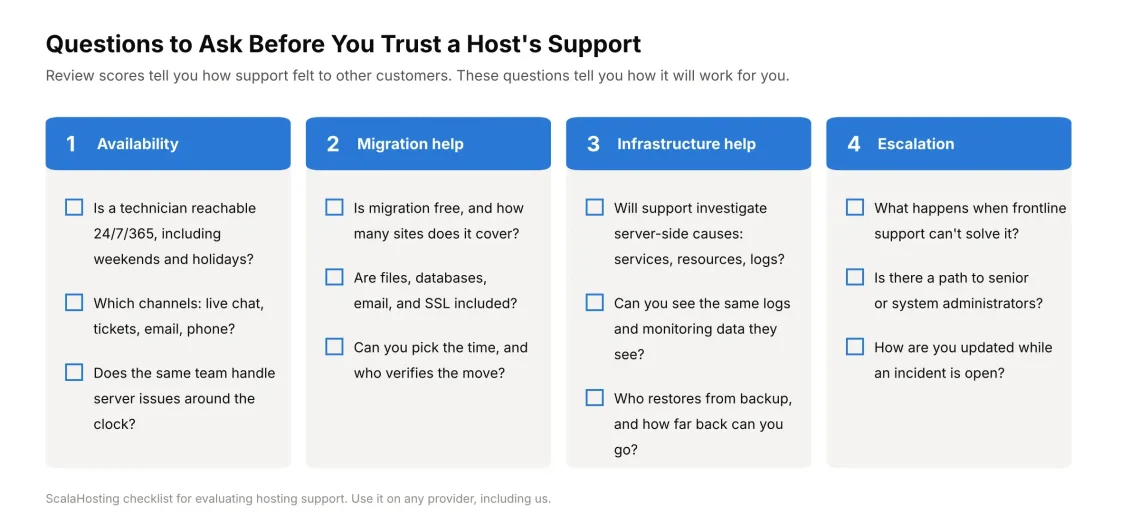
Review scores show how other customers felt about support. These four questions tell you how it’ll work for you.
Availability
Ask whether a technician is reachable around the clock, through which channels, and whether weekend coverage matches weekday coverage. Our managed VPS hosting plans include 24/7/365 support through live chat, tickets, and email.
Migration Assistance
Ask whether migration is free, how many sites it covers, what gets moved, and how the DNS switch is handled so visitors never land on a half-moved site. We offer free migrations on shared, reseller, and managed VPS plans, with no limit on the number of sites. They cover files, databases, email, and SSL certificates. You choose the transfer time, and our technicians check for errors and notify you when the move is done. Everything is tested, so when you change your DNS settings, they are sure to resolve to a working website.
If you’re moving a WordPress site, our guide to migrating a WordPress site explains what to prepare.
Infrastructure Troubleshooting
Ask whether support will investigate server-side causes (stopped services, resource limits, log errors) or just tell you to clear your cache. Also ask whether you have access to the same monitoring and backups support relies on.
Escalation
Ask what happens when the first person you talk to can’t solve the problem. Is there a path to senior system administrators, and how will you hear about progress while the issue is open?
How SPanel Helps You and Our Support Team Investigate Incidents
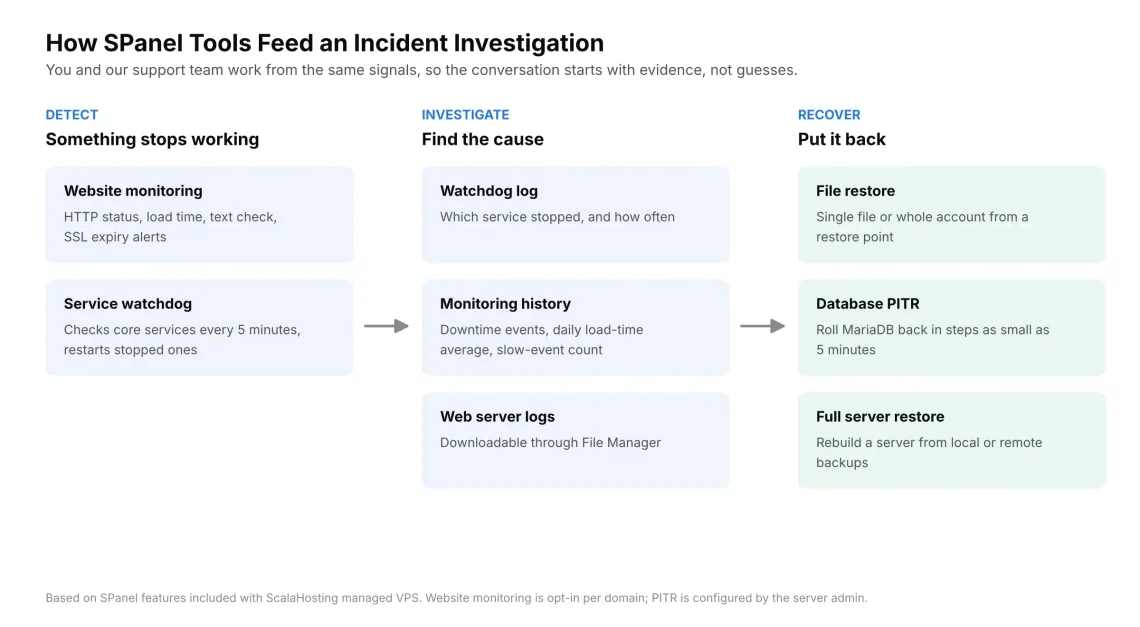
Good support depends on good evidence. SPanel, the control panel we build in-house and include with every managed VPS, collects that evidence before anyone opens a ticket.
Detect: Know Something Broke
A watchdog checks the web server, MariaDB, Exim, Dovecot, Pure-FTPd, BIND, and every installed PHP-FPM version every five minutes, and restarts anything that has stopped.
Website monitoring, which you enable per domain, checks HTTP status, load time, and SSL expiry on a 1-, 5-, 10-, or 15-minute interval. An optional text check catches silent failures, like a page that returns HTTP 200 but shows a database error. Alerts go to your account’s contact email, so make sure it’s set.
Note: SPanel’s website monitoring runs from the hosting server by default. For independent outage detection, customers should use an external uptime monitor or configure two servers to monitor each other.
Investigate: Find the Cause
Every watchdog restart is logged on the server, so support can see which service stopped and how often. That matters, because the watchdog restarts services but doesn’t diagnose why they crashed. Repeated restarts are a signal that a person needs to look deeper.
Monitoring keeps downtime events, a daily load-time average, and a count of slow responses. Web server logs are downloadable through File Manager, so you can hand support the exact error lines.
Recover: Put It Back
You can bring back a single file or an entire account from a restore point. With point-in-time recovery (PITR) enabled, a MariaDB database can roll back in steps as small as five minutes. If a server is lost entirely, the full-server restore rebuilds it from local or remote backups.
An Example: A Plugin Update Breaks a Store
Say your WooCommerce store starts throwing errors right after a plugin update. Monitoring’s text check flags the broken page, and the logs point to the plugin.
Restoring the live database to its pre-update state would also erase every order placed since. So, with PITR enabled, the snapshot from before the update can be restored under a separate database name. Support and your developer compare the two, roll back only what the update changed, and keep the new orders.
What Hosting Support Covers and What It Doesn’t
This is where expectations go wrong most often, so we’ll be direct.
Hosting support covers the platform your site runs on: the server and its services, server-level security, backups and restores, and migrations. Application development covers the code running on top of it: your theme, custom functions, store logic, and third-party plugins.
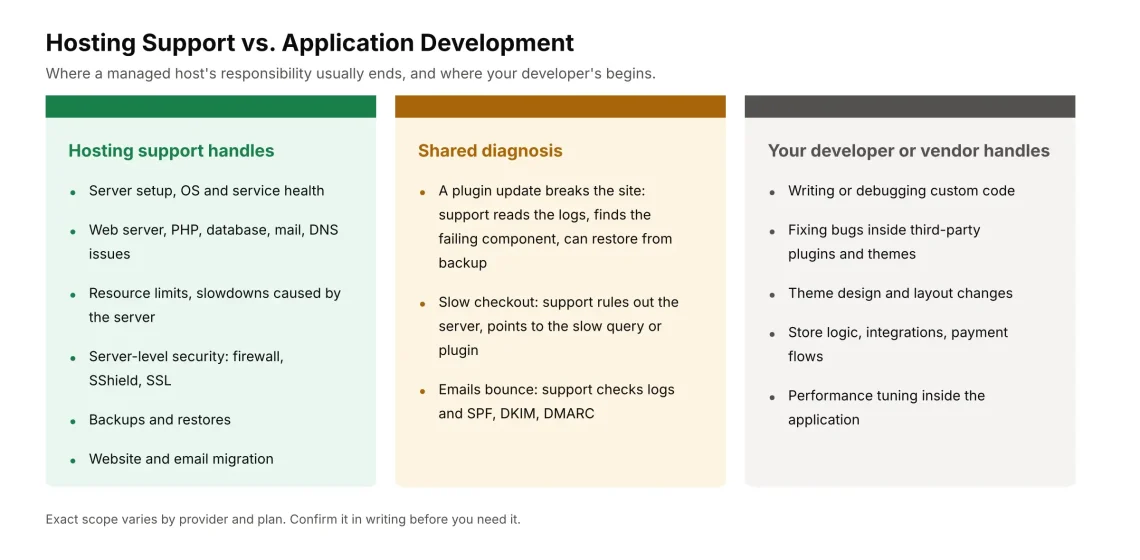
Our team will help you determine whether a problem is server-side or application-side, and we’ll restore from backup when that’s the fastest way to get you back online. Rewriting a plugin’s code, debugging custom functions, or building new features belongs to your developer or the plugin’s vendor.
One note on G2’s “Plugins and Theme support” row: it reflects how reviewers rated a host’s help with plugins and themes. It isn’t a promise of code fixes from any provider in the report.
What to Include When You Contact Support
The fastest tickets share four things:
- The exact URL where the problem shows up.
- When it started, with the time and timezone.
- What changed just before: an update, a new plugin, a DNS edit.
- The error message, or a screenshot or log excerpt.
With those details, support can go straight to the right log instead of asking follow-up questions.
Get Support That Can See What Your Server Sees
A 99% score is a good sign, but the real test is how support handles your incident. Our managed VPS plans pair 24/7 support with SPanel’s monitoring and recovery tools, and we’ll move your sites for free. Explore our managed VPS plans and request your free migration when you’re ready.
Frequently Asked Questions
Q: What Is G2’s Quality of Support Score?
A: It’s a G2 user-satisfaction metric based on reviewers’ ratings of the support they received, displayed as a percentage.
Q: Which Hosting Provider Had the Best Support Score in G2’s Report?
A: ScalaHosting had the highest displayed Quality of Support score in G2’s six-provider comparison: 99%, based on 433 responses, using reviews collected as of August 2, 2026.
Q: Do Response Counts Affect How Reliable a G2 Score Is?
A: Yes. A score based on hundreds of responses changes little when one new review arrives, while a score based on 10 or 20 responses can shift by several points. Always read the score next to its response count.
Q: Does ScalaHosting Offer Free Website Migrations?
A: Yes. Migrations are free on shared, reseller, and managed VPS plans, with no limit on the number of sites. Files, databases, email, and SSL certificates are included.
Q: Will Hosting Support Fix My WordPress Plugin?
A: Support will help find out whether a plugin is causing the problem and can restore a working version from backup. Fixing the plugin’s code is a developer’s job.