Website management is the only job where doing it well produces no evidence you did it.
There’s no metric for the outage that didn’t happen. No line in analytics for the visitors who didn’t bounce because the page loaded fast. No report showing the compromise that got blocked in week three, quietly, at four in the morning.
So it’s the first thing cut from a budget, and the first thing regretted. The website management guide below is an attempt to make that invisible work legible: every recurring task, sorted by how often it actually needs doing rather than by category, and sized for a single business site or a portfolio of forty client sites.
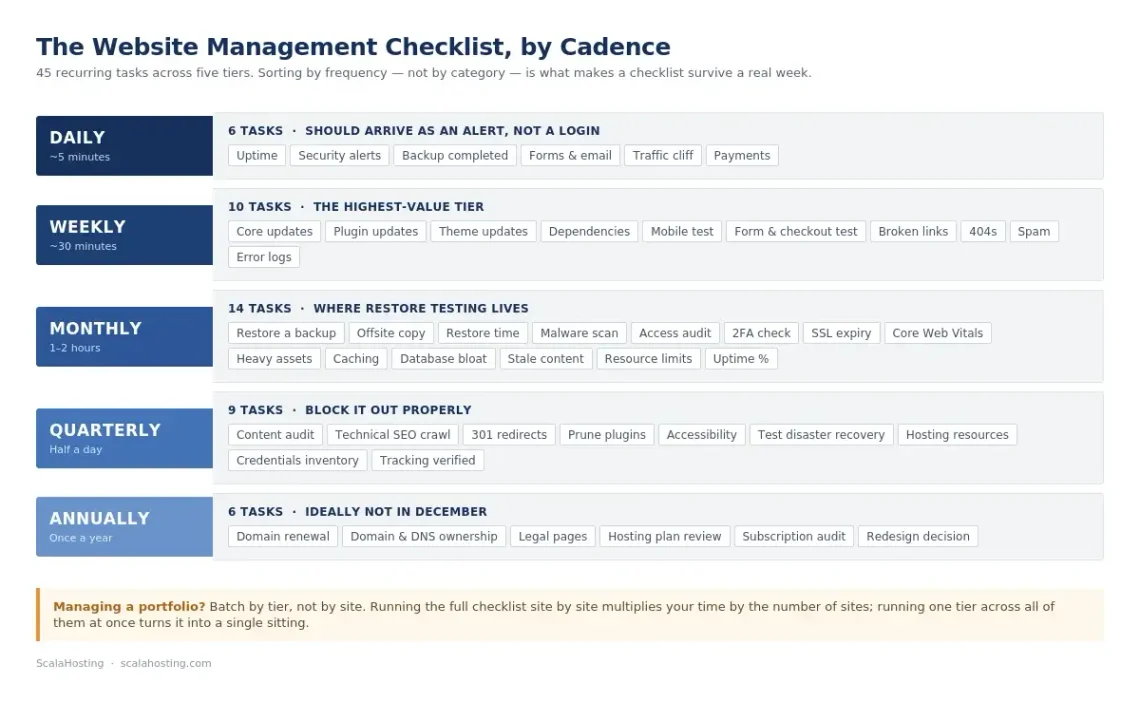
Figure 1. The website management checklist, organized by cadence.
What Is Website Management?
Website management is the ongoing operational work of keeping a live site secure, available, fast, accurate, and recoverable. It covers software updates, backups and restore testing, security monitoring, uptime checks, performance tuning, content accuracy, and the administrative housekeeping around domains, certificates, DNS, and user access.
It is not the same thing as building a website, and it’s not quite the same thing as maintaining one – though the three get used interchangeably often enough to cause real confusion when someone signs a contract.
Web Development
Website Maintenance
Website Management
What it is
Building or rebuilding the site
Keeping the existing site working
Owning the site’s operational health end to end
Cadence
Project-based, has an end date
Reactive plus scheduled fixes
Continuous, on a fixed schedule
Typical scope
Design, code, launch
Updates, bug fixes, small edits
Maintenance plus security, performance, backups, monitoring, content, and reporting
Ends when
The project ships
The ticket closes
Never – it ends when the site does
Here’s why the distinction matters commercially: a maintenance retainer usually buys you someone who fixes what you report. A management arrangement buys you someone who notices before you do.
The Complete Website Management Checklist
Sorting tasks by cadence rather than by category is what makes a checklist survive contact with a real week. Category lists (“security tasks,” “SEO tasks”) tell you what exists; cadence lists tell you what to do today.
Work through the tiers below in order. If you run a single business site, most of the daily tier should be automated, and the whole monthly tier fits in an afternoon. If you manage client sites, treat each tier as a batch operation and run it across the portfolio in one sitting rather than site by site.
Download our Website Management Checklist to stay on top of the essential tasks that keep your website secure, up to date, and performing at its best. [Download the Free Checklist]
Daily Website Management Tasks
Five minutes, and most of it should be a notification rather than a login.
Task
Why It Matters
Confirm the site is up and loading correctly
Automated uptime alerts should tell you. If you’re checking manually, you don’t have monitoring – you have a habit
Review security alerts and blocked-attack notifications
Attack patterns change quickly; a spike is a signal, not noise
Check that the previous night’s backup completed
A backup job that fails silently is worse than no backup, because you’ll trust it
Scan form submissions and transactional email delivery
Contact and checkout forms fail quietly and often
Skim analytics for a traffic cliff
A sudden drop is usually technical, not marketing
Weekly Website Management Tasks
Roughly 30 minutes for one site.
Task
Why It Matters
Apply CMS core, plugin, theme, and dependency updates
The single highest-value recurring task on this list
Test the site on mobile and in a second browser
Layout breaks after updates and nobody notices on desktop
Moderate comments, spam, and user-generated content
Spam links damage rankings and reputation
Check for broken internal and outbound links
Broken links accumulate silently after every content change
Review 404 errors in your analytics or server logs
Reveals broken links on other people’s sites pointing at yours
Confirm forms, checkout, and search still work end to end
The features that generate revenue are the ones you test least
Monthly Website Management Tasks
One to two hours for a single site.
Task
Why It Matters
Restore a backup to a staging environment
An untested backup is a hypothesis, not a safety net
Run a full malware and file-integrity scan
Catches anything real-time monitoring missed
Review page speed and Core Web Vitals
Slow pages lose visitors and rankings simultaneously
Audit user accounts and remove stale access
Ex-contractors, old agencies, and unused admin accounts
Check SSL certificate expiry dates
Auto-renewal fails more often than people expect
Review database size and clean up bloat
Revisions, transients, and logs grow without limit
Update content that has gone stale
Pricing, staff, hours, and product availability drift
Check disk, bandwidth, and resource usage against plan limits
Hitting a ceiling mid-month is an outage you can schedule around
Review and prune plugins, themes, and integrations
Every unused extension is attack surface with no upside
Audit accessibility against WCAG basics
Increasingly a legal exposure, not just a nice-to-have
Test the disaster recovery plan, not just the backups
Restoring a file is not the same as rebuilding a server
Review hosting resources against actual growth
Right-size before the traffic arrives, not after
Refresh documentation and credentials inventory
The person who knows everything will eventually be unavailable
Annual Website Management Tasks
Task
Why It Matters
Renew domains and verify registrar contact details
Expired domains are recoverable, but rarely cheaply
Review privacy policy, terms, and cookie consent
Regulations change faster than legal pages do
Reassess the hosting plan and provider
Requirements at renewal rarely match requirements at signup
Audit third-party services and subscriptions
Tools accumulate; nobody ever cancels anything
Evaluate whether the site needs a redesign or a rebuild
Design debt compounds like technical debt
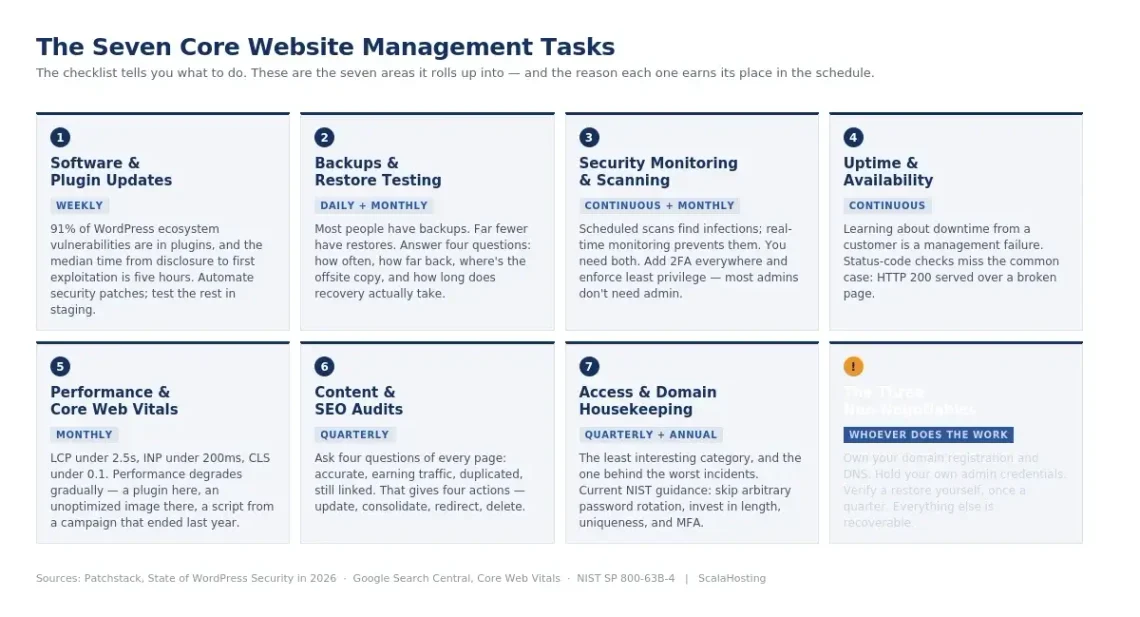
The Seven Core Website Management Tasks Explained
The checklist tells you what to do. This section covers why, so you can defend the time to whoever controls the budget.
Figure 2. The seven areas the checklist rolls up into, and the three responsibilities that stay with the site owner.
1. Software and Plugin Updates
Updates are where most compromises are won or lost, and the data is not subtle about it. Patchstack’s State of WordPress Security in 2026 recorded 11,334 new vulnerabilities across the WordPress ecosystem during 2025 – a 42% year-on-year increase – with 91% of them found in plugins rather than in core. The report also puts the weighted median time from public disclosure to first exploitation at five hours.
Five hours is shorter than most people’s update cycle. That gap is the entire argument for automating security patches and running weekly checks on everything else.
Two things are worth a mention here:
Test updates in staging when the site earns money, because a broken checkout costs more than an unpatched plugin.
Treat plugin count as a security metric: every extension you remove is an entire category of future vulnerability you’ll never have to patch.
2. Backups and Restore Testing
Most people have backups. Far fewer have restores.
A backup regime is only as good as the last time someone actually recovered from it, and the failure modes are mundane: the job stopped running three months ago, the archive is corrupt, the database dumped without the file uploads, or everything is stored on the same server that just died.
A defensible setup answers four questions. How often does it run? How far back does it go? Where is the copy that isn’t on the production server? And how long does a full restore take – measured, not estimated?
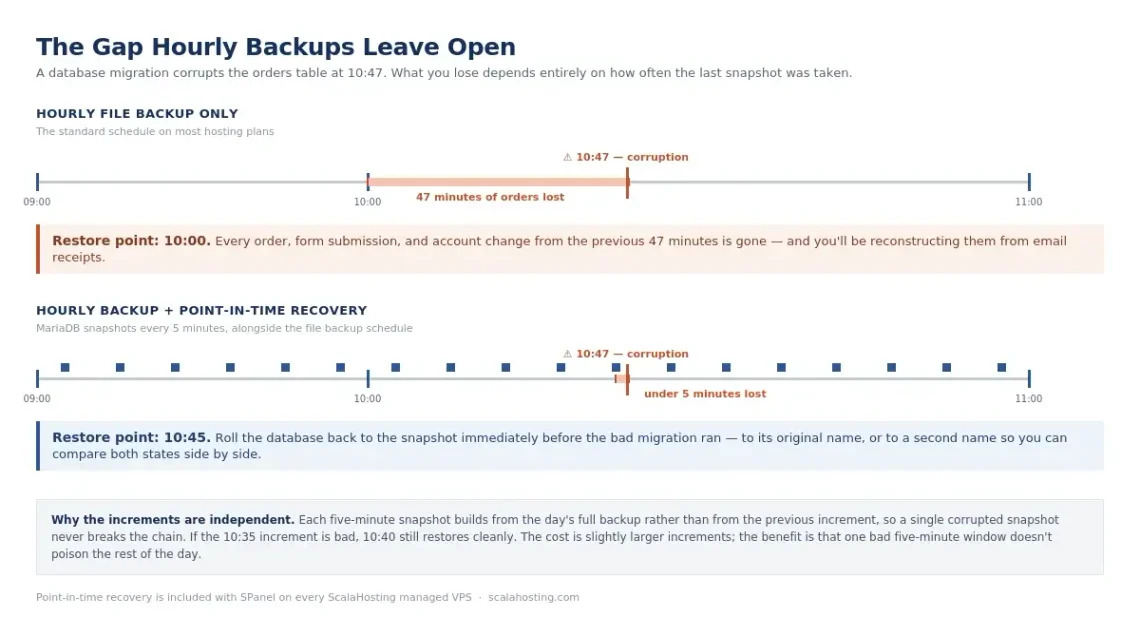
Add one more for anything transactional. If your store takes an order every few minutes, an hourly backup means an hour of orders lost in the worst case. That’s the gap point-in-time recovery exists to close.
Figure 3. What an hourly backup schedule costs you when something breaks at 10:47.
3. Security Monitoring and Malware Scanning
Scheduled scans find infections. Real-time monitoring prevents them. You want both, because they solve different halves of the same problem.
The baseline for any site: a web application firewall, brute-force protection on login, file-integrity monitoring that flags unexpected changes, and alerting that reaches a human. Layer on two-factor authentication for every administrative account, and enforce least privilege – most people with admin access don’t need it.
Scan output needs a triage habit, too. A scanner that emails 200 low-severity notices every week trains you to ignore it, which is functionally the same as not having one.
4. Uptime and Availability Monitoring
Learning about downtime from a customer is a management failure, not a hosting failure.
Basic uptime monitoring polls the site at intervals and alerts when it stops responding. That catches hard outages. It does not catch the more common and more damaging case: the site returns HTTP 200 while rendering a database error, an empty product grid, or a half-broken page where the failing component was caught and silenced.
The fix is a content check – monitor for a specific string that should always appear on the page (a footer line, a nav item, a tagline) and treat its absence as downtime regardless of status code. Pair that with certificate expiry alerts and a response-time threshold, and you’ll know about most problems before anyone else does.
5. Performance and Core Web Vitals
Google’s Core Web Vitals are the three metrics worth tracking on a schedule: Largest Contentful Paint under 2.5 seconds, Interaction to Next Paint under 200 milliseconds, and Cumulative Layout Shift under 0.1.
Check them monthly using field data rather than a one-off lab test, because performance degrades gradually – a plugin here, an unoptimized hero image there, a tracking script someone added for a campaign that ended last year.
The recurring wins are unglamorous and reliable: compress and correctly size images, serve modern formats, defer non-critical scripts, keep a caching layer in front of database queries, and periodically ask whether every third-party script still earns its place.
6. Content and SEO Audits
Content decays. Pricing pages go stale, team pages list people who left, statistics age out, and pages that ranked well two years ago now slide down the rankings.
A quarterly audit means crawling the site and asking four questions of every page: Is it accurate?Is it earningtraffic?Does it duplicate something else? And does anything still link to it? That produces four actions – update, consolidate, redirect, or delete – and a site that gets meaningfully smaller and better each year.
Redirects deserve specific attention. Every deleted or renamed URL needs a 301 to its closest replacement, or you’re throwing away link equity you already paid for.
7. Access, Credentials, and Domain Housekeeping
The least interesting category, and the one that causes the worst incidents.
Keep an inventory of who has access to what: CMS, hosting panel, domain registrar, DNS, analytics, payment processor, email. Review it quarterly and revoke on the day someone leaves, not at the next audit.
On passwords, current NIST digital identity guidance advises against arbitrary periodic password rotation – change credentials when there’s evidence of compromise, and put the effort into length, uniqueness, breach-list screening, and multi-factor authentication instead.
One rule above all: the business owns the domain registration and DNS. Not the agency, not the developer, not the marketing hire. Everything else is recoverable.
Website Management Tools
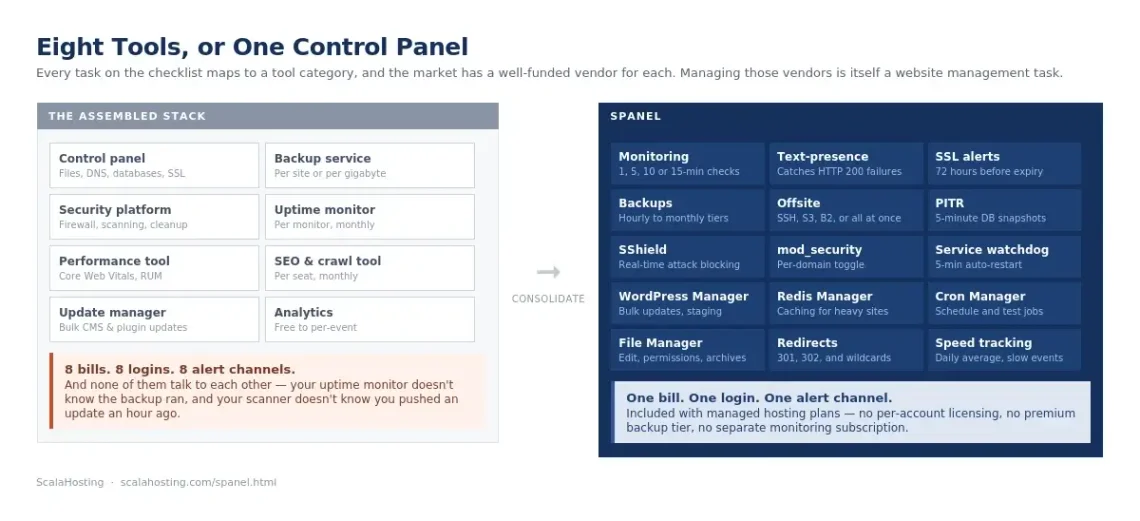
Every task above maps to a tool category, and the market has a well-funded vendor for each one.
Now the part nobody mentions in the sales copy: managing eight tools is itself a website management task.
Eight vendors means eight bills, eight logins, eight alert channels, eight support relationships, and eight places where your data lives. It also means the tools don’t talk to each other – your uptime monitor doesn’t know your backup ran, and your security scanner doesn’t know you pushed an update an hour ago. When something breaks at 2 am, you’re correlating timestamps across dashboards instead of fixing it.
For a single site, that overhead is annoying. Across thirty client sites, it’s a job.
How SPanel Consolidates Website Management
Most of the checklist above assumes you’ll assemble it from parts. The alternative is a control panel that already contains the parts.
SPanel is ScalaHosting’s own hosting control panel, and it was built around the assumption that the operational work – not just file and database access – belongs in one place. Here’s how the checklist maps onto it.
Figure 4. Eight separate subscriptions, or one control panel.
Checklist Task
Where It Lives in SPanel
Uptime and availability checks
Built-in website monitoring, with 1-, 5-, 10-, or 15-minute check intervals
Silent-failure detection
Text-presence check – flags the site as down when expected content is missing, even on an HTTP 200
SSL expiry alerts
Daily certificate check with an alert 72 hours before expiration
Performance tracking
Load time recorded on every check, with a daily average and a configurable slow-event threshold
Scheduled backups
Hourly, daily, weekly, and monthly retention tiers, each configurable independently
Offsite copies
Local disk, a remote server over SSH, S3-compatible storage, Backblaze B2, or any combination running simultaneously
Database point-in-time recovery
Physical MariaDB snapshots as often as every five minutes
Real-time security monitoring
SShield
Per-site firewall control
Per-domain mod_security toggle, on by default
Bulk WordPress updates and staging
WordPress Manager
Caching for database-heavy sites
Redis Manager
Scheduled maintenance tasks
Cron Job Manager, including running a job manually to test it
File edits, permissions, and archives
Browser-based File Manager
Redirects after content audits
Panel-managed 301 and 302 redirects, including wildcards
A few of those are worth more than a table row.
The monitoring runs on your own server, not a third party’s. Response-time history, alert records, and certificate data stay in your account rather than on a monitoring vendor’s platform. It will also poll any URL, not just domains hosted on that server – including sites you keep at other providers or client sites you manage. Running more than one ScalaHosting server lets you configure each to monitor the others, which gives you genuine external checks without a separate subscription.
Point-in-time recovery closes the gap hourly backups leave open. For a store taking orders continuously, restoring to the top of the hour means losing everything since. Snapshots at five-minute intervals mean rolling back to just before a bad migration or a corrupted table, and each increment is independent – one bad snapshot doesn’t poison the rest of the day’s restore points.
Something is watching the services themselves. Every five minutes, a watchdog checks the web server, database, mail server, FTP, IMAP, DNS, and every installed PHP-FPM version, and restarts anything that has stopped. It’s the difference between a database crash at 3 am costing you five minutes and costing you until 9 am.
SShieldhandles the real-time half of security. It monitors traffic continuously and blocks 99.998% of web attacks before they land, without plugin configuration – which pairs with, rather than replaces, the scheduled scans and update discipline in the checklist. For the wider picture, our guide to website security best practices goes deeper than this article can.
All of it comes with fully managed hosting plans at no additional cost – no per-account licensing, no premium backup tier, no separate monitoring subscription. Which is the practical argument: the consolidation isn’t just fewer logins, it’s fewer line items.
When a Separate Tool Still Makes Sense
Consolidation is the right default, not an absolute rule. A few cases still call for a dedicated tool alongside SPanel, and it is worth naming them so the choice is deliberate.
Independent external uptime monitoring. SPanel’s monitor is excellent, but a monitor running on the same server it watches goes down with that server. Run one lightweight external check as a backstop — or, if you operate more than one ScalaHosting server, point them at each other.
Specialist SEO and rank-tracking suites. SPanel covers the technical hygiene — redirects, uptime, speed — but keyword research and competitive rank tracking are a different discipline with their own dedicated platforms.
Compliance-grade, third-party audit logging. Regulated industries sometimes need an immutable audit trail held outside the hosting environment. That is a deliberate separation-of-duties choice, not a gap in the panel.
For everything else on the checklist — backups, security monitoring, uptime, updates, caching, and redirects — a built-in tool you never have to reconcile against a separate bill is the simpler and more reliable choice.
Editor’s note on scope: if the site has grown past what a single server should carry – where an outage is a revenue event rather than an inconvenience – Managed Cluster Hosting distributes the workload across multiple nodes so a single node failure doesn’t take the site down. Every cluster is designed around the specific workload, so it’s a conversation with our technical team rather than a plan you pick from a page.
How Much Does Website Management Cost?
There’s no standard price, because “website management” describes anything from 20 minutes a week to a full operations function. What is standard is the shape of the options.
Approach
Typical Monthly Range
What You’re Buying
Best Fit
Do it yourself
Tool costs only
Your own time, plus whatever tools you assemble
Simple sites, technically comfortable owners
Freelancer retainer
Low hundreds
A few hours a month of someone else’s attention
Small business sites with modest change volume
Agency retainer
Mid hundreds to low thousands
Managed service with reporting and an SLA
Revenue-critical sites, regulated industries
Managed hosting
Bundled into the hosting plan
The infrastructure layer handled: patching, monitoring, backups, security
Most businesses, most of the time
In-house
A salary line
Full control and immediate availability
Large portfolios, complex custom applications
The number most people never calculate is their own. Take the checklist honestly – roughly six to ten hours a month for one site done properly – and multiply by what an hour of your time is worth. For a founder billing at $100, that’s $600–$1,000 a month of unbudgeted labor, spent on work that generates no revenue when it goes right.
Three costs that tend to sit outside the headline price:
Tool subscriptions. Backup, security, monitoring, and SEO tools are usually billed separately from any retainer. Still, if you go with ScalaHosting, backups and security monitoring are a part of the deal.
Emergency work. Hack cleanup, data recovery, and out-of-hours incidents are almost always outside scope.
Development time. Management keeps the site running; it doesn’t build new pages or features.
The reason bundled managed hosting looks favorable in this table isn’t that it’s cheapest in absolute terms. It’s that the infrastructure half of the checklist – patching, monitoring, backups, security, uptime – moves from a variable cost you administer to a fixed cost someone else administers.
Who Should Manage Your Website?
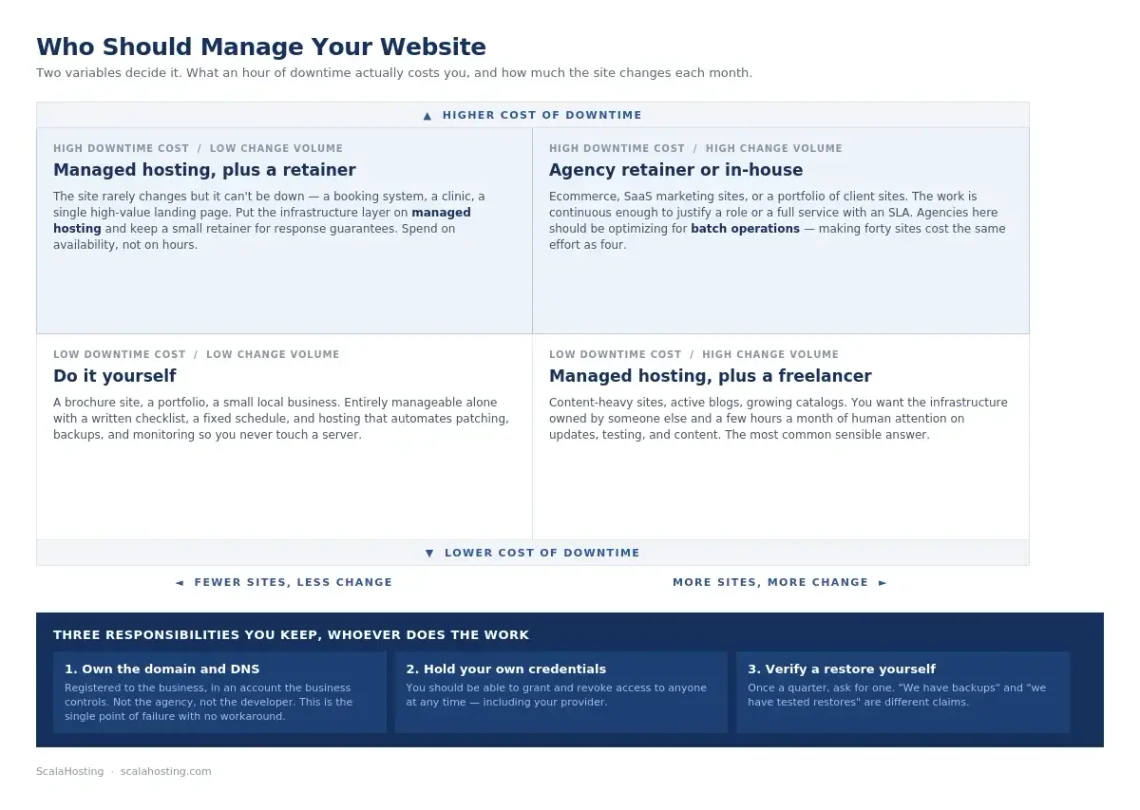
Answer three questions honestly, and the choice usually makes itself. What does an hour of downtime actually cost you? How technical is the person who’d be doing this? And how much does the site change each month?
Figure 5. Two variables decide it: what downtime costs, and how much the site changes.
Choose This
If
Yourself
The site is small and mostly static, you’re comfortable in a control panel, and an hour of downtime costs you little
Managed hosting alone
You handle content and updates, but want the server, security, backups, and monitoring layer owned by someone else
Managed hosting plus a freelancer
You want the infrastructure covered and a few hours a month of human attention on content and updates
Agency retainer
The site is revenue-critical, you need response guarantees, or you have compliance obligations
In-house
You run many sites or a custom application, and the work is continuous enough to justify a role
For agencies, the calculation is different – the question isn’t whether to manage sites but how to make forty of them cost the same effort as four. That’s a tooling problem, and it’s won by batch operations, consistent environments, and a control panel that doesn’t charge per hosted account.
Three responsibilities to keep regardless of who does the work:
Own your domain and DNS. Registered to the business, in an account the business controls. This is the single point of failure that has no workaround.
Hold your own admin credentials. You should be able to grant and revoke access to anyone at any time, including your provider.
Verify the backups yourself. Once a quarter, ask for a restore. “We have backups” and “we have tested restores” are different claims.
The Bottom Line
Website management isn’t hard. It’s just relentless – and the only reliable defense against relentless is a written schedule and an environment that automates the parts nobody enjoys.
Print the checklist, put the quarterly review in the calendar, and move as much of the daily and weekly tier as possible onto infrastructure that handles it without being asked.
A Simple Checklist for Better Website Management From updates and security to performance and content, use our checklist to keep your website running smoothly. [Download the Website Management Checklist]
Website Management FAQ
Q:What Is Included in Website Management?
A: Website management typically includes software and plugin updates, scheduled backups with tested restores, security monitoring and malware scanning, uptime and performance checks, content accuracy reviews, SSL and domain renewals, and user access audits. Some arrangements add content updates and SEO work; most do not include new development.
Q:How Often Should a Website Be Updated?
A: Security patches should be applied as close to immediately as possible, since exploitation frequently follows disclosure within hours. Non-security updates suit a weekly cycle, tested in staging when the site handles transactions. Content should be reviewed monthly and audited in full each quarter.
Q:How Much Does Website Management Cost per Month?
A: It ranges from tool costs alone if you do it yourself, up to a full salary for an in-house hire, with freelancer and agency retainers in between. The highest hidden cost is usually the owner’s own time – six to ten hours a month for a single site managed properly.
Q:Can I Manage My Own Website?
A: Yes, for most small business sites. It takes a written checklist, a fixed schedule, and a hosting environment that automates the infrastructure work. The tasks that genuinely require expertise – server patching, firewall configuration, malware remediation – are the ones a managed hosting plan is meant to absorb.
Q:What’s the Difference Between Website Management and Website Maintenance?
A: Maintenance is reactive and task-based: it fixes what’s reported and applies scheduled updates. Management is continuous and outcome-based: it owns availability, security, performance, and recoverability, and it’s supposed to catch problems before anyone reports them.
Q:Do I Still Need Separate Tools if My Host Handles This?
A: It depends on what the host actually includes. If backups, security monitoring, uptime checks, and updates are built into the hosting environment, separate subscriptions are usually redundant. Keep an independent external uptime check regardless – a monitor running on the same server it monitors goes down with it.
Q:How Long Does the Website Management Checklist Take Each Month?
A: For a single business site with the infrastructure work automated: roughly five minutes a day, thirty minutes a week, and two hours a month, with a half-day quarterly. Across a portfolio, batch each tier rather than working site by site.
Q:What Are the Main Website Management Tasks?
A: The core recurring website management tasks are software and plugin updates, backups with tested restores, security monitoring and malware scanning, uptime and availability checks, performance and Core Web Vitals tracking, content and SEO audits, and access, credentials, and domain housekeeping. Most are scheduled rather than reactive: daily checks take about five minutes, the weekly tier around 30 minutes, and the monthly tier one to two hours.