Redis Cache for WooCommerce: Speed Up Your Online Store

Running an online store with WooCommerce is a dynamic adventure. You have to constantly monitor your site’s performance, as even a single second of delay can disrupt your user experience, sales, and search engine rankings.
Luckily, you have more than a few tools to keep things running smoothly.
A properly configured Redis cache for ecommerce environments helps keep your site responsive even during busy shopping periods.
This is great news for WooCommerce store owners.
Implementing Redis for WooCommerce is one of the most effective ways to optimize performance, especially for stores handling frequent product updates, customer sessions, and checkout activity. It does this by caching repeated database lookups and serving data from memory instead of repeatedly querying the database.
Redis helps WooCommerce by caching repeated object, product, cart-related, session-related, and plugin lookups in memory. It is not a page cache, but it can reduce database pressure for dynamic store activity when connected through a compatible WordPress object cache plugin and hosted on a VPS with enough available RAM.
This approach is particularly valuable for WooCommerce online shops and growing ecommerce businesses that are starting to see higher traffic, more concurrent users, or seasonal spikes that strain their infrastructure.
Our job today is to take a deep dive into Redis for WooCommerce – what it is, how it works, and whether your store can also benefit from this in-memory caching solution. In this guide, we explain where Redis helps WooCommerce, which store workloads benefit most, and how to use SPanel’s Redis Cache feature safely and productively on a managed VPS.
Here is what we have found.
What is Redis Cache for WooCommerce?

Redis is an in-memory caching system that stores frequently accessed data in RAM, avoiding repeated database queries. In simple terms, Redis acts as a high-speed storage layer between your WooCommerce store and its database, delivering commonly requested information almost instantly.
For many growing WooCommerce stores, Redis becomes especially valuable once product queries, cart activity, logged-in users, and plugin workloads start putting pressure on the database.
Online stores are very dynamic and process a lot of queries – product lookups, cart updates, customer logins, and checkout operations, to name a few. Without a caching solution like Redis, each of these requests will create a database query. As your shop grows and your traffic increases, your database will get bigger, and processing these requests will get slower and slower.
Having your frequently used stored directly in your operating memory removes that obstacle. Redis directly optimizes your:
- Database Queries – WooCommerce relies heavily on database interactions for products, inventory, pricing, and orders. Redis stores the results of common queries, reducing database load and improving response times.
- Dynamic Content – As you can imagine, WooCommerce is much more than a static site app. Ecommerce stores have a lot of dynamic elements (like prices, inventory, personalized recommendations, etc.), and you want to deliver that data quickly and consistently.
- Logged-in User Sessions – Logged users generate continuous activity that not only follows their client journey, but also gives invaluable data for tracking and remarketing. Redis can help keep repeated session-related and cart-related lookups fast when the WooCommerce cache plugin is configured correctly.
There is one distinction that is critical here.
Redis is an object cache, not a page cache.
This means that Redis only stores application data, and not full web pages. This can include:
- Database query results
- Product data
- Cart information
- User sessions
- Plugin data
For many growing WooCommerce stores, object caching becomes especially valuable because page caching alone cannot cover every dynamic cart, checkout, and logged-in user interaction. Ecommerce projects deal with tons of personalized data, so a full page caching mechanism won’t cut it. This is why Redis is widely used in production ecommerce environments, from small stores to large, high-traffic shops. Without it, you can expect much more CPU load, slow database queries, and a laggy backend.
| Feature | Redis | Page Cache |
|---|---|---|
| Type | Object cache | Full-page cache |
| Dynamic content | ✅ Yes | ❌ No |
| Logged-in users | ✅ Works | ❌ Limited |
How to Set Up Redis for WooCommerce
Setting up Redis for WooCommerce is straightforward on modern managed VPS hosting. The process typically takes just a few minutes and delivers immediate performance benefits by enabling object caching for your store. Below is a practical, step-by-step workflow:
- Log into your SPanel.
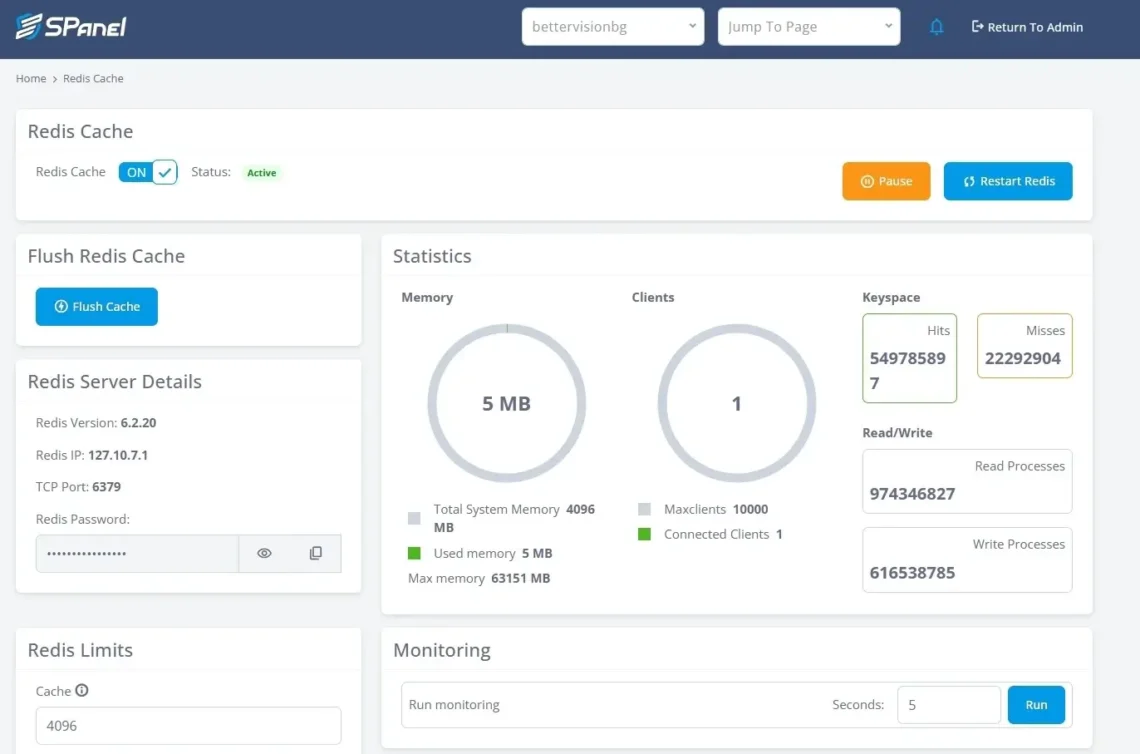
- Go to Redis Cache under the Software section.
- Turn the toggle in the top-left corner to On.
Once enabled, Redis will start listening on the default port (usually 6379) and be ready to accept connections from WooCommerce. Your dashboard in SPanel will look like this:
You now need to install a Redis plugin for WordPress. If you are using LiteSpeed/OpenLiteSpeed as a web server, the best option is LSCache. Good alternatives are Redis Object Cache (by Till Kruss) and WP Redis (by Pantheon).
Once installed from the Plugins menu in your WP dashboard, you need to connect Redis to your online shop.
- Go to Settings -> Redis.
- Click the Enable button next to your cache plugin. Confirm the add-on is active.
- Object Cache: Enabled
- Status: Connected
- Response time: Active
If you have SSH access, you can also test the connection with redis-cli using the Redis IP, TCP port, and password shown in SPanel. Otherwise, rely on the plugin status and SPanel Redis statistics.
redis-cli -h REDIS_IP -p REDIS_PORT –askpass ping
The expected response here is:
PONG
This confirms the Redis service is running correctly.
- If all is working as expected, you can check the Redis impact via popular performance tools like GTMetrix and WebPageTest. Typical improvements should include:
- Faster product page loading
- Reduced database queries
- Lower CPU usage
- Improved checkout responsiveness
Redis can noticeably reduce repeated database work in WooCommerce, especially for product, cart-related, session-related, and plugin data. The actual improvement depends on the store size, plugin stack, traffic pattern, cache hit rate, and server resources.
- For best results, make sure to regularly check the performance of your store with Redis enabled. Key metrics to watch include:
- Memory usage
- Cache hit rate
- CPU usage
- Redis uptime
- Response latency
As Redis stores cached data in memory, you have to ensure you have allocated enough resources for its smooth sailing. Here are some recommendations:
- Small stores: 128 MB
- Growing stores: 256 MB
- High-traffic stores: 512 MB
Watch memory usage, hit rate, and evictions before increasing the limit.
What makes Redis in SPanel different
SPanel does not connect WooCommerce stores to a shared Redis pool. Each hosting account gets its own dedicated Redis process with a private loopback IP, unique 16-character password, configurable memory limit, and systemd-managed lifecycle. The default setup uses 256 MB of memory and the allkeys-lfu eviction policy, which keeps frequently used keys and removes colder data when the cache fills. Store owners can check Redis stats, use the monitor tool to confirm WooCommerce is sending cache commands, flush stale cache after product or plugin changes, and rely on automatic restart behavior if the Redis service crashes.
Hosting Requirements for Redis for WooCommerce
Running Redis for WooCommerce effectively depends heavily on the quality of your hosting environment. While Redis itself is lightweight, WooCommerce workloads – product queries, cart sessions, and checkout processes – require consistent performance, fast memory access, and stable background services. Choosing the right hosting setup ensures Redis delivers the speed and reliability it’s designed for.
At its core, Redis needs three things to work optimally – sufficient RAM, stable processes, and low-latency infrastructure.
When it comes to your operating memory, it’s good to allocate as much as possible when running a WooCommerce store. This will help you prevent cache eviction, improve checkout stability, and handle more simultaneous users.
Redis runs as a continuous background service. If the Redis process is interrupted or restricted, caching performance drops immediately. That means your hosting environment must allow persistent processes to run reliably. This will affect your user sessions, cart data, and order processing.
Redis is designed for extremely fast responses – often under 1 millisecond. But to achieve that, the underlying infrastructure has to be up for the challenge. This means having enough processing power, operating memory, and a reliable network.
Knowing all that, let’s see how ScalaHosting stacks up.
In terms of infrastructure, you have a wide range of top-tier data centers with excellent global connectivity. The physical machines are more than impressive – you have ultra-fast servers with a CPU of up to 4.1Ghz. The storage is the latest NVMe SSD, guaranteeing excellent read/write speeds.
Thanks to the cloud VPS environment, your WooCommerce store can grow practically limitless. The servers are immensely scalable, and you can add more CPU and RAM with a simple mouse click.
If your project grows out of a single server, you can take advantage of cluster hosting. Our specialists will consult with you for free to determine what type of infrastructure will best suit your ecommerce project. You can add multiple servers, set up load balancers, and even utilize different data centers for better redundancy.
You get a ton of useful features with any WooCommerce VPS plan. Automatic backups, free data migrations, a dedicated IP address, a CDN solution, SSL certificates, WP-CLI, blacklist monitoring – everything is out there for the taking at no added cost.
SPanel is hands-down the crown jewel of this setup. The ScalaHosting control panel is lightweight, user-friendly, and features unique tools such as the Redis Manager, SShield (security monitoring), and WordPress Manager.


Why Shared Hosting Is Not Suitable for Redis
You might be wondering if the most affordable hosting plans can also host Redis. While the software requirements might suggest so, in reality, there are many setbacks that will prove this option fruitless:
❌ Limited RAM allocation
❌ Restricted background services
❌ Resource contention (“noisy neighbors”)
❌ Performance throttling
❌ Limited configuration control
❌ Unpredictable latency
In many cases, Redis cannot even run properly on shared hosting because providers restrict persistent services or memory usage.
For WooCommerce stores using object caching, this environment introduces unnecessary risk.
What Redis does not replace
Redis is not a full-page cache, CDN, image optimizer, database replacement, or backup system. It helps reduce repeated application/database work, but it does not fix slow PHP code, poorly optimized queries, oversized product images, third-party scripts, or weak hosting resources. For WooCommerce, Redis works best alongside correct page-cache exclusions, optimized product queries, sufficient VPS resources, and regular backups.
Conclusion
Adding Redis to WooCommerce is one of the most impactful performance upgrades you can implement for an online store. By storing frequently accessed data in memory, Redis reduces database load, speeds up dynamic content delivery, and keeps checkout and user sessions responsive. The result is a faster shopping experience, more stable performance under load, and better conversion potential as your store grows.
What makes Redis especially valuable is its scalability. Whether you’re running a small store or preparing for high seasonal demand, object caching helps your infrastructure handle more visitors without immediately requiring major hardware upgrades. Combined with the right hosting environment, you have a well-suited environment for all kinds of WooCommerce projects.
FAQ
Q: What is Redis, and how does it work with WooCommerce?
A: Redis is an in-memory data store used for caching and speeding up database queries. When integrated with WooCommerce, it stores frequently accessed data in memory, reducing load times and improving overall site performance, user experience, and checkout flow.
Q: Do I need Redis for my WooCommerce store?
A: You may benefit from Redis if your store has high traffic, many products, slow page loads, or frequent database queries. Small stores can run without it, but medium to large stores typically see noticeable performance improvements.
Q: Is Redis the same as page caching?
A: No. Redis is an object cache, while page caching stores full HTML pages. Redis speeds up dynamic operations (like cart and checkout), which page caching cannot handle effectively.
Q: Is Redis safe to use with WooCommerce?
A: Yes, Redis is safe when configured correctly. WooCommerce-compatible caching plugins automatically exclude sensitive data such as cart sessions and user-specific information.
Q: How much faster will my WooCommerce site be with Redis?
A: Performance gains vary by store size, hosting resources, plugin stack, traffic pattern, and cache hit rate. Common improvements include faster dynamic page generation, reduced repeated database work, lower CPU pressure, and better stability during traffic spikes.
Typical benefits may include:
- Faster dynamic page generation
- Reduced server CPU usage
- Fewer repeated database queries
- Better performance under heavier traffic
Actual results depend on your hosting plan, traffic, and WooCommerce store size.