n8n MCP Integration: Connecting AI Models to Your Automation Workflows

Most n8n workflows do exactly as they’re told. A trigger fires, data moves from A to B, and a notification goes out. That’s useful, but it’s not intelligence. The workflow doesn’t decide anything; it executes.
Model Context Protocol (MCP) changes that. It’s the open standard that lets AI models reach outside themselves and interact with the tools, APIs, and workflows your business already runs. n8n MCP integration is what closes the gap between AI decision-making and real-world action. Your automations stop being static sequences and become something an AI can reason about, select, and act on in real time.
This guide covers how it works, what it unlocks for real business operations, and how to get it running. The examples here are drawn from real AI-powered n8n automation workflows, not theoretical demos.
What Is MCP (Model Context Protocol)?
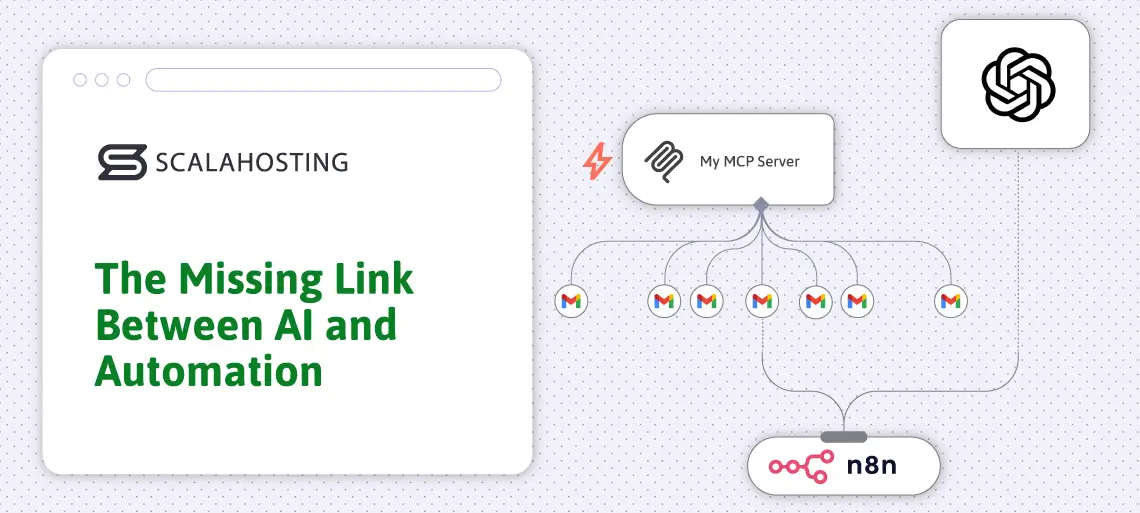
AI is more than a chat interface. Given the right connection, an AI model can query a database, send an email, update a CRM record, or trigger a workflow – all without a human in the loop. MCP is the protocol that makes this possible in a standardized, repeatable way.
Before MCP, connecting an AI model to an external tool meant building a custom integration for every pairing. Every new model, every new service: more custom code, more maintenance. MCP introduces a common language that works across all compatible systems, so you only need to build the connection once.
The architecture has two sides:
MCP servers expose tools and data sources. They advertise their purpose and capabilities – “I can query this database,” “I can send this message,” “I can trigger this webhook” – and respond when called.
MCP clients are the AI models or applications that make the calls. They discover what’s available on a connected MCP server and decide which tool to use based on the task at hand.
The result: an AI model that knows what tools are available and can choose the right one at the right moment, without being explicitly programmed for every possible scenario.
SPanel handles the standard n8n deployment and reverse-proxy setup for you. For production MCP endpoints, especially when using SSE or streamable HTTP clients, test the MCP URL after deployment and confirm the endpoint works through your domain.
What is n8n MCP Integration and Why It Changes Everything?
n8n MCP integration is the bridge between AI reasoning and workflow execution. It connects an AI model’s decision-making capabilities to n8n’s library of hundreds of service integrations – so that what the AI decides to do, n8n actually carries out.
n8n connects hundreds of services – databases, CRMs, messaging platforms, cloud APIs – through a visual workflow builder. When you add MCP to that picture, those workflows become tools that an AI model can call directly.
n8n supports MCP in both directions through two dedicated nodes:
- The MCP Server Trigger node lets n8n act as an MCP server. It exposes tool nodes to MCP clients, and you can expose an n8n workflow by attaching it through the Custom n8n Workflow Tool node.
- The MCP Client Tool node allows n8n to connect to external MCP servers. Your workflows can call tools hosted elsewhere – live web search, custom databases, third-party APIs – without a custom integration for each.
The practical flow looks like this:
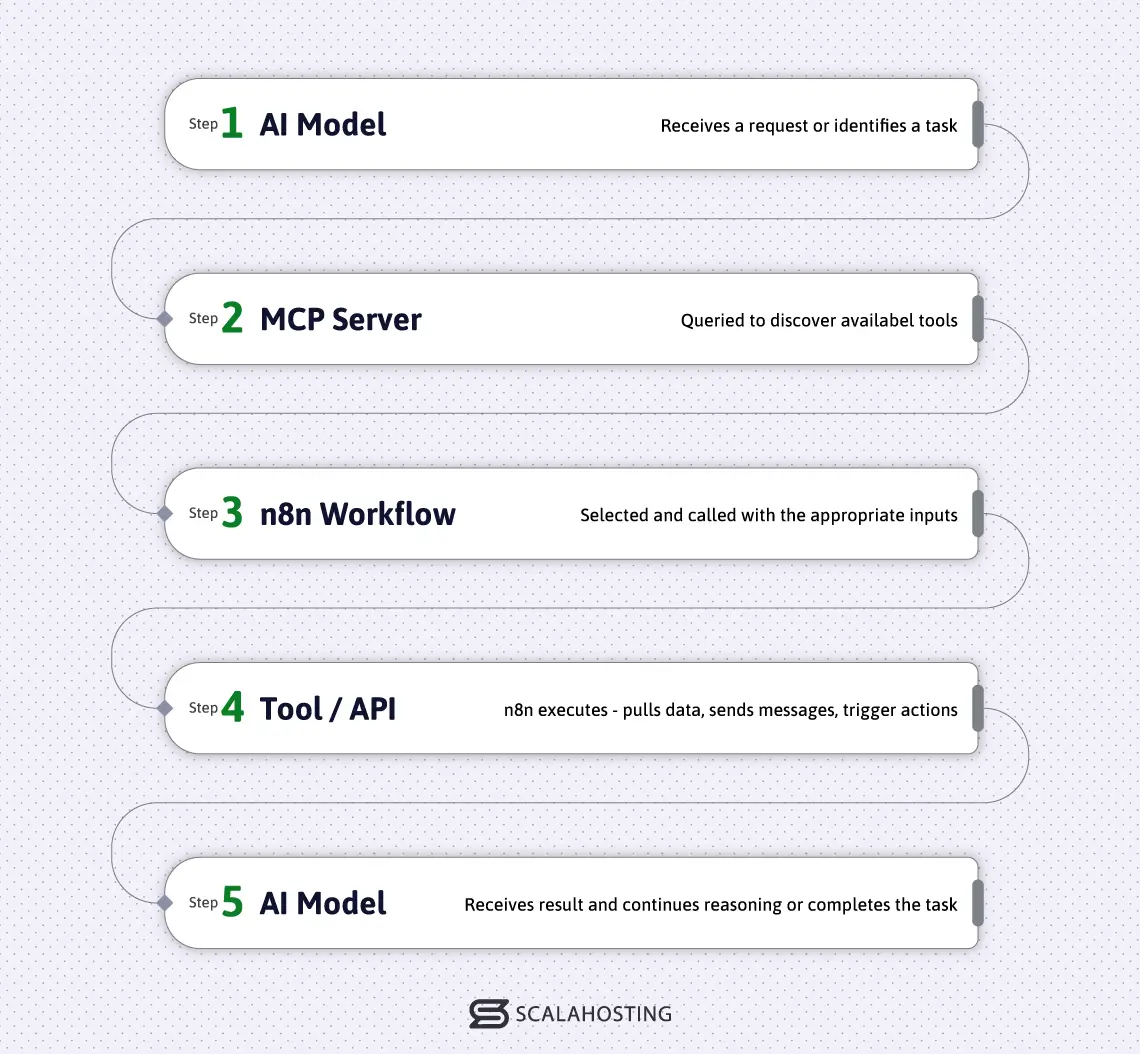
This is the shift from static to dynamic automation. A traditional n8n workflow fires when its trigger condition is met. An MCP-connected AI agent decides when to fire it, what to pass in, and what to do with the result – based on context that no fixed automation could anticipate.
Think of it less like a rule-based system and more like a capable team member – always available, always working with current information, never waiting to be told the same thing twice.
Real Use Cases
AI Customer Support with Tool Access
An AI support agent connected to n8n via MCP can do far more than answer questions from a knowledge base. When a customer submits a ticket, the AI pulls their history from the CRM, checks account status, generates a response tailored to their situation, and triggers the right follow-up workflow – with human approval gates for sensitive actions such as account changes, refunds, cancellations, or outbound customer messages. For businesses already thinking about AI support, MCP is what moves it from concept to operational reality.
AI Data Analyst Agent
Instead of running scheduled reports, an AI analyst agent can query databases on demand, generate summaries, and send insights to the right people at the right time. Unlike static reporting, the agent can explore the data, spot anomalies that weren’t anticipated when the report was built, and surface optimization suggestions that a fixed query would never catch.
AI Ecommerce Assistant
An ecommerce operation connected through n8n MCP can have an AI agent that monitors inventory levels, drafts personalized outreach to individual customers based on their purchase history, and flags product portfolio adjustments based on shifts in buying behavior – with little or no human involvement in the execution layer.
AI DevOps Automation
DevOps workflows are natural candidates for MCP integration. An AI agent can monitor system health, run diagnostic scripts when something looks off, correlate events across services, and alert the right team member with context – not just a raw error code, but an explanation of what it found and what it already tried.
How to Set Up n8n MCP Integration
Getting n8n and MCP connected involves a few distinct stages. Here’s the general shape of each one, focused on orientation rather than configuration details that vary by environment.
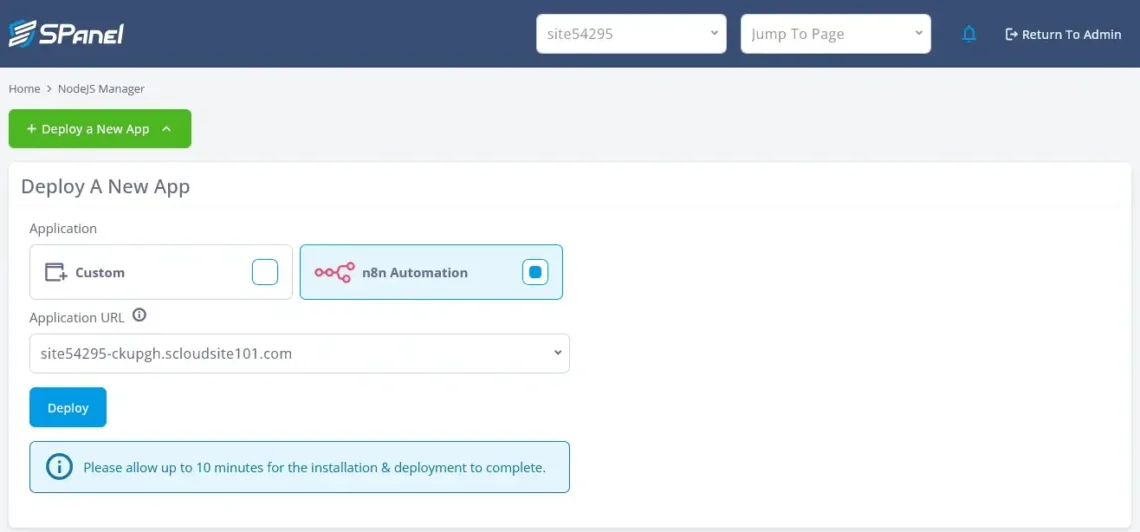
- Set up n8n. Self-hosted n8n is the right choice for MCP workflows. You keep your data on your own infrastructure, avoid per-execution pricing, and maintain full control over your environment. If you’re a ScalaHosting customer, SPanel – ScalaHosting’s own control panel, built and developed in-house – handles this through the NodeJS Manager. Select n8n Automation on the Deploy A New App page, choose your domain or subdomain from the Application URL drop-down, and click Deploy. No command-line work or manual Node.js configuration is required for the standard deployment. For MCP endpoints, test the generated MCP URL after deployment to confirm your client can connect through the live domain.
- Connect your AI model. n8n has built-in credential support for the major AI models. In your workflow settings, add credentials for your model of choice – OpenAI, Anthropic (Claude), Google Gemini, and others are supported natively. You’ll need an API key from your model provider. Once saved, that credential can be referenced in any AI Agent node in your workflows.
- Configure the MCP server. Add the MCP Server Trigger node to a new workflow. The node generates a unique endpoint URL that external AI agents use to connect. Secure it with Bearer token authentication or custom header auth – don’t skip this step in a production environment.
- Define your tools. Each tool connected to the MCP Server Trigger – a database query, a webhook call, an API request, a message send – becomes something an AI agent can discover and invoke. Clear, specific tool descriptions matter: the AI reads them to decide which tool applies to a given task.
- Test AI interactions. Before going live, use n8n’s pin data feature to simulate tool calls and verify that the agent discovers your tools, calls them with the right parameters, and handles responses correctly.
Production MCP workflows should include authentication controls, logging, approval gates for sensitive actions, and fallback handling for failed tool calls or invalid AI responses.
n8n MCP vs. Traditional API Integrations
Some of what MCP enables can technically be replicated with traditional API calls. You can send an email, check inventory, or trigger a webhook via API. The difference isn’t in what individual actions are possible – it’s in who decides what happens next and when.
| Feature | MCP | Traditional API |
|---|---|---|
| AI decision making | Yes | No |
| Dynamic actions | Yes | Limited |
| Context awareness | High | Low |
| Flexibility | Very High | Medium |
With traditional APIs, the logic of when to call and what to call is hardcoded into the automation. MCP puts that decision-making in the hands of an AI model that reasons from context – the same request can produce different tool calls depending on circumstances, history, and what the AI finds.
When MCP Makes Sense
- Your use case requires an AI model to choose between multiple tools dynamically based on real-time context
- Your workflows need to respond to variable conditions rather than a fixed trigger
- You’re building n8n AI agents that need to act across several services in a single session
When It May Not
- Your automation is simple and deterministic – the same input always produces the same output
- There is no AI model involved in the decision-making
- Your team has limited capacity to maintain tool descriptions and handle MCP-specific debugging
Best Models to Use With n8n MCP
Three models with strong n8n ecosystem support are Claude (well-suited to complex, multi-step reasoning and large context tasks), OpenAI’s GPT models (versatile, widely integrated, with a large library of community workflow templates), and Google Gemini (a strong choice where image or document inputs are part of the workflow). Teams that want to keep the model on their own infrastructure alongside n8n can look at Mistral and Llama-based models, both of which have active self-hosted deployment communities.
Where to Host n8n + MCP Workflows
With SPanel’s NodeJS Manager, n8n is not just installed and left running as a loose process. SPanel allocates an application port, writes the web-server proxy configuration, starts the app through pm2, tracks its running status, and gives you a panel-level view of the deployed app. For n8n specifically, this matters because MCP workflows depend on persistent availability, stable URLs, and a process manager that can bring the application back after a crash.
Before choosing where to run n8n, it helps to know what a production MCP setup actually requires.Based on ScalaHosting’s n8n system requirements guidance, a production self-hosted setup should usually start around 4GB RAM, 2–4 CPU cores, and 50GB SSD storage, with 8GB+ RAM recommended for heavier AI-assisted workflows.
| Resource | Production Minimum | With AI Integration |
|---|---|---|
| RAM | 4GB | 8GB+ |
| CPU cores | 2–4 | 4+ |
| Storage | 50GB SSD | 50GB+ SSD |
For a full breakdown of how these requirements scale with workflow complexity, see our n8n system requirements guide.
Shared hosting won’t meet these requirements. Resource contention from neighboring accounts, restricted RAM, and no support for persistent processes make it the wrong environment for anything an AI agent depends on in real time.
For ScalaHosting customers, the infrastructure choice carries benefits that go well beyond hardware specs.
SPanel, ScalaHosting’s own control panel built entirely in-house, makes n8n deployment a matter of a few clicks through the NodeJS Manager – no SSH session, no manual configuration. That’s not just a convenience; it means the platform managing your automation stack is developed and maintained by the same team running your infrastructure, with updates and improvements that reflect real hosting needs rather than a third-party roadmap.
The hardware underneath is enterprise-grade. ScalaHosting’s managed VPS plans run on high-performance NVMe SSD storage and modern CPU architecture, so the low-latency operations that n8n MCP workflows depend on perform consistently – not just when the server happens to have spare capacity.
SShield, ScalaHosting’s AI-powered security system, runs at the server level independently of your application. For n8n MCP workflows connecting AI agents to live databases and external APIs, that matters: an exposed MCP endpoint is an attack surface, and SShield’s real-time monitoring helps detect and block suspicious activity before it reaches your stack.
Resources scale on demand as your automation workload grows – adding RAM or CPU without migrating your n8n instance, without downtime, and without reprovisioning your entire environment. That flexibility is built into ScalaHosting’s cloud architecture from the start.
And when something needs immediate attention, ScalaHosting’s technical support team is available around the clock. Thousands of five-star reviews on Trustpilot and G2 reflect what that looks like in practice: fast, knowledgeable responses from people who understand the infrastructure, not a generic ticketing queue.
Explore ScalaHosting’s n8n self-hosted cloud to see what properly matched infrastructure for n8n MCP looks like.
Common Mistakes
No tool structure. Tools with vague or overlapping descriptions confuse the AI model. It can’t reliably choose the right one. Define each tool clearly, specifically, and with a distinct scope.
Poor prompts. The AI’s behavior is shaped by how it’s instructed. Underspecified system prompts produce inconsistent tool selection and unpredictable results at the workflow level.
No error handling. MCP workflows touch live services. APIs fail, databases time out, webhooks return unexpected responses. Without error handling built into your n8n workflows, a single failure can cascade into a broken agent loop with no clear exit.
Weak hosting. An AI agent that fires a workflow at 2am doesn’t care that the server is overloaded. Failed executions at the infrastructure level look like application bugs – and they’re significantly harder to debug.
Conclusion
MCP transforms n8n from a workflow automation tool into an active layer of your AI stack. Workflows that once fired on a fixed schedule or a trigger condition become tools that an n8n AI agent can reason about, select, and invoke based on context. That’s the shift from automation to agency – and n8n’s breadth of integrations makes it one of the most practical platforms to build on right now.
Explore ScalaHosting’s n8n self-hosted cloud to run your n8n MCP workflows on infrastructure built for it.
FAQ
Q: What is n8n MCP Integration?
A: n8n MCP integration is the connection between an AI model’s decision-making capabilities and n8n’s library of workflow automations. Using the Model Context Protocol standard, an AI agent can discover available n8n workflows, choose the right one based on context, and invoke it – turning static automations into tools an AI can reason about and act on in real time. n8n supports this in both directions: workflows can be exposed as MCP tools for external AI agents to call, and n8n workflows can themselves connect to external MCP servers to access tools hosted elsewhere.
Q: What Is MCP in AI?
A: MCP (Model Context Protocol) is an open standard that defines how AI models connect to and interact with external tools, data sources, and services. Rather than requiring custom integrations for every model-tool pairing, MCP provides AI models with a standardized way to discover available tools and call them, enabling AI to take real-world actions rather than just generating text responses.
Q: Does n8n Support MCP?
A: Yes. n8n introduced native MCP support in early 2025 through two dedicated nodes: the MCP Server Trigger, which exposes n8n workflows as tools that external AI agents can discover and call, and the MCP Client Tool, which lets n8n workflows reach out to external MCP servers during workflow execution.
Q: What Is an MCP Server?
A: An MCP server is any system that exposes tools, data, or capabilities in the MCP format. It publishes what it can do and responds when an MCP client requests a tool call. In an n8n context, a workflow built around the MCP Server Trigger node effectively becomes an MCP server that AI agents can connect to.
Q: Can I connect OpenAI to n8n?
A: Yes. n8n has native credential support for OpenAI. You add your OpenAI API key through n8n’s credential system, then reference it in AI Agent nodes within your workflows. GPT models can then serve as the reasoning layer that decides which n8n tools to invoke based on incoming context.
Q: Do I Need Coding Skills for n8n MCP?
A: Not for the core setup. n8n’s visual interface lets you configure the MCP Server Trigger and MCP Client Tool nodes without writing code. More advanced tool definitions or custom integrations may benefit from familiarity with JSON or JavaScript, but the fundamental workflow is accessible to non-developers.