Wix vs. WooCommerce: Full Comparison

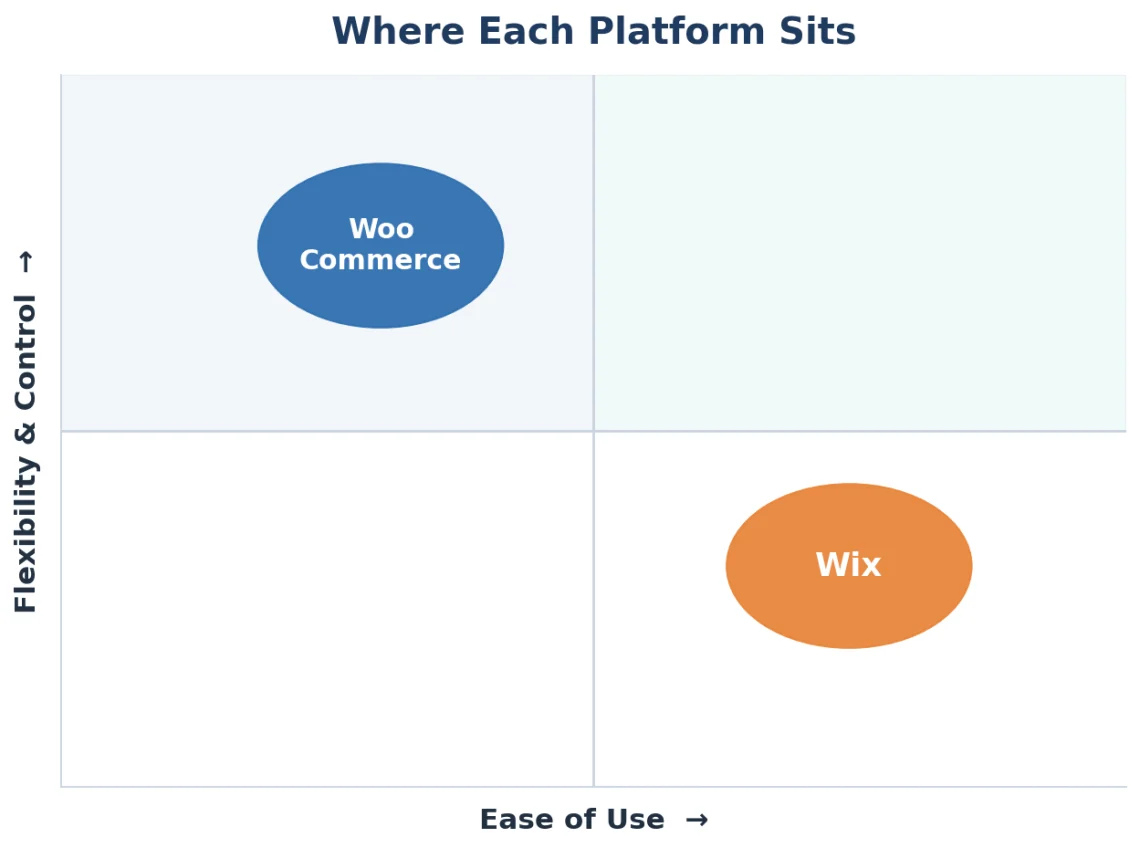
Choosing between Wix vs. WooCommerce comes down to one trade-off: convenience versus control. Wix hands you a finished store and the keys in an afternoon. WooCommerce hands you a blank canvas and near-total freedom, on the condition that you bring your own hosting. Everything else, from design and SEO to features and cost, flows from that single decision.
Here’s how the two stack up, and how to tell which one fits the store you’re actually trying to build.
TL;DR
- Wix is an all-in-one hosted website builder: fast to launch, easy for non-technical owners, and a single monthly price that includes web hosting.
- WooCommerce is a free, open-source plugin for WordPress: near-unlimited flexibility and control, but you pick and manage your own hosting.
- Pick Wix for speed and simplicity on a small-to-mid store. Pick WooCommerce to own your store, scale it, and customize without limits.
- The catch with WooCommerce is hosting quality. A store is only as fast and secure as the server under it, which turns the platform choice into a hosting choice.
Wix vs. WooCommerce at a Glance
If you only read one section, read this one. Here’s the short version before the detail:
| Question | Wix | WooCommerce |
|---|---|---|
| Type | Hosted website builder | Open-source WordPress plugin |
| Hosting | Included | You choose and control it |
| Ease of setup | Fastest | More steps up front |
| Flexibility | Within Wix’s limits | Effectively unlimited |
| Best for | Speed and simplicity | Control, scale, and ownership |
What Wix and WooCommerce Actually Are
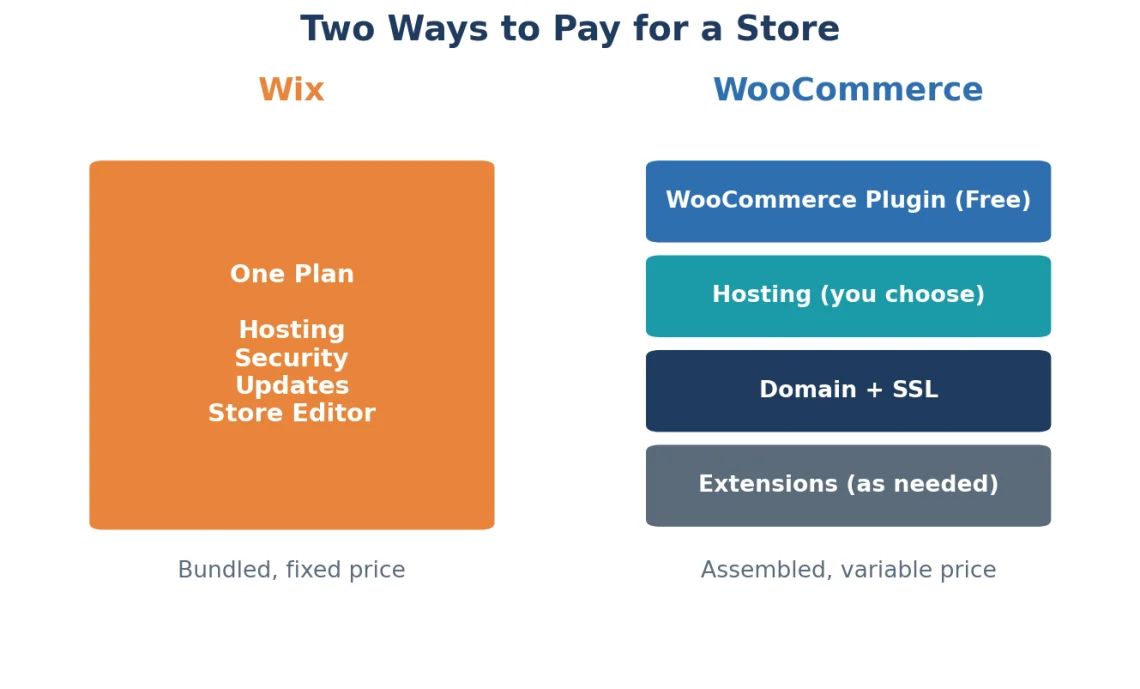
Wix is a fully hosted, all-in-one website builder. You pay a monthly subscription fee, and hosting, security, updates, and the store editor are all bundled into one account. There’s nothing to install and no server to manage.
WooCommerce is a free, open-source ecommerce plugin for WordPress. It turns a WordPress site into a full online store, but WordPress needs hosting, and that service is yours to choose. WooCommerce runs on top of WordPress, which powers roughly 43% of all websites, according to W3Techs, and the plugin itself has more than 7 million active installations on WordPress.org.
That’s the core split.
Wix is a closed, managed ecosystem. WooCommerce is an open, self-hosted platform. Wix Stores holds over 12% of the ecommerce market, while WooCommerce sits among the most widely deployed ecommerce systems on the web. Neither is “better” in the abstract. They serve different owners.
Wix vs. WooCommerce – Ease of Use
Wix is easier to launch. That’s the honest answer for anyone starting from zero. You sign up, pick a template or answer a few questions to auto-generate a layout, drag elements around, and publish. No hosting setup, no plugins, no database.
WooCommerce asks more of you up front. You need a WordPress site, a hosting account, and the plugin itself before you sell a thing. Once it’s running, the day-to-day management is straightforward, but the initial setup involves more moving parts. If you’re new to WordPress, our guide on how to install WooCommerce walks through it step by step.
Wix vs. WooCommerce – Design Flexibility
WooCommerce wins on flexibility, and it isn’t close. Because it’s built on WordPress, you get access to thousands of themes, full control over the code, and the freedom to change anything from the checkout flow to the database. If you can imagine it, you can build it, either yourself or with a developer.
Wix takes the opposite approach. Its editor is genuinely pleasant, with true drag-and-drop placement and a large template library. The limit is structural: once you pick a Wix template, you can’t switch to a different one without rebuilding the site. You’re designing inside Wix’s boundaries, which is fine until you hit them.
For a straightforward store, those boundaries rarely get in the way. For a brand that wants a distinctive storefront or custom functionality, WooCommerce’s open canvas is the difference between adapting your vision and abandoning it.
Wix vs. WooCommerce – SEO
Both platforms can rank. The difference is how much control you have over the details that move the needle.
WooCommerce, through WordPress, gives you full command over technical SEO. You control URL structure, meta tags, schema markup, image optimization, and site speed, backed by plugins like Yoast and Rank Math. Critically, you control the hosting, which means you control page load times, a direct ranking and conversion factor.
Wix has closed much of its historical SEO gap and now offers solid built-in tools. What you don’t get is the same depth of control or the ability to change your web hosting environment to chase better performance. You work with the speed and infrastructure Wix provides.
Is Wix or WooCommerce better for SEO? For most small stores, Wix’s built-in SEO is enough to compete. For stores where organic search is a primary growth channel, WooCommerce’s granular control and hosting freedom give it the higher ceiling.
Wix vs. WooCommerce – Ecommerce Features
Wix ships with a capable set of store features out of the box. WooCommerce ships lean and expands through extensions, and its extension ecosystem is enormous. The practical question is whether you want features handed to you or assembled to fit.
Here’s how the two compare on the essentials:
| Feature | Wix | WooCommerce |
|---|---|---|
| Setup | Instant, no install | Requires WordPress + hosting |
| Product limits | Up to 50,000 products | Unlimited |
| Payment options | Built-in, plus integrations | 100+ via extensions |
| Extensibility | App market (800+ apps) | Thousands of plugins |
| Hosting | Included | You choose and control it |
| Platform transaction fees | None (processing fees apply) | None (gateway fees apply) |
| Code access | Limited | Full |
| Ownership | Store lives on Wix | You own the store and data |
The pattern is consistent. Wix optimizes for “works immediately.” WooCommerce optimizes for “works exactly how I need it to.”
Wix vs. WooCommerce – Pricing
The two platforms price in completely different ways, and comparing them means comparing structures, not just numbers.
Wix charges a monthly subscription that bundles everything. As of 2026, its ecommerce plans run from about $29/mo for the entry Core plan to $159/mo for Business Elite, with payment processing fees of roughly 2.9% plus $0.30 per transaction on top. Hosting, security, and updates are all included in that price.
WooCommerce is free to download. Your real cost is the stack around it: hosting, a domain, an SSL certificate, and any paid themes or extensions you add. That makes WooCommerce cheaper to start and more variable to run. A lean store on modest hosting can cost less than any Wix plan; a feature-rich store on premium web hosting can cost more.
| Cost factor | Wix | WooCommerce |
|---|---|---|
| Platform / Plugin | $29 to $159/mo | Free |
| Hosting | Included | Separate (you choose) |
| Domain | Often free first year | About $10 to $15/yr |
| Extensions | Some free, some paid | Many free, premium paid |
| Predictability | Fixed monthly | Variable by your stack |
The Web Hosting Factor: Where WooCommerce Lives or Dies
A WooCommerce store is only as fast, secure, and reliable as the server underneath it. That’s the part the platform comparison usually skips, and it’s the part that matters most once real traffic arrives.
WooCommerce is database-heavy by nature. Every product page, cart update, and checkout runs live database queries. On cheap shared hosting, those queries pile up during traffic spikes, checkout slows, and abandoned carts climb. The plugin didn’t fail. The hosting did.
This is where a managed VPS hosting plan changes the equation. Instead of sharing resources with hundreds of neighboring sites, your store gets dedicated CPU and RAM that don’t buckle when a promotion goes live, backed by a 99.9% uptime guarantee. You get the performance headroom an online store needs, without becoming a server administrator to get it.
Managing that environment is its own concern, and it’s the reason SPanel exists. It’s ScalaHosting’s control panel, and it handles the server-level work, from creating databases to issuing SSL certificates, through one interface built to be approachable rather than intimidating.
For the database load that slows stores down, Redis Manager caches repeated query results in memory instead of re-running them on every page view, which is exactly the optimization a busy catalog needs. If you want an environment tuned for this out of the box, our hosting built for online stores is a good place to start.
Who Should Use Each
The right platform depends on where you are and where you’re headed.
Choose Wix if you:
- Want an instant live online store with no technical setup
- Run a small-to-mid catalog and value simplicity over customization
- Prefer one predictable monthly bill that covers everything
- Don’t plan to deeply customize the code or move hosts
Choose WooCommerce if you:
- Want to own your store, your data, and your infrastructure
- Plan to scale, customize, or add functionality over time
- Care about granular SEO control and hosting-level performance
- Already run on WordPress or expect to
The one-line test: if convenience is the priority, Wix earns its keep. If control and growth are the priority, WooCommerce is built for it.
Moving From Wix to WordPress
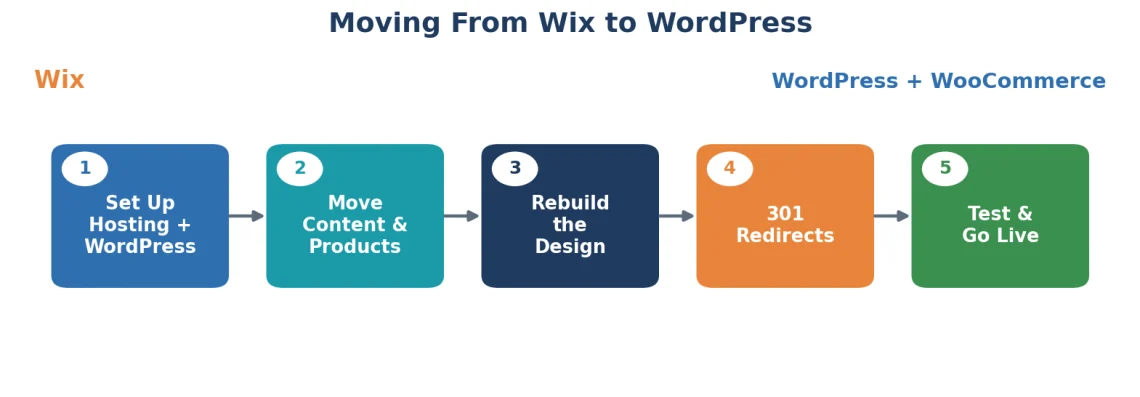
If you started on Wix and outgrew it, the good news is that moving to WooCommerce is a well-worn path. Wix is a closed system, so there’s no one-click export of a finished store, but the migration is manageable when you break it into steps:
- Set up your foundation. Get a web hosting account, install WordPress, and then add the WooCommerce plugin to turn it into a store.
- Move your content. Export your Wix blog posts and pages, then bring your product data into WooCommerce via CSV import or a migration tool.
- Rebuild the design. Choose a WooCommerce theme and recreate your storefront’s look, which is your chance to improve on the original.
- Redirect and preserve SEO. Set up 301 redirects from your old Wix URLs to the new ones, so you keep your search rankings and don’t strand visitors.
- Test before launch. Place test orders, check every product page, and confirm payments work before pointing your domain at the new store.
Migrations feel daunting, which is why we take that step off your plate. If you’d rather not touch the technical side at all, ScalaHosting’s free migration service moves your store to a self-hosted WooCommerce setup without downtime or data loss.
The Bottom Line
Wix and WooCommerce aren’t really competing for the same owner. Wix is for getting a solid store online fast with zero technical overhead. WooCommerce is for owners who want to control every layer of their store and scale without hitting a ceiling, provided the hosting underneath can keep up. Get that service right, and WooCommerce’s ceiling is as high as your ambition.
If you’re ready to build or move a WooCommerce store on infrastructure built for it, explore ScalaHosting’s managed VPS plans and see how your store runs with room to grow.


Frequently Asked Questions
Q: Is WooCommerce better than Wix?
A: Neither is universally better. WooCommerce offers more flexibility, control, and scalability, while Wix offers faster setup and simpler management. WooCommerce suits owners who want to customize and grow; Wix suits owners who want simplicity and speed.
Q: Can you move from Wix to WooCommerce?
A: Yes, but not through a direct file transfer. You need to export your Wix content, install WordPress and WooCommerce on your own hosting, import your products, and set up 301 redirects to preserve SEO. Because Wix is a closed platform, the process takes a few deliberate steps rather than a single click.
Q: Is WooCommerce free?
A: The WooCommerce plugin is free to download and use. Running a store still costs money for web hosting, a domain, an SSL certificate, and any premium themes or extensions you choose to add.
Q: Which is better for SEO, Wix or WooCommerce?
A: WooCommerce has the higher SEO ceiling because it gives you full control over technical factors and your hosting environment, including page speed. Wix’s built-in SEO tools are strong enough for most small stores but offer less granular control.
Q: Do you need separate hosting for WooCommerce?
A: Yes. Unlike Wix, which bundles web hosting, WooCommerce runs on WordPress and requires your own hosting account. That’s a feature, not a flaw, because it lets you choose an environment tuned for your store’s performance and security.