What Is a Web Server?

Do you need an in-depth understanding of all the technology that powers your website?
Technically speaking, it’s not strictly necessary. Most site owners use a content management system with a point-and-click backend dashboard where you upload content, enable features, and configure the site’s behavior. Your hosting account is likely equipped with a management platform, such as SPanel, which offers a graphical user interface for deploying and managing websites, emails, databases, and other services.
All this enables you to build and run a website without being fully familiar with the underlying technology.
Unfortunately, this often means you’re not entirely sure what to do when things go wrong. The lack of insight into how your site works can also prevent you from making the most of your hosting environment and improving your project’s performance and security.
That’s why today’s guide will lift the curtain on one of the most fundamental components that keep your site operational – the web server.
We’ll learn what a web server is, how it works, and what to consider when choosing the best possible web server for your site.
Web Server – What It Does
You need to make a distinction between two completely different concepts – a server and a web server.
A server is a physical or virtual machine that runs 24/7 and is accessible from anywhere in the world over the internet. A server can be used to store data, send and receive email, and host multiplayer gaming sessions. In a web hosting context, it refers to the machine you deploy your website on.
A web server is specialized software and is related to the website only. Its job is to serve as an intermediary between user and site.
When users, search engine crawlers, or applications try to open a web page, the web server receives the request. It processes them and passes them to the content management system. The application returns the resources (HTML files, CSS stylesheets, images, etc.) required to render the page on the screen, and the web server relays them back to the visitor.
That’s not the end of it, though. Modern interactive websites allow users to submit information for storage in the site’s database. For example, when they sign up for a service or log in to their accounts, they enter personal details and login credentials into the site’s forms. Yet again, it’s the web server’s job to receive the data and forward it to the CMS.
In short, it’s one of the components that ensures the correct data ends up in the correct place.
How Does a Web Server Work?
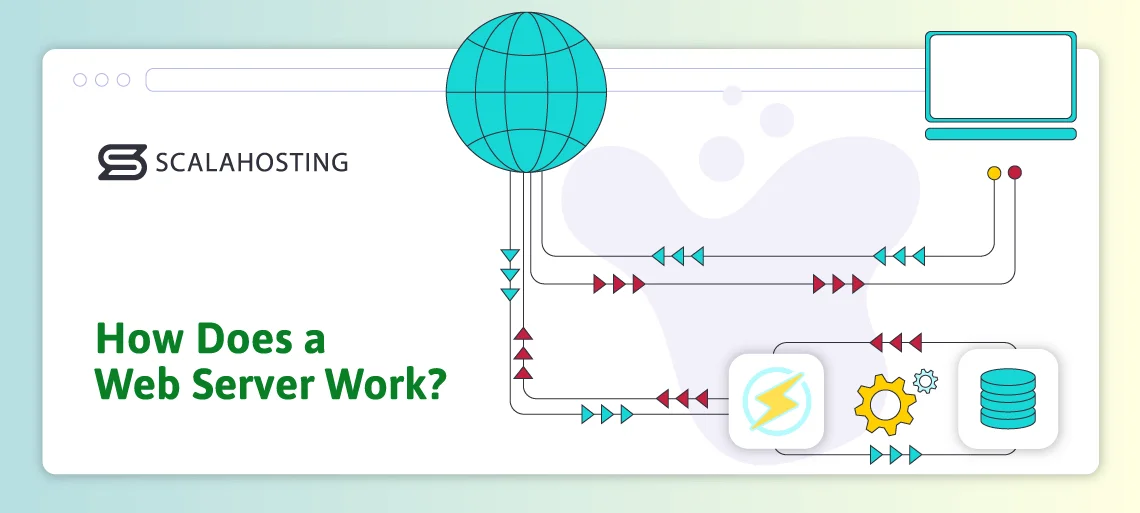
The web server is one of the most critical mechanisms for delivering content over the internet. Its importance in determining your website’s performance and reliability shouldn’t be underestimated.
With technology evolving so rapidly, it should come as no surprise that the web server market has undergone significant shifts over the last few decades. New web servers have been introduced, and the traditional ones have been developed and improved, with new features and functionalities being added constantly.
However, the fundamental principles have remained largely unchanged since Tim Berners-Lee invented the World Wide Web. The client-server communication model, for example, is the same as it was over 30 years ago, and the web server is at the core of it. Here’s a breakdown:
1. DNS resolution and connection establishment
Usually, the client is the browser installed on the visitor’s computer, but it could also be a mobile app, a command-line utility, a backend service, or even an IoT device. The client first queries the global Domain Name System (DNS) to determine the IP address of the server hosting the website.
It then connects to the IP and, when an SSL certificate is present, negotiates the version of the TLS protocol that will be used for encrypting the communication.
2. Request processing
Next, the client constructs an HTTP request, which consists of:
- Header
The header contains metadata about the client and the requested information. This is where the client provides information about the user agent, referrer, content type, cookies, caching control, authentication tokens, etc.
- Request line
In the request line, you’ll find the HTTP method, which determines what action is to be performed. There are a total of seven methods: GET, POST, PUT, DELETE, PATCH, HEAD, and OPTIONS.
The request target is also included in the request line. Usually, it’s the URL of the webpage or file the client is trying to access.
In addition to the method and the request target, the HTTP version is included in the request line. If HTTP/1.1 or HTTP/2 are used, the connection is established via TCP. With HTTP/3, the client uses the QUIC protocol.
- Body
The body is typically used with methods such as POST and PUT, where the client uploads data to the server. If you’re logging in to your account, for example, your login credentials will be included in this part of the request.
When the request arrives at the destination IP, the web server processes it and forwards it to the relevant application.
3. Content delivery
The requested information is located and sent back to the web server, which puts it in an HTTP response and sends it back to the client.
An HTTP response consists of:
- Header
The header of an HTTP response contains metadata about the server, its content, length, cookies, session state, redirects, caching, and other relevant information.
- Status line
In the status line, the web server puts the HTTP version and the status code. Some of the common status codes include:
- 200 OK
- 301 Moved Permanently
- 400 Bad Request
- 404 Not Found
- 500 Internal Server Error
- Response body
The response body contains the requested web page and all related resources, including images, HTML, CSS, and JavaScript files. For some status codes (404, 400, and 500), the response body is empty, and the client only sees an error message.
4. Closure and logging
After the HTTP response is sent back to the user, the web server determines how to handle the connection. Its behavior depends on the HTTP version. With HTTP/1.0 (primarily used by bots, search engine crawlers, and legacy systems), the connection is closed immediately after the response. Still, with newer versions, it typically remains open unless specified in the request’s control headers.
All interactions between the client and the web server are recorded and stored in the web server’s access logs. The logs contain the client IP, user agent, timestamp, URL path, query string, status code, and response size for every single request. Additionally, the web server maintains error logs for application crashes, 500 Internal Server Error details, script failures, etc.
Types of Web Servers
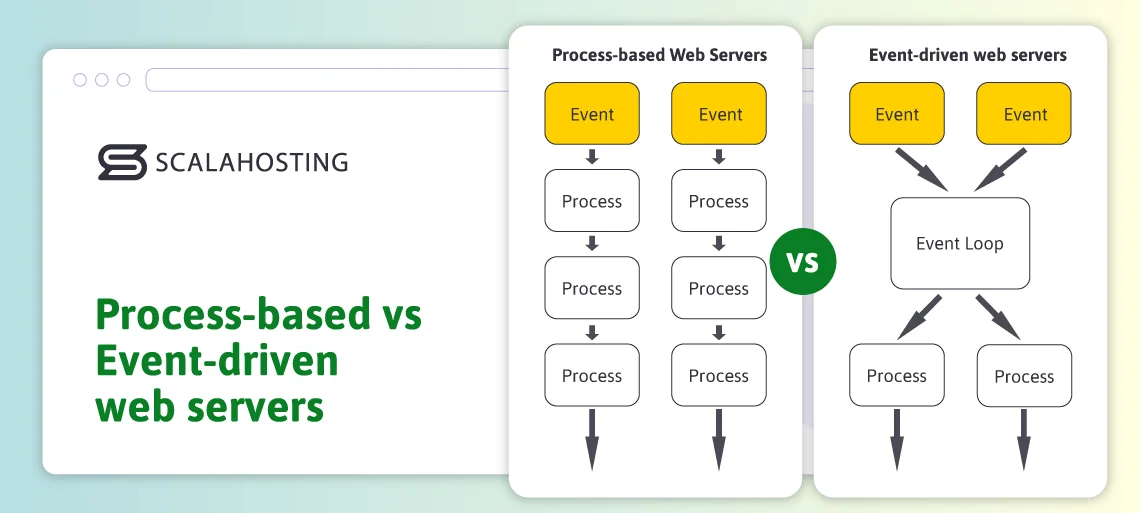
Every web server fulfills the same role – it’s the component that processes incoming requests and delivers the required content. However, you may not be too surprised to learn that there are several different approaches to doing all this.
Over the years, software engineers have developed numerous techniques for handling requests. However, two architectures have emerged as the most popular bases for modern web servers.
Process-based web servers
A typical process-based server creates a pool of worker processes waiting for incoming requests. When a request arrives, it’s assigned to a worker process, which handles the request from start to finish. When it’s done, the process is freed and waits for another incoming request.
The architecture is fairly straightforward – there is a separate process for each individual connection, and data is delivered synchronously.
- Strengths
- Isolation: If one worker process crashes, the remaining processes continue running.
- Simple programming model: Process-based web servers don’t require any complex callbacks or async event loops.
- No danger of a single process blocking the entire server: Synchronous code execution eliminates the risk of a single crash bringing down the entire web server.
- Weaknesses
- High resource usage: Each process consumes memory and processing power.
- Concurrency limitations: You could have limits on the number of processes (and, therefore, the number of requests) you can run simultaneously.
- Potential performance issues: Traffic surges and spikes in the number of incoming requests can quickly increase server load, slowing down the entire website.
- Context switching costs: The operating system must constantly switch between processes.
Event-driven web servers
Instead of creating a worker process per request, event-driven web servers handle thousands of open connections through a single process. Requests aren’t executed in a single long blocking flow. Instead, the web server reacts to events and handles them efficiently.
You can think of it as a single waiter managing several tables at a restaurant. While food is being prepared for table 1, he takes orders from table 2 and serves drinks at table 3.
The asynchronous execution of all required steps makes event-driven web servers the preferred choice, especially for high-traffic websites.
- Strengths
- Highly scalable: Because a single process handles thousands of connections, an event-driven web server is very easy to scale.
- Efficient use of hardware resources: You don’t have a large number of worker processes running simultaneously, meaning an event-driven web server can handle a lot more traffic with the same resources.
- High throughput for I/O-intensive workloads: Event-driven web servers exhibit excellent speed when delivering static files and working as reverse proxies or API gateways.
- Minimal context switching: Since there aren’t numerous processes handling a single request, the operating system doesn’t need to switch between contexts all the time.
- Weaknesses
- Trickier to program and maintain: Developers must avoid blocking calls, and debugging can be more challenging.
- A potential single point of stall: Because a single process manages numerous connections, if a handler performs a blocking operation, the entire worker could freeze.
Popular Web Servers

There are dozens of different web server solutions, each with its own pros and cons. However, a few stand head and shoulders above the rest in terms of popularity. Let’s have a look at them:
Apache
Although accurate market share data is hard to come by, Apache remains one of the most widely deployed web servers, more than three decades after its initial release. Its longevity isn’t just a matter of historical inertia, either. Apache remains a popular choice for many new projects because of its advantages.
- Strengths
- Well-tested
Apache has been running in production environments since the mid-1990s, and over time, it has been deployed across various configurations, operating systems, and setups. It’s been tested in many different scenarios, and tweaked and adapted to provide a truly stable and predictable platform for your site.
- Flexible
Apache’s modular design means that nearly every aspect of its behavior – including logging, caching, URL rewriting, authentication, and more – can be modified or extended using modules. This gives administrators fine-grained control and the ability to customize their deployments.
- Well-documented and easy to deploy
Apache is a process-based web server, so it’s comparatively straightforward to run and maintain. Additionally, over the years, it has developed a massive ecosystem of tutorials, guides, community support, and integrations. Many administrators prefer to rely on these resources rather than plunge into the unknown with a newer, less supported web server.
- Compatible with traditional hosting models
Apache integrates seamlessly with most shared hosting setups, and many scripts and content management systems were created and tested on top of it. That’s why many providers and administrators prefer it over the competition.
Despite its age, Apache still has a lot to offer. However, over the years, the appearance of more modern solutions has highlighted a few disadvantages that should not be overlooked.
- Limitations and drawbacks
- Legacy architecture
The process-based architecture puts Apache on the back foot when it’s up against its more modern competitors. When it was first introduced, the World Wide Web was a vastly different place, and although Apache has evolved over the years, the older concurrency models it was built around are still evident.
- Heavier resource usage
Apache’s process-based setup also makes it less efficient than its more modern alternatives. Memory usage per connection is particularly high, so you’ll need frequent RAM upgrades as your site’s traffic grows.
- Comparatively slow static content delivery under heavy load
Event-driven web servers can handle thousands of idle or slow connections with minimal overhead. By contrast, managing a large number of worker processes can significantly slow Apache, especially when a lot of data must be served to many visitors.
- Complex configuration in certain use cases
The functionality of Apache modules often overlaps, and configuration files can be tricky to find and edit. Managing the web server can become particularly challenging on older installations with numerous accumulated changes over the years.
In short, Apache remains relevant thirty years after its initial rollout mainly because it’s stable and because people know how to work with it. It can be an excellent choice in environments where compatibility is more important than performance. However, for high-traffic websites and applications that prioritize loading speeds, event-driven web servers offer a definitive edge.
Nginx
Nginx was rolled out in 2004 with the goal of solving the so-called C10K problem (handling ten thousand concurrent connections efficiently). The internet had evolved significantly since Apache’s early days, and software engineers had to devise a new approach to handling the ever-increasing volume of traffic. Enter Nginx’s event-driven architecture.
It was a fundamentally different solution to a growing problem at the time, and even now, more than twenty years later, it maintains Nginx’s reputation as a properly fast web server, especially for high-traffic websites and applications. Performance isn’t the only advantage, though.
- Strengths
- Event-driven architecture for high concurrency
Nginx uses a small number of worker processes to handle thousands of concurrent connections. It enables a more efficient use of hardware resources and is ideal for busy websites, real-time applications, and projects that require the delivery of a large volume of media.
- Frequently used with Apache
Although Nginx can serve as a standalone web server, many administrators prefer to deploy it as a reverse proxy in front of Apache. This allows them to reap the benefits of Nginx’s event-driven architecture while keeping the Apache setup that many applications and content management systems are built around. Nginx is compatible with other platforms as well, and in more complex hosting environments, it can offer load balancing, caching, compression, and security features.
- Excellent performance for static content
Nginx can run efficiently with extremely low overhead. Memory and system calls are kept to a minimum, allowing your website to serve images, stylesheets, scripts, and downloads quickly and efficiently.
- Clear configuration syntax
Nginx’s configuration syntax is declarative and considered much easier to understand compared to some legacy alternatives. There will be a learning curve if you come from a career of managing Apache servers, but overall, getting used to Nginx’s routing, proxying, and caching configuration rules shouldn’t be too challenging.
All in all, Nginx has the edge over Apache in several areas, particularly in high-traffic scenarios. However, it’s not perfect.
- Limitations and drawbacks
- Less flexible for custom configurations
Nginx’s configuration syntax may be straightforward and clean, but it can be relatively restrictive, especially when compared to Apache and its extensive module ecosystem. In certain scenarios, modifying Nginx’s behavior to your exact specifications may require a lot of custom work.
- No .htaccess equivalent
Nginx doesn’t allow per-directory configuration files. On the plus side, this boosts performance and security; however, it imposes a severe restriction for shared hosting setups or when implementing directory-level overrides is necessary.
- Tuning can be tricky
Modifying Nginx’s default configuration can be relatively easy, but things like optimizing caching, buffering, SSL configuration, etc., can be a challenge, especially if your experience is limited. To take full advantage of Nginx, you’ll need to spend some time getting familiar with its event-driven model.
- Not designed for dynamic content out of the box
Nginx doesn’t execute application code. Delivering dynamic content requires separate backend services like PHP-FPM or a dedicated application server. The setup can have certain advantages, but it’s trickier to get it right.
Whether used on its own or as a reverse proxy for Apache, Nginx excels at handling large traffic volumes and serving static content efficiently. It’s highly scalable and compatible with many popular platforms, which is why it’s often considered the go-to solution for busy websites and more complex applications. All that being said, the technical challenges of setting it up and managing it correctly are not to be underestimated.
Internet Information Services (IIS)
Internet Information Services is Microsoft’s web server and application hosting platform built directly into Windows Server, an operating system designed for servers rather than desktop and laptop computers. Although it doesn’t receive as much attention as some of the other web servers on our list, IIS remains a major player, especially in enterprise environments with Windows-based infrastructure and .NET applications. Thanks to its tight integration with the Windows ecosystem, it’s a natural choice for organizations that rely heavily on Microsoft technologies. Let’s explore some of its advantages.
- Strengths
- Deep integration into the Windows ecosystem
IIS works seamlessly with Active Directory, PowerShell, and other Microsoft technologies. Configuring, securing, and maintaining it within Windows-based networks is easy.
- A hybrid architecture
Fundamentally speaking, IIS is a process-based web server. However, it incorporates event-driven concepts that allow it to efficiently route incoming client requests while maintaining excellent performance and keeping server load to a minimum.
- Enterprise features out of the box
IIS offers built-in modules for authentication, authorization, compression, logging, URL rewriting, and request filtering. These features work seamlessly with Windows’s default security mechanisms, making deployment in corporate environments a breeze.
- Powerful management tools
IIS has a graphical management console called IIS Manager and can also be managed through extensive command-line and scriptable interfaces via PowerShell. Administrators like this because it provides an interactive way to configure the web server, while also allowing for automated deployments.
Microsoft technology isn’t particularly popular among web hosting providers, but there are clearly a few scenarios where IIS may be a viable web server for your project. However, it’s not without its downsides.
- Drawbacks and limitations
- Windows-only
IIS only runs on Windows. It’s by far the biggest limitation compared to the other web servers on our list, and it’s enough to put off many website owners and administrators.
- Not particularly lightweight
Despite the event-driven concepts integrated into the architecture, the process-based model still consumes a fair chunk of resources. The web server is highly optimized for the Windows environment it’s deployed in, but it can start to struggle under heavy load.
- Steeper learning curve for non-Windows administrators
The vast majority of web hosting servers don’t run on Windows, so if you’ve worked as a server administrator in the past, chances are, your experience with Windows Server is limited. It’s an entirely different ecosystem you’ll have to get used to when working with IIS.
- Less popular with the open-source community
IIS provides excellent support for websites that utilize the .NET framework. However, if you want to build a website based on WordPress, Joomla, or another open-source CMS, Microsoft’s web server probably won’t be your first choice.
IIS is a strong and reliable option for organizations that already use Windows Server and Microsoft’s development technology stack. In fact, it’s the default web server choice for those setups. However, outside Microsoft’s ecosystem, its application is limited.
OpenLiteSpeed/LiteSpeed
LiteSpeed offers two versions: OpenLiteSpeed (open-source) and LiteSpeed Enterprise (commercial). Both are built on event-driven architecture similar to Nginx’s, and both are designed with efficiency and scalability in mind. LiteSpeed Enterprise and OpenLiteSpeed focus on delivering unmatched performance while remaining easy to configure and maintain, particularly for users of popular content management systems.
- Strengths
- Excellent performance under load
The event-driven architecture allows LiteSpeed Enterprise and OpenLiteSpeed to handle high traffic levels without consuming excessive system resources. Unlike Nginx, they are quick when serving both static and dynamic content and tend to remain stable even when visitor numbers spike.
- Seamless integration with WordPress, Joomla, and other CMSs
LiteSpeed/OpenLiteSpeed’s developers offer a free LSCache extension, which is available for all popular CMSs, including WordPress, Joomla, Magento, Drupal, PrestaShop, OpenCart, etc. It offers server-level caching and integrates closely with the site-building application to deliver noticeably faster load times and lower server load. This integration is one of LiteSpeed/OpenLiteSpeed’s biggest advantages and a major reason for its popularity with hosting providers.
- Apache compatibility
LiteSpeed and OpenLiteSpeed support .htaccess and mod_rewrite rules, as well as other commonly used Apache configuration formats. As a result, migrating from Apache is relatively straightforward and rarely requires significant configuration changes.
- Built-in security features
LiteSpeed and OpenLiteSpeed offer native support for ModSecurity rules and include numerous anti-DDoS controls, bandwidth throttling, and IP blocking features. For CMS-based websites that are frequently targeted by brute-force attacks and injection exploits, these controls can be extremely helpful.
LiteSpeed and OpenLiteSpeed offer a lot in terms of speed, compatibility, and security, so it’s not surprising they’ve gained popularity among website owners over the last few years. However, despite their undeniable advantages, they’re still nowhere near as widely adopted as Apache or Nginx. Let’s see why.
- Drawbacks and limitations
- Licensing costs (for the Enterprise edition)
LiteSpeed’s commercial edition requires a paid license, which may not be ideal for website owners on a tight budget.
- Compatibility differences between the two versions
OpenLiteSpeed can offer the same speed and security as LiteSpeed’s Enterprise edition, but there are differences. For example, when you make changes to the .htaccess file, you have to restart the web server for them to come into effect. This is something to keep in mind when switching between the two.
- Limited ecosystem compared to Apache and Nginx
In terms of popularity, LiteSpeed and OpenLiteSpeed are still lagging far behind Apache and Nginx. As a result, the community and resource ecosystem that supports them are noticeably smaller.
LiteSpeed and OpenLiteSpeed are worthy of serious consideration, especially for website owners using modern content management systems. The speed advantage when serving both static and dynamic content, coupled with the easy CMS integration and compatibility with traditional technologies, makes for an appealing proposition. They may not be perfect for all scenarios, but in the right environment, they can strike a strong balance of performance, efficiency, and usability.
Choosing the Right Web Server – Practical Advice
The web server is a crucial component of your technology stack and can significantly affect how you build, maintain, and optimize your website. Different web servers work in different scenarios, and to pick the right one, you must be fully aware of your project’s requirements, the type of data you’re serving, and the projected growth.
Below, you’ll find a comparison table that highlights the differences between the top web servers, helping you find your bearings more easily.
| Web Server | Type | OS Support | Pros | Cons | Best For |
|---|---|---|---|---|---|
| Apache | Process-based | Cross-platform | Customizable modular architecture | High resource usage | Shared hosting environment and dynamic websites with low to medium traffic. |
| Nginx | Event-driven, often used as a reverse proxy in front of Apache | Cross-platform | Fast and efficient static content delivery | Steeper learning curve and configuration challenges | High-traffic websites with lots of static data |
| IIS | Process-based with a few event-driven concepts integrated into its core | Windows only | Easy management and seamless integration into the Microsoft ecosystem | Limited to Windows environments | Corporate environment running on Microsoft technology |
| LiteSpeed/OpenLiteSpeed | Event-driven | Cross-platform | Excellent performance, seamless compatibility, and plenty of security features | Commercial version costs | CMS-based websites that prioritize performance |
Over the years, we’ve seen firsthand how the choice of web server affects a website’s development, and we’ve used that experience when setting up our hosting services.
Unlike most hosting plans out there, our cloud VPS solutions aren’t tied to a specific web server. For example, people who need to use IIS can have a look at our self-managed cloud servers. After they select the hardware configuration, they proceed to the order page, where they can choose the operating system for their virtual server.
In addition to several Linux distributions, they can also pick Windows Server 2019 or Windows Server 2022. Once their Windows-based VPS is deployed, they can easily enable and configure IIS.
If you don’t require Windows or a custom Linux environment, you can opt for one of our managed cloud VPS servers instead. They use Rocky Linux and come with everything you need to build a website pre-installed and ready to go. As for the web server, it’s up to you to choose which one to use.
ScalaHosting’s virtual servers are equipped with SPanel – an in-house developed web hosting management platform that helps you launch your projects and configure your hosting environment through an intuitive graphical user interface. In SPanel’s Admin Interface, you’ll find a utility called Web Server Manager. Through it, you can switch between four different web server setups:
- Apache
- Nginx as a reverse proxy in front of Apache
- LiteSpeed Enterprise
- OpenLiteSpeed
The interface is about as straightforward as it gets. There’s a tab for each web server, and activating your chosen setup requires a single mouse click. The change is fully automatic, but note that it requires a VPS reboot, so be sure to do it during the quiet hours of the day. You can test all different setups, and if you’re not happy with the change, you can revert it just as easily.
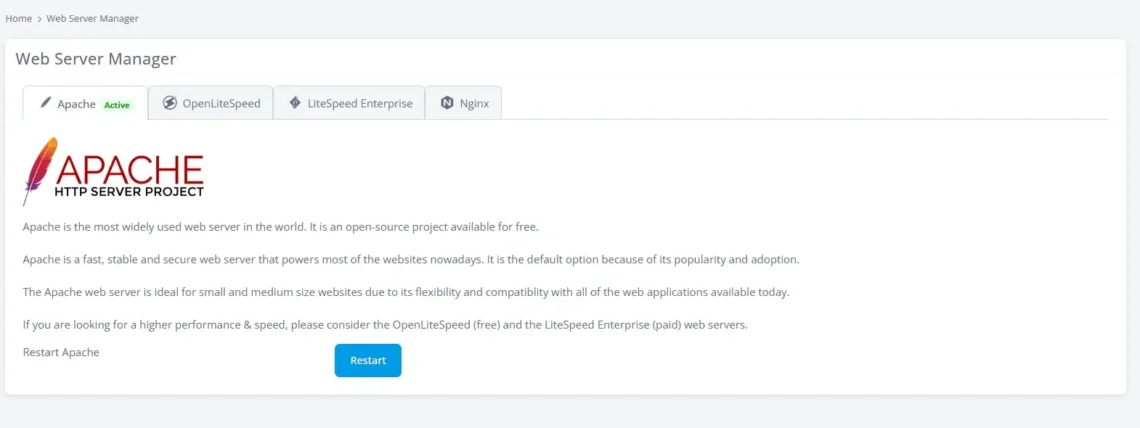
To make sure all web servers are as usable as possible, we’ve configured SPanel to monitor OpenLiteSpeed VPSs for changes to the .htaccess file. When it detects them, the control panel automatically restarts the web server to ensure they’re active. This allows you to take advantage of the enormous performance boost provided by OpenLiteSpeed’s event-driven architecture without any inconveniences or changes to the way you build and maintain your websites.
Conclusion
Whether you’re running a small personal blog with limited traffic or an ecommerce shopping application with millions of downloads and thousands of clicks per second, the web server is the critical component responding to your visitors’ requests.
It has been fundamental to how the internet works since the early 1990s, and this is unlikely to change anytime soon. The technology has evolved significantly over the years, and today you can choose from numerous web server options, each with its own architecture, advantages, and disadvantages.
Understanding those differences will help you choose the best setup for your project.
FAQ
Q: What’s the difference between a web server and an application server?
A: Web servers handle HTTP requests for static and dynamic content. When requests arrive, they are forwarded to the application server, which executes the code and returns the requested data.
Q: Do I need a web server for my website?
A: The web server is an essential component of any website-hosting service. Without it, content delivery would be impossible.
Q: How can I optimize my web server for maximum performance?
A: Different web servers have different optimization techniques. For example, Apache has a modular architecture that allows administrators to streamline operations and modify behavior through add-ons. With other platforms, improving performance is only possible through configuration changes.