Redis Cache: Guide to High-Performance Caching

Speeding up your online project in 2026 is no longer just a perk – it’s a core goal for any site owner.
At ScalaHosting, we’ve been helping developers and businesses build faster, more reliable websites for over 15 years. One of the most impactful tools in our arsenal is Redis caching – an in-memory data store that dramatically improves speed, reduces server load, and optimizes resource usage.
Whether you’re running a WordPress blog, a Magento ecommerce store, a Laravel application, or a custom Node.js API, Redis cache can cut response times by 50–90% and handle traffic spikes without breaking a sweat.
Our mission today is to help developers and novice users take advantage of this amazing tool. We’ll explain exactly what Redis cache is, how it works under the hood, why you should enable it on every production website, and how ScalaHosting’s SPanel makes Redis deployment a piece of cake.
Let’s start with the basics.
What Is Redis Cache?
Redis (REmote DIctionary Server) is an open-source caching solution that speeds up websites and apps by storing frequently accessed data directly in RAM instead of the database. By doing this, you eliminate the need for searching extensive datasets for a specific record.
Imagine having a notebook that contains all the important information about your life. Apart from that, you have all the essential highlights written on sticky notes. When you want to bring up any of those highlights, there is no need to go through the entire notebook, as you can already find them on a sticky note.
This is exactly what Redis cache does for your site and app data.
Here are some key characteristics that make Redis the go-to caching solution in 2026:
- Ultra-low latency – Typical read/write operations are completed in microseconds.
- Rich data structures – Strings, hashes, lists, sets, sorted sets, bitmaps, and streams can all be subject to caching.
- Advanced features – Built-in pub/sub messaging, Lua scripting, Redis Functions (server-side scripting introduced in Redis 7), and modules via RedisStack (Bloom filters, JSON, time-series, search, etc.) are just a few of the exciting functionalities.
- Persistence options – RDB snapshots and Append-Only File (AOF) for durability when needed.
- High availability – Replication, Sentinel, and Redis Cluster are available for failover and sharding.
Unlike database systems like MySQL and PostgreSQL, Redis prioritizes speed over permanent storage. It’s not a full database replacement but the perfect complement for caching layers in modern software stacks (LEMP, LAMP, MEAN, etc.).
Major companies recognize Redis as a go-to performance enhancer. Notable brands include GitHub, Twitter (X), Pinterest, Stack Overflow, and Snapchat – proof of its scalability in real-world, high-traffic environments.
How Redis Caching Works: The Technical Breakdown
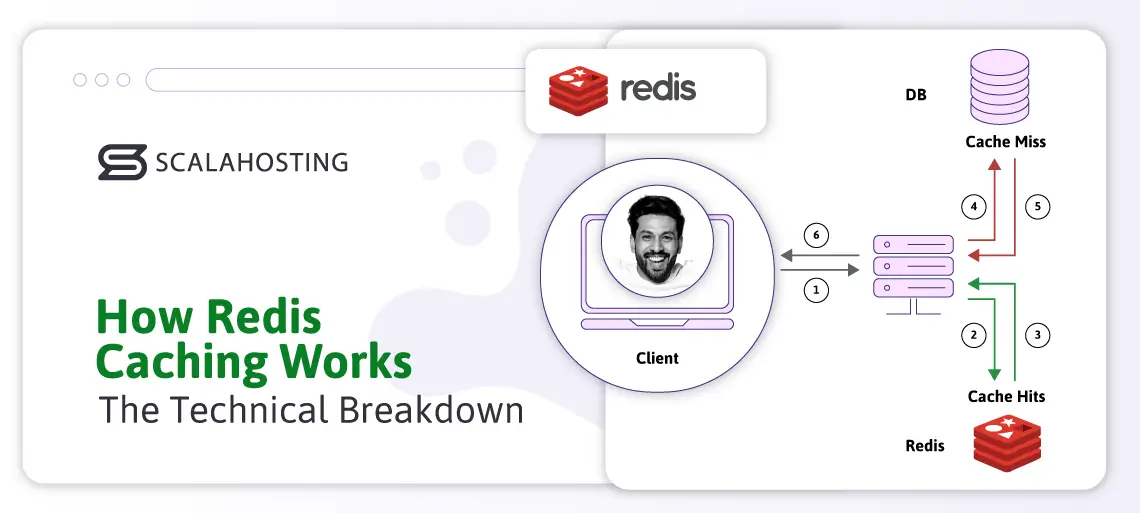
The caching workflow in Redis is straightforward but quite powerful. You have:
- Application Request – A client requests data (e.g., product catalog).
- Cache Lookup – Your code checks Redis for a key (e.g., products:category:electronics).
- Cache Hit – If the key exists and hasn’t expired, Redis returns the value instantly from RAM.
- Cache Miss – If missing, the application queries the backend database, computes the result, and writes it to Redis with a TTL (time-to-live).
- Invalidation – On data updates, explicitly delete or update the relevant keys to prevent stale data.
Redis operates on a single-threaded event loop, achieving 100,000+ operations per second even on a modest hardware. Connections can use TCP or faster Unix domain sockets (which SPanel configures automatically for local performance gains).
Example in PHP (using PRedis or PhpRedis):
PHP
$redis = new Redis();
$redis->connect(‘/var/run/redis/redis.sock’); <i>// Unix socket via SPanel</i>
$key = “user:{$userId}:profile”;
$data = $redis->get($key);
if ($data === false) {
$data = $db->query(“SELECT * FROM users WHERE id = ?”, [$userId]);
$redis->setex($key, 3600, json_encode($data)); <i>// Cache for 1 hour</i>
} else {
$data = json_decode($data, true);
}
return $data;
Here are some edge cases to consider:
- Thundering herd – Occurs when a large number of processes are simultaneously “awakened” but only one can handle it, leading to CPU power waste (ex. System reboot). Mitigate with probabilistic early recomputation or locking.
- Memory pressure – A stress metric that indicates your RAM usage efficiency. In Redis, you can configure eviction policies (allkeys-lru, volatile-ttl, noeviction).
- Cold cache warm-up – Your cache is “cold” when it is empty or contains irrelevant data. Filling it with valuable information is called a “warm-up.” You can solve this by pre-populating critical keys on deployment.
Why Every Website Needs Redis Cache Enabled
In 2026, users expect instant page loads. Google’s Core Web Vitals heavily weight performance metrics, and slow sites suffer in rankings and conversion rates.
Real-world benefits:
- Speed – you can expect Time to First Byte (TTFB) reductions of 70–90% for Redis-cached content.
- Scalability – Redis helps you offload 80%+ of database reads.
- Resource efficiency – when it comes to resources, Redis reduces your CPU, I/O, and RAM usage on the database tier, optimizing hosting costs as you grow.
- Traffic spike resilience – handle traffic spikes during flash sales or viral content sharing without slowdowns or downtime.
The benchmarks speak for themselves. Here is some data gathered from Redis Labs and community tests in 2024-25:
- WordPress with Redis object caching: 3–5× faster page loads.
- Magento: Checkout times drop from 4s to <1s.
- API endpoints: 10–50× higher throughput.
- Without caching, every request hits the database, which is wasteful for read-heavy workloads that dominate most sites (90%+ reads vs writes).
Redis vs Other Caching Solutions
| Feature | Redis | Memcached | Varnish | OPCache (PHP) |
|---|---|---|---|---|
| Data structures | Rich (hashes, lists, sets, etc.) | Strings only | Full-page HTTP | Bytecode only |
| Persistence | Yes (RDB/AOF) | No | No | No |
| Expiration & eviction | Advanced policies | Basic LRU | TTL only | N/A |
| Pub/Sub & scripting | Yes | No | No | No |
| Best for | Object/session caching, real-time | Simple key-value | Full-page caching | PHP script acceleration |
| Performance (ops/sec) | ~100K–1M | ~100K–500K | HTTP-focused | Compile-time |
ScalaHosting’s SPanel: Dedicated, Secure Redis Instances for Every Website
Unlike traditional shared hosting or cPanel servers that often share a single Redis instance (leading to noisy-neighbor issues and security risks), ScalaHosting’s SPanel provides a dedicated, password-protected Redis access for each website/account. This isolation ensures one site’s cache activity never impacts others, something crucial for agencies and multi-site developers.
SPanel’s Redis integration includes:
- One-click activation – enable via the Redis Cache Manager in seconds. You will find it under Software -> Redis Cache.
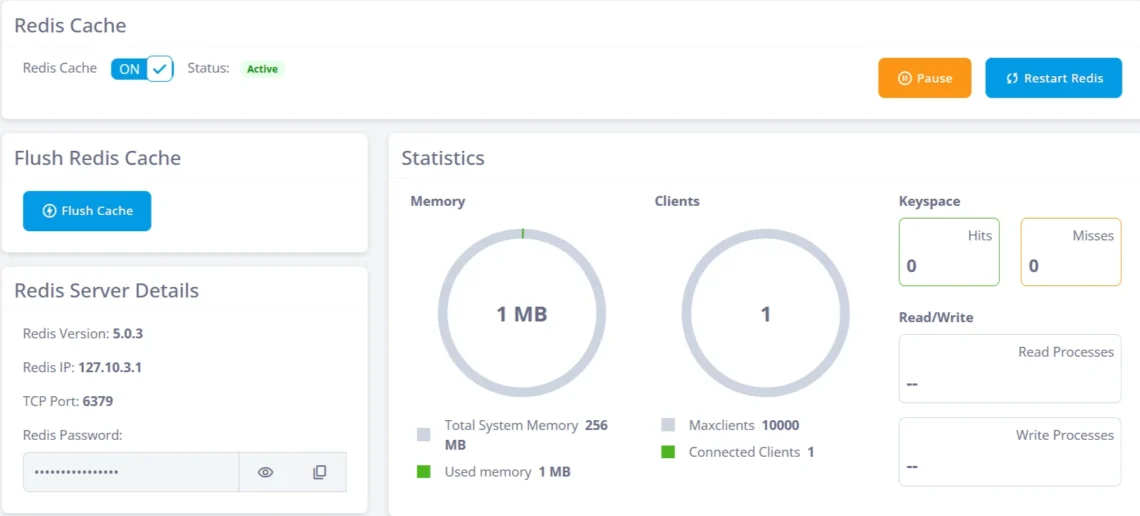
- Automatic configuration – you can take advantage of Unix socket connections, optimized memory limits, and secure credentials generated per site.
- Fine-grained controls – adjust max memory, eviction policy (e.g., allkeys-lru), timeout settings, persistence mode, and client limits.
- Real-time monitoring – view memory usage, hit/miss ratios, connected clients, and recent commands to ensure you never miss optimization opportunities or potential risks.
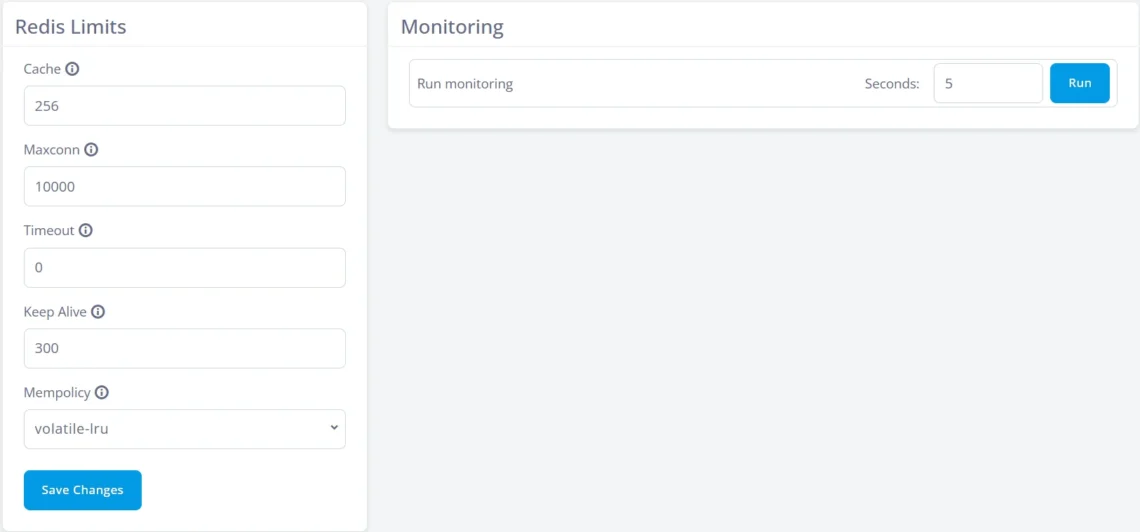
- Security – the Redis Cache comes with mandatory authentication + optional TLS; instances run under the site’s user for least-privilege access.
All ScalaHosting managed cloud VPS and dedicated servers include Redis Cache at no extra cost.
Step-by-Step: Enabling Redis Cache in SPanel
To say that activating the Redis Cache in SPanel is easy will be an understatement. There are just a few steps to go through and the entire configuration takes less than a minute:
- Log into SPanel.
- Navigate to Software → Redis Cache Manager.
- Select the target domain/account.
- Toggle the Enable Redis Cache option.
- Note the generated password and socket/path (usually /home/username/redis/redis.sock).
- Install/configure your application (e.g., enable Redis Object Cache plugin in WordPress and enter the socket/path).
That’s it – your site now has a private, high-performance cache.
Here is a wonderful video on how to use Redis in SPanel efficiently:
Integrating Redis with Popular Platforms
If you are using one of the more common web-building apps, adding Redis Cache to your mix is as simplified as possible.
Here are some suggestions:
- WordPress – Use the free “Redis Object Cache” plugin by Till Krüss. It acts as a drop-in replacement for WP’s default object cache.
- Magento 2 – The ecommerce CMS offers built-in Redis support for page, block, and session caching.
- Laravel – The framework allows you to configure CACHE_DRIVER=redis and SESSION_DRIVER=redis.
- Node.js/Express – For node.js, you can find specific libraries like ioredis or connect-redis that make the Redis Cache integration a piece of cake.
As a ScalaHosting client, our SPanel platform pre-installs the PHP Redis extension across all supported PHP versions.
Common Pitfalls and Best Practices (2026 Edition)
Naturally, when working with any caching solution, it is crucial to be aware of its potential risks and learn how to overcome them.
Here are some common issues we have gathered in our experience with this performance enhancer:
- Over-caching – Overdoing things is just a bad as not doing them at all. If we cache more than our essential data, the system will spend more time maintaining that cache instead of focusing on the key information. This is why we should set appropriate TTLs and use cache tags for easier invalidation.
- Memory bloat – As Redis stores the cache in your RAM, you can easily exhaust your resources if you don’t set TTLs and optimize your data structures. It’s always a good idea to monitor and set maxmemory with allkeys-lru policy.
- Security – Never expose Redis publicly. Always require authentication. Another benefit of SPanel is that the platform automatically enforces this.
- Warm-up strategy – You can further improve your site/app performance by pre-loading critical keys after deployments.
- Monitoring – Use Redis INFO command or the SPanel dashboard to track hit rates (>80% is ideal).
Final Takes
Redis caching is a powerful way to dramatically improve application performance, reduce database load, and scale systems efficiently. By storing frequently accessed data in memory, Redis delivers ultra-low latency and predictable response times, making it ideal for high-traffic applications. With the right caching strategy, expiration policies, and consistency controls, Redis can become a critical component in building fast, resilient, and scalable systems.
To help you with your caching needs, ScalaHosting’s SPanel offers quick and easy Redis integration, configuration, and monitoring.
Ready to supercharge your sites? All ScalaHosting managed cloud VPS plans include SPanel’s powerful Redis integration. Start today and see the difference instantly.


FAQ
Q: What is Redis cache used for?
A: Redis cache is primarily efficient for storing transient data (database results, sessions, computed values) in RAM for ultra-fast access. It is an excellent solution for improving application performance.
Q: Is the Redis cache persistent?
A: By default Redis cache is non-persistent. Still you can configure it for more durability by using two methods – Redis Database Snapshotting (RDB) and Append Only File (AOF).
Q: How much faster is Redis than MySQL?
A: Storing cached information in RAM is much faster than having to search for a record in your database. The difference is typically 50–100× for reads due to the in-memory storage.
Q: Do I need Redis on every website?
A: For static sites with <100 daily visitors, Redis might not make a significant difference. But for dynamic and growing websites – this is absolutely the way to go.
Q: Why choose ScalaHosting for Redis caching?
A: ScalaHosting clients get SPanel, which offers a free Redis integration per account/website. You can also benefit from one-click management, monitoring, and expert support included on all plans.