What is Web Hosting and How Does it Work?

Ever wondered how websites load instantly the moment you type a URL into your browser? With over 1.1 billion websites online today, the answer almost always comes down to one thing – web hosting.
At its core, web hosting is the service that stores your website’s files on powerful servers and makes them accessible to users 24/7. When someone visits your site, the hosting server delivers those files in milliseconds, be it images, text, or code. The quality of your web hosting service directly affects your website’s speed, reliability, security, and uptime. And those will inevitably impact user experience, trust, and search engine rankings.
Modern hosting goes beyond just storage. At ScalaHosting, we believe that a reliable host is like a business partner – they should care about a website and give it opportunities to thrive as if it were their own. This is why we strive to redefine the industry with innovations such as SPanel, removing common pain points around server management, maintenance, performance, and more.
In this guide, you’ll learn exactly how web hosting works, why it matters, and how to choose the right solution.
Let’s start with the fundamentals.
What is Web Hosting?

Web hosting has come a long way since the early Internet era.
Imagine your site as a digital library. The books represent your website’s content – images, text, videos, and code. To make that library available to readers, though, you need a secure building where the books are stored, organized, and maintained. You also need staff and systems to ensure visitors can access the books at any time without disruption.
In this analogy, web hosting is the library building and infrastructure that safely stores your content and makes it accessible to anyone searching for it online. Without hosting, your website simply wouldn’t be visible on the internet.
Short History of Web Hosting
In the 90s, most websites were hosted on personal or university servers. They provided sufficient resources for the static informational pages that were predominant at the time.
As the demand for online presence grew, so did the need for more intricate solutions. Dedicated hosting companies started taking center stage, offering shared servers with plenty of resources to distribute among multiple clients.
But then websites started becoming more complex and dynamic.
The industry quickly adapted with the rise of virtual private servers (VPS) and dedicated machines for hosting a single client.
This was sufficient for a while, but demand continued to grow, and competition intensified.
Today, cloud hosting is one of the hottest trends, leveraging resources across multiple interconnected servers to improve connectivity, reliability, and speed. Complementing security and server management tools are widespread, and green-friendly initiatives are taking a front seat.
What will the future bring for web hosting? We are yet to see. But it will surely be exciting!
Who Needs Web Hosting?
The short answer to that question is “Everyone.”
In an era where everyone is online, you’d be missing out on a lot of opportunities without your own space on the Internet. For example:
- Individuals
Making a website is actually quite fun, and anyone should try it. Be it an image gallery to store precious family and wedding photos, or a portfolio page where you can showcase your skills to potential employers. Or maybe a private page to host the teams and results of that fantasy game you play with your friends. Website building is really for anyone!
- Bloggers and Content Creators
Some people like to share their thoughts, ideas, and multimedia skills with a wider audience than just their peeps. A hosted website is a great opportunity to showcase your personality and creativity to people around the world.
- Small Businesses and Big Enterprises
Naturally, building websites is not just for fun and games. Companies can use that as a lucrative opportunity to connect with potential clients. You can not only use this service as a business card, but also to establish a strong brand, showcase products, provide support, and let everyone know about your latest deals.
- Ecommerce Businesses
Brick-and-mortar shops are slowly becoming a thing of the past. Why should we be limited to the choices we have in our neighborhood when there are thousands more around the world we can shop from without leaving the comfort of our living room?
Web Hosting vs. Domain Names
Some people still confuse the terms “web hosting” and “domain name.” While they are an integral part of any online project, it’s important we understand the difference from the very beginning.
- Domain Name = Address
A domain name is what users type into their browser to reach your site (for example, yourwebsite.com). It helps visitors locate your website easily instead of remembering a numerical IP address. - Web Hosting = The Infrastructure
Web hosting is where your website’s files and data are physically stored and delivered to users when they visit your domain.
Simplifying it even more, the domain is the name of your business, and the web hosting ensures your products are in place when someone comes to your location.
How Does Web Hosting Work?
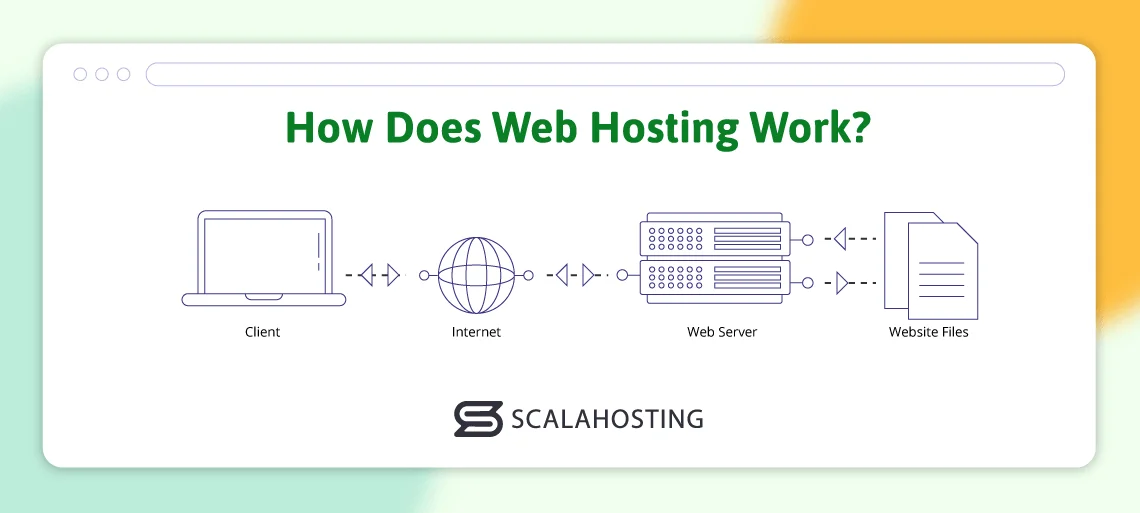
When you visit a website, it can feel almost magical – type a name, hit Enter, and a fully designed page appears in seconds. Behind the scenes, though, there’s a clear and logical process happening.
Let’s break it down step by step.
At its simplest, web hosting is the service that stores your website and makes it available on the internet.
At its core, a website is just a collection of files. You have:
- Text (HTML)
- Design rules (CSS)
- Images and videos (multimedia)
- Data from a database (like blog posts or products)
These files live on a server, which is a powerful computer designed to stay online at all times. To ensure their proper operation, servers are housed in secure buildings called data centers, where they have constant electricity, cooling, internet connection, and on-site staff.
When someone visits your site, their browser sends a request to the server to retrieve the files. The server verifies the requested location and authorization, then returns the required content.
The Full Journey: How a Website Loads
Let’s walk through what happens when a user visits a website, from start to finish.
- The user types a domain name in their browser
www.example.com
- The DNS finds the server’s address
The Domain Name System (DNS) seeks the IP address behind the name (ex. 192.0.0.1)
- The browser sends a server request
This can be either a standard protocol (HTTP) or an encrypted one (HTTPS).
- The server processes the request
The server uses specific software (like Apache) to locate the needed files and retrieve the data from the website’s database.
- The files are sent back to the browser
Once the server has the data, it uses bandwidth to send that data back to the requested location.
- The browser displays the content
The browser “reads” the HTML code, applies the CSS, adds any multimedia files, and shows the completed page to the user.
Here is the same process displayed as a flowchart:
User types domain
↓
DNS resolves domain to IP
↓
Browser sends HTTP/HTTPS request
↓
Web server (Apache/Nginx) processes request
↓
Website files + data sent back
↓
Browser renders the page
To get the full picture, here are some basic web hosting terms explained:
- Bandwidth – the amount of data that your site can send to visitors. The more images and web requests – the more bandwidth you would need.
- Uptime – how often your website is online. A typical good uptime is around 99.9%, as any unexpected downtime leads to major losses, especially for ecommerce businesses.
- SSD Storage – faster storage solution means quicker page loading. Solid state drives (SSD) are typically much faster than traditional hard disk drives (HDD).
- SSL certificate – a security protocol that encrypts the connection between user and server, preventing any data leaks and breaches.
- CDN – content delivery networks utilize an entire network of interconnected servers to guarantee faster data serving and eliminate the single point of breach.
To learn more, you can check our blog article with common web hosting terms.
Types of Web Hosting

Online projects can greatly vary in scope and purpose. Some are relatively small and aim to serve a limited audience. Others are huge and seek to gain popularity for commercial purposes. Some are localized, while others have an international audience.
In short, we have different needs that can only be fulfilled by different hosting types.
Looking around, there are a few general services you can find:
Shared Hosting
Shared hosting means your website resides on a server with many other projects, typically over a few hundred. They all share the same server resources and have limited customization freedom.
Pros
- Lowest cost
- Easy to use
- Beginner-friendly
Cons
- Slower performance during traffic spikes
- Limited control
- One busy site can affect others
Best for: Personal sites, small blogs, early-stage projects
VPS Hosting
A VPS (virtual private server) divides one physical server into multiple virtual servers. Each website gets its own dedicated portion of resources and an isolated, scalable environment.
Pros
- Better performance and security than shared hosting
- More control and customization
- Dedicated server resources
Cons
- Higher cost than shared hosting
- May require technical knowledge (unless managed)
Best for: Growing websites, small businesses, developers
Dedicated Hosting
With dedicated hosting, you rent an entire physical server just for your website. You have full root access for customizations and utilize all of its resources.
Pros
- Full control over the server
- No resource sharing
Cons
- Quite expensive
- Requires server management expertise
- Often more power than most sites need
Best for: Large enterprises, custom applications
Managed Cloud VPS Hosting (The Modern Approach)
Managed cloud VPS hosting combines the flexibility of cloud infrastructure with the stability of dedicated resources, while the hosting provider handles the technical work.
Pros
- Strong performance and reliability
- Easy scalability
- No server management stress
- Future-ready infrastructure
Cons
- Costs more than shared hosting
- Less raw control than unmanaged servers (by design)
Best for: Businesses that want performance, scalability, and peace of mind
ScalaHosting specializes in fully managed cloud VPS services, offering optimal performance, security, and scalability at the most cost-effective rates
This means:
- Your site can grow steadily as your website gets more popular
- Resources aren’t shared unpredictably
- Server maintenance, security, and updates are handled for you


The Role of Control Panels – How SPanel Disrupts the Market
Web hosting and control panels go together like a horse and carriage. Sure, you can ride the horse without one, but having it will guarantee you have a safer, more comfortable trip.
The control panel supplies the graphical interface to your account, so you don’t need to operate everything through a command terminal. You can manage your emails, domain names, site files, databases, security settings, and much more without the need for any technical experience.
For many users, the control panel is the hosting experience. A powerful, intuitive panel can dramatically reduce technical barriers and operational costs, while a poor one can slow down workflows and increase dependency on system administrators.
The Traditional Control Panel Landscape: cPanel’s Long Dominance
For more than two decades, cPanel was the undisputed leader in hosting control panels. It became an industry standard thanks to its reliability, rich feature set, and widespread adoption by hosting providers worldwide.
But as the company grew, so did its ambitions.
Back in 2019, cPanel completely shifted its business model to a per-account licensing. This raised costs significantly, especially for hosting providers that operated hundreds or thousands of accounts. This, in turn, led to hosts raising the prices for end clients, something that created big waves in the industry.
The price disruption didn’t stop there, though.
In the next few years, cPanel hiked its prices a few more times, forcing more and more people to jump ship. But what else did the market have to offer?
The Rising Alternative: How SPanel Changed the Control Panel Game
In response to its industry monopoly and price hikes, the ScalaHosting developers came up with SPanel – a multifunctional platform that goes way beyond simplified hosting management.
Best of all – it comes completely free with any hosting plan!
But zero licensing costs are just the tip of the iceberg for SPanel. The control panel offers much more than any industry competitor.
Key SPanel Features
- SShield – an AI-driven cybersecurity system that monitors traffic in real time and blocks malicious activity. It recognized about 99.98% of all known attacks and malware, alerting the client long before they became a problem.
- WordPress Manager / Joomla Manager – unique tools that allow you to install, update, and manage your CMS with little to no effort. In the case of WordPress, you also have a Security Lock that blocks any unauthorized user from editing.
- Daily Backups & One-Click Restore – many hosting companies charge for backups, but not ScalaHosting. SPanel contains a comprehensive backup too,l which makes it easy to create manual or automated data archives and restore them with a simple click.
- Softaculous Autoinstaller – this application installer contains over 450 options to configure a web-building software. There are a few simple steps to follow, and you can start your online project in a matter of minutes.
- Cloudflare CDN – SPanel offers numerous integrations, but one of the most popular is with Cloudflare. The market leader in CDN solutions can be activated in less than two minutes, optimizing your site performance and strengthening its security.
- No Hidden Fees and Efficient Resource Usage – unlike traditional panels that require separate licensing, SPanel is included for free with ScalaHosting plans. It also consumes fewer server resources, allowing hosting providers to allocate more power to customer websites.
- 24/7 SPanel Support – very few control panel platforms offer adequate support, let alone for free. This is exactly where SPanel excels. You can not only get assistance at anytime – you will receive it from the experts who worked closely in SPanel’s development.
SPanel’s feature set might be great as it is, but we don’t just stop there. New functionalities and security patches are added in each new version, thanks to the active community. Clients have a special forum where they can suggest features and vote for them. The most popular ones are promptly added to new SPanel releases, further improving the user experience and efficiency.
SPanel vs. cPanel: Feature Comparison
| Feature | SPanel | cPanel |
|---|---|---|
| Licensing Cost | Free with hosting plan | Paid (per-account pricing) |
| AI Security | SShield (real-time AI protection) | Limited (third-party add-ons required) |
| Backups | Free daily backups + one-click restore | Often paid or provider-dependent |
| WordPress/Joomla Manager | Built-in | Built-in |
| LiteSpeed/OpenLiteSpeed Support | Yes | Yes (depends on provider) |
| Resource Usage | Lightweight, optimized | Heavier footprint |
| Community-Driven Features | Cloud Democracy voting system | Vendor-driven roadmap |
| Support | 24/7 ScalaHosting experts | Varies by provider |
SPanel’s introduction has had a ripple effect across the hosting industry. By offering enterprise-grade features without licensing fees, it democratized premium hosting capabilities, making them accessible to small businesses, developers, and startups.
Industry reviewers and hosting communities frequently describe SPanel as the leading cPanel alternative, praising its security architecture, performance, and transparent pricing model. More importantly, its success has pressured competitors to reconsider pricing strategies and invest in innovation rather than relying on legacy dominance.
Key Factors to Consider When Choosing a Hosting Provider
1. Uptime Reliability (99.9% or Higher)
Uptime measures how often your website is available online. Even small downtime percentages can translate into significant revenue loss or reduced credibility.
- Look for providers that guarantee 99.9% uptime or better in their Service Level Agreements (SLAs).
- Check independent reviews and monitoring reports to verify real-world performance.
2. Speed and Performance (SSD, CDN, and Server Stack)
Website speed directly affects user experience and search engine rankings.
- SSD or NVMe storage ensures faster data access compared to traditional HDDs.
- A Content Delivery Network (CDN) distributes your content across global servers, reducing latency for international visitors.
- Advanced server technologies like LiteSpeed, caching layers, and optimized PHP configurations further enhance performance.
3. Security Features
Cybersecurity is no longer optional. A good hosting provider should include:
- Real-time malware scanning and firewall protection
- DDoS mitigation
- Automatic updates and patching
- Isolated accounts to prevent cross-site contamination
4. Customer Support Quality
Even experienced developers need support from time to time. Hosting issues can arise at any time, so reliable support is crucial.
- Look for 24/7 live chat, ticket, and phone support.
- Check response times, technical expertise, and customer satisfaction ratings.
- Knowledge bases and tutorials are helpful, but they should not replace real human support.
5. Scalability and Future Growth
Your web hosting needs today may not be the same tomorrow. You have to plan for growth.
- Ensure the provider offers easy upgrades – from shared hosting to VPS, cloud, or dedicated servers.
- Look for flexible resources (CPU, RAM, storage) that can scale without downtime or complex migrations.
6. Transparent Pricing
Pricing should be clear, predictable, and fair.
- Watch for promotional rates that increase drastically upon renewal.
- Ensure you understand what is included in the base price (backups, security, control panel, support).
Red Flags to Watch Out For
Hidden Fees
Some providers advertise low entry prices but charge extra for essentials like backups, security tools, migrations, or control panel licenses. Always read the fine print.
Poor or Slow Support
Long response times, scripted answers, and unresolved tickets are warning signs. Web hosting is a critical service – support should be proactive and technically competent.
Outdated or Proprietary Control Panels
An outdated or clunky control panel can slow down your workflow and limit functionality. Modern panels should be intuitive, secure, and actively developed.
Overcrowded Servers and Performance Issues
If a provider oversells resources, performance will suffer. Look for reviews mentioning slow speeds or frequent downtime.
Final Takes
Web hosting is more than just renting server space – it is the infrastructure that powers websites, applications, and digital businesses across the internet. From uptime and speed to security, scalability, and support, the quality of your hosting directly influences user experience, search rankings, and business success.
Throughout this article, we’ve seen how web hosting has evolved from simple shared servers to sophisticated cloud environments, and how control panels have become the interface that defines the user experience. Traditional solutions like cPanel shaped the industry for years, but rising costs and changing needs created space for innovation. Platforms like SPanel demonstrate how modern hosting can be faster, more secure, and more accessible.
Ultimately, choosing the right hosting provider is about trust and long-term value. Reliable uptime, transparent pricing, strong security, responsive support, and the ability to scale with your growth are what separate a good host from a great one.
FAQs
Q: Is free hosting good enough?
A: Free hosting allows individuals to test the service and potentially build a small test project. But for anything other than that, paying for web hosting makes a real difference. You have many more guarantees regarding uptime and performance while having plenty of resources to establish and grow a business.
Q: Are all hosts the same?
A: While it might look like most established companies offer pretty much the same – server machines with CPU/RAM and disk space – that is far from the whole picture. Reliable providers invest in top-tier hardware, in-house tools, and support training to help their customers feel at home.
Q: Is SPanel better than cPanel?
A: In many aspects, SPanel excels over cPanel. Starting with the price, you are getting a fully functional platform with no licensing fees. On top of that, you are saving on resources, optimizing your overall performance. The integrations and growing number of features are the tipping point that will help SPanel establish itself as the best cPanel alternative on the market.
Q: How does SPanel help with cybersecurity?
A: One unique module to SPanel is SShield – an AI-driven security monitor. SShield monitors your web traffic, identifying potential risks and vulnerabilities. Once it detects such – it sends an immediate notification to the account owner, allowing them enough time to tackle the issue before it harms the server.
Q: Can I back up my website using SPanel?
A: Absolutely. SPanel comes with a state-of-the-art backup system. It helps you create manual and automated backups, storing them on a separate server for better security. If you need to bring back a data archive, you simply choose the file from the desired date and restore it with a simple click.